
【转载】 C#读写注册表
文章地址:https://blog.csdn.net/younghaiqing/article/details/61918968
自Windows95以来的所有Windows版本中,注册表是包含Windows安装,用户首选项,以及已安装软件和设备的所有配置信息的核心存储库。目前,几乎所有的商用软件都使用注册表来存储这些信息,COM组件必须把它们的信息存储在注册表中,才能有客户端调用。.NET Framework引入了独立存储器的概念,通过它应用程序可以在文件中存储专用于每个用户的信息,.NET Framework将确保为每个在机器上注册的用户单独地存储数据。
注册表的库和.NET库一样复杂,它包括访问注册表的类。其中有两个类涉及注册表,即Registry和RegistryKey,这两个类都在Microsoft Win32 名称控件中。
1.先介绍一下注册表
注册表的层次结构非常类似于文件系统的层次结构。查看和修改注册表的内容的一般方式是使用regedit或regedt32应用程序。
在运行中输入:regedit,可以看到如下界面:
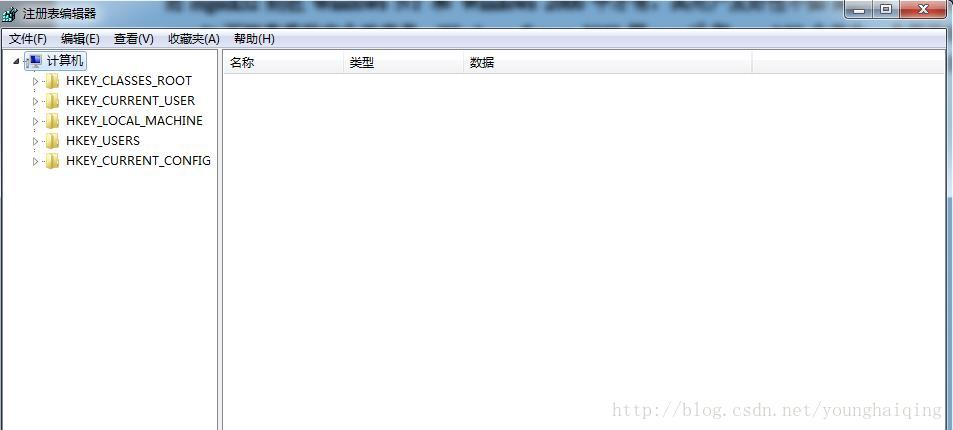
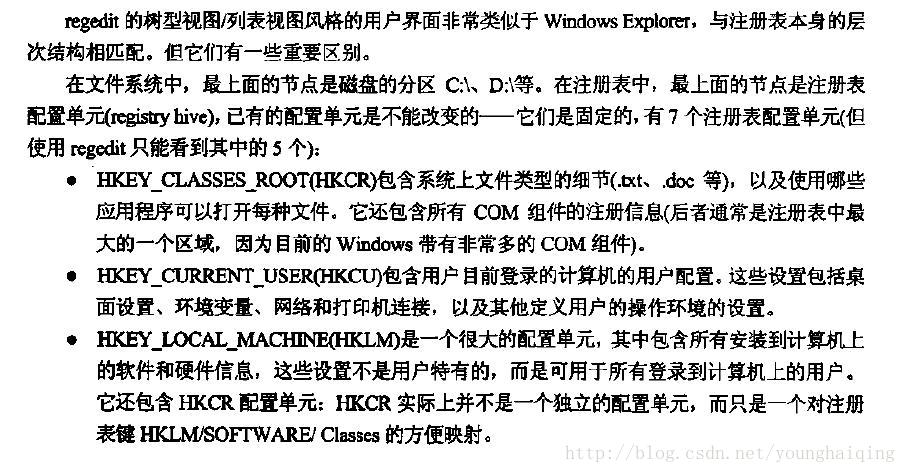
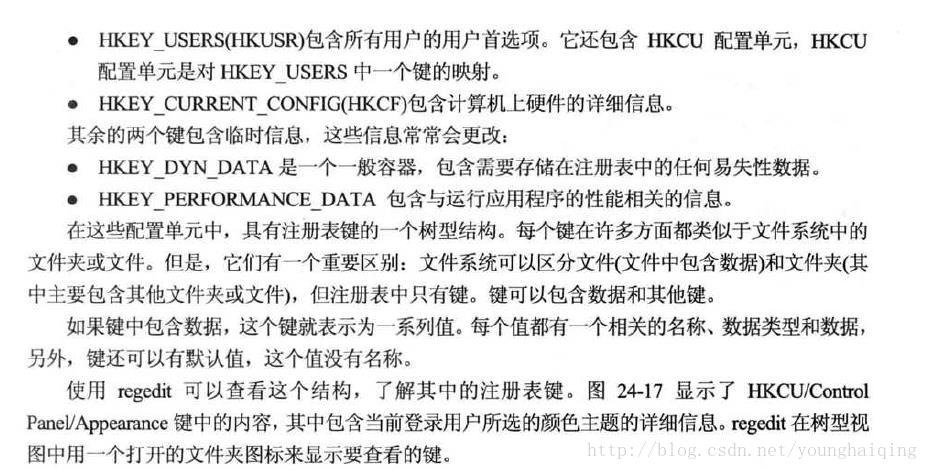
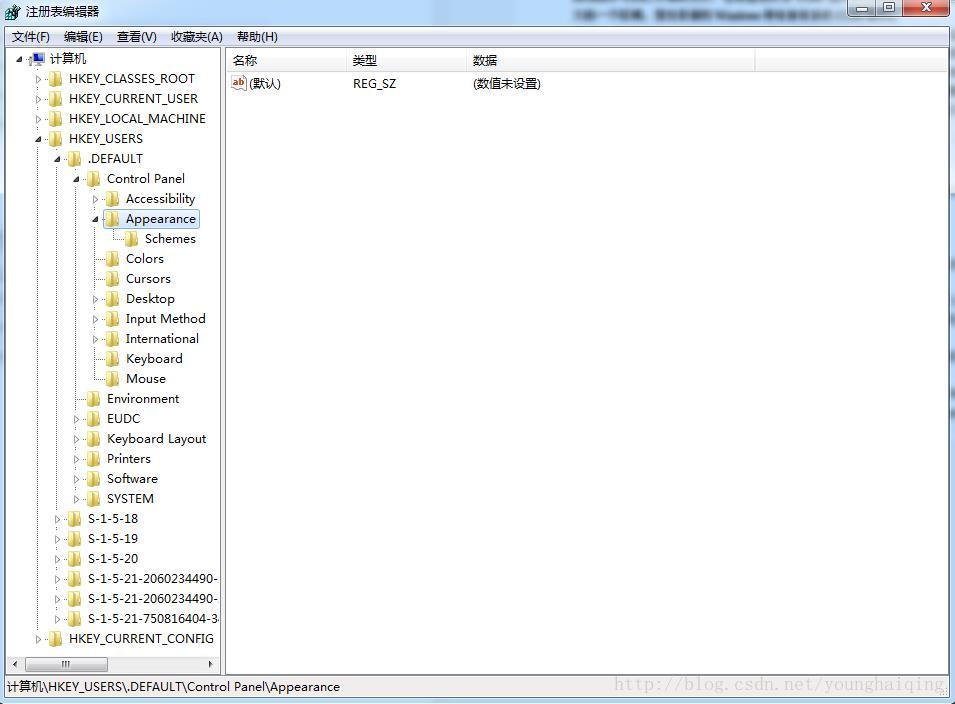
2.NET 注册表类
要访问注册表,就可以使用Registry和RegistryKey。
RegistryKey实例表示一个注册表键。这个类实现的方法可以浏览子键,创建新键,读取或修改键中的值。换句话说,通过这类可以实现对注册建所有的操作,包括设置键的安全级别。
Registry类只能对注册表键进行单一的访问,以执行简单的操作。Registry类的另一个作用是提供表示顶级键的RegistryKey实例,以便开始在注册表中定位。Registry通过静态属性来提供这些实例。
那么接下来先介绍一下Registry 类
作用:提供了 RegistryKey 表示 Windows 注册表中的根键的对象和 static 方法,以访问键/值对。
Registry方法
| 名称 | 说明 |
|---|---|
| GetValue(String, String, Object) | 检索与指定的注册表项中具有指定名称关联的值。 如果未在指定的键中找到的名称,将返回你提供一个默认值或 null 如果指定的键不存在。 |
| SetValue(String, String, Object) | 设置指定的注册表项指定的名称/值对。 如果指定的键不存在,则创建它。 |
| SetValue(String, String, Object, RegistryValueKind) | 使用指定的注册表数据类型的指定的注册表项设置的名称/值对。 如果指定的键不存在,则创建它。 |
Registry字段
| 名称 | 说明 |
|---|---|
| ClassesRoot | 定义文档以及与这些类型相关联的属性类型 (或类)。 此字段中读取的 Windows 注册表基项 HKEY_CLASSES_ROOT。 |
| CurrentConfig | 包含与不是特定于用户的硬件相关的配置信息。 此字段中读取的 Windows 注册表基项 HKEY_CURRENT_CONFIG。 |
| CurrentUser | 包含有关当前用户首选项的信息。 此字段中读取的 Windows 注册表基项 HKEY_CURRENT_USER |
| DynData | 已过时。 包含动态注册表数据。 此字段中读取的 Windows 注册表基项 HKEY_DYN_DATA。 |
| LocalMachine | 包含为本地计算机的配置数据。 此字段中读取的 Windows 注册表基项 HKEY_LOCAL_MACHINE。 |
| PerformanceData | 包含软件组件的性能信息。 此字段中读取的 Windows 注册表基项 HKEY_PERFORMANCE_DATA。 |
| Users | 包含有关默认用户配置信息。 此字段中读取的 Windows 注册表基项 HKEY_USERS。 |
3.备注
此类提供在运行 Windows 的计算机上的注册表中找到的标准的根键的集合。 注册表是有关应用程序、 用户和默认的系统设置的信息存储设施。 例如,应用程序可以使用注册表来存储信息,必须关闭该应用程序之后, 被保留并重新加载应用程序时访问这些信息。 例如,您可以存储颜色首选项、 屏幕位置或窗口的大小。 通过将信息存储在注册表中的其他位置,可以控制每个用户的此数据。
基或根 RegistryKey 实例公开的 Registry 类描述的子项和值在注册表中的基本存储机制。 所有键都是只读的因为注册表取决于它们存在。 通过公开的项 Registry 是︰
| 名称 | 说明 |
|---|---|
| ClassesRoot | 存储有关类型 (类) 的信息以及它们的属性。 |
| CurrentConfig | 将存储非特定于用户的硬件信息。 |
| CurrentUser | 存储有关用户首选项的信息。 |
| DynData | 将动态数据存储。 |
| LocalMachine | 存储在本地计算机的配置信息。 |
| PerformanceData | 存储软件组件的性能的信息。 |
| Users | 存储有关默认用户配置信息。 |
一旦确定要在其下存储/检索信息从注册表的根密钥,您可以使用 RegistryKey 类来添加或删除子项,并处理给定键的值。
硬件设备可以将信息放在使用自动插接口注册表中。 用于安装设备驱动程序软件可以通过写入到标准 Api 在注册表中放信息。
用于获取和设置值的静态方法
在.NET Framework 2.0 版中, Registry 类还包含 staticGetValue 和 SetValue 用于设置和从注册表项中检索值的方法。 这些方法都将打开和关闭注册表项的每个使用它们,因此它们不会执行的时间以及中的类似方法 RegistryKey 类,当您访问大量的值。
RegistryKey 类还提供了允许您设置的注册表项,以进行检索之前,测试一个值的数据类型并删除注册表项的 Windows 访问控制安全性的方法。
示例
示例 1
下面的代码示例演示如何检索 HKEY_USERS 项的子项并打印到屏幕的名称。 使用 OpenSubKey 方法来创建感兴趣的特定子项的一个实例。 然后,可以使用中的其他操作 RegistryKey 来操作该注册表项。
using System;

using Microsoft.Win32;

class Reg {

    public static void Main() {

        // Create a RegistryKey, which will access the HKEY_USERS

        // key in the registry of this machine.

        RegistryKey rk = Registry.Users;

        // Print out the keys.

        PrintKeys(rk);

    }

    static void PrintKeys(RegistryKey rkey) {

        // Retrieve all the subkeys for the specified key.

        String [] names = rkey.GetSubKeyNames();

        int icount = 0;

        Console.WriteLine("Subkeys of " + rkey.Name);

        Console.WriteLine("-----------------------------------------------");

        // Print the contents of the array to the console.

        foreach (String s in names) {

            Console.WriteLine(s);

            // The following code puts a limit on the number

            // of keys displayed.  Comment it out to print the

            // complete list.

            icount++;

            if (icount >= 10)

                break;

        }

    }

}- 1
- 2
- 3
- 4
- 5
- 6
- 7
- 8
- 9
- 10
- 11
- 12
- 13
- 14
- 15
- 16
- 17
- 18
- 19
- 20
- 21
- 22
- 23
- 24
- 25
- 26
- 27
- 28
- 29
- 30
- 31
- 32
- 33
- 34
- 35
- 36
- 37
示例 2
下面的代码示例将多个数据类型的值存储在一个示例键中创建密钥,因为它这样做了,然后检索并显示的值。 该示例演示如何存储和检索默认 (无名) 的名称/值对,以及如何使用 defaultValue 名称/值对不存在时。
using System;

using Microsoft.Win32;

public class Example

{

    public static void Main()

    {

        // The name of the key must include a valid root.

        const string userRoot = "HKEY_CURRENT_USER";

        const string subkey = "RegistrySetValueExample";

        const string keyName = userRoot + "\\" + subkey;

        // An int value can be stored without specifying the

        // registry data type, but long values will be stored

        // as strings unless you specify the type. Note that

        // the int is stored in the default name/value

        // pair.

        Registry.SetValue(keyName, "", 5280);

        Registry.SetValue(keyName, "TestLong", 12345678901234,

            RegistryValueKind.QWord);

        // Strings with expandable environment variables are

        // stored as ordinary strings unless you specify the

        // data type.

        Registry.SetValue(keyName, "TestExpand", "My path: %path%");

        Registry.SetValue(keyName, "TestExpand2", "My path: %path%",

            RegistryValueKind.ExpandString);

        // Arrays of strings are stored automatically as

        // MultiString. Similarly, arrays of Byte are stored

        // automatically as Binary.

        string[] strings = {"One", "Two", "Three"};

        Registry.SetValue(keyName, "TestArray", strings);

        // Your default value is returned if the name/value pair

        // does not exist.

        string noSuch = (string) Registry.GetValue(keyName,

            "NoSuchName",

            "Return this default if NoSuchName does not exist.");

        Console.WriteLine("\r\nNoSuchName: {0}", noSuch);

        // Retrieve the int and long values, specifying

        // numeric default values in case the name/value pairs

        // do not exist. The int value is retrieved from the

        // default (nameless) name/value pair for the key.

        int tInteger = (int) Registry.GetValue(keyName, "", -1);

        Console.WriteLine("(Default): {0}", tInteger);

        long tLong = (long) Registry.GetValue(keyName, "TestLong",

            long.MinValue);

        Console.WriteLine("TestLong: {0}", tLong);

        // When retrieving a MultiString value, you can specify

        // an array for the default return value.

        string[] tArray = (string[]) Registry.GetValue(keyName,

            "TestArray",

            new string[] {"Default if TestArray does not exist."});

        for(int i=0; i<tArray.Length; i++)

        {

            Console.WriteLine("TestArray({0}): {1}", i, tArray[i]);

        }

        // A string with embedded environment variables is not

        // expanded if it was stored as an ordinary string.

        string tExpand = (string) Registry.GetValue(keyName,

             "TestExpand",

             "Default if TestExpand does not exist.");

        Console.WriteLine("TestExpand: {0}", tExpand);

        // A string stored as ExpandString is expanded.

        string tExpand2 = (string) Registry.GetValue(keyName,

            "TestExpand2",

            "Default if TestExpand2 does not exist.");

        Console.WriteLine("TestExpand2: {0}...",

            tExpand2.Substring(0, 40));

        Console.WriteLine("\r\nUse the registry editor to examine the key.");

        Console.WriteLine("Press the Enter key to delete the key.");

        Console.ReadLine();

        Registry.CurrentUser.DeleteSubKey(subkey);

    }

}

//

// This code example produces output similar to the following:

//

//NoSuchName: Return this default if NoSuchName does not exist.

//(Default): 5280

//TestLong: 12345678901234

//TestArray(0): One

//TestArray(1): Two

//TestArray(2): Three

//TestExpand: My path: %path%

//TestExpand2: My path: D:\Program Files\Microsoft.NET\...

//

//Use the registry editor to examine the key.

//Press the Enter key to delete the key.- 1
- 2
- 3
- 4
- 5
- 6
- 7
- 8
- 9
- 10
- 11
- 12
- 13
- 14
- 15
- 16
- 17
- 18
- 19
- 20
- 21
- 22
- 23
- 24
- 25
- 26
- 27
- 28
- 29
- 30
- 31
- 32
- 33
- 34
- 35
- 36
- 37
- 38
- 39
- 40
- 41
- 42
- 43
- 44
- 45
- 46
- 47
- 48
- 49
- 50
- 51
- 52
- 53
- 54
- 55
- 56
- 57
- 58
- 59
- 60
- 61
- 62
- 63
- 64
- 65
- 66
- 67
- 68
- 69
- 70
- 71
- 72
- 73
- 74
- 75
- 76
- 77
- 78
- 79
- 80
- 81
- 82
- 83
- 84
- 85
- 86
- 87
- 88
- 89
- 90
- 91
- 92
- 93
- 94
- 95
2.RegistryKey 类
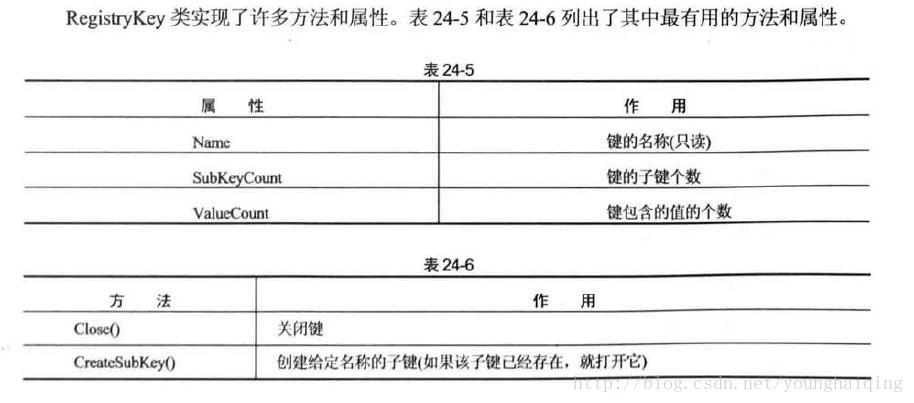
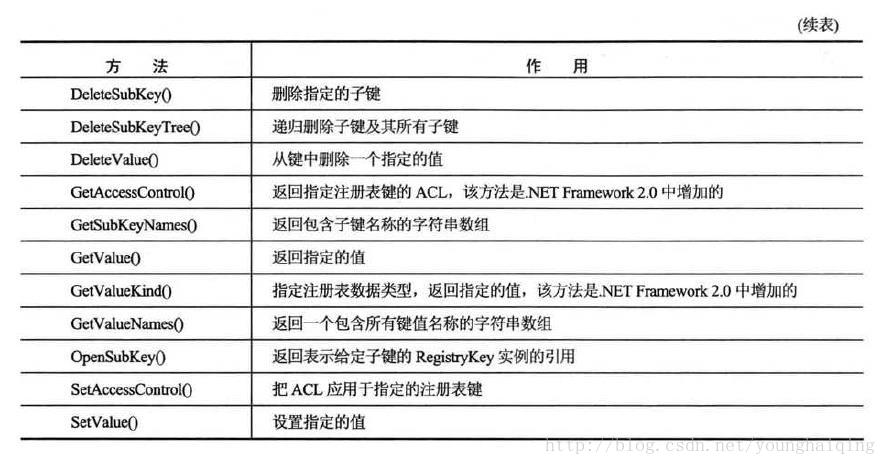
一:C#注册表项的创建,打开与删除
1:创建
创建注册表项主要用到RegistryKey 的CreateSubKey()方法。如:
RegistryKey key = Registry.LocalMachine;

RegistryKey software = key.CreateSubKey("software\\test");

//在HKEY_LOCAL_MACHINE\SOFTWARE下新建名为test的注册表项。如果已经存在则不影响!- 1
- 2
- 3
2:打开
打开注册表项主要用到RegistryKey 的OpenSubKey()方法。如:
注意,如果该注册表项不存在,这调用这个方法会抛出异常
RegistryKey key = Registry.LocalMachine;

RegistryKey software = key.OpenSubKey("software\\test",true);

//注意该方法后面还可以有一个布尔型的参数,true表示可以写入。- 1
- 2
- 3
3:删除
删除注册表项主要用到RegistryKey 的DeleteSubKey()方法。如:
RegistryKey key = Registry.LocalMachine;

key.DeleteSubKey("software\\test",true); //该方法无返回值,直接调用即可

key.Close();- 1
- 2
- 3
注意,如果该注册表项不存在,这调用这个方法会抛出异常
二:键值的创建(设置值、修改),读取和删除
1:创建(设置值、修改)
对键值的创建修改等操作主要用到RegistryKey 的SetValue()方法
RegistryKey key = Registry.LocalMachine;

RegistryKey software = key.OpenSubKey("software\\test",true); //该项必须已存在

software.SetValue("test", "博客园");

//在HKEY_LOCAL_MACHINE\SOFTWARE\test下创建一个名为“test”,值为“博客园”的键值。如果该键值原本已经存在,则会修改替换原来的键值,如果不存在则是创建该键值。

// 注意:SetValue()还有第三个参数,主要是用于设置键值的类型,如:字符串,二进制,Dword等等~~默认是字符串。如:

// software.SetValue("test", "0", RegistryValueKind.DWord); //二进制信息

Key.Close();- 1
- 2
- 3
- 4
- 5
- 6
- 7
2:读取
string info = "";

RegistryKey Key;

Key = Registry.LocalMachine;

myreg = Key.OpenSubKey("software\\test");

// myreg = Key.OpenSubKey("software\\test",true);

info = myreg.GetValue("test").ToString();

myreg.Close();- 1
- 2
- 3
- 4
- 5
- 6
- 7
info结果为:博客园
3:删除
RegistryKey delKey = Registry.LocalMachine.OpenSubKey("Software\\test", true);

delKey.DeleteValue("test");

delKey.Close();- 1
- 2
- 3
细心的读者可能发现了第二个例子中OpenSubKey()方法参数与其他例子的不同。
如果你要修改键值,包括创建、设置、删除键值等都要在方法后面加个布尔参数,设置为true,表示可写可改;如果仅仅只是读取键值可以不加,此时可写关闭,你不能再往里写值(当然,你要加也可以true)!
还有读者提到读写默认键值的问题,主要在设置、读取的方法中将键名置空则就是对默认键值的操作。
如:
software.SetValue(“”, “博客园”); // 在HKEY_LOCAL_MACHINE\SOFTWARE\test修改默认键值的值为“博客园”。读取类似!
另外,默认的键值是不能删除的,所以不要用DeleteValue()方法去删除,会抛出异常的!
三:判断注册表项是否存在
private bool IsRegeditItemExist()

{

    string [] subkeyNames;

    RegistryKey hkml = Registry.LocalMachine;

    RegistryKey software = hkml.OpenSubKey("SOFTWARE");

    //RegistryKey software = hkml.OpenSubKey("SOFTWARE", true);

    subkeyNames = software.GetSubKeyNames();

    //取得该项下所有子项的名称的序列,并传递给预定的数组中

    foreach (string keyName in subkeyNames)

    //遍历整个数组

    {

        if (keyName == "test")

        //判断子项的名称

        {

            hkml.Close();

            return true ;

        }

    }

    hkml.Close();

    return false;

}- 1
- 2
- 3
- 4
- 5
- 6
- 7
- 8
- 9
- 10
- 11
- 12
- 13
- 14
- 15
- 16
- 17
- 18
- 19
- 20
- 21
四:判断键值是否存在这里写代码片
private bool IsRegeditKeyExit()

{

  string[] subkeyNames;

  RegistryKey hkml = Registry.LocalMachine;

  RegistryKey software = hkml.OpenSubKey("SOFTWARE\\test");

  //RegistryKey software = hkml.OpenSubKey("SOFTWARE\\test", true);

  subkeyNames = software.GetValueNames();

  //取得该项下所有键值的名称的序列,并传递给预定的数组中

  foreach (string keyName  in subkeyNames)

  {

    if (keyName ==  "test") //判断键值的名称

    {

        hkml.Close();

        return true;

    }

  }

  hkml.Close();

  return false;

}
【转载】 C#读写注册表的更多相关文章
- javascript取得机器名,用户名,读写注册表,启动应用程序
javascript取得机器名,用户名,读写注册表,启动应用程序//javascript有个特殊的对象ActiveXObject,通过它可以访问windows的本地文件系统和应用程序,比如:有的时候我 ...
- 【Qt】QSettings读写注册表、配置文件【转】
简述 一般情况下,我们在开发软件过程中,都会缓存一些信息到本地,可以使用轻量级数据库sqlite,也可以操作注册表.读写配置文件. 关于QSettings的使用前面已经介绍过了,比较详细,见“更多参考 ...
- c#读写注册表示例分享
c#读写注册表示例,示例中有详细注释. 代码: //写注册表RegistryKey regWrite;//往HKEY_CURRENT_USER主键里的Software子键下写一个名为“Test”的子键 ...
- QSettings读写注册表、配置文件
简述 一般情况下,我们在开发软件过程中,都会缓存一些信息到本地,可以使用轻量级数据库sqlite,也可以操作注册表.读写配置文件. 关于QSettings的使用前面已经介绍过了,比较详细,见" ...
- nim读写注册表的小例子
nim读写注册表的小例子 2018年5月7日 15:11:58 codegay 贴一个nim读写注册表的例子,虽然简单,但是nim官方没有写windows注册表相关的文档, 我贴的例子兴许能帮大家省点 ...
- 倍福TwinCAT(贝福Beckhoff)基础教程5.1 TwinCAT-3 读写注册表
读写注册表和读写文件一样,里面涉及的输入类型比较复杂,需要参考官方范例 sSubKey是指注册表的路径 sValName是指注册表要写入的名值对的名称 eValType是一个枚举类型(而且不是什么常规 ...
- vc读写注册表
注册表是Windows重要组成部分,注册表记录了大量有关电脑软硬件的信息.注册表中的值通过其名称标识.值名称由与键名相同的字符组成.值本身可以是字符串.二进制数据或者是32位无符号值.在这里我们主要运 ...
- 关于 JAVA 中使用 Preferences 读写注册表时要注意的地方
要注意的只有一个地方,那就是键名或者项名不要包含大写字母,否则读不到数据. 代码是这样的: 1: Preferences preferences = Preferences.systemRoot(); ...
- 读写注册表 registrykey 创建删除
namespace WindowsFormsApplication1 { public partial class Form1 : Form { public Form1() { Initialize ...
随机推荐
- 【BZOJ5292】[BJOI2018]治疗之雨(高斯消元)
[BZOJ5292][BJOI2018]治疗之雨(高斯消元) 题面 BZOJ 洛谷 题解 设\(f[i]\)表示剩余\(i\)点生命时的期望死亡的次数. 考虑打\(k\)次下来脸上被打了\(i\)下的 ...
- 【转】MSVCRTD.lib(crtexew.obj) : error LNK2019: 无法解析的外部符号 _WinMain@16,该符号在函数 ___tmainC
@2018-12-18 [小记] vs-2013 编译 cJSON code in git-hub 时遇见问题 error LNK2019,解决如下 [问题描述]MSVCRTD.lib(crtexew ...
- 540. Single Element in a Sorted Array
题目大意: 给你一个由小到大排好序的数组,里面只有一个数出现了一次,其他数都出现了两次,要求找出那个只出现一次的数,而且时间复杂度为O(logn) 题目思路: 说实话一开始没想到,因为几乎每个数都出现 ...
- bzoj2288 生日礼物 (线段树)
我当然想选最大的子段和啦 但要选M次 那不一定就是最好的 所以提供一个反悔的选项,我选了一段以后,就把它们乘个-1,然后再选最好的(类似于网络流的思路) 这个可以用线段树来维护,记一个区间包含左端点/ ...
- hdu 4300 Clairewd’s message(扩展kmp)
Problem Description Clairewd is a member of FBI. After several years concealing in BUPT, she interce ...
- CodeFroces--Joseph’s Problem
题目意思:给出n k 求 k%1 + k%2 +k%3+...+k%n 的和 利用分块的思想 我们知道 k%i ==k-k/i*i 同时 一段连续的区间的 k/i 是相等的 #include< ...
- 通过jpa getResultList 获取查询到的内容
String sql = "select * from spatial_event "; Query query = em.createNativeQuery(sql); // q ...
- Vim auto-pairs设置选项
let g:AutoPairs = {'(':')', '[':']', '{':'}',"'":"'",'"':'"'} 设置要自动配对的 ...
- 洛谷 P1393 P3157 动态逆序对
嘛,好久没碰CDQ分治了,做道题练练手. 时间倒流——把删数改为加数. 对于每个被删的,我的想法是拆成询问和add,后来发现一个足矣. 我本来准备对每个删的数都求一遍整体逆序对,后来发现无论如何都不可 ...
- increment/decrement/dereference操作符
标题以上分别对于++/--/* #include <iostream> #include <cstddef> using namespace std; class INT { ...