
ASP.NET Web API 管道模型
ASP.NET Web API 管道模型
前言
ASP.NET Web API是一个独立的框架,也有着自己的一套消息处理管道,不管是在WebHost宿主环境还是在SelfHost宿主环境请求和响应都是从消息管道经过的,这是必经之地,本篇就为大家简单的介绍一下ASP.NET Web API框架中的管道对象模型。
ASP.NET Web API路由、管道
- ASP.NET Web API 开篇介绍示例
- ASP.NET Web API 路由对象介绍
- ASP.NET Web API 管道模型
- ASP.NET Web API selfhost宿主环境中管道、路由
- ASP.NET Web API webhost宿主环境中管道、路由
管道模型介绍
HttpMessageHandler消息处理程序(基类)
    public abstract class HttpMessageHandler : IDisposable

    {

        protected HttpMessageHandler();

        public void Dispose();

        protected virtual void Dispose(bool disposing);

        protected internal abstract Task<HttpResponseMessage> SendAsync(HttpRequestMessage request, CancellationToken cancellationToken);

    }
上面的代码中定义的是消息处理程序基类,在管道中的每一个消息处理部分都是继承自它。
并且定义了一个会执行异步操作的SendAsync()方法,这个方法也是串联管道中各个消息处理程序的一个入口,但是并不是靠它来串联。
DelegatingHandler消息处理程序(基类)
    public abstract class DelegatingHandler : HttpMessageHandler

    {

        protected DelegatingHandler();

        protected DelegatingHandler(HttpMessageHandler innerHandler);

        public HttpMessageHandler InnerHandler { get; set; }

        protected override void Dispose(bool disposing);

        protected internal override Task<HttpResponseMessage> SendAsync(HttpRequestMessage request, CancellationToken cancellationToken);

    }
这里的DelegatingHandler继承自HttpMessageHandler类型,而且DelegatingHandler也是抽象类型,DelegatingHandler类型并不是就是简单的继承,而是对基类进行了扩展,使之变成一个带指向箭头(对象引用)的对象类型也就是InnerHandler属性,InnerHandler属性的值就是在当前这个消息处理程序的下一个消息处理程序,DelegatingHandler类型对基类的扩展,HttpMessageHandler类型我感觉它的存在就是一个规范,从管道中的第一个处理程序开始一直到最后一个,除了最后一个消息处理程序,其他的都是DelegatingHandler类型的子类(当然也是HttpMessageHandler的子类),最后一个消息处理程序是直接继承自HttpMessageHandler类型,因为它是最后一个处理程序了不必要有指向下一个处理程序的属性,这种对职责的划分真的很优美,说不出好在哪就是觉得漂亮。
HttpServer消息处理程序(实现类-管道头)
public class HttpServer : DelegatingHandler

    {

        public HttpServer();

        public HttpServer(HttpConfiguration configuration);

        public HttpServer(HttpMessageHandler dispatcher);

        public HttpServer(HttpConfiguration configuration, HttpMessageHandler dispatcher);

        public HttpConfiguration Configuration { get; }

        public HttpMessageHandler Dispatcher { get; }

        protected override void Dispose(bool disposing);

        protected virtual void Initialize();

        protected override Task<HttpResponseMessage> SendAsync(HttpRequestMessage request, CancellationToken cancellationToken);

    }
HttpServer类型继承自DelegatingHandler类型,是作为管道中第一个消息处理的,要说明的是重载的这些构造函数,如果只是采用默认的构造函数的话,HttpConfiguration类型的参数默认的就是实例化HttpConfiguration类型,而HttpMEssageHandler类型的参数默认的是实例化HttpRoutingDispatcher类型的消息处理器,并且是赋值到Dispatcher属性的,是作为管道中最后一个消息处理器的(真正的操作实际不是它,后面篇幅会有讲到)。
HttpRoutingDispatcher消息处理程序(实现类-管道尾)
    public class HttpRoutingDispatcher : HttpMessageHandler

    {

        // Fields

        private readonly HttpConfiguration _configuration;

        private readonly HttpMessageInvoker _defaultInvoker;

        // Methods

        public HttpRoutingDispatcher(HttpConfiguration configuration);

        public HttpRoutingDispatcher(HttpConfiguration configuration, HttpMessageHandler defaultHandler);

        private static void RemoveOptionalRoutingParameters(IDictionary<string, object> routeValueDictionary);

        protected override Task<HttpResponseMessage> SendAsync(HttpRequestMessage request, CancellationToken cancellationToken);

    }
HttpRoutingDispatcher类型继承自HttpMessageHandler类型,上面也说到过它是作为在管道中最后一个消息处理器的,说是可以这么说,但是真正执行的却不是它,而是在执行重载的构造函数的时候会默认的生成HttpControllerDispatcher类型作为HttpMessageHandler类型的构造函数参数,这里就不对它进行过多的阐述了,后面的篇幅自然会说明的很详细。
下面我们来看一下ASP.NET Web API管道的大概示意图。
图1
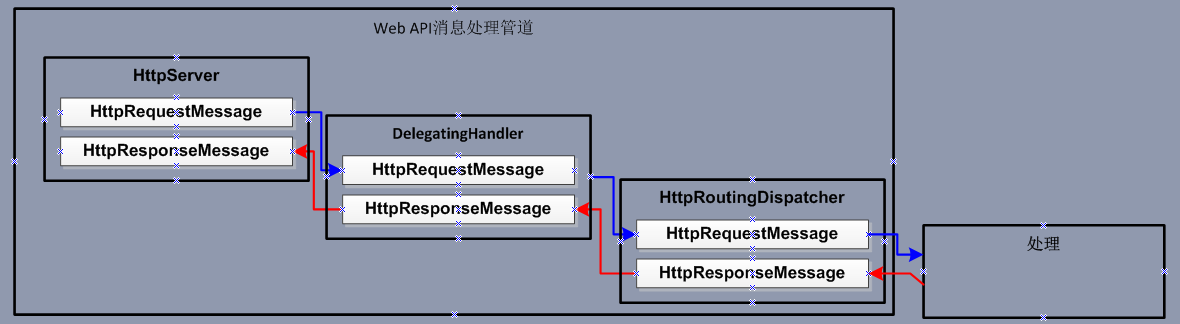
(蓝色线条表示请求,红色线条表示响应)
这样的示意图说明的不是太清晰下面我们用《ASP.NET Web API 开篇介绍示例》中的SelfHost环境下的示例来演示一下,这样大家自然就会清楚这个流程了。
首先我们定义一个消息处理器类型命令为CustomDelegatingHandler,并且继承自DelegatingHandler类型。示例代码如下
代码1-1
    public class CustomDelegatingHandler : DelegatingHandler

    {

        protected override Task<HttpResponseMessage> SendAsync(HttpRequestMessage request, System.Threading.CancellationToken cancellationToken)

        {

            Console.WriteLine(request.RequestUri.OriginalString + "____" + request.Method.Method);

            Task<HttpResponseMessage> responseMessage = base.SendAsync(request, cancellationToken);

            Console.WriteLine(responseMessage.Result.RequestMessage.Method.Method);

            return responseMessage;

        }

   }
随之我们在SelfHost环境下的服务端在注册路由之后注册刚才我们新建的消息处理程序对象,示例代码如下:
代码1-2
        static void Main(string[] args)

        {

            HttpSelfHostConfiguration selfHostConfiguration =

                new HttpSelfHostConfiguration("http://localhost/selfhost");

            using (HttpSelfHostServer selfHostServer = new HttpSelfHostServer(selfHostConfiguration))

            {

                selfHostServer.Configuration.Routes.MapHttpRoute(

                    "DefaultApi", "api/{controller}/{id}", new { id = RouteParameter.Optional });

                RegistrationMessageHandler(selfHostServer.Configuration);

                selfHostServer.OpenAsync();

                Console.WriteLine("服务器端服务监听已开启");

                Console.Read();

            }

        }

        static void RegistrationMessageHandler(HttpConfiguration httpconfiguration)

        {

            httpconfiguration.MessageHandlers.Add(new HttpMessageHandlers.CustomDelegatingHandler());

        }
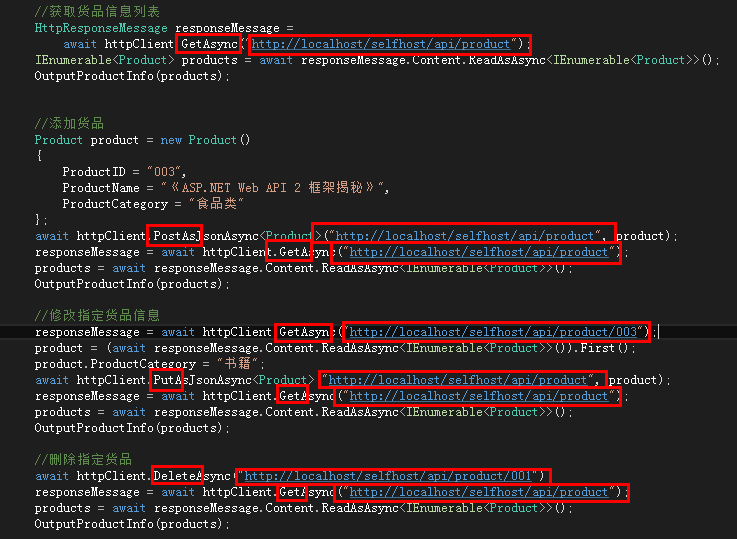
在注册完毕,并且服务器已经启动开启请求监听,客户端也随之发出请求之后,我们再来看一下客户端发出的请求以及类型,如下图。
图2
这个时候我们再来看一下服务端管道处理情况,如下图。
图3
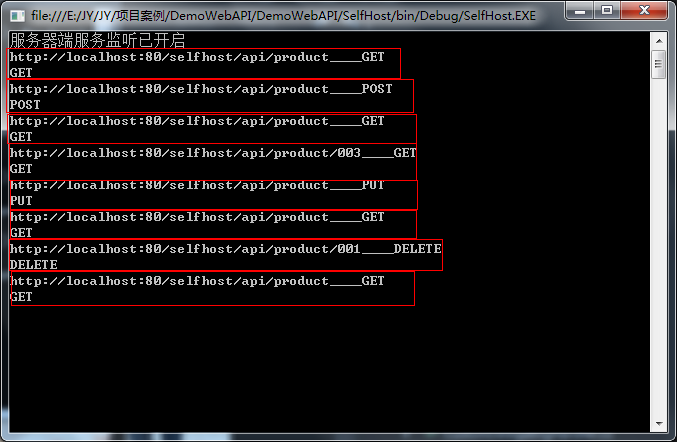
每一个红框圈中的部分都表示着一个请求和响应的流程跟图2中的所有请求是对应的,可以从代码1-1中就可以看出输出的内容。
如果说这样的示例并不不明显,不能让人很清楚明白的了解管道的执行过程以及顺序,那我们定义两个处理程序,并且修改代码1-1,示例代码如下:
代码1-3
    public class CustomDelegatingHandler : DelegatingHandler

    {

        protected override Task<HttpResponseMessage> SendAsync(HttpRequestMessage request, System.Threading.CancellationToken cancellationToken)

        {

            Console.WriteLine(this.GetType().Name + ":" + request.RequestUri.OriginalString + "____" + request.Method.Method);

            Task<HttpResponseMessage> responseMessage = base.SendAsync(request, cancellationToken);

            Console.WriteLine(this.GetType().Name + ":" + responseMessage.Result.RequestMessage.Method.Method);

            return responseMessage;

        }

    }

    public class CustomDelegatingHandler_1 : DelegatingHandler

    {

        protected override Task<HttpResponseMessage> SendAsync(HttpRequestMessage request, System.Threading.CancellationToken cancellationToken)

        {

            Console.WriteLine(this.GetType().Name + ":" + request.RequestUri.OriginalString + "____" + request.Method.Method);

            Task<HttpResponseMessage> responseMessage = base.SendAsync(request, cancellationToken);

            Console.WriteLine(this.GetType().Name + ":" + responseMessage.Result.RequestMessage.Method.Method);

            return responseMessage;

        }

}
随之我们注册管理处理程序的地方也要新增一个消息处理程序,示例代码如下:
代码1-4
        static void RegistrationMessageHandler(HttpConfiguration httpconfiguration)

        {

            httpconfiguration.MessageHandlers.Add(new HttpMessageHandlers.CustomDelegatingHandler());

            httpconfiguration.MessageHandlers.Add(new HttpMessageHandlers.CustomDelegatingHandler_1());

        }
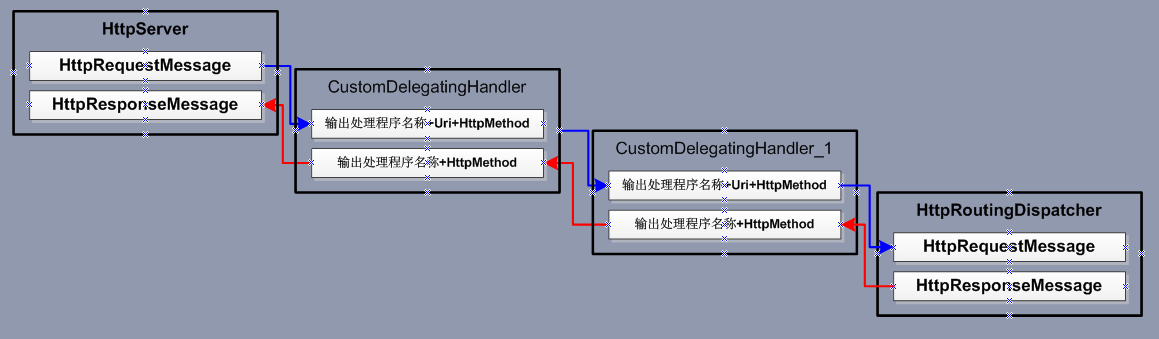
这个时候按照图2之前的那段说明操作,再看一下服务端的管道处理情况,请求还是那些个请求,看下示意图如下:
图4

(红框部分的代表就是跟上面所说的一样,一个请求一个响应管道所对应的处理情况)
最后再看一下图5结合图4,这样更好更容易理解。
图5
作者:金源
出处:http://www.cnblogs.com/jin-yuan/
本文版权归作者和博客园共有,欢迎转载,但未经作者同意必须保留此段声明,且在文章页面
ASP.NET Web API 管道模型的更多相关文章
- ASP.NET Web API编程——模型验证与绑定
1.模型验证 使用特性约束模型属性 可以使用System.ComponentModel.DataAnnotations提供的特性来限制模型. 例如,Required特性表示字段值不能为空,Range特 ...
- ASP.NET WEB API 自定义模型校验过滤器
对外公开WEB接口时,对模型校验是常见的安全常识,常见的写法是在controller中判断ModelState.IsValid,以注册用户API为例. Model: public class Regi ...
- ASP.NET Web API WebHost宿主环境中管道、路由
ASP.NET Web API WebHost宿主环境中管道.路由 前言 上篇中说到ASP.NET Web API框架在SelfHost环境中管道.路由的一个形态,本篇就来说明一下在WebHost环境 ...
- ASP.NET Web API Selfhost宿主环境中管道、路由
ASP.NET Web API Selfhost宿主环境中管道.路由 前言 前面的几个篇幅对Web API中的路由和管道进行了简单的介绍并没有详细的去说明一些什么,然而ASP.NET Web API这 ...
- ASP.NET Web API 控制器创建过程(一)
ASP.NET Web API 控制器创建过程(一) 前言 在前面对管道.路由有了基础的了解过后,本篇将带大家一起学习一下在ASP.NET Web API中控制器的创建过程,这过程分为几个部分下面的内 ...
- ASP.NET Web API 路由对象介绍
ASP.NET Web API 路由对象介绍 前言 在ASP.NET.ASP.NET MVC和ASP.NET Web API这些框架中都会发现有路由的身影,它们的原理都差不多,只不过在不同的环境下作了 ...
- ASP.NET Web API模型验证以及异常处理方式
ASP.NET Web API的模型验证与ASP.NET MVC一样,都使用System.ComponentModel.DataAnnotations. 具体来说,比如有:[Required(Erro ...
- Self Host模式下的ASP. NET Web API是如何进行请求的监听与处理的?
构成ASP.NET Web API核心框架的消息处理管道既不关心请求消息来源于何处,也不需要考虑响应消息归于何方.当我们采用Web Host模式将一个ASP.NET应用作为目标Web API的宿主时, ...
- ASP.NET Web API路由系统:路由系统的几个核心类型
虽然ASP.NET Web API框架采用与ASP.NET MVC框架类似的管道式设计,但是ASP.NET Web API管道的核心部分(定义在程序集System.Web.Http.dll中)已经移除 ...
随机推荐
- 在ubuntu16.10 PHP测试连接MySQL中出现Call to undefined function: mysql_connect()
1.问题: 测试php7.0 链接mysql数据库的时候发生错误: Fatal error: Uncaught Error: Call to undefined function mysqli_con ...
- Modify Branding of FreeCAD
Modify Branding of FreeCAD eryar@163.com This article describes the Branding of FreeCAD. Branding me ...
- Could not evaluate expression
VS15 调试变量不能显示值,提示:Could not evaluate expression 解决办法: 选择"在调试时显示运行以单击编辑器中的按钮"重启VS即可. 可参考:Vi ...
- SHA-1算法
SHA-1.h #ifndef _SHA1_H #define _SHA1_H #include<iostream> using namespace std; //4个函数 #define ...
- PHP设计模式(五)建造者模式(Builder For PHP)
建造者模式:将一个复杂对象的构造与它的表示分离,使同样的构建过程可以创建不同的表示的设计模式. 设计场景: 有一个用户的UserInfo类,创建这个类,需要创建用户的姓名,年龄,爱好等信息,才能获得用 ...
- Flexible 弹性盒子模型之CSS flex-flow
实例 让弹性盒的元素以相反的顺序显示,且在必要的时候进行拆行: display:flex; flex-flow:row-reverse wrap; 效果预览 浏览器支持 表格中的数字表示支持该属性 ...
- 去IOE的一点反对意见以及其他
某天在机场听见两老板在聊天,说到他们目前销售的报表老跟不上的问题,说要请一个人,专门合并和分析一些发过来的excel表格,我真想冲上去说,老板,你需要的是一个信息处理的系统,你需要咨询么.回来一直耿耿 ...
- Android 旋转屏幕--处理Activity与AsyncTask的最佳解决方案
一.概述 运行时变更就是设备在运行时发生变化(例如屏幕旋转.键盘可用性及语言).发生这些变化,Android会重启Activity,这时就需要保存activity的状态及与activity相关的任务, ...
- 编写简单的Makefile文件
makefile中的编写内容如下: www:hello.c x.h gcc hello.c -o hello clean: rm hello www:hello.c x.h 表示生成www这个文件需 ...
- Ognl表达式基本原理和使用方法
Ognl表达式基本原理和使用方法 1.Ognl表达式语言 1.1.概述 OGNL表达式 OGNL是Object Graphic Navigation Language(对象图导航语言)的缩写,他是一个 ...