
使用Azure Automation(自动化)定时关闭和启动虚拟机
1. 概述
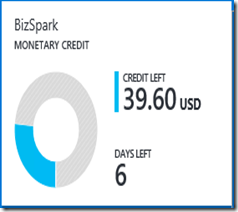
作为Windows Azure的用户,使用Azure的过程中,最担心的事情就是还没到月底,预设的费用就快消耗完了(下面两张账单图是我最讨厌看到的)。但是仔细分析自己的费用列表,发现绝大部分费用消耗在虚拟机上,而Azure的虚拟机是按照开机时间来计费的,因此迫切需要找到一个方案来节省虚拟机的开销。最简单的方案就是在不需要的时候将虚拟机自动关闭,需要的时间让其自动开机。在Google了一通以后,发现可以通过Azure的自动化(Automation)功能达到上述目的。下面介绍我在Azure上的实践,通过设置Azure Automation,实现定时自动启动和关闭虚拟机。

2. 必要条件
1. Windows Azure的订阅账户
2. 在Azure中有可以正常启动和关闭的虚拟机。可以参考这个链接创建一个虚拟机https://azure.microsoft.com/en-us/documentation/articles/virtual-machines-windows-tutorial/
3. 创建自动化账户 Automation
按照Azure的描述,Automation自动化账户是自动化资源的容器,使用Automation自动化账户可以将自动化的资源与分配给其他自动化账户的资源隔离。如果你从未在Azure订阅中创建过自动化账户,参考下面介绍创建一个:
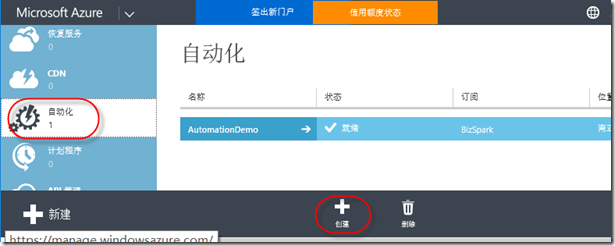
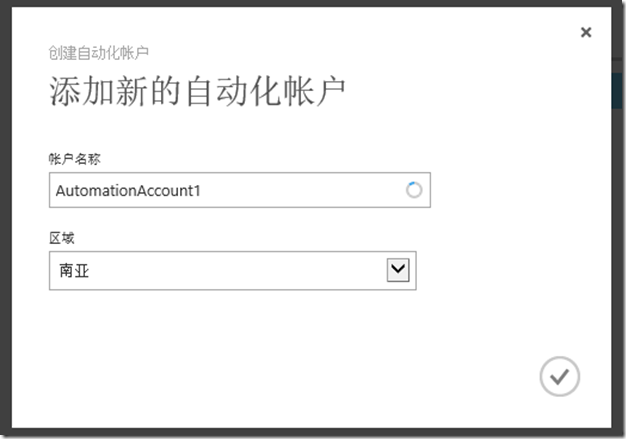
4. 创建和管理证书
4.1 在IIS中创建证书
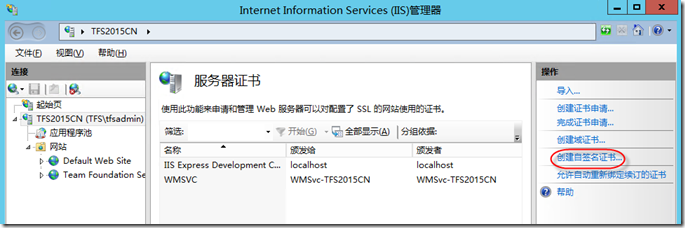
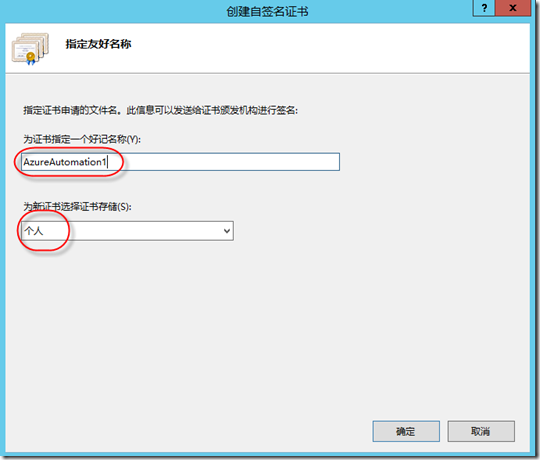
在Azure订阅中运行自动化的任务(脚本),需要使用基于证书的认证。你可以使用第三方的商业证书,也可以在任意一台安装了Internet Infomation Services (IIS)的服务器上创建一个证书。下面介绍如何在Windows Server 2012中使用IIS创建一个自签名的证书:
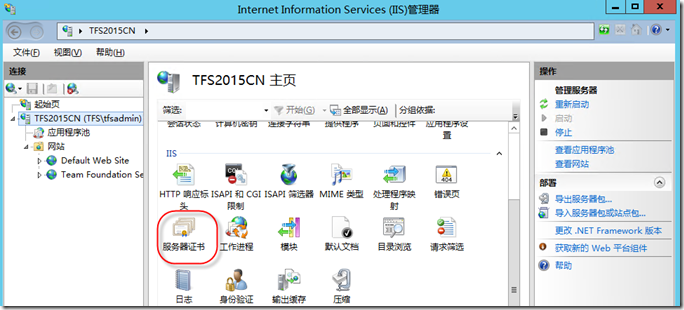
4.2 从IIS中导出.pfx证书
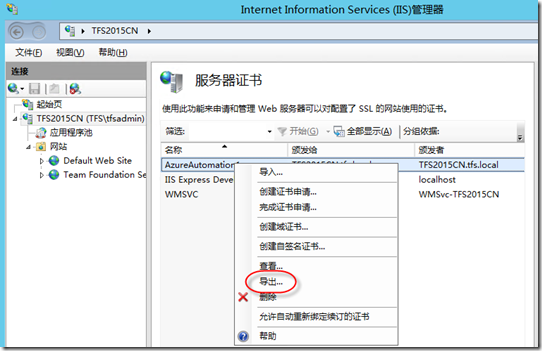
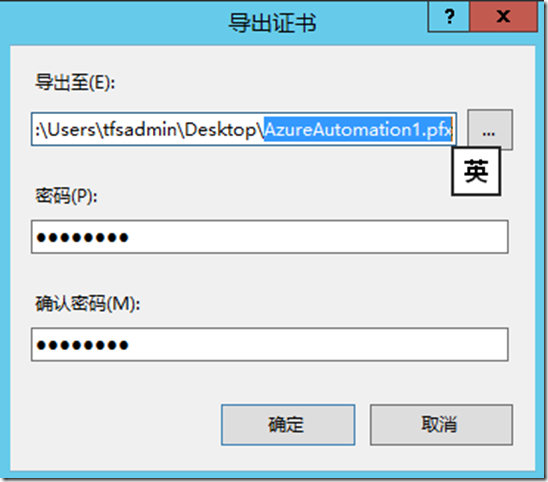
4.3 从IIS中导出.cer证书
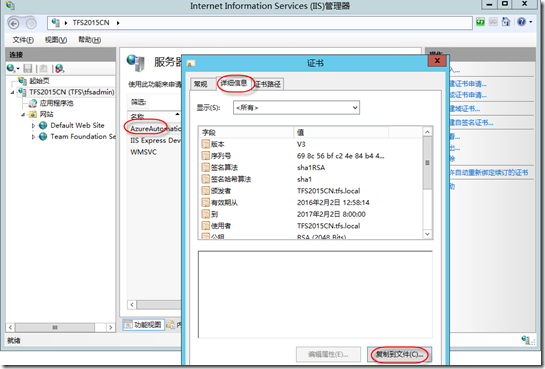
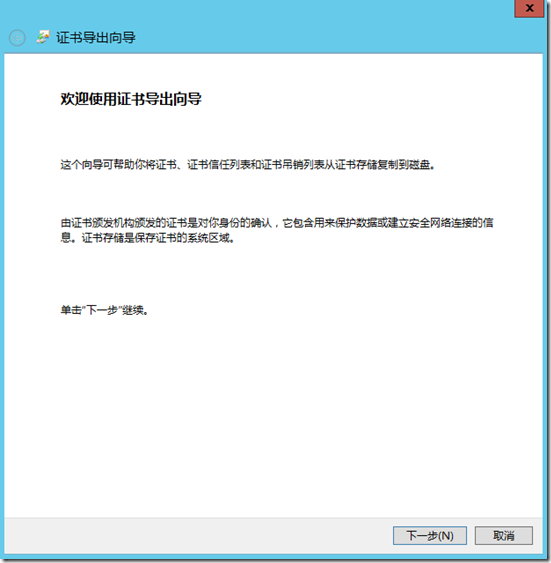
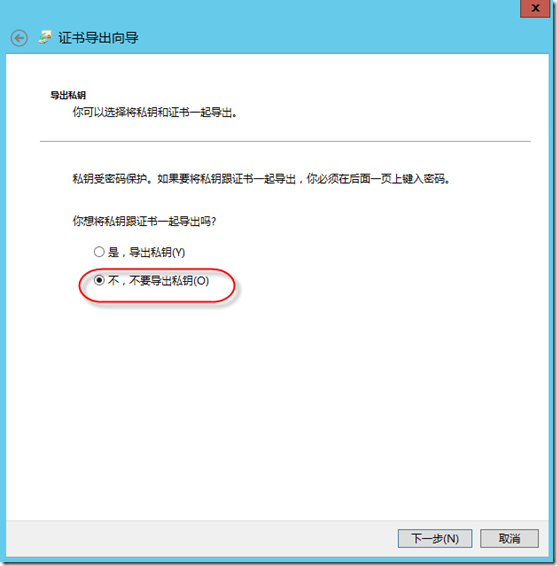
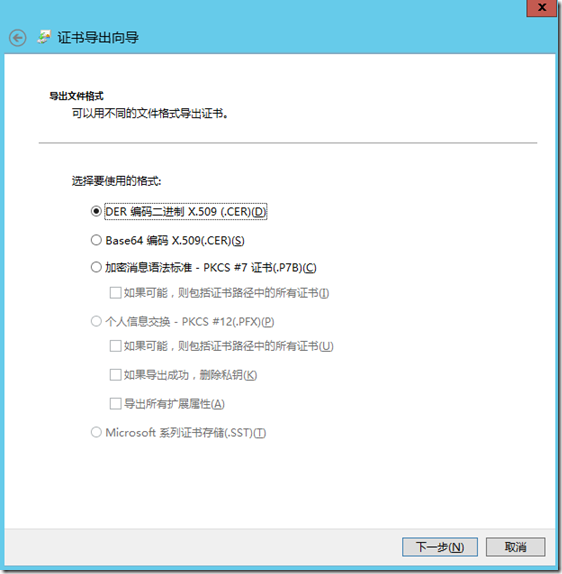
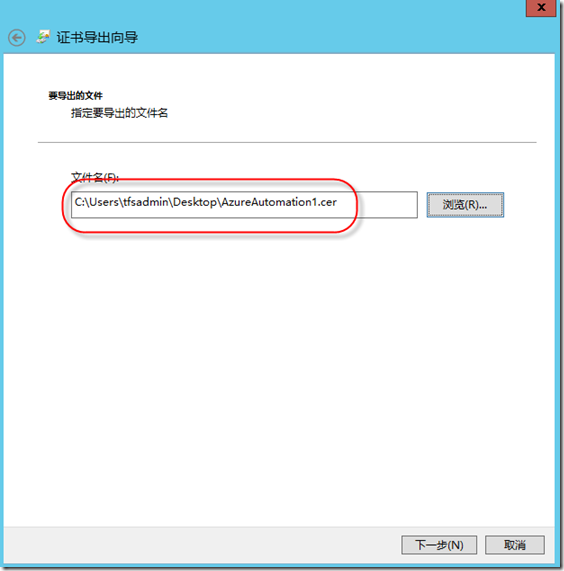
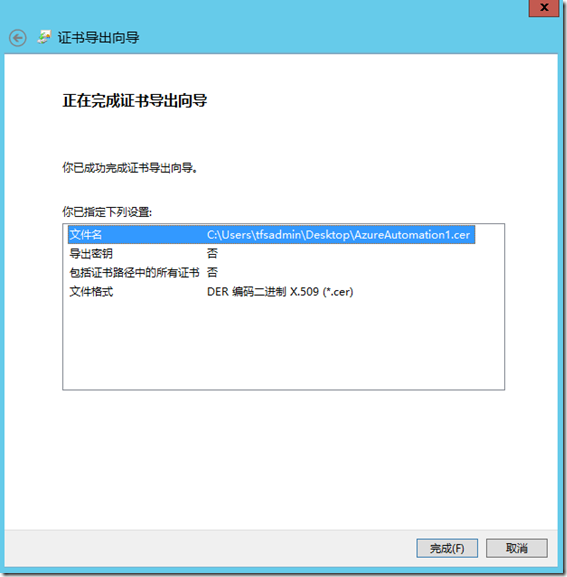
4.4 将.cer证书上传到订阅账户
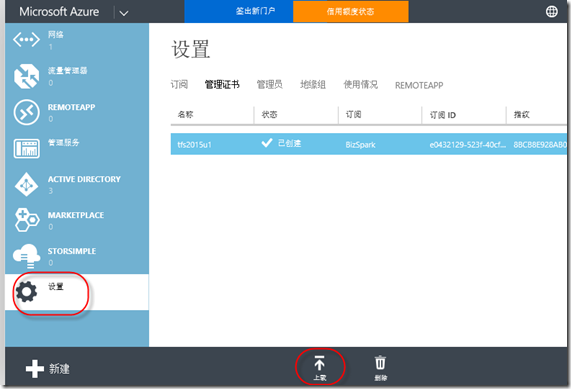
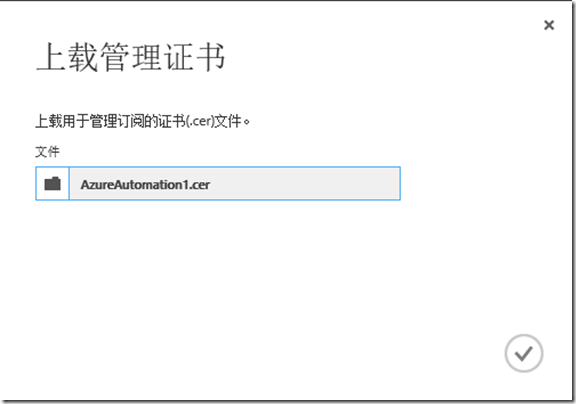
5. 配置自动化脚本
5.1 配置资产,准备自动化脚本运行过程中需要的素材
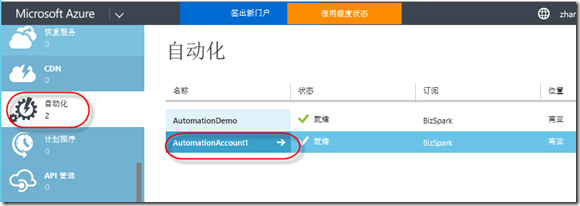
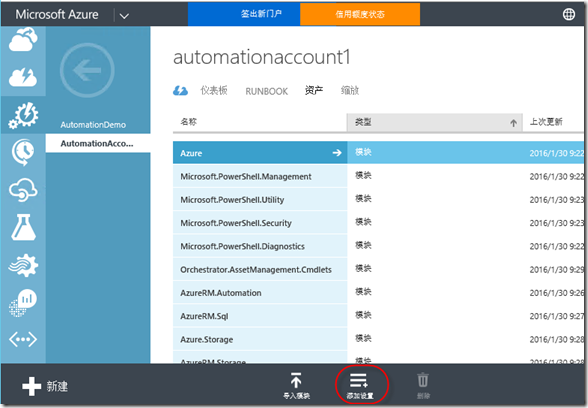
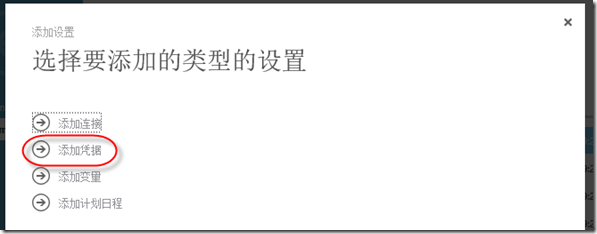
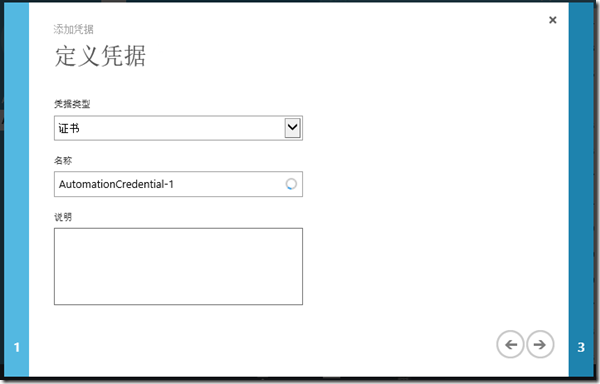
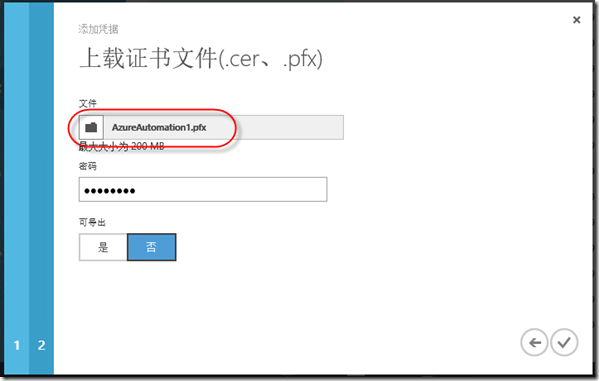
(上传之前导出的.pfx证书)
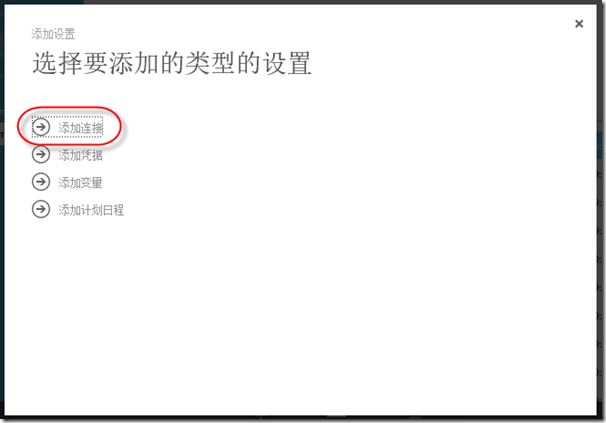
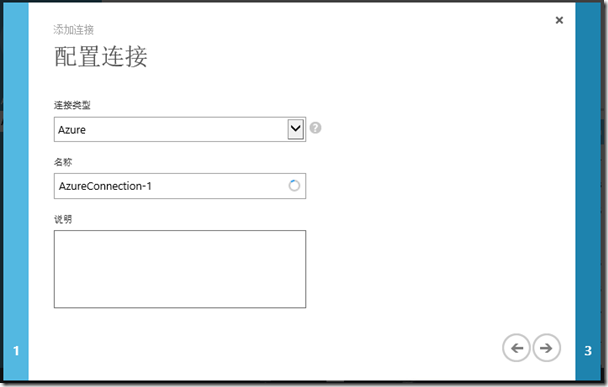
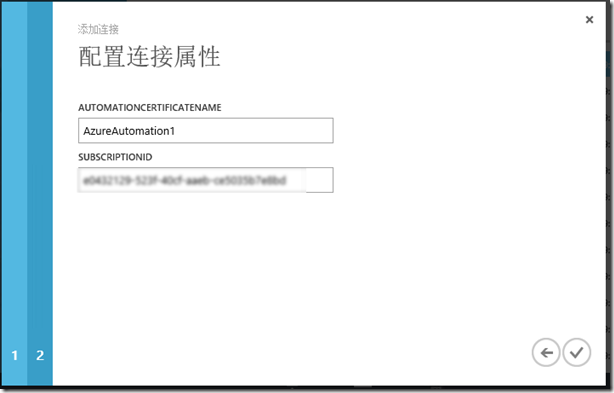
(自动化证书名称需要使用证书在IIS中的友好名称;订阅ID可以在Azure的设置中查询到)
5.2 配置自动化脚本
Runbook是执行自动化操作的脚本。可以通过左下角的“新建”按钮从脚本库中快速创建一个脚本,也可以完全自定义一个脚本:
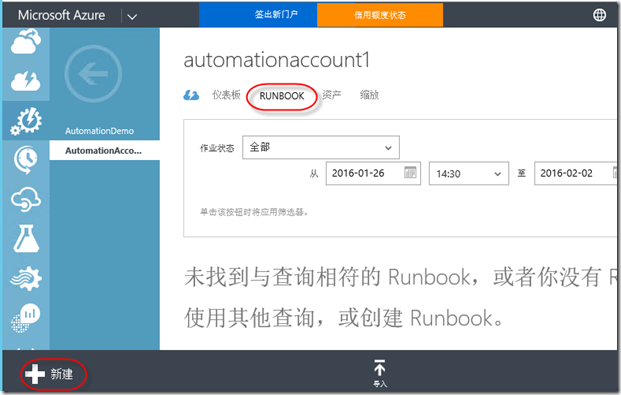
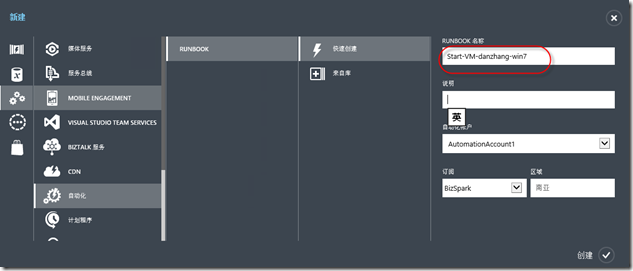
(创建好脚本后,选择脚本,进入编辑页面)
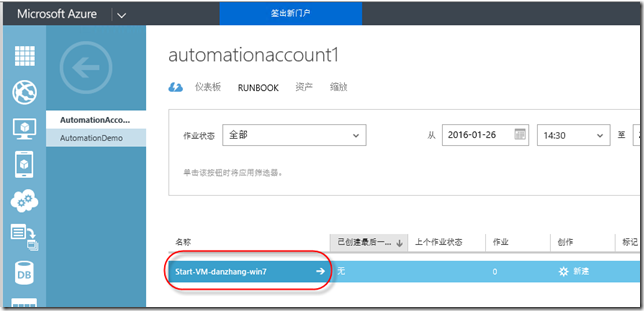
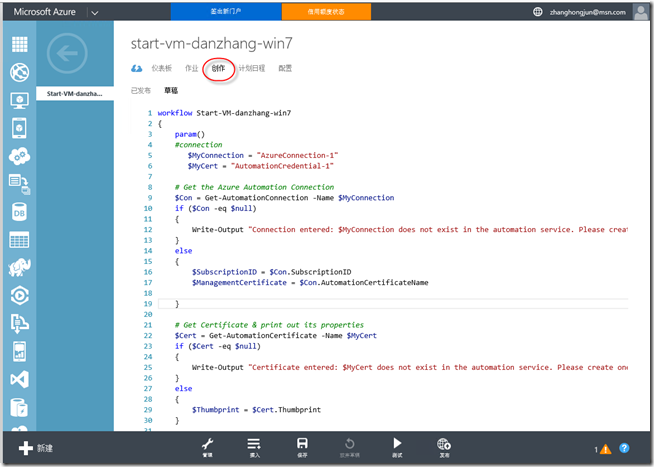
(在“创作”中编辑自动化运行的脚本,脚本如下,其中高亮部分是需要根据实际情况修改的内容:)
|
workflow Start-VM-danzhang-win7 # Get Certificate & print out its properties #Set and Select the Azure Subscription #Select Azure Subscription Write-Output "-------------------------------------------------------------------------" Write-Output "Starting the VM.." # Please type the name of your Domain Controllers #convert date time to UTC time Zone #$locatTimeDayOfWeek #do not start VM on saturday and Sunday if($locatTimeDayOfWeek -ne "Saturday" -and $locatTimeDayOfWeek -ne "Sunday") } Write-Output $"Virtual Machine danzhang-win7 started." |
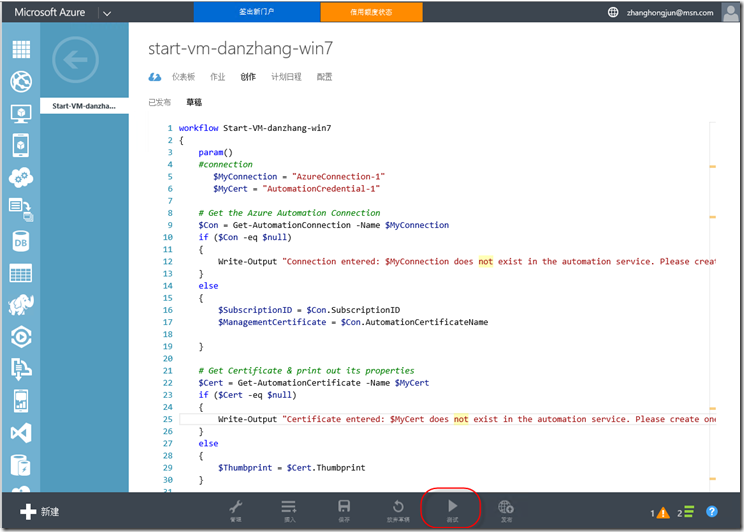
(保存并点击“测试”按钮运行脚本)
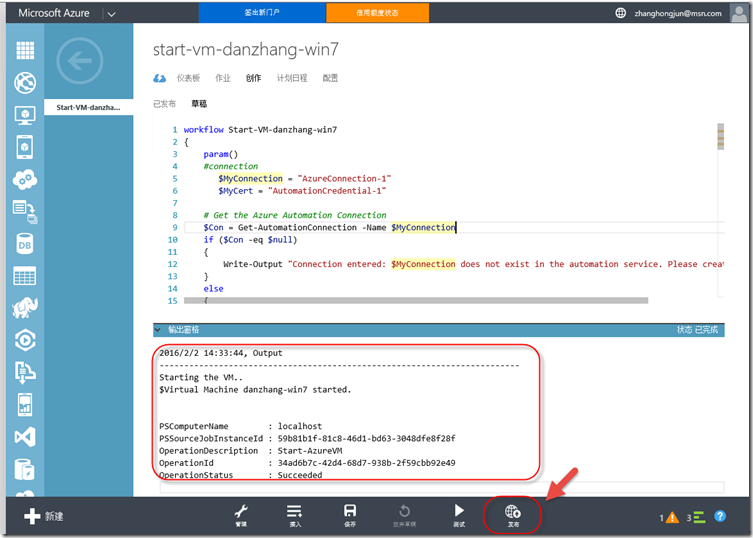
(如果脚本正确,你会在输出窗口中看到成功的提示,同时看到虚拟机已经启动了;点击“发布”按钮发布脚本)
创建关闭虚拟机脚本的过程与上面完全一致,脚本的内容参考下表:
|
workflow Stop-VM-danzhang-win7 # Get Certificate & print out its properties #Set and Select the Azure Subscription #Select Azure Subscription Write-Output "-------------------------------------------------------------------------" Write-Output "Stoping the VM.." # Please type the name of your Domain Controllers #convert date time to UTC time Zone #$locatTimeDayOfWeek #do not start VM on saturday and Sunday if($locatTimeDayOfWeek -ne "Saturday" -and $locatTimeDayOfWeek -ne "Sunday")
#$StopOutPut = Start-AzureVM -ServiceName "mkadamvm" -Name $Using:test #$sample = Get-AzureWinRMUri -ServiceName $Using:CloudServiceName -Name $Using:VMName $StopOutPut = Stop-AzureVM -ServiceName "danzhang-win7" -Name "danzhang-win7" -Force } Write-Output $"Virtual Machine danzhang-win7 Stopped." |
5.3配置日程,实现定时运行脚本
脚本调试成功以后,就可以通过“计划日程”定期运行脚本,以实现定期启动和关机的目标。
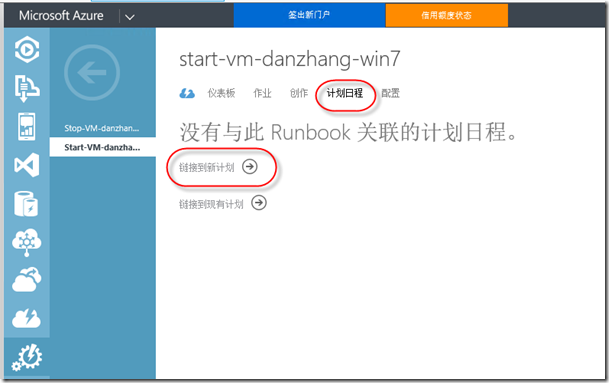
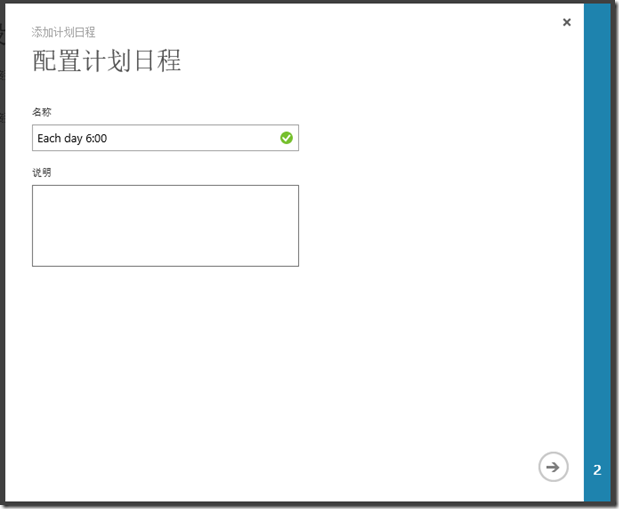
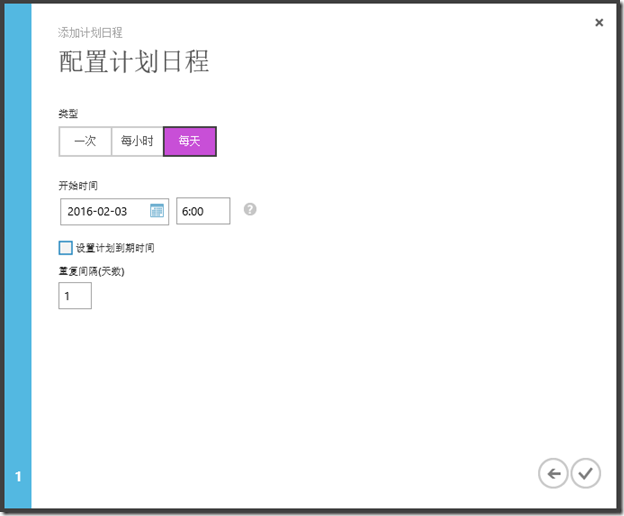
(注意这里的时间是20小时格式的,并且你不需要考虑时区,系统会自动按照你本地的时区做转换)
可以按照上面的操作,设置关闭虚拟机的时间。
http://www.cnblogs.com/danzhang/ ALM MVP 张洪君
使用Azure Automation(自动化)定时关闭和启动虚拟机的更多相关文章
- 【Azure Developer】Azure Automation 自动化账号生成的时候怎么生成连接 与证书 (Connection & Certificate)
Azure Automation :The Azure Automation service provides a highly reliable and scalable workflow exec ...
- 利用Azure Automation实现云端自动化运维(4)
在上述基本准备工作做完后,wo们看看如何实现利用Azure Automation实现定时自动开关机的操作,这种场景非常适合Dev/Test环境,因为Azure的虚拟机是按照分钟收费的,所以我们可以在开 ...
- Azure Automation (1) 入门
<Windows Azure Platform 系列文章目录> 通过Azure Automation(自动化),开发人员可以自动完成通常要在云环境中执行的手动.长时间进行.易出错且重复性高 ...
- Azure 上通过Automation 实现定时开关虚拟机
更多内容,请关注公众号: Azure Automation 可以提供一些自动化的功能,比如我们可以指定在每天早上6点开启虚拟机,每天晚上8点关闭虚拟机.同时还提供一些基于监控参数的自动化配置.今天的主 ...
- 利用Azure Automation实现云端自动化运维(1)
Azure Automation是Azure上的一个自动化工作流引擎,基于Powershell,来帮助用户简化,集成和自动化Azure上的运维工作,例如: 实现定时开关虚拟机,节约成本 实现定时创建删 ...
- 利用Azure Automation实现云端自动化运维(3)
Azure automation的认证方式:证书 该种方式是推荐的进行Automation认证的方式,好处在于安全性高,过期时间由自己控制,不好的地方在于大家在Windows上要生成证书比较麻烦, ...
- 利用Azure Automation实现云端自动化运维(2)
Azure automation的认证: 用户名和密码 在Azure的automation中使用Powershell可以管理当前订阅的资源,也可以管理不同订阅的资源,那么问题就来了,安全性如何 ...
- 使用本地计划任务定时关闭azure虚拟机
本文包含以下内容 前提条件 如何实现定时关闭虚拟机 前提条件 Controller 机器上必须安装 Azure PowerShell,并且要在 PowerShell 里登录一次 Azure, 请参见: ...
- Step by Step 用Azure Automation 来开虚机(ARM)
使用Azure Automation来自动化处理各种重复的耗时的云管理任务从而帮助云运维人员提升效率,帮助降低运营成本. 具体相关的介绍以及怎样利用Azure Automation来完成定期开关虚拟机 ...
随机推荐
- jquery实现全选功能
主要是模拟一些网页中的表格实现全选功能. <form> 你爱好的运动是: <input type="checkbox" id="Check" ...
- 与众不同 windows phone (45) - 8.0 语音: TTS, 语音识别, 语音命令
[源码下载] 与众不同 windows phone (45) - 8.0 语音: TTS, 语音识别, 语音命令 作者:webabcd 介绍与众不同 windows phone 8.0 之 语音 TT ...
- Python for循环内部实现的一个sample
#!/usr/bin/env python # -*- coding: utf-8 -*- it = iter([1,2,3,4,5]) while True: try: x = next(it) p ...
- C# Sqlite事务
在 C#中执行Sqlite数据库事务有两种方式:Sql代码和C#代码 1.Sql代码: BEGIN… COMMIT /ROLLBACK 2.C#代码: using (SQLiteConnection ...
- 2013学习总结----JavaScript
javascript面向对象,实现的几种方式 1:直接使用JSON对象 var o1={ "a":1, "b":2, "c":functio ...
- [原创]winform_PC宴会图片抽奖/文字抽奖
14年6月 好友结婚 14年4月左右知道他们婚礼由迎宾照抽奖的环节 问我有没有可以用的抽奖软件 我网上找了一会儿,就放弃了,自己做一个更快不是? 14年6月,PC宴会图片抽奖软件成功使用 --- 操作 ...
- Javascript的一种代码结构方式——插件式
上几周一直在做公司的webos的前端代码的重构,之中对javascript的代码进行了重构(之前的代码耦合严重.拓展.修改起来比较困难),这里总结一下当中使用的一种代码结构——插件式(听起来怎么像独孤 ...
- 基本完成了一个SEGY扫描程序
利用Seismic.NET编写了一个SEG-Y文件的扫描程序,可以自动判断道头字中主测线号.横测线号.X坐标和Y坐标的位置,自动快速扫描地震数据体中的拐点坐标.10GB多的数据体几十秒全部扫描完成! ...
- virtualbox迁移至vcenter/vmware workstation
参考文献: http://www.itsecurenet.com/virtualbox-ova-to-vsphere-ovf/ http://www.techrepublic.com/blog/win ...
- RecyclerView解析--onViewDetachedFromWindow()/onViewAttachedToWindow()
先看这段源码介绍: /** * Called when a view created by this adapter has been detached from its window. * * &l ...