
【Azure Developer】Azure Automation 自动化账号生成的时候怎么生成连接 与证书 (Connection & Certificate)
Azure Automation :The Azure Automation service provides a highly reliable and scalable workflow execution engine to automate frequently repeated management tasks. The processes are automated through runbooks, which are Windows PowerShell Workflows run in the Azure Automation execution engine. You can use this API to create, update, read, and delete automation resources, including runbooks and runbook jobs. In addition you can manage assets such as variables, schedules, Windows PowerShell modules, credentials, and certificates.
Azure 自动化服务提供了一个高度可靠和可扩展的工作流执行引擎,可以自动执行频繁重复的管理任务。 这些流程通过 runbook 自动完成,这些 runbook 是在 Azure 自动化执行引擎中运行的 Windows PowerShell 工作流。 可以使用此 API 来创建、更新、读取和删除自动化资源,包括 runbook 和 runbook 作业。 此外,还可以管理诸如变量、时间表、Windows PowerShell 模块、凭据和证书等资产。
Source : https://docs.microsoft.com/en-us/rest/api/automation/
问题描述
自动化账号( Automation Account )生成的时候怎么生成连接( Connection)与证书( Certificate)?
问题回答
在中国区Azure中创建Connection时,需要修改为中国区的ARM Endpoint。比如Connection的Endpoint (终结点)应为:
https://management.chinacloudapi.cn
/subscriptions/<subscriptionid>
/resourceGroups/< resourceGroups >/providers/Microsoft.Automation
/automationAccounts/< automationAccounts name>
/connections/<connectionname>?api-version=2015-10-31
Sample Request
PUT https://management.chinacloudapi.cn/subscriptions/subid/resourceGroups/rg/providers/Microsoft.Automation/automationAccounts
/myAutomationAccount28/connections/mysConnection?api-version=2015-10-31
Request Body
{

  "name": "mysConnection",

  "properties": {

    "description": "my description goes here",

    "connectionType": {

      "name": "Azure"

    },

    "fieldDefinitionValues": {

      "AutomationCertificateName": "mysCertificateName",

      "SubscriptionID": "subid"

    }

  }

}
Sample Response
- Status code:201
{

  "id": "/subscriptions/subid/resourceGroups/rg/providers/Microsoft.Automation/automationAccounts/myAutomationAccount28/connections/mysConnection",

  "name": "mysConnection",

  "properties": {

    "creationTime": "2017-03-27T07:52:29.29+00:00",

    "lastModifiedTime": "2017-03-27T07:52:29.29+00:00",

    "description": "my description goes here",

    "fieldDefinitionValues": {

      "AutomationCertificateName": "mysCertificateName",

      "SubscriptionID": "subid"

    },

    "connectionType": {

      "name": "Azure"

    }

  }

}
- Status code:200
{

  "id": null,

  "name": "mysConnection",

  "properties": {

    "creationTime": "2017-03-27T07:52:29.29+00:00",

    "lastModifiedTime": "2017-03-27T07:52:29.29+00:00",

    "description": "my description goes here",

    "fieldDefinitionValues": {

      "AutomationCertificateName": "mysCertificateName",

      "SubscriptionID": "subid"

    },

    "connectionType": {

      "name": "Azure"

    }

  }

}
对Automation Account创建证书,则和Connection接口相似。详情可见:https://docs.microsoft.com/en-us/rest/api/automation/certificate。
而如果是指在调用REST API时,需要在Header中携带 Authorization 值。基于Azure对授权的统一管理,需要在Azure AD中对客户端(REST API调用端)进行一个身份注册,然后可以在AAD中上传证书或者是通过密钥登录。
设置密钥(Secret)非常简单:打开Azure AD页面 --> 选择所注册的Applicaiton --> 选择“Certificates & secrets” --> "New client secret"
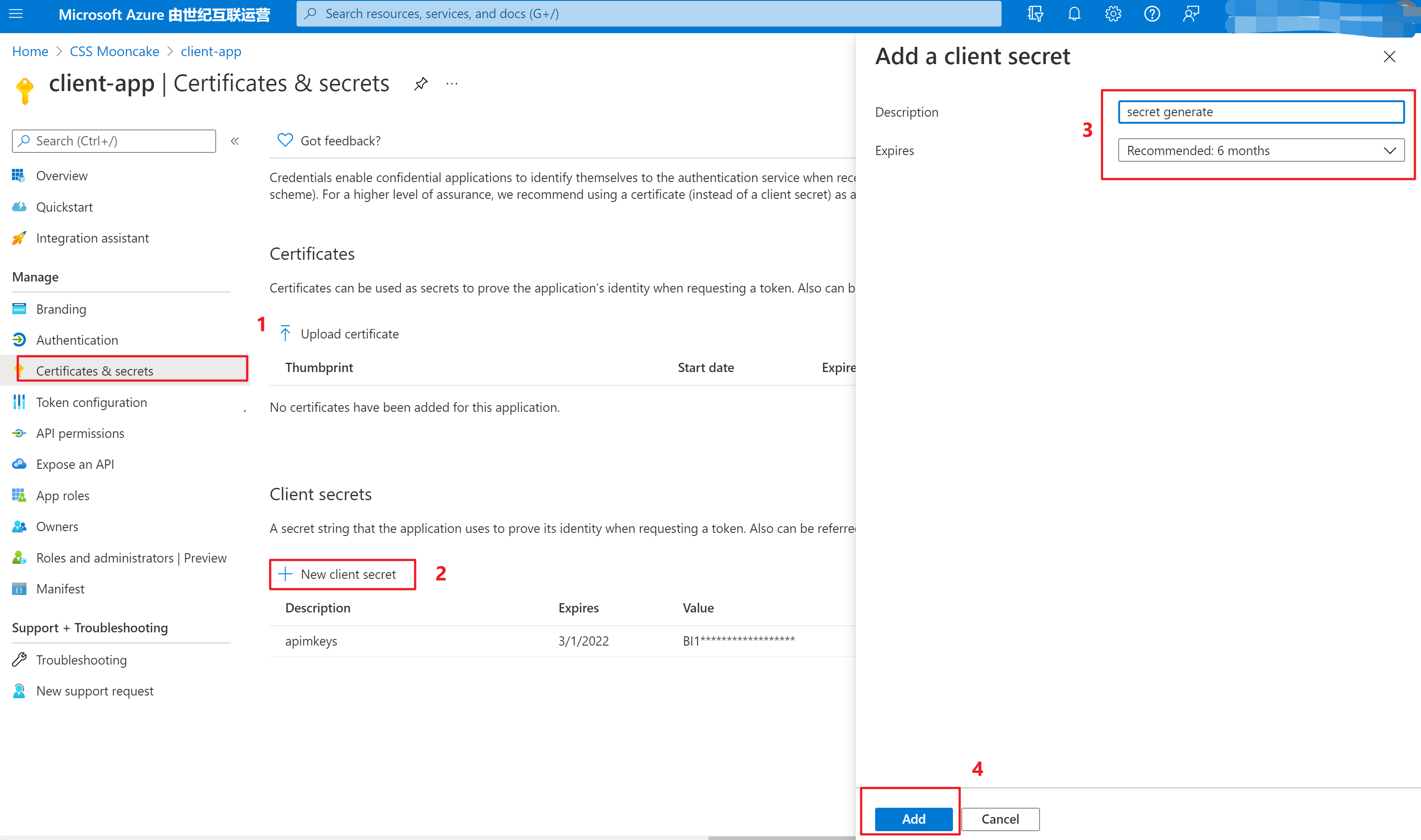
而设置证书方式,与密钥在同一个页面,只是上传证书需注意:要上传带有私钥的证书,不能为公钥证书。否则,会遇见“ The private key is not present in the X.509 certificate ”错误。
参考资料
Automation REST API Reference: https://docs.microsoft.com/en-us/rest/api/automation/
【Azure Developer】Azure Automation 自动化账号生成的时候怎么生成连接 与证书 (Connection & Certificate)的更多相关文章
- 如何在Win8.1和Win2012上运用PowerShell快速生成、安装、导出自签名证书 (Self-Signed Certificate)
自签名证书用途很广,测试,开发,本地或者云端网站(比如Microsoft Azure Web Site)都会使用到.本文会介绍一种在Win8.1和Win2012 R2上使用PowerShell快速生成 ...
- 体验Azure的 Automation “自动化” 服务预览版
一直想要实现对Azure上跑的虚机进行定期的自动备份.在网上搜了一下有关的解决方案,发现一个不错的帖子,是基于国外的Azure服务做的.基本原理就是利用Azure的Automation(自动化)服务来 ...
- 使用Azure Automation(自动化)定时关闭和启动虚拟机
1. 概述 作为Windows Azure的用户,使用Azure的过程中,最担心的事情就是还没到月底,预设的费用就快消耗完了(下面两张账单图是我最讨厌看到的).但是仔细分析自己的费用列表,发现绝大部分 ...
- 【Azure Developer】解决Azure Key Vault管理Storage的示例代码在中国区Azure遇见的各种认证/授权问题 - C# Example Code
问题描述 使用Azure密钥保管库(Key Vault)来托管存储账号(Storage Account)密钥的示例中,从Github中下载的示例代码在中国区Azure运行时候会遇见各种认证和授权问题, ...
- 【Azure Developer】使用Microsoft Graph API 批量创建用户,先后遇见的三个错误及解决办法
问题描述 在先前的一篇博文中,介绍了如何使用Microsoft Graph API来创建Azure AD用户(博文参考:[Azure Developer]使用Microsoft Graph API 如 ...
- 【Azure Developer】Github Action部署资源(ARM模板)到Azure中国区时,遇见登录问题的解决办法
问题描述 在参考文档"使用 GitHub Actions 部署 ARM 模板"一文中,由于是在中国区Azure上操作,所以生产的部署凭证为中国区凭证.当创建工作流时,在登录到Azu ...
- 【Azure Developer】【Python 】使用 azure.identity 和 azure.common.credentials 获取Azure AD的Access Token的两种方式
问题描述 使用Python代码,展示如何从Azure AD 中获取目标资源的 Access Token. 如要了解如何从AAD中获取 client id,client secret,tenant id ...
- 【Azure Developer】使用 Microsoft Authentication Libraries (MSAL) 如何来获取Token呢 (通过用户名和密码方式获取Access Token)
问题描述 在上一篇博文<[Azure Developer]使用 adal4j(Azure Active Directory authentication library for Java)如何来 ...
- 【Azure Developer】调用SDK的runPowerShellScript方法,在Azure VM中执行PowerShell脚本示例
当需要通过代码的方式执行PowerShell脚本时,可以参考以下的示例. Azure SDK中提供了两个方法来执行PowerShell脚本 (SDK Source Code: https://gith ...
随机推荐
- .static 和const分别怎么用,类里面static和const可以同时修饰成员函数吗。
static的作用: 对变量: 1.局部变量: 在局部变量之前加上关键字static,局部变量就被定义成为一个局部静态变量. 1)内存中的位置:静态存储区 2)初始化:局部的静态变量只能被初始化一次, ...
- 狂神说SpringBoot02:运行原理初探
狂神说SpringBoot系列连载课程,通俗易懂,基于SpringBoot2.2.5版本,欢迎各位狂粉转发关注学习. 微信公众号:狂神说(首发) Bilibili:狂神说Java(视频) 未经作 ...
- vs2019 实现C#调用c++的dll两种方法
1.托管与非托管的区别 2.非托管类的实现 第一步:创建C++空项目(命名Caculate)添加一个类AddOperate 第二步:将C++代码编译成动态库dll 第三步:将dll拷贝到c#项目输入目 ...
- 关于 go-fastdfs-web 的SpringBoot 后台管理
1.问题的产生: 1.公司需要存储图片数据,采用Go语言的fastdfs,实现存储,我的职责就是部署,SpringBoot版本的管理平台. 2.当我看见代码之后我的内心是拒绝的,没有注释....... ...
- tar.gz 文件解压
tar.gz 文件解压 解压缩 file.tar.gz 的过程中出现如下所示问题: tar: 它似乎不像是一个 tar 归档文件 tar: 跳转到下一个头 tar: 由于前次错误,将以上次的错误状态退 ...
- 不用调整Nginx,SpringBoot也能解决前端访问的跨域问题
1.什么情况下会出现跨域问题 通常,在前端工程师的开发过程中,往往在本地机器启动前端服务, 而调用的后端接口服务是在另外一台机器运行,这时就会出现跨域问题,让接口无法调通. 而到了测试环境和生产环境, ...
- win10 uwp 通过 Win2d 完全控制笔迹绘制逻辑
本文来告诉大家如何通过 Win2d 完全控制笔迹绘制逻辑,本文适合用来实现复杂的自定义逻辑,可以完全控制笔迹的行为.包括在书写过程中切换模式,如进行手势擦除切换为橡皮擦模式 本文提供的方法适合用来做复 ...
- Mybatis源码解析3——核心类SqlSessionFactory,看完我悟了
这是昨晚的武汉,晚上九点钟拍的,疫情又一次来袭,曾经熙熙攘攘的夜市也变得冷冷清清,但比前几周要好很多了.希望大家都能保护好自己,保护好身边的人,生活不可能像你想象的那么好,但也不会像你想象的那么糟. ...
- Confluence7.4安装并破解汉化教程
Confluence是一款由JAVA编写用于企业知识库管理协同软件,多用于构建企业内部WIKI,支持多人协作,共享信息等. 当前系统环境Centos7.9,内存至少2G以上,数据库采用MySQL5.7 ...
- Git工具的使用教程二
1.3时光穿梭机--版本回退 版本回退分为两步骤进行操作: 步骤: 1.查看版本,确定需要回到的时候点 指令: git log git log ...