
Timeout Detection & Recovery (TDR)
Timeout Detection & Recovery (TDR)
NVIDIA® Nsight™ Development Platform, Visual Studio Edition 2.2 User Guide
Send Feedback
TDR stands for Timeout Detection and Recovery. This is a feature of the Windows operating system which detects response problems from a graphics card, and recovers to a functional desktop by resetting the card. If the operating system does not receive a response from a graphics card within a certain amount of time (default is 2 seconds), the operating system resets the graphics card.
Before TDR existed, problems of this nature would have resulted in a system freeze and required a reboot of the operating system. If TDR is enabled and you see the TDR error message, "Display driver stopped responding and has recovered," this means that the Windows operating system reset the display driver.
There are three different possible debugging configurations:
- Local debugging with a single GPU,
- Local debugging with multiple GPUs, or
- Remote debugging.
Choose the one that most closely reflects your NVIDIA Nsight setup:
Local Debugging with a Single GPU
Disabling TDR removes a valuable layer of protection, so it is generally recommended that you keep it enabled.
However, setting the TDR delay too low can cause the debugger to fail for one of two reasons:
- Debugging on some GPUs will fails with a TDR delay of less than 10 seconds.
- Debug builds of CUDA kernels run more slowly and may intrinsically require additional time to complete. With too low of a TDR delay, the kernels may not have enough time to complete.
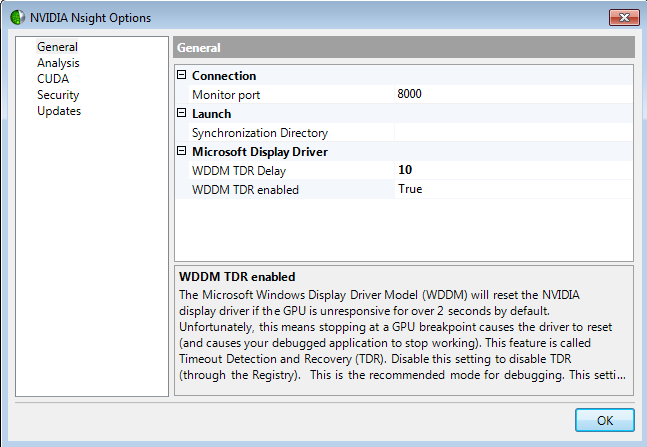
Therefore, if you are using local debugging with a single GPU, it's recommended that you leave TDR enabled, and set the delay to 10 seconds.
To enable TDR and change the delay, do the following:
- Right-click the Nsight Monitor icon in the system tray.
- Select Options.
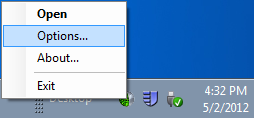
- In the Options window on the General tab, set WDDM TDR enabled to True.
Change the WDDM TDR Delay from the default setting to 10.
Local Debugging with Multiple GPUs or Remote Debugging
When using either a local debugging configuration with multiple GPUs, or a remote debugging configuration, it's important to disable TDR. This is because with most CUDA applications, a TDR means that any debugging operation after the TDR will fail. You will not be able to step, set breakpoints, view variables, etc. The application will receive a grid launch failure, and the CUcontext will begin to report errors.
Having TDR enabled can interfere with GPU debugging because the graphics card is perceived by the operating system as unresponsive when the execution of a target application is paused or when the debugger is performing certain operations.
To disable TDR, do the following:
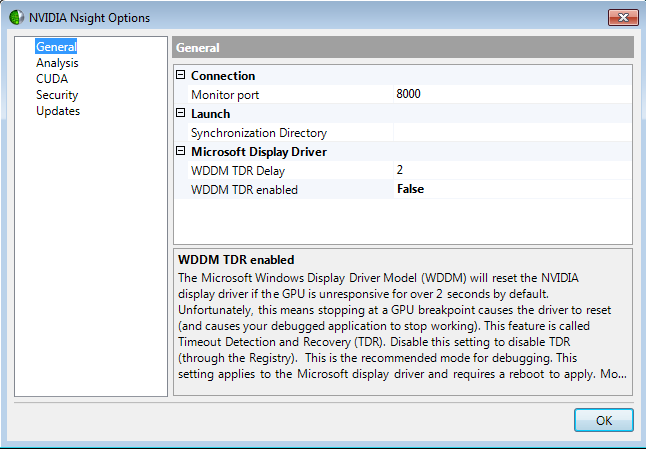
- Right-click the Nsight Monitor icon in the system tray.
- Select Options.
- In the Options window on the General tab, set WDDM TDR enabled to False.
For more information about TDR, see:
http://www.microsoft.com/whdc/device/display/wddm_timeout.mspx
Timeout Detection & Recovery (TDR)的更多相关文章
- 解决CUDA程序的黑屏恢复问题
本文引用自 http://blog.163.com/yuhua_kui/blog/static/9679964420146183211348/ 问题描述: 在运行CUDA程序时,出现黑屏,过一会儿 ...
- Windows平台CUDA开发之前的准备工作
CUDA是NVIDIA的GPU开发工具,眼下在大规模并行计算领域有着广泛应用. windows平台上面的CUDA开发之前.最好去NVIDIA官网查看说明,然后下载对应的driver. ToolKits ...
- [Kong 与 Konga与postgres数据库] 之 Kuberneres 部署
1.Kong的概述 Kong是一个clould-native.快速的.可扩展的.分布式的微服务抽象层(也称为API网关.API中间件或在某些情况下称为服务网格)框架.Kong作为开源项目在2015年推 ...
- [Kong 与 Konga 与 Postgres数据库] 之 Kuberneres 部署
1.Kong的概述 Kong是一个clould-native.快速的.可扩展的.分布式的微服务抽象层(也称为API网关.API中间件或在某些情况下称为服务网格)框架.Kong作为开源项目在2015年推 ...
- 理解 OpenStack 高可用(HA) (4): Pacemaker 和 OpenStack Resource Agent (RA)
本系列会分析OpenStack 的高可用性(HA)概念和解决方案: (1)OpenStack 高可用方案概述 (2)Neutron L3 Agent HA - VRRP (虚拟路由冗余协议) (3)N ...
- 关于Redis中交互的过程
一.Redis启动 加载配置(命令行或者配置文件) 启动TCP监听,客户端的列表保存在redisserver的clients中 启动AE Event Loop事件,异步处理客户请求 事件处理器的主循环 ...
- 微信【跳一跳】 opencv视觉识别 + 物理外挂
视频连接:http://v.youku.com/v_show/id_XMzMyNDQxNTA0OA==.html?spm=a2h3j.8428770.3416059.1 初入门C++ 与 opencv ...
- Redis源码阅读(一)事件机制
Redis源码阅读(一)事件机制 Redis作为一款NoSQL非关系内存数据库,具有很高的读写性能,且原生支持的数据类型丰富,被广泛的作为缓存.分布式数据库.消息队列等应用.此外Redis还有许多高可 ...
- 第10课:[实战] Redis 网络通信模块源码分析(3)
redis-server 接收到客户端的第一条命令 redis-cli 给 redis-server 发送的第一条数据是 *1\r\n\$7\r\nCOMMAND\r\n .我们来看下对于这条数据如何 ...
随机推荐
- ural 1069
题意:删除一棵树上的叶子 每删除一片叶子就写下连着该片叶子的节点 让你还原一棵树 记录每个节点连着的叶子数 0表示此时这个节点就是叶子 -1表示这个节点已经删除 删除的只能是0 就是说是叶子 暴 ...
- static函数与普通函数
转自http://blog.163.com/sunshine_linting/blog/static/44893323201191294825184/ 全局变量(外部变量)的说明之前再冠以static ...
- jmeter HTTP信息头管理器使用一例
最近在测试过程中遇到一个问题,被测系统会检测http header:如果不包含制定内容会引发302跳转操作,从而是测试达不到效果.解决办法,增加http 信息头管理器,直接上图 此处注意: 1.此处“ ...
- 李洪强漫谈iOS开发[C语言-012]-C语言基本数据类型
// // main.m // 08 - 基本数据类型 // // Created by vic fan on 16/7/16. // Copyright © 2016年 李洪强. All r ...
- 【mysql的设计与优化专题(1)】ER图,数据建模与数据字典
需求分析是做项目中的极为重要的一环,而作为整个项目中的'血液'--数据,更是重中之重.viso,workbench,phpmyadmin等软件可以帮我们更好的处理数据分析问题. ER图 E-R方法是& ...
- CURL与PHP-CLI的应用【CURL篇】
curl是一个极为强大的HTTP传输工具,支持文件的上传和下载; curl在命令行下的使用 命令参数 -a/--append 上传文件时,附加到目标文件 -A/--user-agent <str ...
- inflate方法与findViewById的区别
LayoutInflater作用是将layout的xml布局文件实例化为View类对象. 对于一个没有被载入或者想要动态载入的界面,都需要使用LayoutInflater.inflate()来找 re ...
- Android 权限查寻表
示例 <?xml version="1.0" encoding="utf-8"?> <manifest xmlns:android=" ...
- C++中const小结
1.const修饰普通变量(非指针变量)const修饰变量,一般有两种写法:const TYPE value;TYPE const value;对于一个非指针的类型TYPE,这两种写法在本质上是一样的 ...
- 《C#并行编程高级教程》第8章 线程池 笔记
主要的几个概念(详细最好还是看书,配合插图看) 任务是会被分配到线程上的,而这些线程都在线程池引擎下管理 线程池引擎管理着合适数量的线程池,线程从全局队列获取工作项执行. .NET4 Framew ...