
iOS 实现进度条(progress)
#import <UIKit/UIKit.h>

@interface ZSDProgressView : UIView

{

    UIView *progressView;//进度view

}

//进度值

@property(nonatomic,assign)float progress;

@end

#define UIColorFromRGB(rgbValue) [UIColor \

colorWithRed:((float)((rgbValue & 0xFF0000) >> ))/255.0 \

green:((float)((rgbValue & 0xFF00) >> ))/255.0 \

blue:((float)(rgbValue & 0xFF))/255.0 alpha:1.0]

#import "ZSDProgressView.h"

@implementation ZSDProgressView

-(id)initWithFrame:(CGRect)frame

{

    if (self=[super initWithFrame:frame])

    {

        self.backgroundColor=UIColorFromRGB(0xDADADA);

    }

    return self;

}

-(void)awakeFromNib

{

    self.backgroundColor=UIColorFromRGB(0xDADADA);

    progressView=[[UIView alloc]init];

    progressView.translatesAutoresizingMaskIntoConstraints=NO;

    [self addSubview:progressView];

}

-(void)setProgress:(float)progress

{

    _progress=progress;

    /**

     *  activePartView添加约束

     */

    //左边约束

    [self addConstraint:[NSLayoutConstraint constraintWithItem:progressView attribute:NSLayoutAttributeLeft relatedBy:NSLayoutRelationEqual toItem:self attribute:NSLayoutAttributeLeft multiplier: constant:]];

     //上边约束

    [self addConstraint:[NSLayoutConstraint constraintWithItem:progressView attribute:NSLayoutAttributeTop relatedBy:NSLayoutRelationEqual toItem:self attribute:NSLayoutAttributeTop multiplier: constant:]];

    //高度约束

    [self addConstraint:[NSLayoutConstraint constraintWithItem:progressView attribute:NSLayoutAttributeHeight relatedBy:NSLayoutRelationEqual toItem:nil attribute:NSLayoutAttributeHeight multiplier: constant:self.frame.size.height]];

    //宽度约束

    NSLayoutConstraint *widthCon = [NSLayoutConstraint constraintWithItem:progressView

                                                                attribute:NSLayoutAttributeWidth

                                                                relatedBy:NSLayoutRelationEqual

                                                                   toItem:self

                                                                attribute:NSLayoutAttributeWidth

                                                               multiplier:_progress

                                                                 constant:];

    [self addConstraint:widthCon];

    //用背景图来填充背景颜色

    UIImage *bgImage=[UIImage imageNamed:@"invest_jindu"];

    UIColor *bgColor=[UIColor colorWithPatternImage:bgImage];

    [progressView setBackgroundColor:bgColor];

    //更新约束

    [progressView needsUpdateConstraints];

}

@end
#import "ViewController.h"

#import "ZSDProgressView.h"

@interface ViewController ()

@property (weak, nonatomic) IBOutlet ZSDProgressView *progressView;

@end

@implementation ViewController

- (void)viewDidLoad {

    [super viewDidLoad];

    // Do any additional setup after loading the view, typically from a nib.

}

- (void)didReceiveMemoryWarning {

    [super didReceiveMemoryWarning];

    // Dispose of any resources that can be recreated.

}

- (IBAction)setBtnClick:(UIButton *)sender

{

    _progressView.progress=0.6;

}

@end
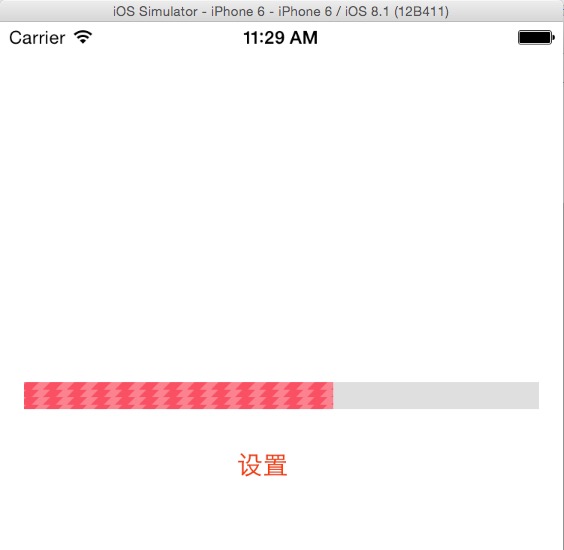
iOS 实现进度条(progress)的更多相关文章
- amazeui学习笔记--css(常用组件13)--进度条Progress
amazeui学习笔记--css(常用组件13)--进度条Progress 一.总结 1.进度条基本使用:进度条组件,.am-progress 为容器,.am-progress-bar 为进度显示信息 ...
- [iOS]圆形进度条及计时功能
平时用战网安全令的时候很喜欢圆形倒计时的效果,然后简单看了一下Android的圆形进度条,后来又写了一个IOS的.整体界面参照IOS系统的倒计时功能,顺便熟悉了UIPickerView的一些特性的实现 ...
- iOS 渐变进度条
#import <UIKit/UIKit.h> @interface JianBianView : UIView //为了增加一个表示进度条的进行,可们可以使用mask属性来屏蔽一部分 @ ...
- iOS 自定义进度条
自定义条形进度条(iOS) ViewController.m文件 #import "ViewController.h" @interface ViewController () @ ...
- IOS 圆形进度条
// // CCProgressView.h // Demo // // Created by leao on 2017/8/7. // Copyright © 2017年 zaodao. All r ...
- 详解HTML5中的进度条progress元素简介及兼容性处理
一.progress元素基本了解 1.基本知识 progress元素属于HTML5家族,指进度条.IE10+以及其他靠谱浏览器都支持. 注释:Internet Explorer 9 以及更早的版本不支 ...
- iOS 环形进度条
.h文件 #import <UIKit/UIKit.h> @interface YTProgressView : UIView@property (nonatomic, copy) NSS ...
- vue 渐变 进度条 progress
废话 不多少说 ,直接上代码 新建文件 gradual-progress.vue <!-- * @Author: gfc * @Date: 2019-11-07 14:00:11 * @Last ...
- 【原】Github系列之三:开源iOS下 渐变颜色的进度条WGradientProgress
概述 今天我们来实现一个iOS平台上的进度条(progress bar or progress view).这种进度条比APPLE自带的更加漂亮,更加有“B格”.它拥有渐变的颜色,而且这种颜色是动态移 ...
随机推荐
- log4j:ERROR LogMananger.repositorySelector was null likely due to error in class reloading, using NOPLoggerRepository.
The reason for the error is a new listener in Tomcat 6.0.24. You can fix this error by adding this l ...
- ACM 中常用的算法有哪些? 2014-08-21 21:15 40人阅读 评论(0) 收藏
ACM 中常用的算法有哪些?作者: 张俊Michael 网络上流传的答案有很多,估计提问者也曾经去网上搜过.所以根据自己微薄的经验提点看法. 我ACM初期是训练编码能力,以水题为主(就是没有任何算法, ...
- Codeforces Round #367 (Div. 2) C. Hard problem(DP)
Hard problem 题目链接: http://codeforces.com/contest/706/problem/C Description Vasiliy is fond of solvin ...
- SQL Case When Then
适用sqlServer,oracle CASE WHEN 条件1 THEN 结果1 WHEN 条件2 THEN 结果2 WHEN 条件3 THEN 结果3 WHEN 条件4 T ...
- cvc-elt.1: Cannot find the declaration of element 'beans'
@(编程) 现象描述 导入的一个eclipse项目报错,各种方法都无法解决,报错信息如下: cvc-elt.1: Cannot find the declaration of element 'bea ...
- labview视频采集IMAdx
grab(连续采集) 摄像头打开之后便一直采集图像,存储在IMAQ开辟的临时空间里,只要while循环不断的读取临时空间就可以显示当前图像(grab调用的是image句柄)
- BootCamp支持软件4/5
按 Mac 机型列出的 Boot Camp 要求 不同的 Mac 电脑适用不同版本的 Windows.如果您不知道您拥有的 Mac 是什么机型,请从 Apple 菜单中选取“关于本机”. 每个表格条目 ...
- Linux-Ubuntu 启用root账户
Ubuntu Linux有一个与众不同的特点,那就是初次使用时,你无法作为root来登录系统,为什么会这样?这就要从系统的安装说起.对于其他Linux系统来 说,一般在安装过程就设定root密码,这样 ...
- ASP.NET的分页方法(三)
第三讲是应用于MVC上面的分页,很多时候MVC要和EF表达式一起使用,但是我这个使用的最原始的ADO.NET,一样实现了这个效果.要实现这个效果首先要得到MvcPager.dll,引用之后,前台操作如 ...
- msyql数据库主从架构
在Web应用系统中,数据库性能是导致系统性能瓶颈最主要的原因之一.尤其是在大规模系统中,数据库集群已经成为必备的配置之一.集群的好处主要有:查询负载.数据库复制备份等. MySQL数据库支持数据库的主 ...