
iOS 自定义进度条
自定义条形进度条(iOS)
ViewController.m文件
#import "ViewController.h"

@interface ViewController ()

@property(strong,nonatomic)UIButton *btnBegin;

@property(strong,nonatomic)UIButton *btnStop;

@property(strong,nonatomic)UIButton *btnResert;

@property(strong,nonatomic)UITextField *shangx;

@property(strong,nonatomic)UIproessMy *proess;

@end

@implementation ViewController

- (void)viewDidLoad {

    self.proess=[[UIproessMy alloc]initWithFrame:CGRectMake(, , , )];

    self.proess.backgroundColor=[UIColor clearColor];

    [self.view addSubview:self.proess];

    //设置值 百分比

    self.proess.index=;

    [self setBtn];

}

//生成按钮

-(void)setBtn{

    self.btnBegin=[[UIButton alloc]initWithFrame:CGRectMake(, , , )];

    self.btnBegin.backgroundColor=[UIColor colorWithRed:0.294 green:1.000 blue:0.368 alpha:1.000];

    self.btnBegin.layer.cornerRadius=;

    self.btnBegin.layer.masksToBounds=YES;

    [self.btnBegin setTitle:@"开始" forState:UIControlStateNormal];

    [self.btnBegin addTarget:self action:@selector(chang) forControlEvents:UIControlEventTouchUpInside];

    [self.view addSubview:self.btnBegin];

    self.btnStop=[[UIButton alloc]initWithFrame:CGRectMake(, , , )];

    self.btnStop.backgroundColor=[UIColor colorWithRed:0.294 green:1.000 blue:0.368 alpha:1.000];

    self.btnStop.layer.cornerRadius=;

    self.btnStop.layer.masksToBounds=YES;

    [self.btnStop setTitle:@"停止" forState:UIControlStateNormal];

    [self.btnStop addTarget:self action:@selector(stopBtn) forControlEvents:UIControlEventTouchUpInside];

    [self.view addSubview:self.btnStop];

    self.btnResert=[[UIButton alloc]initWithFrame:CGRectMake(, , , )];

    self.btnResert.backgroundColor=[UIColor colorWithRed:0.294 green:1.000 blue:0.368 alpha:1.000];

    self.btnResert.layer.cornerRadius=;

    self.btnResert.layer.masksToBounds=YES;

    [self.btnResert setTitle:@"重置" forState:UIControlStateNormal];

    [self.btnResert addTarget:self action:@selector(Resert) forControlEvents:UIControlEventTouchUpInside];

    [self.view addSubview:self.btnResert];

}

//停止

-(void)stopBtn{

    [self.proess stop];

}

//开始

-(void)chang{

    [self.proess begin];

}

//重置

-(void)Resert{

    [self.proess resert];

}

- (void)didReceiveMemoryWarning {

    [super didReceiveMemoryWarning];

}

@end
自定义类
UIproessMy.h
#import <UIKit/UIKit.h>

@interface UIproessMy : UIView

@property(strong,nonatomic)UIView *aView;

@property(strong,nonatomic)UIView *UIProess;

@property(strong,nonatomic)UILabel *label;

@property(strong,nonatomic)NSTimer *time;

@property(assign,nonatomic)float index;

-(void)change;

-(void)begin;

-(void)stop;

-(void)resert;

@end
UIproessMy.m文件
#import "UIproessMy.h"

@implementation UIproessMy

- (instancetype)initWithFrame:(CGRect)frame

{

    self = [super initWithFrame:frame];

    if (self) {

        //初始化

        self.aView=[[UIView alloc]initWithFrame:CGRectMake(, , , )];

        self.aView.backgroundColor=[UIColor colorWithRed:0.841 green:0.848 blue:0.773 alpha:1.000];

        self.UIProess=[[UIView alloc]initWithFrame:CGRectMake(, ,, )];

        self.aView.layer.cornerRadius=;

        self.aView.layer.masksToBounds=YES;

        self.UIProess.layer.cornerRadius=;

        self.UIProess.layer.masksToBounds=YES;

        self.UIProess.backgroundColor=[UIColor colorWithRed:0.327 green:0.816 blue:0.075 alpha:1.000];

        self.label=[[UILabel alloc]initWithFrame:CGRectMake(, , , )];

        self.label.backgroundColor=[UIColor colorWithRed:0.457 green:0.889 blue:1.000 alpha:1.000];

        self.label.layer.cornerRadius=;

        self.label.layer.masksToBounds=YES;

        self.label.textAlignment=NSTextAlignmentCenter;

        self.label.font=[UIFont boldSystemFontOfSize:];

        self.label.text=[NSString stringWithFormat:@"0%%"];

        [self.aView addSubview:self.UIProess];

        [self addSubview:self.aView];

        [self addSubview:self.label];

    }

    return self;

}

//开始

-(void)begin{

    if (self.UIProess.frame.size.width<*(self.index)*0.01) {

        self.time=[NSTimer scheduledTimerWithTimeInterval:0.01 target:self selector:@selector(change) userInfo:nil repeats:YES];

        [[NSRunLoop mainRunLoop] addTimer:self.time forMode:NSDefaultRunLoopMode];

    }else{

         [self.time invalidate];

    }

}

//重置

-(void)resert{

    [self initWithFrame:CGRectMake(, , , )];

    self.label.text=[NSString stringWithFormat:@"0%%"];

    [self.time setFireDate:[NSDate distantFuture]];

}

//停止

-(void)stop{

    int a=;

    if (a==) {

        [self.time setFireDate:[NSDate distantFuture]];

        a=;

    }else{

        [self.time setFireDate:[NSDate date]];

        a=;

    }

  }

//变化 调用定时器

-(void)change{

    CGRect changeFrame=self.UIProess.frame;

    changeFrame.size.width+=0.25;

    self.UIProess.frame=changeFrame;

    if (self.UIProess.frame.size.width>=*(self.index)*0.01) {

        [self.time invalidate];

//        [self initWithFrame:self.UIProess.frame];

    }

    self.label.text=[NSString stringWithFormat:@"%.1f%%",self.UIProess.frame.size.width/*];

}

@end
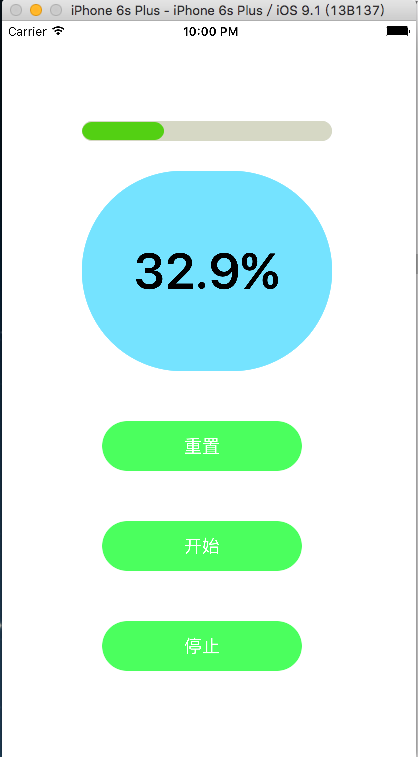
效果
iOS 自定义进度条的更多相关文章
- android 自定义进度条颜色
android 自定义进度条颜色 先看图 基于产品经理各种自定义需求,经过查阅了解,下面是自己对Android自定义进度条的学习过程! 这个没法了只能看源码了,还好下载了源码, sources\b ...
- Qt之模型/视图(自定义进度条)
简述 在之前的章节中分享过关于QHeaderView表头排序.添加复选框等内容,相信大家模型/视图.自定义风格有了一定的了解,下面我们来分享一个更常用的内容-自定义进度条. 实现方式: 从QAbstr ...
- android113 自定义进度条
MainActivity: package com.itheima.monitor; import android.os.Bundle; import android.app.Activity; im ...
- 自定义进度条PictureProgressBar——从开发到开源发布全过程
自定义进度条PictureProgressBar——从开发到开源发布全过程 出处: 炎之铠邮箱:yanzhikai_yjk@qq.com 本文原创,转载请注明本出处! 本项目JCenter地址:htt ...
- C# 根据BackgroundWoker异步模型和ProgressBar控件,自定义进度条控件
前言 程序开发过程中,难免会有的业务逻辑,或者算法之类产生让人能够感知的耗时操作,例如循环中对复杂逻辑处理;获取数据库百万乃至千万级数据;http请求的时候等...... 用户在使用UI操作并不知道程 ...
- BitBlt()函数实现带数字百分比进度条控件、静态文本(STATIC)控件实现的位图进度条、自定义进度条控件实现七彩虹颜色带数字百分比
Windows API BitBlt()函数实现带数字百分比进度条控件. 有两个例子:一用定时器实现,二用多线程实现. 带有详细注解. 此例是本人原创,绝对是网上稀缺资源(本源码用Windows AP ...
- [iOS]圆形进度条及计时功能
平时用战网安全令的时候很喜欢圆形倒计时的效果,然后简单看了一下Android的圆形进度条,后来又写了一个IOS的.整体界面参照IOS系统的倒计时功能,顺便熟悉了UIPickerView的一些特性的实现 ...
- 最简单的android自定义进度条样式
一.自定义圆形进度条样式 1.在安卓项目drawable目录下新建一个xml文件如下:<?xml version="1.0" encoding="utf-8&quo ...
- Android_自定义进度条
转载:http://blog.csdn.net/lmj623565791/article/details/43371299 ,本文出自:[张鸿洋的博客] 1.概述 最近需要用进度条,秉着不重复造轮子的 ...
随机推荐
- CSS选择器、优先级与匹配原理
为了分析Bootstrap源码,所以的先把CSS选择器相关的东东给巩固好 废话就不多说了 CSS 2.1 selectors, Part 1 计算指定选择器的优先级:重新认识CSS的权重 标签的权值为 ...
- windows下mysql远程访问慢
在my.conf中加入 skip-name-resolve
- TypeScript札记:初体验
1.简介 TypeScript 是一种由微软开发的自由和开源的编程语言.它是JavaScript的一个超集,而且本质上向这个语言添加了可选的静态类型和基于类的面向对象编程. TypeScript是一种 ...
- Java 随机数
本章先讲解Java随机数的几种产生方式,然后通过示例对其进行演示. 广义上讲,Java中的随机数的有三种产生方式:(01). 通过System.currentTimeMillis()来获取一个当前时间 ...
- 高性能JavaScript-JS脚本加载与执行对性能的影响
在web产品优化准则中,很重要的一条是针对js脚本的加载和执行方式的优化.本篇文章简单描述一下其中的优化准则. 1. 脚本加载优化 1.1 脚本位置对性能的影响 优化页面加载性能的原则之一是将scri ...
- 为sourceinsight添加makefile、kconfig、*.S文件支持
转载:http://www.cnblogs.com/myblesh/articles/2452030.html 大家用source insight看linux源码的时候都遇到这么一个麻烦,make ...
- [转载]部署Office Web Apps Server并配置其与SharePoint 2013的集成
Office Web Apps Server 是新的 Office 服务器产品,它提供 Word.PowerPoint.Excel 和 OneNote 的基于浏览器的版本.单个 Office Web ...
- So Easy!让开发人员更轻松的工具和资源
这篇文章给大家分享让开发人员生活更轻松的免费工具和资源.所以,如果你正在寻找一些为迅速解决每天碰到的设计和开发问题的工具和资源,不要再观望,试试这些工具吧.这些奇妙的工具不仅会加快您的生产,也让你的工 ...
- 《HelloGitHub月刊》第02期
<HelloGithub>第02期 兴趣是最好的老师,而<HelloGitHub> 就是帮你找到兴趣! 因为我比较熟悉python语言,所以月刊中python语言的项目居多,个 ...
- Velocity魔法堂系列三:模板与宿主环境通信
一.前言 Velocity作为历史悠久的模板引擎不单单可以替代JSP作为Java Web的服务端网页模板引擎,而且可以作为普通文本的模板引擎来增强服务端程序文本处理能力.而且Velocity被移植到不 ...