
Hibernate逍遥游记-第12章 映射值类型集合-004映射Map(<map-key>)
1.
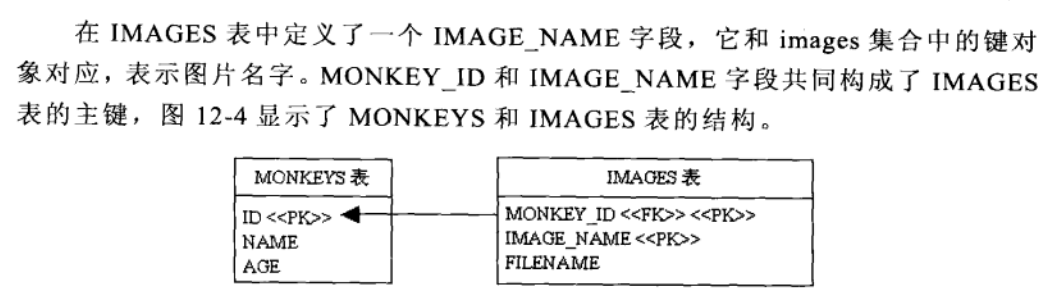
2.
 <?xml version="1.0"?>

 <!DOCTYPE hibernate-mapping

 PUBLIC "-//Hibernate/Hibernate Mapping DTD 3.0//EN"

 "http://hibernate.sourceforge.net/hibernate-mapping-3.0.dtd">

 <hibernate-mapping >

   <class name="mypack.Monkey" table="MONKEYS" >

     <id name="id" type="long" column="ID">

       <generator class="increment"/>

     </id>

     <property name="name" type="string" >

         <column name="NAME" length="15" />

     </property>

    <property name="age" type="int" >

         <column name="AGE" />

    </property>

    <map   name="images"   table="IMAGES"    lazy="true">

         <key column="MONKEY_ID" />

         <map-key column="IMAGE_NAME" type="string"/>

         <element column="FILENAME" type="string"  not-null="true"/>

    </map>

   </class>

 </hibernate-mapping>
3.
 package mypack;

 import java.io.Serializable;

 import java.util.Map;

 import java.util.HashMap;

 public class Monkey implements Serializable {

     private Long id;

     private String name;

     private int age;

     private Map images=new HashMap();

     /** full constructor */

     public Monkey(String name, int age,Map images) {

         this.name = name;

         this.age=age;

         this.images = images;

     }

     /** default constructor */

     public Monkey() {

     }

     /** minimal constructor */

     public Monkey(Map images) {

         this.images = images;

     }

     public Long getId() {

         return this.id;

     }

     public void setId(Long id) {

         this.id = id;

     }

     public String getName() {

         return this.name;

     }

     public void setName(String name) {

         this.name = name;

     }

     public int getAge() {

         return this.age;

     }

     public void setAge(int age) {

         this.age = age;

     }

     public Map getImages() {

         return this.images;

     }

     public void setImages(Map images) {

         this.images = images;

     }

 }
4.
 package mypack;

 import org.hibernate.*;

 import org.hibernate.cfg.Configuration;

 import java.util.*;

 import java.sql.*;

 public class BusinessService{

   public static SessionFactory sessionFactory;

   static{

      try{

        Configuration config = new Configuration().configure();

       sessionFactory = config.buildSessionFactory();

     }catch(RuntimeException e){e.printStackTrace();throw e;}

   }

   public void saveMonkey(Monkey monkey){

       Session session = sessionFactory.openSession();

       Transaction tx = null;

       List results=new ArrayList();

       try {

        tx = session.beginTransaction();

        session.save(monkey);

        tx.commit();

     }catch (RuntimeException e) {

       if (tx != null) {

         tx.rollback();

       }

       throw e;

     } finally {

       session.close();

     }

   }

   public Monkey loadMonkey(long id){

       Session session = sessionFactory.openSession();

       Transaction tx = null;

       try {

        tx = session.beginTransaction();

        Monkey monkey=(Monkey)session.get(Monkey.class,new Long(id));

        Hibernate.initialize(monkey.getImages());

        tx.commit();

       return monkey;

     }catch (RuntimeException e) {

       if (tx != null) {

         tx.rollback();

       }

       throw e;

     } finally {

       session.close();

     }

   }

    public void test(){

       Map images=new HashMap();

       images.put("image1","image1.jpg");

       images.put("image4","image4.jpg");

       images.put("image2","image2.jpg");

       images.put("imageTwo","image2.jpg");

       images.put("image5","image5.jpg");

       Monkey monkey=new Monkey("Tom",21,images);

       saveMonkey(monkey);

       monkey=loadMonkey(1);

       printMonkey(monkey);

   }

   private void printMonkey(Monkey monkey){

      System.out.println(monkey.getImages().getClass().getName());

      Map images=monkey.getImages();

      Set keys=images.keySet();

      Iterator it=keys.iterator();

      while(it.hasNext()){

        String key=(String)it.next();

        String filename=(String)images.get(key);

        System.out.println(monkey.getName()+" "+key+" "+filename);

      }

   }

   public static void main(String args[]){

     new BusinessService().test();

     sessionFactory.close();

   }

 }
5.
 drop database if exists SAMPLEDB;

 create database SAMPLEDB;

 use SAMPLEDB;

 create table MONKEYS (

    ID bigint not null,

    NAME varchar(15),

    AGE int,

    primary key (ID)

 );

 create table IMAGES(

    MONKEY_ID bigint not null,

    IMAGE_NAME varchar(15) not null,

    FILENAME varchar(15) not null,

    primary key (MONKEY_ID,IMAGE_NAME)

 );

 alter table IMAGES add index IDX_MONKEY(MONKEY_ID), add constraint FK_MONKEY foreign key (MONKEY_ID) references MONKEYS(ID);
6.
Hibernate逍遥游记-第12章 映射值类型集合-004映射Map(<map-key>)的更多相关文章
- Hibernate逍遥游记-第12章 映射值类型集合-005对集合排序Map(<order-by>\<sort>)
1. <?xml version="1.0"?> <!DOCTYPE hibernate-mapping PUBLIC "-//Hibernate/Hi ...
- Hibernate逍遥游记-第12章 映射值类型集合-005对集合排序(<order-by>\<sort>)
1. 2. <?xml version="1.0"?> <!DOCTYPE hibernate-mapping PUBLIC "-//Hibernate ...
- Hibernate逍遥游记-第12章 映射值类型集合-003映射List(<list-index>)
1. <?xml version="1.0"?> <!DOCTYPE hibernate-mapping PUBLIC "-//Hibernate/Hi ...
- Hibernate逍遥游记-第12章 映射值类型集合-002映射Bag(<idbag><collection-id>)
1. 2. <?xml version="1.0"?> <!DOCTYPE hibernate-mapping PUBLIC "-//Hibernate ...
- Hibernate逍遥游记-第12章 映射值类型集合-001映射set(<element>)
1. 2. <?xml version="1.0"?> <!DOCTYPE hibernate-mapping PUBLIC "-//Hibernate ...
- 攻城狮在路上(壹) Hibernate(十)--- 映射值类型集合
一.映射Set(集):未排序,无重复. 实例代码: <set name="images" table="IMAGES" lazy="true&q ...
- Hibernate逍遥游记-第13章 映射实体关联关系-006双向多对多(分解为一对多)
1. 2. <?xml version="1.0"?> <!DOCTYPE hibernate-mapping PUBLIC "-//Hibernate ...
- Hibernate逍遥游记-第13章 映射实体关联关系-005双向多对多(使用组件类集合\<composite-element>\)
1. <?xml version="1.0"?> <!DOCTYPE hibernate-mapping PUBLIC "-//Hibernate/Hi ...
- Hibernate逍遥游记-第13章 映射实体关联关系-004双向多对多(inverse="true")
1. <?xml version="1.0"?> <!DOCTYPE hibernate-mapping PUBLIC "-//Hibernate/Hi ...
随机推荐
- 5种IO模型
Unix下可用的5种I/O模型分别是: 阻塞IO 非阻塞IO IO复用(select和poll) 信号驱动式IO(SIGIO) 异步IO(POSIX的aio系列函数) 阻塞式I/O模型: ...
- 给view 添加事件
//绑定图片点击事件 UITapGestureRecognizer *g=[[UITapGestureRecognizeralloc]initWithTarget:selfaction:@select ...
- java 下载spring的方法
spring是很好用,可惜的是,貌似现在没有办法从网站上找到整合在一起的包了... 我以前只能通过maven去抓... 今天终于知道了一个方法: 访问如下地址: http://repo.spring. ...
- Python之str(),repr(),``
对于对象obj: str()生成的字串是给人看的 repr()生成的字串是给解析器看的 ``与repr()等义. 最直接就是: ------------------- obj=eval(repr(ob ...
- Nginx模块开发-理解HTTP配置
理解HTTP配置 相关数据结构 先明白Nginx下述数据结构,再理解 HTTP配置的解析与合并过程 ngx_module_t 官方API typedef struct{ NGX_MODULE_V1; ...
- 【jquery】 API讲解 内部培训资料
资料在百度云盘 一.jquery API讲解 1.jquery api如何使用 jquery api http://www.hemin.cn/jq/ 2.常用api讲解 选择器: 通过$()获取 ...
- 关于WP8 微信分享的补充说明
1.根据微信官方Demo完成相应功能. 2.在分享完后,从微信回来,需要进行 快速恢复. 3.在快速恢复中加入 RootFrame.Navigating += HandlerFotResetNavig ...
- phpcms v9 企业黄页系统发布没有表单出现的解决方案
第一种解决方案: 第一步:把yp_UTF8压缩文件解压得到:api.caches.phpcms.statics四个文件夹. 第二步:把这四个文件夹分别覆盖已安装好的phpcms系统根目录下的文件夹.这 ...
- Android crop image size
private void performCrop() { try { //call the standard crop action intent (the user device may not s ...
- rJava配置
1. 下载安装R-3.1.1-win.exe: 2. 在R中安装rJava > install.packages("rJava") 3. 设置环境变量: PATH:D:\So ...