
sphinx:python项目文档自动生成
Sphinx:
发音:
DJ音标发音: [sfiŋks] KK音标发音: [sfɪŋks]
单词本身释义:
an ancient imaginary creature with a lion's body and a woman's head
- Mythology A figure in Egyptian myth having the body of a lion and the head of a man, ram, or hawk.
【古埃及神话】 斯芬克斯:古代埃及神话中人面、公羊头或鹰头的狮身像 - Greek Mythology A winged creature having the head of a woman and the body of a lion, noted for killing those who could not answer its riddle.
【希腊神话】 斯芬克斯:古代希腊神话中带翼的狮身女面怪物,专杀那些猜不出其谜语的人
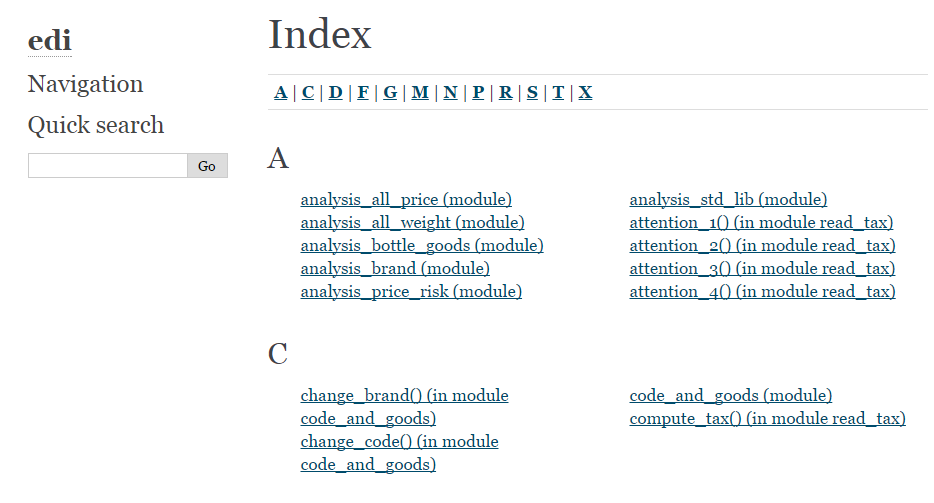
Sphinx在此处是一个可自动生成python项目api的工具,使用起来也比较简单,只需要在项目上进行简单的配置,即可生成项目的api文档(如下图)
步骤:
1. 安装sphinx
pip install sphinx2. 在项目的开发过程中
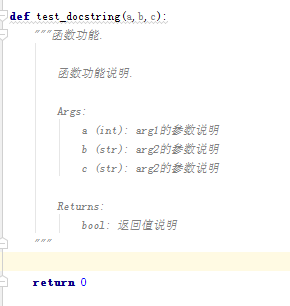
2.1注意在注释中说清楚函数的用途描述,参数意义以及返回了什么,例如:(在pycharm中,在函数名的下一行输入3个引号后回车会自动生成函数描述的模板
2.2 在pycharm中设置文件头及函数注释的模板
2.2.1
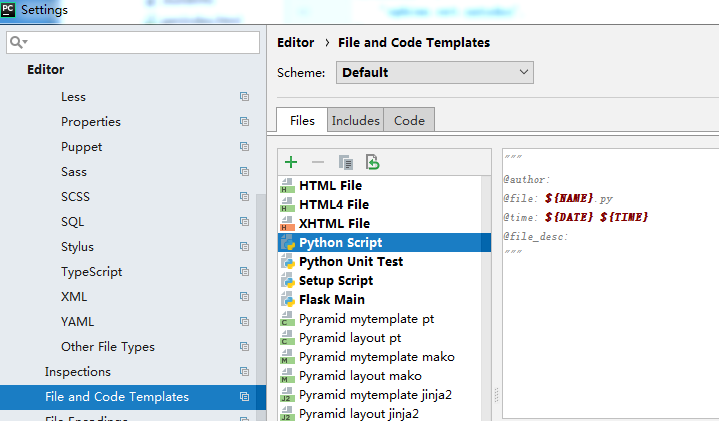
文件头模板设置
** File->settings->Editor->File and Code Templates->Python Script
函数知识模板设置
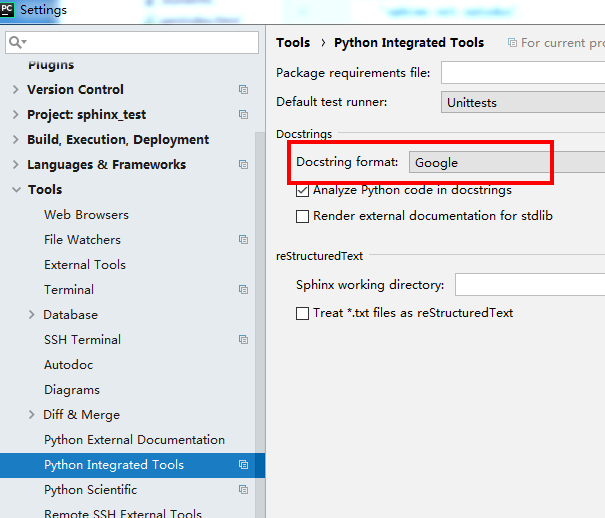
** File->Settings->Tools->Python integrated Tools->Docstring format,把该框选为Google或nunpy等
因numpy对于多个returns的支持较好,所以选用了numpy
3. 配置sphinx
3.1 在项目文档下新建一个文件夹,可命名为doc (路径 your_project_path/doc)
3.2 进入doc文件夹下的命令行窗口,输入sphinx-quickstart进行配置 (文中一下的命令行,如无特殊说明,皆是在doc路径下执行)
配置你的项目名,版本,等
在此处的选项中,除了autodoc使用非默认的选项,选了y,其他的,皆使用默认项。配置项选错了也没关系,最后都可以在conf.py中更改
sphinx-quickstartWelcome to the Sphinx 1.8.3 quickstart utility.
Please enter values for the following settings (just press Enter to
accept a default value, if one is given in brackets).
Selected root path: .
You have two options for placing the build directory for Sphinx output.
Either, you use a directory "_build" within the root path, or you separate
"source" and "build" directories within the root path.
> Separate source and build directories (y/n) [n]:
Inside the root directory, two more directories will be created; "_templates"
for custom HTML templates and "_static" for custom stylesheets and other static
files. You can enter another prefix (such as ".") to replace the underscore.
> Name prefix for templates and static dir [_]:
The project name will occur in several places in the built documentation.
> Project name: test_sphinx
> Author name(s): testname
> Project release []: 0
If the documents are to be written in a language other than English,
you can select a language here by its language code. Sphinx will then
translate text that it generates into that language.
For a list of supported codes, see
http://sphinx-doc.org/config.html#confval-language.
> Project language [en]:
The file name suffix for source files. Commonly, this is either ".txt"
or ".rst". Only files with this suffix are considered documents.
> Source file suffix [.rst]:
One document is special in that it is considered the top node of the
"contents tree", that is, it is the root of the hierarchical structure
of the documents. Normally, this is "index", but if your "index"
document is a custom template, you can also set this to another filename.
> Name of your master document (without suffix) [index]:
Indicate which of the following Sphinx extensions should be enabled:
> autodoc: automatically insert docstrings from modules (y/n) [n]: y
> doctest: automatically test code snippets in doctest blocks (y/n) [n]:
> intersphinx: link between Sphinx documentation of different projects (y/n) [n]:
> todo: write "todo" entries that can be shown or hidden on build (y/n) [n]:
> coverage: checks for documentation coverage (y/n) [n]:
> imgmath: include math, rendered as PNG or SVG images (y/n) [n]:
> mathjax: include math, rendered in the browser by MathJax (y/n) [n]:
> ifconfig: conditional inclusion of content based on config values (y/n) [n]:
> viewcode: include links to the source code of documented Python objects (y/n) [n]:
> githubpages: create .nojekyll file to publish the document on GitHub pages (y/n) [n]:
A Makefile and a Windows command file can be generated for you so that you
only have to run e.g. `make html' instead of invoking sphinx-build
directly.
> Create Makefile? (y/n) [y]:
> Create Windows command file? (y/n) [y]:
Creating file .\conf.py.
Creating file .\index.rst.
Creating file .\Makefile.
Creating file .\make.bat.
Finished: An initial directory structure has been created.
You should now populate your master file .\index.rst and create other documentation
source files. Use the Makefile to build the docs, like so:
make builder
where "builder" is one of the supported builders, e.g. html, latex or linkcheck.
在doc文件夹下得到如下
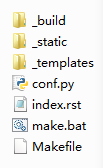
3.3 配置生成各个py文件的rst文件,在doc下生成一个rst文件夹
sphinx-apidoc -o [生成rst的位置] [项目代码的位置] -f(强制重新覆盖写,否则会检测,如果有同名文件存在,会跳过不更新)

sphinx-apidoc -o rst ../src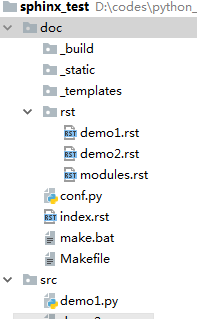
3.4 修改conf.py文件
3.4.1 将conf.py中第15-17行的注释取消,并讲第17行的路径改为源代码的所在路径
import os

import sys

sys.path.insert(0, os.path.abspath('../src'))
3.4.2 如果源代码中引入了pandas,numpy等比较大的包,需要在conf.py中做相应的设置,否则会有import errpr之类的报错
autodoc_mock_imports = ["pandas","pyecharts"]3.4.3 为了google的docstring换行的展示,更改
extensions = ['sphinx.ext.autodoc','sphinx.ext.napoleon']3.5 生成html
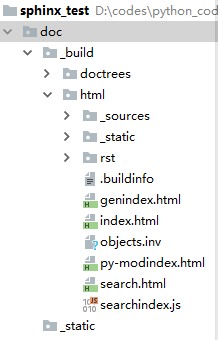
make html在doc下的子文件夹中会生成若干html,打开index.html即可查阅相关的函数API
sphinx:python项目文档自动生成的更多相关文章
- springboot成神之——swagger文档自动生成工具
本文讲解如何在spring-boot中使用swagger文档自动生成工具 目录结构 说明 依赖 SwaggerConfig 开启api界面 JSR 303注释信息 Swagger核心注释 User T ...
- VS文档自动生成
VS2008文档自动生成 (发现,Sandcastle主要是用于C#项目.里面的注释都是XML格式的.不太适合VC的.最终还是得用Doxygen) 一.Sandcastle简介: Sandcastle ...
- Word 2010文档自动生成目录和某页插入页码
一.Word 2010文档自动生成目录 关于Word文档自动生成目录一直是我身边同学们最为难的地方,尤其是毕业论文,经常因为目录问题,被要求修改,而且每次修改完正文后,目录的内容和页码可能都会发生变化 ...
- django接口文档自动生成
django-rest_framework接口文档自动生成 只针对用到序列化和返序列化 一般还是用第三方yipi 一.安装依赖 pip3 install coreapi 二.设置 setting.py ...
- 优于 swagger 的 java markdown 文档自动生成框架-01-入门使用
设计初衷 节约时间 Java 文档一直是一个大问题. 很多项目不写文档,即使写文档,对于开发人员来说也是非常痛苦的. 不写文档的缺点自不用多少,手动写文档的缺点也显而易见: 非常浪费时间,而且会出错. ...
- java 文档自动生成的神器 idoc
写文档 作为一名开发者,每个人都要写代码. 工作中,几乎每一位开发者都要写文档. 因为工作是人和人的协作,产品要写需求文档,开发要写详细设计文档,接口文档. 可是,作为一个懒人,平时最讨厌的一件事情就 ...
- 如何让接口文档自动生成,SpringBoot中Swagger的使用
目录 一.在SpringBoot项目中配置Swagger2 1.pom.xml中对Swagger2的依赖 2.编写配置类启用Swagger 3.配置实体类的文档 4.配置接口的文档 5.访问文档 二. ...
- Api文档自动生成工具
java开发,根据代码自动生成api接口文档工具,支持RESTful风格,今天我们来学一下api-doc的生成 作者:互联网编程. 欢迎投稿,一起交流技术 https://www.jianshu.co ...
- API的文档自动生成——基于CDIF的SOA基本能力
当前,作为大部分移动app和云服务后台之间的标准连接方式,REST API已经得到了绝大部分开发者的认可和广泛的应用.近年来,在新兴API经济模式逐渐兴起,许多厂商纷纷将自己的后台业务能力作为REST ...
随机推荐
- C语言中的指针运算
int a[5]={1,2,3 ,4,5} *p=a; *p++ 等价于*(p++) 等价于a[i++](i++ i首先会被使用任何进行自+) *++p等价于*(++p) 等价于 a[++i] (++ ...
- poj2485
Highways Time Limit: 1000MS Memory Limit: 65536K Total Submissions: 27912 Accepted: 12734 Descri ...
- 洛谷P1073 最优贸易==codevs1173 最优贸易
P1073 最优贸易 题目描述 C 国有 n 个大城市和 m 条道路,每条道路连接这 n 个城市中的某两个城市.任意两个 城市之间最多只有一条道路直接相连.这 m 条道路中有一部分为单向通行的道路,一 ...
- java web Listener的简单使用案例
1.web.xml的配置 <?xml version="1.0" encoding="UTF-8"?> <web-app xmlns:xsi= ...
- swift打印方法名文件路径
1.打印方法名 print(#function) 1.打印文件路径 print(#file)
- Zabbix-Agent 客户端安装配置
1.安装Zabbix官方的yum源 [root@crazy-acong ~]# rpm -ivh http://repo.zabbix.com/zabbix/2.2/rhel/6/x86_64/zab ...
- IOS navigationItem 设置返回button,title图片和rightBarButtonItem
1.自己定义返回button UIBarButtonItem *backItem = [[UIBarButtonItem alloc] initWithTitle:@"返回" st ...
- Js中的apply和call
1.call和apply都是为了改变某个函数运行时的上下文而存在的 2.也就是改变函数体内this的指向. 3.二者的作用完全一样,只是接受参数的方式不太一样. 4.call 需要把参数按顺序传递进去 ...
- Django用ajax发送post请求时csrf拦截的解决方案
把下面的代码写在模版文件中就可以了, 注:不是js文件,是模版文件加载的执行的,所有写js里没效果 $.ajaxSetup({ data: {csrfmiddlewaretoken: '{{ csrf ...
- scala actor编程之对象传递
scala 最吸引人的一点就是actor并发编程了.但是纵观scala官方文档,baidu文档,IBM文档都写的通过字符串传呀传,如果用作actor编程说明当然没有问题.但是在正式开放中,光传字符串就 ...