
unity调用c++ dll方法介绍
摘要
unity用的很普遍,现在很多代码还是用c++写的,需要用unity去调用c++的代码。这里介绍了一种unity调用c++ dll的方法,希望有所帮助。
我采用的软件是Visual Studio 2015和 Unity 5.3.4

1. 建立VS DLL 工程
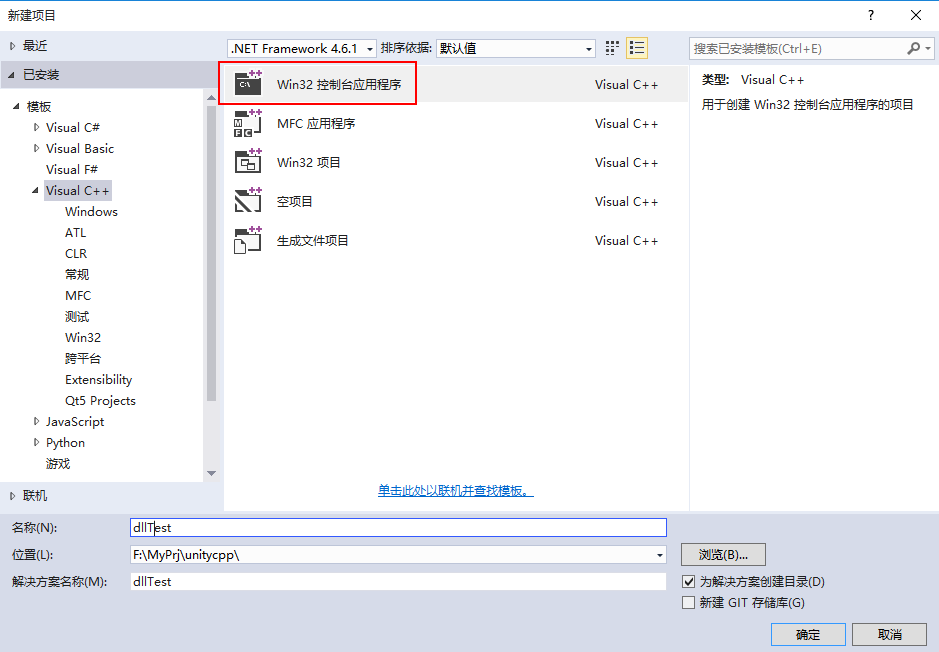

2. cpp代码编辑
test.cpp
#define EXPORTBUILD

#include "test.h"

#include <iostream>

_DLLExport int cpp_get_int_value()

{

	return 51;

}

_DLLExport void cpp_get_int_ptr(int* value)

{

	*value = 52;

}

_DLLExport void cpp_get_int_ref(int& value)

{

	value = 53;

}

_DLLExport float cpp_get_float_value()

{

	return 51.1f;

}

_DLLExport void cpp_get_float_ptr(float* value)

{

	*value = 52.1f;

}

_DLLExport void cpp_get_float_ref(float& value)

{

	value = 53.1f;

}

_DLLExport void cpp_get_string_value(char** str_ptr)

{

	char* str = "hello world";

	strcpy(*str_ptr, str);

	return;

}

struct cpp_struct_one

{

	int value1;

	float value2;

};

_DLLExport void cpp_get_struct_one_value(cpp_struct_one* stu)

{

	stu->value1 = 10;

	stu->value2 = 10.1f;

	return;

}

_DLLExport void cpp_get_struct_one_value2(cpp_struct_one& stu)

{

	stu.value1 = 11;

	stu.value2 = 11.1f;

	return;

}

_DLLExport void cpp_get_struct_one_value3(cpp_struct_one* stu)

{

	stu->value1 = 12;

	stu->value2 = 12.1f;

	return;

}

struct cpp_struct_two

{

	int value1[10];

	float value2;

};

_DLLExport void cpp_get_struct_two_value(cpp_struct_two* stu, int count)

{

	for (int i = 0; i < count; i++)

	{

		stu->value1[i] = i;

	}

	stu->value2 = 10.1f;

	return;

}

_DLLExport void cpp_get_int_arr1(int* arr, int count)

{

	for (int i = 0; i < count; i++)

	{

		arr[i] = i;

	}

	return;

}

_DLLExport void cpp_get_int_arr2(int* arr, int count)

{

	for (int i = 0; i < count; i++)

	{

		arr[i] = i;

	}

	return;

}

_DLLExport void cpp_get_int_arr3(int* arr, int count)

{

	for (int i = 0; i < count; i++)

	{

		arr[i] = i;

	}

	return;

}

_DLLExport void cpp_set_string_value(char* s)

{

	std::string str = s;

	printf("str %s length %d", str.c_str(), str.length());

	return;

}
3. 构建Dll 文件

4. unity 工程创建
在unity在 Assets文件下文件Plugins目录,在目录下方放入Dll文件。要是没有Plugins文件夹,就新建一个。

5. unity 代码编辑
这里注意,Dll文件不需要加后缀 .dll
using UnityEngine;

using System.Collections;

using System.Runtime.InteropServices;

using System.Text;

using System;

public class NewBehaviourScript : MonoBehaviour {

    [DllImport("cppDll")]

    private static extern int cpp_get_int_value();

    [DllImport("cppDll")]

    private static extern void cpp_get_int_ptr(ref int value);

    [DllImport("cppDll")]

    private static extern void cpp_get_int_ref(ref int value);

    [DllImport("cppDll")]

    private static extern float cpp_get_float_value();

    [DllImport("cppDll")]

    private static extern void cpp_get_float_ptr(ref float value);

    [DllImport("cppDll")]

    private static extern void cpp_get_float_ref(ref float value);

    [DllImport("cppDll")]

    private static extern void cpp_get_string_value(ref StringBuilder ptrStr);

    [StructLayout(LayoutKind.Sequential)]

    public struct cpp_struct_one

    {

        public int value1;

        public float value2;

    };

    [DllImport("cppDll")]

    private static extern void cpp_get_struct_one_value(ref cpp_struct_one stu);

    [DllImport("cppDll")]

    private static extern void cpp_get_struct_one_value2(ref cpp_struct_one stu);

    [DllImport("cppDll")]

    private static extern void cpp_get_struct_one_value3(IntPtr stu);

    [StructLayout(LayoutKind.Sequential)]

    public struct cpp_struct_two

    {

        [MarshalAs(UnmanagedType.ByValArray, SizeConst = 32)]

        public int[] value1;

        public float value2;

    };

    [DllImport("cppDll")]

    private static extern void cpp_get_struct_two_value(IntPtr stu, int count);

    [DllImport("cppDll")]

    private static extern void cpp_get_int_arr1(ref int arr, int count);

    [DllImport("cppDll")]

    private static extern void cpp_get_int_arr2(int[] arr, int count);

    [DllImport("cppDll")]

    private static extern void cpp_get_int_arr3(IntPtr arr, int count);

    [DllImport("cppDll")]

    private static extern void cpp_set_string_value(string s);

    // Use this for initialization

    void Start () {

        // 获取int类型

        int int_value = cpp_get_int_value();

        Console.WriteLine("cpp_get_int_value\t " + int_value);

        // 获取int类型 指针

        int int_ptr = new int();

        cpp_get_int_ptr(ref int_ptr);

        Console.WriteLine("cpp_get_int_ptr\t " + int_ptr);

        // 获取int类型 引用

        int int_ref = new int();

        cpp_get_int_ref(ref int_ref);

        Console.WriteLine("cpp_get_int_ref\t " + int_ref);

        // 获取float类型

        float float_value = cpp_get_float_value();

        Console.WriteLine("cpp_get_float_value\t " + float_value);

        // 获取float类型 指针

        float float_ptr = new float();

        cpp_get_float_ptr(ref float_ptr);

        Console.WriteLine("cpp_get_float_ptr\t " + float_ptr);

        // 获取float类型 引用

        float float_ref = new float();

        cpp_get_float_ref(ref float_ref);

        Console.WriteLine("cpp_get_float_ref\t " + float_ref);

        // 获取结构体类型

        cpp_struct_one stu = new cpp_struct_one();

        cpp_get_struct_one_value(ref stu);

        Console.WriteLine("cpp_get_struct_one_value " + stu.value1 + " " + stu.value2);

        // 获取结构体类型 方法2

        cpp_struct_one stu2 = new cpp_struct_one();

        cpp_get_struct_one_value2(ref stu2);

        Console.WriteLine("cpp_get_struct_one_value2 " + stu2.value1 + " " + stu2.value2);

        // 获取结构体类型 方法3

        // 使用非托管内存

        int cpp_struct_one_size = Marshal.SizeOf(typeof(cpp_struct_one));

        IntPtr cpp_struct_one_buffer = Marshal.AllocHGlobal(cpp_struct_one_size);

        cpp_get_struct_one_value3(cpp_struct_one_buffer);

        cpp_struct_one stu3 = (cpp_struct_one)Marshal.PtrToStructure(cpp_struct_one_buffer, typeof(cpp_struct_one));

        Console.WriteLine("cpp_get_struct_one_value3 " + stu3.value1 + " " + stu3.value2);

        // 获取结构体类型2(带数组结构体)

        // 使用非托管内存

        int cpp_struct_two_size = Marshal.SizeOf(typeof(cpp_struct_two));

        IntPtr cpp_struct_two_buffer = Marshal.AllocHGlobal(cpp_struct_two_size);

        cpp_get_struct_two_value(cpp_struct_two_buffer, 10);

        cpp_struct_two stu4 = (cpp_struct_two)Marshal.PtrToStructure(cpp_struct_two_buffer, typeof(cpp_struct_two));

        Console.WriteLine("cpp_get_struct_two_value " + stu4.value1[5] + " " + stu3.value2);

        // 获取字符串

        StringBuilder str = new StringBuilder();

        cpp_get_string_value(ref str);

        Console.WriteLine("cpp_get_string_value " + str.ToString());

        // 获取int型数组 方法1

        int[] arr1 = new int[10];

        cpp_get_int_arr1(ref arr1[0], arr1.Length);

        Console.WriteLine("cpp_get_int_arr1  5 " + arr1[5]);

        // 获取int型数组 方法2

        int[] arr2 = new int[10];

        cpp_get_int_arr2(arr2, arr2.Length);

        Console.WriteLine("cpp_get_int_arr2  5 " + arr2[5]);

        // 获取int型数组 方法3

        int arr3_length = 10;

        int arr3_size = Marshal.SizeOf(typeof(int)) * arr3_length;

        IntPtr arr3_buffer = Marshal.AllocHGlobal(arr3_size);

        cpp_get_int_arr3(arr3_buffer, arr3_length);

        int arr3_test_value = (int)Marshal.PtrToStructure(arr3_buffer + 5 * Marshal.SizeOf(typeof(int)), typeof(int));

        Console.WriteLine("cpp_get_int_arr3 " + arr3_test_value);

        // 传入字符串

        string s = "hello world";

        cpp_set_string_value(s);

    }

	// Update is called once per frame

	void Update () {

    }

}
unity运行结果

项目地址
https://github.com/caimagic/Unity_Call_Cplusplus-s-Dll.git
unity调用c++ dll方法介绍的更多相关文章
- UNITY调用安桌方法出现 JNI: Init'd AndroidJavaClass with null ptr!
UNITY调用安桌方法出现 JNI: Init'd AndroidJavaClass with null ptr! 原因是····· 得运行在一个真正的Android设备上! 得运行在一个真正的And ...
- c# 调用c++DLL方法及注意事项
引用命名空间 using System.Runtime.InteropServices 调用方法: 一.静态加载 用DllImprot方式来加载c++DLL.如下格式: //对应c++方法 //voi ...
- C# 调用 C++ DLL方法
在C# 中,可以通过 DllImport 调用C++ 的非托管DLL程序. VS2010中C#调用C++的DLL示例: 一.新建C++ DLL程序 1.新建 C++ Win32项目,类型为DLL. 生 ...
- 制作和unity调用动态链接库dll文件
首先用vc建立一个dll工程 然后在里面建立一个testunity.h文件.内容如下 1 extern "C" int _declspec(dllexport)testunity( ...
- unity调用摄像头的方法
http://blog.csdn.net/cocoa_china/article/details/10527995 using UnityEngine; using System.Collection ...
- ocx控件 编译成C#调用的dll 方法 转
打开VS命令提示行 1.注册ActiveX控件(带上 VCbox.ocx的路径) regsvr32 VCbox.ocx 2.编译OCX文件 aximp VCbox.ocx 生成两个dll文件,项 ...
- unity调用C++ dll文件
首先建立Plugins文件夹,把dll文件放在里面 一一对应,我踩的坑是文件名加了后缀.dll,虽然不知道网上为什么都加了我这加了就报找不到dll文件错误,反正解决啦
- Unity 调用 Android Native 方法(一) 获得Android系统音量
学习雷锋,好榜样,接下来的这一系类教程里,将通过unity来实现Android端的一些常用功能, 不需要在 Asset/Plugins/Android 目录下引用jar包或者aar包,这是重点. us ...
- Android-WebView与本地HTML (Java调用--->HTML的方法)
上一篇博客 Android-WebView与本地HTML (HTML调用-->Java的方法) 介绍了 JavaScript 调用--> Java中的方法,而此篇博客是介绍 Java 调用 ...
随机推荐
- 强密码和弱密码并没有什么区别?NIST密码安全标准更新:不再建议密码要求混合大写字母、字符和数字
作为一名认真负责的小编,每次注册账号设置密码的时候都是最痛苦的,太简单的怕被破解,太难的又记不住. 等你好不容易记住密码,三个月后IT同学过来拍拍你的肩膀,"你的密码到期了,记得改啊--&q ...
- 搭建ElasticSearch+MongoDB检索系统
ElasticSearch是一个基于Lucene的搜索服务器.它提供了一个分布式多用户能力的全文搜索引擎,基于RESTful web接口.Elasticsearch是用Java开发的,并作为Apach ...
- 在CentOS 6上安装Apache和PHP
本文演示如何在CentOS 6上安装Apache和PHP.CentOS 6自带的是Apache 2.2.3和PHP 5.1.6,您可以使用默认的CentOS包管理器进行安装yum.使用yum(而不是使 ...
- iconfont 使用
阿里巴巴适量图库 http://www.iconfont.cn/ 官方帮助中有非常详细的操作指导 http://www.iconfont.cn/help/detail?spm=a313x.77810 ...
- Get host name and port(Object-c)
/************************************************************************** @param pChHostName: [out ...
- JavaScript入门(二)
一.JS中的运算符 1.算术运算(单目运算符) + 加.-减.*乘. /除. %取余.++自增运算符 .--自减运算符; >>>+:有两种作用,链接字符串/加法运算符.当+两边全为数 ...
- CentOS 7 服务器配置--安装Ftp
#安装vsftp yum install -y vsftpd #将 /etc/vsftpd/user_list文件和/etc/vsftpd/ftpusers文件中的root这一行注释掉 #root # ...
- js 正则,从url中取参数值
function getQueryString(name) { var reg = new RegExp(name +"=([^&]*)"); var r = window ...
- composer安装报错Composer throws [ReflectionException] Class Fxp\Composer\AssetPlugin\Repository\NpmRepository does not exist
解决方法:删除C:\Users\Administrator\AppData\Roaming\Composer\vendor\fxp下的文件
- BotVS开发基础—2.5 状态信息显示表格
代码 import json def main(): #part 1 bol = True num = 10; # str = "ABC"; # 字符串 list = [1, 2, ...