
qq面板/ 好友列表
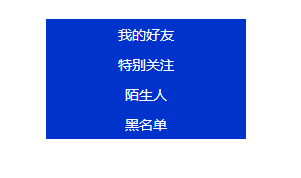
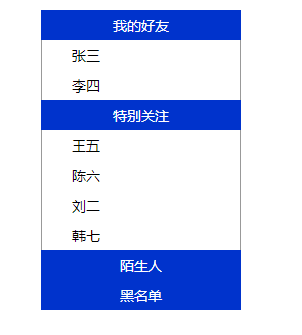
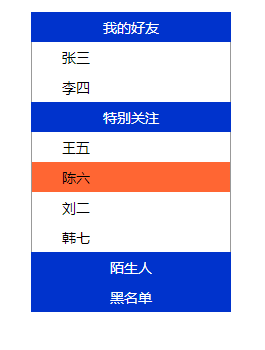
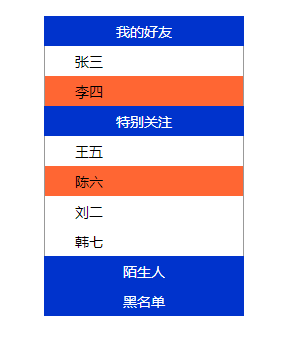
效果如下:依次为图一---图二----图三----图四
主要实现效果:
点击主标题显示下拉好友,再点击收起下拉好友;鼠标移到好友上背景颜色改变;选中的好友背景颜色也要改变;
代码如下:
<!DOCTYPE html PUBLIC "-//W3C//DTD XHTML 1.0 Transitional//EN" "http://www.w3.org/TR/xhtml1/DTD/xhtml1-transitional.dtd">
<html xmlns="http://www.w3.org/1999/xhtml">
<head>
<meta http-equiv="Content-Type" content="text/html; charset=utf-8" />
<title>无标题文档</title>
<style type="text/css">
*{ margin:0px auto;
padding:0px;
font-family:微软雅黑;
font-size:14px;
}
.zhu{ width:200px;
height:30px;
text-align:center;
line-height:30px;
vertical-align:middle;
background-color:#03C;
color:white;
}
.zi{ width:200px;
display:none}
.list{ width:198px;
height:30px;
text-align:left;
line-height:30px;
vertical-align:middle;
border-left:1px solid #999;
border-right:1px solid #999;
}
.kg{
margin-left: 30px;
}
.kg1{
margin-left: 10px;
}
.list:hover{
cursor: pointer;
}
#z4{ border-bottom:1px solid #999;}
</style>
</head>
<body>
<div style="width:200px; height:600px; margin-top:30px">
<div class="zhu" onclick="Show('z1')">
我的好友
</div>
<div class="zi" id="z1">
<div class="list" onclick="Xuan(this)" onmouseover="Bian(this)" onmouseout="Hui(this)" xz="0"><span class="kg">张三</span></div>
<div class="list" onclick="Xuan(this)" onmouseover="Bian(this)" onmouseout="Hui(this)" xz="0"><span class="kg">李四</span></div>
</div>
<div class="zhu" onclick="Show('z2')">
特别关注
</div>
<div class="zi" id="z2">
<div class="list" onclick="Xuan(this)" onmouseover="Bian(this)" onmouseout="Hui(this)" xz="0"><span class="kg">王五</span></div>
<div class="list" onclick="Xuan(this)" onmouseover="Bian(this)" onmouseout="Hui(this)" xz="0"><span class="kg">陈六</span></div>
<div class="list" onclick="Xuan(this)" onmouseover="Bian(this)" onmouseout="Hui(this)" xz="0"><span class="kg">刘二</span></div>
<div class="list" onclick="Xuan(this)" onmouseover="Bian(this)" onmouseout="Hui(this)" xz="0"><span class="kg">韩七</span></div>
</div>
<div class="zhu" onclick="Show('z3')">
陌生人
</div>
<div class="zi" id="z3">
<div class="list" onclick="Xuan(this)" onmouseover="Bian(this)" onmouseout="Hui(this)" xz="0"><span class="kg">王四</span></div>
<div class="list" onclick="Xuan(this)" onmouseover="Bian(this)" onmouseout="Hui(this)" xz="0"><span class="kg">陈三</span></div>
</div>
<div class="zhu" onclick="Show('z4')">
黑名单
</div>
<div class="zi" id="z4">
<div class="list" onclick="Xuan(this)" onmouseover="Bian(this)" onmouseout="Hui(this)" xz="0"><span class="kg">刘二</span></div>
<div class="list" onclick="Xuan(this)" onmouseover="Bian(this)" onmouseout="Hui(this)" xz="0"><span class="kg">韩七</span></div>
</div>
</div>
</body>
<script type="text/javascript">
function Show(id) //作用是收起或显示下拉好友
{
var z = document.getElementById(id);
if(z.style.display=="block")
{
z.style.display = "none";
}
else
{
z.style.display = "block";
}
}
function Xuan(a) //作用是点击好友,好友背景颜色改变
{
var attr = document.getElementsByClassName("list");
for(var i=0;i<attr.length;i++)
{
attr[i].style.backgroundColor = "white";
attr[i].setAttribute("xz","0");
}
a.setAttribute("xz","1"); //自定义属性,将XZ属性添加给选中的div
a.style.backgroundColor = "#F63";
}
function Bian(a) //作用:鼠标移上背景颜色发生改变
{
var attr = document.getElementsByClassName("list");
for(var i=0;i<attr.length;i++)
{
if(attr[i].getAttribute("xz")=="0")
{
attr[i].style.backgroundColor = "white";
}
}
a.style.backgroundColor = "#F63";
}
function Hui(a) //作用是鼠标移走时,背景颜色取消
{
var attr = document.getElementsByClassName("list");
for(var i=0;i<attr.length;i++)
{
if(attr[i].getAttribute("xz")=="0")
{
attr[i].style.backgroundColor = "white";
}
}
}
</script>
</html>
注意:
1、自定义函数运用的形参;
2、为什么不用hover属性,而用onmouseover,onmouseout属性:内嵌样式在js中无法读取。
3、this表示:选中的本div
qq面板/ 好友列表的更多相关文章
- web qq 获取好友列表hash算法
web qq 获取好友列表hash算法 在使用web qq的接口进行好友列表获取的时候,需要post一个参数:hash 在对其js文件进行分析之后,发现计算hash的函数位于: http://0.we ...
- XMPP通讯开发-仿QQ显示好友列表和用户组
在 XMPP通讯开发-服务器好友获取以及监听状态变化 中我们获取服务器上的用户好友信息,然后结合XMPP通讯开发-好友获取界面设计 我们将两个合并起来,首先获取用户组,然后把用户组用List ...
- iOS实现类似QQ的好友列表,自由展开折叠(在原来TableView的基础上添加一个字典,一个Button)
//直接代码 只包含 折叠展开字典的处理搭建#import "CFViewController.h" @interface CFViewController ()<UITab ...
- 基于Qt的相似QQ好友列表抽屉效果的实现
版权声明:本文为博主原创文章.未经博主同意不得转载. https://blog.csdn.net/shuideyidi/article/details/30619167 前段时间在忙毕业设计, ...
- Hadoop_24_MapReduce实现QQ共同好友
1.社交粉丝数据分析: 以下是qq的好友列表数据,冒号前是一个用户,冒号后是该用户的所有好友(数据中的好友关系是单向的) A:B,C,D,F,E,O B:A,C,E,K C:F,A,D,I D:A,E ...
- OS开发UI篇—使用UItableview完成一个简单的QQ好友列表
本文转自:http://www.cnblogs.com/wendingding/p/3763330.html 一.项目结构和plist文件 二.实现代码 1.说明: 主控制器直接继承UITableVi ...
- iOS开发UI篇—使用UItableview完成一个简单的QQ好友列表(一)
iOS开发UI篇—使用UItableview完成一个简单的QQ好友列表(一) 一.项目结构和plist文件 二.实现代码 1.说明: 主控制器直接继承UITableViewController // ...
- iOS开发UI篇—使用UItableview完成一个简单的QQ好友列表(二)
一.实现效果 二.实现代码 1.数据模型部分 YYQQGroupModel.h文件 // // YYQQGroupModel.h // 02-QQ好友列表(基本数据的加载) / ...
- [iOS基础控件 - 6.9.3] QQ好友列表Demo TableView
A.需求 1.使用plist数据,展示类似QQ好友列表的分组.组内成员显示缩进功能 2.组名使用Header,展示箭头图标.组名.组内人数和上线人数 3.点击组名,伸展.缩回好友组 code so ...
随机推荐
- web及H5 的链接测试
1:先下载一个Xenu工具 2:安装完成之后,进入页面(将弹出框关闭) 3:进行设置(一般不用修改设置) 4:修改完成之后点击工具栏中的file按钮,并输入想要测试的URL地址 5:点击OK测试完成之 ...
- 初始Django
Django概述 Django是什么 Django是一个开放源代码的Web应用框架,由Python写成.采用了MVC的软件设计模式,即模型M,视图V和控制器C. Django的主要目标是使得开发复杂的 ...
- Nginx错误页面优雅显示
一.Nginx错误页面优雅显示的原因? 当我们访问网站时,由于特殊的原因,经常会出现诸如403,404,503等错误,这极大的影响用户的访问体验,所以我们很有必要做一下错误页面的优雅显示,以提升用 ...
- SpringMVC:学习笔记(8)——文件上传
SpringMVC--文件上传 说明: 文件上传的途径 文件上传主要有两种方式: 1.使用Apache Commons FileUpload元件. 2.利用Servlet3.0及其更高版本的内置支持. ...
- js实现浏览器添加收藏功能
今天搞项目的时候为了实现浏览者实现添加收藏的功能,特地了解了一下相关的API. 也看到了网上各种版本的代码.整理了一下,代码如下.简单易懂. <script> function _addF ...
- js实现Mac触摸板双指事件(上、下、左、右、放大、缩小)
前言 这几天在修复一个web问题时,需要捕获Mac触摸板双指事件(上.下.左.右.放大.缩小),但发现并没有现成的轮子,还是要自己造. 例如:jquery.mousewheel.js(添加跨浏览器的鼠 ...
- ACM 组合数
组合数 时间限制:3000 ms | 内存限制:65535 KB 难度:3 描述 找出从自然数1.2.... .n(0<n<10)中任取r(0<r<=n)个数的所有组合 ...
- 3097: Hash Killer I
3097: Hash Killer I Time Limit: 5 Sec Memory Limit: 128 MBSec Special JudgeSubmit: 425 Solved: 15 ...
- 1050: [HAOI2006]旅行comf
1050: [HAOI2006]旅行comf Time Limit: 10 Sec Memory Limit: 162 MBSubmit: 1495 Solved: 737[Submit][Sta ...
- 列表总结Canvas和SVG的区别
参考链接: 菜鸟教程 HTML5 内联SVG 经典面试题(讨论canvas与svg的区别) Canvas | SVG ---|--- 通过 JavaScript 来绘制 2D 图形|是一种使用 XML ...