
Docx组件读写Word文档介绍
Docx介绍
官方原文:DocX is a .NET library that allows developers to manipulate Word 2007/2010/2013 files, in an easy and intuitive manner. DocX is fast, lightweight and best of all it does not require Microsoft Word or Office to be installed.(DocX是允许开发者以非常简单的方式操作Word 2007/2010/2013文件的轻量级.NET组件。它的速度非常快,而且不需要安装微软的Office软件。)
Docx特征
DocX组件目前版本的主要特点有:
1)支持在文件中插入、删除和替代文本,支持所有的文本格式,如字体,颜色,大小,斜体字,下划线,删除线,高亮等。
2)支持段落的对齐方式,最新版本支持插入各级标题。
3)支持插入图片、超链接、表格、页眉页脚以及自定义属性等。
Docx实例
官方已经列举了Docx组件几乎所有的功能和实例,这里就不全部说明了。想要了解更多的实例,可以参考官方网站:http://docx.codeplex.com/SourceControl/latest#Examples/Program.cs
使用之前,可以到官网下载最新版本的Docx组件。点击这里下载
实例1:输出支持的所有标题级别
using (DocX document = DocX.Create(@"C:\DocumentHeading.docx"))

{

    foreach (HeadingType heading in (HeadingType[])Enum.GetValues(typeof(HeadingType)))

    {

        string text = string.Format("{0} - The quick brown fox jumps over the lazy dog", heading.EnumDescription());

        Paragraph p = document.InsertParagraph();

        p.AppendLine(text).Heading(heading);

    }

    document.Save();

}
实例2:文档中插入表格
Table table1 = document1.AddTable(1, 3); //一行三列

table1.Design = TableDesign.TableGrid;    //表格样式

table1.Alignment = Alignment.center;      //设置表格居中

table1.Rows[0].Cells[0].Paragraphs[0].Append("列1").Bold();

table1.Rows[0].Cells[1].Paragraphs[0].Append("列2").Bold();

table1.Rows[0].Cells[2].Paragraphs[0].Append("列3").Bold();

table1.Rows[0].Cells[0].Width = 100;   //设置单元格宽度

table1.Rows[0].Cells[1].Width = 100;

table1.Rows[0].Cells[2].Width = 100;

Paragraph p = document1.InsertParagraph();

p.Alignment = Alignment.center;

p.Append("表格名称").Bold();

p.InsertTableAfterSelf(table1);
实例3:文档中插入图片
Paragraph pPicture = document1.InsertParagraph();

pPicture.Alignment = Alignment.center;

Novacode.Image image = document1.AddImage(@"C:\images\1.png);

Picture picture = image.CreatePicture();

picture.Width = 240; //设置图片大小

picture.Height = 180;

pPicture.AppendPicture(picture).AppendLine("图片名称").Bold();
实例4:文档中插入文档
DocX document1 = DocX.Create(@"C:\1.docx");

Paragraph p1 = document1.InsertParagraph();

p1.Append("文档document1");

document1.Save();

DocX document2 = DocX.Create(@"C:\2.docx");

Paragraph p2 = document2 .InsertParagraph();

p2.Append("文档document2");

document2.Save();

//文档2插入到文档1

document1.InsertDocument(document2, true);
实例5:根据模板生成文档
1、设置文档模板,模板形式如下图:

2、通过DocX的Load(string path)方法加载模板
3、通过ReplaceText(string seachValue, string newValue)替换模板中标识
//加载模板

DocX document = DocX.Load(@"C:\templateDocx.docx");

//替换文档中标识

document.ReplaceText("$value$", "根据模板生成文档");

//根据表格模板填充表数据

DataTable dataTable = new DataTable();

dataTable.Columns.Add("Column1");

dataTable.Columns.Add("Column2");

dataTable.Rows[0]["Column1"] = "列1内容";

dataTable.Rows[0]["Column2"] = "列2内容";

DataTable resultNew = new DataTable();

resultNew = dataTable.DefaultView.ToTable(false, new string[] { "Column1", "Column2" });

int templateRowId = 1;   //从第2列填充数据

Table table = document.Tables[0];    //模板文档中表格索引,从0开始

MakeTableByTemplate(table, resultNew, templateRowId);

private void MakeTableByTemplate(Table table, DataTable result, int templateRowId)

{

    Row templateRow = table.Rows[templateRowId];

    int rowId = 0;

    foreach (DataRow row in result.Rows)

    {

        table.InsertRow(templateRow);

        int colId = 0;

        foreach (Cell cell in table.Rows[templateRowId + 1 + rowId].Cells)

        {

            cell.ReplaceText("$d$", row[colId].ToString());

            colId++;

        }

        rowId++;

    }

    table.RemoveRow(templateRowId);

}

//生成文档到指定目录

document.SaveAs(@"C:\sourceFileName.docx");
实例6:文档中生成柱状图
using (DocX document = DocX.Create(@"C:\BarChart.docx"))

{

    // Create chart.

    BarChart c = new BarChart();

    c.BarDirection = BarDirection.Column;

    c.BarGrouping = BarGrouping.Standard;

    c.GapWidth = 400;

    c.AddLegend(ChartLegendPosition.Bottom, false);

    // Create data.

    List<ChartData> company1 = ChartData.CreateCompanyList1();

    List<ChartData> company2 = ChartData.CreateCompanyList2();

    // Create and add series

    Series s1 = new Series("Microsoft");

    s1.Color = Color.GreenYellow;

    s1.Bind(company1, "Mounth", "Money");

    c.AddSeries(s1);

    Series s2 = new Series("Apple");

    s2.Bind(company2, "Mounth", "Money");

    c.AddSeries(s2);

    // Insert chart into document

    document.InsertParagraph("Diagram").FontSize(20);

    document.InsertChart(c);

    document.Save();

}
ChartData类
public class ChartData

{

    public String Mounth { get; set; }

    public Double Money { get; set; }

    public static List<ChartData> CreateCompanyList1()

    {

        List<ChartData> company1 = new List<ChartData>();

        company1.Add(new ChartData() { Mounth = "January", Money = 100 });

        company1.Add(new ChartData() { Mounth = "February", Money = 120 });

        company1.Add(new ChartData() { Mounth = "March", Money = 140 });

        return company1;

    }

    public static List<ChartData> CreateCompanyList2()

    {

        List<ChartData> company2 = new List<ChartData>();

        company2.Add(new ChartData() { Mounth = "January", Money = 80 });

        company2.Add(new ChartData() { Mounth = "February", Money = 160 });

        company2.Add(new ChartData() { Mounth = "March", Money = 130 });

        return company2;

    }

}
生成结果
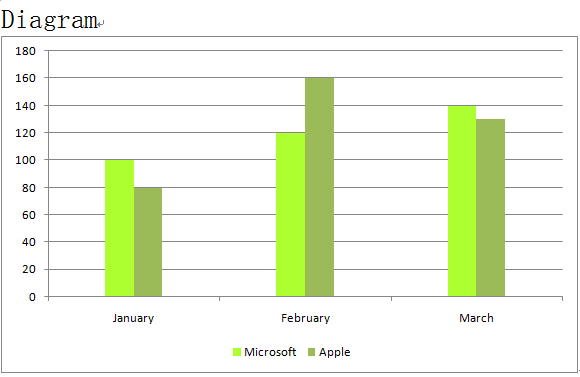
同时还可以生成饼图、线形图。
业精于勤,荒于嬉;行成于思,毁于随。
如果你觉得这篇文章不错或者对你有所帮助,可以通过右侧【打赏】功能,给予博主一点点鼓励和支持
Docx组件读写Word文档介绍的更多相关文章
- .NET通过调用Office组件导出Word文档
.NET通过调用Office组件导出Word文档 最近做项目需要实现一个客户端下载word表格的功能,该功能是用户点击"下载表格",服务端将该用户的数据查询出来并生成数据到Word ...
- 利用Python-docx 读写 Word 文档中的正文、表格、段落、字体等
前言: 前两篇博客介绍了 Python 的 docx 模块对 Word 文档的写操作,这篇博客将介绍如何用 docx 模块读取已有 Word 文档中的信息. 本篇博客主要内容有: 1.获取文档的章节信 ...
- $用python-docx模块读写word文档
工作中会遇到需要读取一个有几百页的word文档并从中整理出一些信息的需求,比如产品的API文档一般是word格式的.几百页的文档,如果手工一个个去处理,几乎是不可能的事情.这时就要找一个库写脚本去实现 ...
- [转载]java读写word文档,完美解决方案
做项目的过程中,经常需要把数据里里的数据读出来,经过加工,以word格式输出. 在网上找了很多解决方案都不太理想,偶尔发现了PageOffice,一个国产的Office插件,开发调用非常简单!比网上介 ...
- [原创]java读写word文档,完美解决方案
做项目的过程中,经常需要把数据里里的数据读出来,经过加工,以word格式输出. 在网上找了很多解决方案都不太理想,偶尔发现了PageOffice,一个国产的Office插件,开发调用非常简单!比网上介 ...
- Python用python-docx读写word文档
python-docx库可用于创建和编辑Microsoft Word(.docx)文件.官方文档:https://python-docx.readthedocs.io/en/latest/index. ...
- BCB 读写Word文档
void __fastcall TForm1::btn1Click(TObject *Sender) { Variant WordApp,WordDocs,WordDoc; Variant word_ ...
- python读写word文档
读: from docx import Document dir_docx = 'F:\Eclipse\workspace\Spider\cnblogs_doc\mytest - 副本.docx' d ...
- C#开源组件DocX处理Word文档基本操作(二)
上一篇 C#开源组件DocX处理Word文档基本操作(一) 介绍了DocX的段落.表格及图片的处理,本篇介绍页眉页脚的处理. 示例代码所用DocX版本为:1.3.0.0.关于版本的区别,请参见上篇,而 ...
随机推荐
- 论SNAPSHOT包的危害性
先介绍一下背景:我们应用是一个标准的spring+webx工程,博主在一次项目发布前为了再次测试一下自己的代码,将分支部署到日常环境中,但是项目启动的时候报错: 第一眼看到这个堆栈后有点懵逼 第一是上 ...
- C#在win10(win8)下读写记事本注意事项
分析:由于windows10或者windows8系统机制问题,C#在读写txt文件的时候,可能会出现如下问题(对路径“”的访问被拒绝): 解决: 1.我们在C盘下面新建立一个记事本,会发下类似如下报错 ...
- bootstrap_下拉菜单+头部
<!DOCTYPE html> <html lang="en"> <head> <meta charset="UTF-8&quo ...
- 基于Selenium2+Java的UI自动化(6)-操作Alert、confirm、prompt弹出框
alert.confirm.prompt这样的js对话框在selenium1 时代处理起来比价麻烦,常常要用autoit来帮助处理.而现在webdriver对这些弹出框做了专门的处理,使用seleni ...
- 聊聊dmClock算法
作者:吴香伟 发表于 2017/01/08 版权声明:可以任意转载,转载时务必以超链接形式标明文章原始出处和作者信息以及版权声明 人们常常容易忽略一些不起眼但特别重要的事物.曾经跟同事聊Python, ...
- Java之路——名词解释(一)
一.开篇 许多人在初接触Java的时候,都会被各种Java的英文缩写名词给弄得头晕脑胀.看一个技术,内容里又会有一堆其他的技术名词,看了半天不知所云.尝试去查一下这些名词的解释,除了非常学术性的解释之 ...
- RDLC系列(一)ASP.NET RDLC 报表自定义数据源
最近一段时间开发ERP系统中要用到不少报表打印,在网上找了一圈发现想些好用的报表控件大部分要收费,一些面免费要么不好用要么IE8不兼容,最后还是用了微软自带的RDLC报表,把自己遇到的坑和技巧整理分享 ...
- Tomcat8 + Redis实现session集中管理
环境准备: 部署两台 tomcat 8.0 安装 redis 服务器 下载工具库( commons-pool2-2.3.jar.jedis-2.7.2.jar .改良版的 tomcat ...
- Linux 命令--查看物理CPU个数、核数、逻辑CPU个数
# 总核数 = 物理CPU个数 X 每颗物理CPU的核数 # 总逻辑CPU数 = 物理CPU个数 X 每颗物理CPU的核数 X 超线程数 # 查看物理CPU个数 cat /proc/cpuinfo| ...
- Hibernate框架Criteria查询
本文章适合一些初学者 一.使用Criteria查询数据 1.条件查询 1.1:使用Criteria查询的步骤 1.使用Sess ...