
ConstraintLayout知识记录
一、准备工作
1. 确保SDK Tools已经下载了ContraintLayout的支持库。
2. gradle中增加对ConstraintLayout的依赖。
compile ‘com.android.support.constraint:constraint-layout:1.0.2’
3. 在使用到ConstraintLayout的xml文件头部添加标签
xmlns:app=”http://schemas.android.com/apk/res-auto”
二、RelativeLayout(RL)与ConstraintLayout(CL)属性对应部分
|
CL属性 |
RL属性 |
|
layout_constraintLeft_toLeftOf |
layout_alignLeft |
|
layout_constraintLeft_toRightOf |
layout_toRightOf |
|
layout_constraintRight_toLeftOf |
layout_toLeftOf |
|
layout_constraintRight_toRightOf |
layout_alignRight |
|
layout_constraintTop_toTopOf |
layout_alignTop |
|
layout_constraintTop_toBottomOf |
layout_below |
|
layout_constraintBottom_toTopOf |
layout_above |
|
layout_constraintBottom_toBottomOf |
layout_alignBottom |
|
layout_constraintBaseline_toBaselineOf |
layout_alignBaseline |
|
layout_constraintStart_toEndOf |
layout_toEndOf(API 17) |
|
layout_constraintStart_toStartOf |
layout_alignStart(API 17) |
|
layout_constraintEnd_toStartOf |
layout_toStartOf(API 17) |
|
layout_constraintEnd_toEndOf |
layout_alignEnd(API 17) |
相对于父布局的相对布局属性,CL的规则是:将父布局当做一个id=”parent”的对象来对待。
|
CL属性 |
RL属性 |
|
layout_constraintTop_toTopOf=”parent” |
layout_alignParentTop=”true” |
|
layout_constraintBottom_toBottomOf=”parent” |
layout_alignParentBottom=”true” |
|
layout_constraintLeft_toLeftOf=”parent” |
layout_alignParentLeft=”true” |
|
layout_constraintRight_toRightOf=”parent” |
layout_alignParentRight=”true” |
|
layout_constraintStart_toStartOf=”parent” |
layout_alignParentStart=”true” |
|
layout_constraintEnd_toEndOf=”parent” |
layout_alignParentEnd=”true” |
|
layout_constraintLeft_toLeftOf=”parent” layout_constraintRight_toRightOf=”parent” |
layout_centerHorizontal=”true” |
|
layout_constraintTop_toTopOf=”parent” layout_constraintBottom_toBottomOf=”parent” |
layout_centerVertical=”true” |
|
layout_constraintLeft_toLeftOf=”parent” layout_constraintRight_toRightOf=”parent” layout_constraintTop_toTopOf=”parent” layout_constraintBottom_toBottom=”parent” |
layout_centerInParent=”true” |
三、固定比例间距
在设置了各类属性居中属性的基础上,通过layout_constraintHorizontal_bias和layout_constraintVertical_bias两个属性,可以简单直观的完成间距比例的设置。
<android.support.constraint.ConstraintLayout

    android:layout_width="match_parent"

    android:layout_height="wrap_content"

    android:layout_marginTop="10dp">

    <TextView

        android:layout_width="100dp"

        android:layout_height="100dp"

        android:background="@color/colorPrimary"

        app:layout_constraintHorizontal_bias="0.3"

        app:layout_constraintLeft_toLeftOf="parent"

        app:layout_constraintRight_toRightOf="parent" />

</android.support.constraint.ConstraintLayout>
四、固定比例宽高
<android.support.constraint.ConstraintLayout

    android:layout_width="match_parent"

    android:layout_height="wrap_content"

    android:layout_marginTop="10dp">

    <View

        android:layout_width="0dp"

        android:layout_height="0dp"

        android:layout_marginLeft="100dp"

        android:layout_marginRight="100dp"

        android:background="@color/colorPrimary"

        app:layout_constraintDimensionRatio="H,4:3"

        app:layout_constraintLeft_toLeftOf="parent"

        app:layout_constraintRight_toLeftOf="parent" />

</android.support.constraint.ConstraintLayout>
Layout_width和layout_height都设置为0dp,0dp在CL布局中等同于MATCH_CONSTRANT,
MATCH_CONSTRANT是CL的一个新属性常量。在CL中,子View/ViewGroup无法使用match_parent属性。
MATCH_CONSTRAINT搭配不同的属性有不同的意义:
(1)设置layout_constraintDimensionRatio属性的情况下,代表该边长度由layout_constraintDimensionRatio动态调整;
(2)weighted chain中,代表该边长度由layout_constraintHorizontal_weight或layout_constraintVertical_weight动态调整;
(3)其他情况下,等同于match_parent,代表该边长度由各margin动态调整。
五、GoneMargin
layout_goneMarginStart, layout_goneMarginEnd, layout_goneMarginLeft, layout_goneMarginRight, layout_goneMarginTop, layout_goneMarginBottom。
layout_goneMargin系列是CL中新加入的属性。相对布局的两个空间,其中一方Visibility==Gone时,另外一方将会根据layout_goneMargin系列属性的值重新规划自己的间距。比较常用于在相对布局中保持各个控件的位置。
六、Chain
Chain是CL中新加入的控件与控件间的关系。组成chain的多个控件,可以在同一方向上更加方便的完成复杂的布局要求。
1.组成chain
多个控件组成chain需要满足以下条件:
(1)控件间的布局存在相互依赖的关系(你依赖我布局,我也依赖你布局);
(2)两个以上的空间,相互依赖关系需要保持在同一个方向上(都是水平方向上的依赖:Left_toRightOf/Right_toLeftOf;或者都是垂直方向上的依赖:Top_toBottomOf/Bottom_toTopOf);
<android.support.constraint.ConstraintLayout

    android:layout_width="match_parent"

    android:layout_height="wrap_content"

    android:layout_marginTop="10dp">

    <TextView

        android:id="@+id/text_a"

        android:layout_width="50dp"

        android:layout_height="50dp"

        android:layout_marginRight="50dp"

        android:background="@color/colorPrimary"

        app:layout_constraintRight_toLeftOf="@id/text_b" />

    <TextView

        android:id="@+id/text_b"

        android:layout_width="50dp"

        android:layout_height="50dp"

        android:background="@color/colorAccent"

        app:layout_constraintLeft_toRightOf="@id/text_a" />

    <TextView

        android:id="@+id/text_c"

        android:layout_width="50dp"

        android:layout_height="50dp"

        android:layout_marginLeft="50dp"

        android:background="@color/colorPrimaryDark"

        app:layout_constraintLeft_toRightOf="@id/text_b" />

</android.support.constraint.ConstraintLayout>
2.设置chain style
水平方向chain最左边的空间和垂直方向chain最顶端的空间被称为head chain。通过对head chain添加chainStyle属性,可以设置该条chain在水平或垂直方向上的chainStyle:
(1)layout_constraintHorizontal_chainStyle
(2)layout_constraintVertical_chainStyle
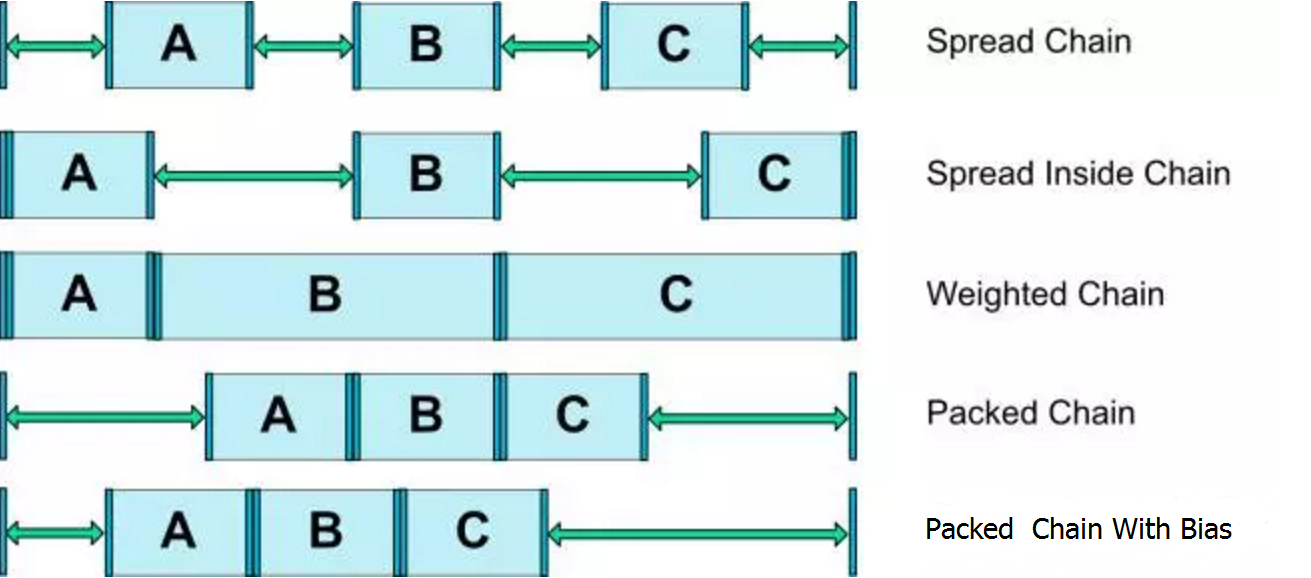
chainStyle属性一共有三种:spread、spread_inside、packed。在配合其他属性,最终可以组成5中chain style:
|
chain style |
设置方式 |
|
Spread Chain |
chainstyle=”spread” |
|
Spread Inside Chain |
chainStyle=”spread_inside” |
|
Packed Chain |
chainStyle=”packed” |
|
Packed Chain with Bias |
chainStyle=”packed” layout_constraintHorizontal_bias layout_constraintVertical_bias |
|
Weighted Chain |
chainStyle=”spread” layout_constraintHorizontal_weight layout_constraintVertical_weight layout_width=”0dp” layout_height=”0dp” |
<android.support.constraint.ConstraintLayout

    android:layout_width="match_parent"

    android:layout_height="wrap_content"

    android:layout_marginTop="10dp">

    <TextView

        android:id="@+id/chain_a"

        android:layout_width="0dp"

        android:layout_height="50dp"

        android:background="@color/colorPrimary"

        app:layout_constraintHorizontal_chainStyle="spread"

        app:layout_constraintHorizontal_weight="0.33"

        app:layout_constraintLeft_toLeftOf="parent"

        app:layout_constraintRight_toLeftOf="@id/chain_b" />

    <TextView

        android:id="@+id/chain_b"

        android:layout_width="0dp"

        android:layout_height="50dp"

        android:background="@color/colorAccent"

        app:layout_constraintHorizontal_weight="0.33"

        app:layout_constraintLeft_toRightOf="@id/chain_a"

        app:layout_constraintRight_toLeftOf="@id/chain_c" />

    <TextView

        android:id="@+id/chain_c"

        android:layout_width="0dp"

        android:layout_height="50dp"

        android:background="@color/colorPrimaryDark"

        app:layout_constraintHorizontal_weight="0.33"

        app:layout_constraintLeft_toRightOf="@id/chain_b"

        app:layout_constraintRight_toRightOf="parent" />

</android.support.constraint.ConstraintLayout>
(1)chain head设置chainStyle为spread;
(2)chain中空间设置了layout_constraintHorizontal_weight参数;
(3)chain中空间都需要将layout_weight设置为0dp;
除此之外,Weighted Chain还有以下特征:
(1)Weighted Chain中的控件也允许在chain方向上使用wrap_content自适应控件宽/高,且布局时优先满足设置为wrap_content的控件;
(2)Weighted Chain中的控件既不设置constraint_weight,也不在chain方向上将边设置为wrap_content,那么该控件将被隐藏;
(3)如果Weighted Chain中的空间在chain方向上设置了margin,margin的距离将计算入该控件实际占有的布局范围;
代码地址:https://github.com/ZhangMiao147/UseBaseViewDemo/tree/master/constraintlayoutdemo
参考文章:https://mp.weixin.qq.com/s/X01KpEbegR47Qnl9TmUd5w
ConstraintLayout知识记录的更多相关文章
- C#基础知识记录一
C#基础知识记录一 static void Main(string[] args) { #region 合并运算符的使用(合并运算符??) 更多运算符请参考:https://msdn.microsof ...
- DataBase MongoDB基础知识记录
MongoDB基础知识记录 一.概念: 讲mongdb就必须提一下nosql,因为mongdb是nosql的代表作: NoSQL(Not Only SQL ),意即“不仅仅是SQL” ,指的是非关系型 ...
- MongoDB基础知识记录
MongoDB基础知识记录 一.概念: 讲mongdb就必须提一下nosql,因为mongdb是nosql的代表作: NoSQL(Not Only SQL ),意即“不仅仅是SQL” ,指的是非关系型 ...
- Web前端理论知识记录
Web前端理论知识记录 Elena· 5 个月前 cookies,sessionStorage和localStorage的区别? sessionStorage用于本地存储一个会话(session) ...
- 关于Excel做表小知识记录
关于Excel做表小知识记录 最近使用Excel做了一系列的报表,觉得这是个很神奇的东西哈哈哈,以前我可是一想到Excel就开始头疼的人... 能用代码或者SQL语句解决的问题绝不会愿意留在Exce ...
- Maven知识记录(一)初识Maven私服
Maven知识记录(一)初识Maven私服 什么是maven私服 私服即私有的仓库.maven把存放文件的地方叫做仓库,我们可以理解成我门家中的储物间.而maven把存放文件的具体位置叫做坐标.我们项 ...
- Linux文件系统知识记录——ext2描述
最近完成了一个编程作业,大致功能是给定一个文件名,给出该文件所在目录和其本身所占用的簇号等信息.笔者选用了Linux的ext系列文件系统作为实验对象,通过实验对ext2文件系统的存储和索引有了一个较为 ...
- 零散知识记录-一个MQ问题
[背景]我有一项零散工作:维护大部门的一台测试公用MQ服务器.当大部分MQ被建立起来,编写了维护手册,大家都按照规程来后,就基本上没有再动过它了.周五有同学跟我反映登录不进去了,周日花了1个小时来解决 ...
- Java实用知识记录 —— 截止到Java8
记录Java实用知识点,截止(包括)到Java8,只作概要的描述,不涉及到具体细节.变量:int.long的包装类支持无符号位操作,即其在内存中的位可以用来全部表示正数."_"可以 ...
随机推荐
- 【quickhybrid】API规划
前言 当一切就绪后,就要开始进行API规划,这一块是整个Hybrid框架中非常重要的内容,毕竟对于前端页面来说,只会通过JS API来调用功能. 基本上,API调用起来是否方便简洁影响着整个体验. 这 ...
- MPSOC之7——开发流程uramdisk
用petalinux的预编译目录里有rootfs文件,选择rootfs.tar.gz作为初始输入. 1.原始文件-->uramdisk 1.1 解压原始rootfs.tar.gz,得到若干文件 ...
- springboot(十五):springboot+jpa+thymeleaf增删改查示例
这篇文章介绍如何使用jpa和thymeleaf做一个增删改查的示例. 先和大家聊聊我为什么喜欢写这种脚手架的项目,在我学习一门新技术的时候,总是想快速的搭建起一个demo来试试它的效果,越简单越容易上 ...
- 微信小程序——轮播图实现
小程序的轮播图,也就是他其中的一个控件可以算是直接上代码: 这是WXML 页面 代码: <view class='carousel_div'> <swiper class=" ...
- 小白的Python之路 day4 装饰器前奏
装饰器前奏: 一.定义: 1.装饰器本质是函数,语法都是用def去定义的 (函数的目的:他需要完成特定的功能) 2.装饰器的功能:就是装饰其他函数(就是为其他函数添加附加功能) 二.原则: 1. 不能 ...
- 【java设计模式】【结构模式Structural Pattern】合成模式Composite Pattern
package com.tn.pattern; import java.util.Vector; public class Client { public static void main(Strin ...
- HTML5 进阶系列:拖放 API 实现拖放排序(转载)
HTML5之拖放API实现拖放排序 前言 HTML5 中提供了直接拖放的 API,极大的方便我们实现拖放效果,不需要去写一大堆的 js,只需要通过监听元素的拖放事件就能实现各种拖放功能. 想要拖放某个 ...
- iOS ShareSDK 三方分享/登录使用
原文 http://www.cnblogs.com/CoderAlex/p/4860352.html 一: 快速集成 1.前言 作为现在App里必不可少的用户分享需要,社交化分享显然是我们开发app里 ...
- Winccflexable触摸屏的报警
1.报警的分类 2.自定义报警分类 3.报警组成 4.Winccflexable中预定义的报警类别 5.报警的确认 6.WinccFlexable报警的显示 1)报警视图 2)报警窗口 3).报警指示 ...
- Java JTS & 空间数据模型
空间数据模型 判断两个几何图形是否存在指定的空间关系.包括: 相等(equals).分离(disjoint).相交(intersect).相接(touches).交叉(crosses).包含于(wit ...