
vue 模仿机票自定义日历组件,区间选择
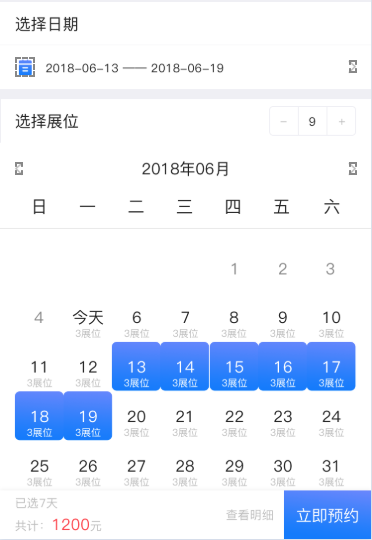
1.创建组件 components > calander > index.vue
<template>

  <div class="page" v-if="show">

    <div class="box">

      <div class="box_head" v-if="!propshow">

        <div class="font28" @click="calanderShowData">取消</div>

        <div class="font28" @click="calanderSubmit">确定</div>

      </div>

      <div class="box-flex">

        <div class="flex-item item-content-current-day  item-content-tit">

          <div class="item-content titleHead">{{currentDate}}</div>

        </div>

        </div>

      </div>

      <div class="box-flex">

        <div class="flex-item">

          <div class="item-content">一</div>

        </div>

        <div class="flex-item">

          <div class="item-content">二</div>

        </div>

        <div class="flex-item">

          <div class="item-content">三</div>

        </div>

        <div class="flex-item">

          <div class="item-content">四</div>

        </div>

        <div class="flex-item">

          <div class="item-content">五</div>

        </div>

        <div class="flex-item">

          <div class="item-content">六</div>

        </div>

        <div class="flex-item">

          <div class="item-content">日</div>

        </div>

      </div>

      <div class="box-flex">

        <div class="flex-item flexData" v-for='(item, index) in currentDayList' :key='item' @click='itemFun(item.num,mouth[index],index, "first", item.state)' :class="{'hover-date': Section[index] && item.num, 'noBack': !item.state && item.num && !propshow}">

            <div class="item-content red-background" v-if='currentDay === item.num && mouth[index].mouth === currentMouth.mouth && currentMouth.year === mouth[index].year' :class="{'hoverColorData' : Section[index] && item.num, 'hover-date':active[index]}">

              <p>今天</p>

              <p v-if="item.number && propshow">{{item.number}}展位</p>

            </div>

            <div class="item-content backgroundData" v-else :class="{'hover-date':active[index]}" >

              <p>{{item.num}}</p>

              <p v-if="item.number && propshow">{{item.number}}展位</p>

            </div>

        </div>

      </div>

          <div class="box">

      <div class="box-flex">

        <div class="flex-item item-content-current-day  item-content-tit">

          <div class="item-content titleHead">{{currentDateTwo}}</div>

        </div>

        </div>

      </div>

      <div class="box-flex">

        <div class="flex-item">

          <div class="item-content">一</div>

        </div>

        <div class="flex-item">

          <div class="item-content">二</div>

        </div>

        <div class="flex-item">

          <div class="item-content">三</div>

        </div>

        <div class="flex-item">

          <div class="item-content">四</div>

        </div>

        <div class="flex-item">

          <div class="item-content">五</div>

        </div>

        <div class="flex-item">

          <div class="item-content">六</div>

        </div>

        <div class="flex-item">

          <div class="item-content">日</div>

        </div>

      </div>

      <div class="box-flex">

        <div class="flex-item flexData" v-for='(item, index) in currentDayListData' :key='item' @click='itemFun(item.num,mouths[index],index, "last", item.state)' :class="{'hover-date': Sections[index] && item.num, 'noBack': !item.state && item.num && !propshow}">

            <div class="item-content backgroundData" :class="{'hover-date':actives[index]}">

              <p>{{item.num}}</p>

              <p v-if="item.number && propshow">{{item.number}}展位</p>

            </div>

        </div>

      </div>

  <div v-if="propshow" class="propshowData"></div>

</div>

</template>

<script>

import vue from 'vue'

export default {

  name: 'calander',

  data () {

    return {

      calanderList: [],

      show: false,

      currentDate: '2017年05月03日',

      currentDateTwo: '2017年06月03日',

      dayList: '',

      currentDayList: [],

      currentObj: '',

      currentDay: '',

      mouth: [],

      currentMouth: null,

      hoverDate: {'date': null, 'mouth': null, 'year': null},

      activeClick: 0,

      active: [],

      actives: [],

      Section: [],

      firstIndex: 0,

      lastIndex: 0,

      currentDayListData: [],

      currentJudge: false,

      currentObjNew: '',

      Sections: [],

      lastType: '',

      fristType: '',

      numArray: [],

      numArrayTwo: []

    }

  },

  props: {

    propshow: false,

    boothArray: [], // 从父级传来的数组,中主要携带number展位数,

    calanderList: [],

    yearAndmouthFirst: {},

    yearAndmouthTwo: {},

    calanderShow: false

  },

  mounted () {

    let timeData = this.getNextMonth(new Date(),1)

    var currentObj = this.getCurrentDayString()

    this.currentDate = currentObj.getFullYear() + '年' + (currentObj.getMonth() + 1) + '月' + currentObj.getDate() + '日'

    this.currentDateTwo = timeData.getFullYear() + '年' + (timeData.getMonth() + 1) + '月' + timeData.getDate() + '日'

    // this.currentObjNew = currentObj.getFullYear() + '/' + (currentObj.getMonth() + 2) + '/' + currentObj.getDate()

    this.currentDay = currentObj.getDate()

    this.currentObj = currentObj

    this.currentMouth = {

      mouth: currentObj.getMonth() + 1,

      year: currentObj.getFullYear()

    }

    setTimeout(() => {

      this.setSchedule(currentObj, 'newMonth')

      this.setSchedule(this.getNextMonth(new Date(),1), 'nextMonth')

      // this.setSchedule(new Date(this.currentObjNew), 'nextMonth')

    },100);

  },

  methods: {

    monthDay: function (year, month) {

        month = parseInt(month, 10);

        var d = new Date(year, month, 0);  //这个是都可以兼容的

        var date = new Date(year + "/" + month + "/0")   //IE浏览器可以获取天数,谷歌浏览器会返回NaN

        return d.getDate();

    },

    getNextMonth: function (date,length) {

      let yy = date.getFullYear()

      let mm = date.getMonth()

      let dd = date.getDate()

      let nm= 0//目标月份

      nm = mm+length

      let nd = 0//目标天数

      if(this.monthDay(yy,nm+1)<dd){

        nd = this.monthDay(yy,nm+1)

      }else{

        nd = dd-1

      }

      date.setDate(1)

      date.setMonth(nm)

      date.setDate(nd)

      return date

    },

    calanderSubmit(){

      console.log(this.numArray)

      this.$emit('assignment', this.numArray)

    },

    calanderShowData(){

      this.$emit('calanderShowClick', this.calanderShow)

    },

    formatTwo (n) {

      if (n >= 10) return n

      else return '0' + n

    },

    // 判断日历的当前日期是否不可点击

    isDisabled (calander, index, item) {

      // if (new Date(calander).getTime() < new Date().getTime()) {

      //   this.mouth[index].state = 'disabled'

      //   return false

      // }

    },

    getWeekDayNextMonth(){

      var myDate = new Date()

      myDate.setMonth(myDate.getMonth() + 1);

      myDate.setDate(1);

      var weekDay=new Array(7, 1, 2, 3, 4, 5, 6)

      return weekDay[myDate.getDay()];

    },

    itemFun (item, yearAndmouth, index, type, stateClick) {

      if (stateClick) {

        let dataD = new Date();

        let curMonthDays = new Date(dataD.getFullYear(), (dataD.getMonth()+1), 0).getDate()

        this.hoverDate = {'date': item, 'mouth': yearAndmouth.mouth, 'year': yearAndmouth.year}

        if (type == 'first') {

          var activeArrayData = this.active

          var SectionArrayData = this.Section

        } else {

          var activeArrayData = this.actives

          var SectionArrayData = this.Sections

        }

        if (this.activeClick == 0) {

          this.yearAndmouthFirst = yearAndmouth

          this.yearAndmouthFirst.date = item

          for(let i=0; i<this.active.length; i++){

            this.active[i] = false

            vue.set(this.active, i, this.active[i])

          }

          for(let i=0; i<this.actives.length; i++){

            this.actives[i] = false

            vue.set(this.actives, i, this.actives[i])

          }

          for(let t=0; t<this.Section.length; t++){

            this.Section[t] = false

            vue.set(this.Section, t, this.Section[t])

          }

          for(let t=0; t<this.Sections.length; t++){

            this.Sections[t] = false

            vue.set(this.Sections, t, this.Sections[t])

          }

          this.numArray = []

          this.activeClick = 1

          this.fristType = type

          this.firstIndex = item

          this.yearFirst = yearAndmouth.year

          this.mouthFirst = yearAndmouth.mouth

          activeArrayData[index] = true

          vue.set(activeArrayData, index, activeArrayData[index])

          this.numArray.push(this.yearAndmouthFirst)

          console.log(this.numArray)

        } else if (this.activeClick == 1){

          this.numArray = []

          this.yearAndmouthTwo = yearAndmouth

          this.yearAndmouthTwo.date = item

          if (this.firstIndex != index) {

            this.activeClick = 0

            this.lastIndex = item

            this.lastType = type

            this.yeaTwo = yearAndmouth.year

            this.mouthTwo = yearAndmouth.mouth

            activeArrayData[index] = true

            vue.set(activeArrayData, index, activeArrayData[index])

            if (this.fristType == this.lastType) {

              if (this.lastIndex > this.firstIndex) {

                var indexCenter = this.lastIndex - this.firstIndex + 1

              } else {

                var indexCenter = this.firstIndex - this.lastIndex + 1

              }

              for(let j=0; j<indexCenter; j++){

                if (this.lastIndex < this.firstIndex) {

                  var indexData = j + index

                  this.numArray.push({'date': item + j, 'mouth': yearAndmouth.mouth, 'year': yearAndmouth.year})

                } else {

                  this.numArray.unshift({'date': item - j, 'mouth': yearAndmouth.mouth, 'year': yearAndmouth.year})

                  var indexData = index - j

                }

                SectionArrayData[indexData] = true

                vue.set(SectionArrayData, indexData, SectionArrayData[indexData])

              }

            } else {

              if (this.fristType == 'first') {

                var indexCenter = curMonthDays - this.firstIndex + 1

                var indexCenters = this.lastIndex

              } else {

                var indexCenter = curMonthDays - this.lastIndex + 1

                var indexCenters = this.firstIndex

              }

              for(let j=0; j<indexCenter; j++){

                if (this.fristType == 'first') {

                  var indexData = this.firstIndex + j

                  this.numArray.push({'date': indexData, 'mouth': this.mouthFirst, 'year': this.yearFirst})

                } else {

                  var indexData = this.lastIndex + j

                  this.numArray.push({'date': item + j, 'mouth': this.mouthTwo, 'year': this.yeaTwo})

                }

                this.Section[indexData + 1] = true

                vue.set(this.Section, indexData, this.Section[indexData])

              }

              var monthData = this.getWeekDayNextMonth()

              for(let j=0; j<indexCenters; j++){

                if (this.fristType == 'first') {

                  var indexDatas = j + monthData - 1

                  this.numArrayTwo.unshift({'date': item - j, 'mouth': this.mouthTwo, 'year': this.yeaTwo})

                } else {

                  var indexDatas = this.firstIndex - j + monthData -2

                  this.numArrayTwo.unshift({'date': this.firstIndex - j , 'mouth': this.mouthFirst, 'year': this.yearFirst})

                }

                this.Sections[indexDatas] = true

                vue.set(this.Sections, indexDatas, this.Sections[indexDatas])

              }

            }

            this.numArray = this.numArray.concat(this.numArrayTwo)

          }

        }

      }

    },

    doDay: function (e) {

      var that = this

      var currentObj = that.currentObj

      var Y = currentObj.getFullYear()

      var m = currentObj.getMonth() + 1

      let newData = new Date

      let newMonth=newData.getMonth()+1;

      let d = currentObj.getDate()

      var str = ''

      if (e.currentTarget.dataset.key === 'left') {

        m -= 1

        if (m <= 0) {

          str = (Y - 1) + '/' + 12 + '/' + d

        } else {

          str = Y + '/' + m + '/' + d

        }

        this.currentJudge = true

      } else if(e.currentTarget.dataset.key === 'right') {

        if (newMonth !== m) {

          m += 1

          if (m <= 12) {

            str = Y + '/' + m + '/' + d

          } else {

            str = (Y + 1) + '/' + 1 + '/' + d

          }

          this.currentJudge = true

        } else {

          this.currentJudge = false

        }

      } else if (e.currentTarget.dataset.key === 'leftTwo'){

        if (newMonth !== m) {

          m -= 1

          if (m <= 0) {

            str = (Y - 1) + '/' + 12 + '/' + d

          } else {

            str = Y + '/' + m + '/' + d

          }

          this.currentJudge = true

        } else {

          this.currentJudge = false

        }

      } else if (e.currentTarget.dataset.key === 'rightTwo'){

        m += 1

        if (m <= 12) {

          str = Y + '/' + m + '/' + d

        } else {

          str = (Y + 1) + '/' + 1 + '/' + d

        }

        this.currentJudge = true

      }

      if (this.currentJudge) {

        currentObj = new Date(str)

        this.currentDate = currentObj.getFullYear() + '年' + (currentObj.getMonth() + 1) + '月' + currentObj.getDate() + '日'

        this.currentDateTwo = currentObj.getFullYear() + '年' + (currentObj.getMonth() + 2) + '月' + currentObj.getDate() + '日'

        this.currentObjNew = currentObj.getFullYear() + '/' + (currentObj.getMonth() + 2) + '/' + currentObj.getDate() + '/'

        this.currentObj = currentObj

        if (e.currentTarget.dataset.key == 'left' || e.currentTarget.dataset.key == 'right') {

          this.setSchedule(currentObj, 'newMonth')

        } else {

          this.setSchedule(new Date(this.currentObjNew), 'nextMonth')

        }

      }

    },

    getCurrentDayString: function () {

      var objDate = this.currentObj

      if (objDate !== '') {

        return objDate

      } else {

        var cobj = new Date()

        var a = cobj.getFullYear() + '/' + (cobj.getMonth() + 1) + '/' + cobj.getDate()

        return new Date(a)

      }

    },

    setSchedule: function (currentObj, type) {

      var that = this

      var m = currentObj.getMonth() + 1

      var Y = currentObj.getFullYear()

      var d = currentObj.getDate()

      var newDate = new Date()

      var newYear = newDate.getFullYear()

      var newMonth = newDate.getMonth() + 1

      // var dayString = Y + '/' + m + '/' + currentObj.getDate()

      var currentDayNum = new Date(Y, m, 0).getDate()

      var currentDayWeek = currentObj.getUTCDay() + 1

      var result = currentDayWeek - (d % 7 - 1)

      var firstKey = result <= 0 ? 7 + result : result

      var currentDayListNew = []

      var mouth = []

      var f = 0

      for (var i = 0; i < 42; i++) {

        mouth[i] = {

          'mouth': m,

          'year': Y

        }

        currentDayListNew[i] = {

          'num': '',

          'number': '',

          'state': false

        }

        if (i < firstKey - 1) {

          currentDayListNew[i].num = ''

        } else {

          if (f < currentDayNum) {

            currentDayListNew[i].num = f + 1

            f = currentDayListNew[i].num

            if (newYear == Y && newMonth == m) {

              if (f >= d) {

                currentDayListNew[i].state = true

              }

            } else {

              if (f <= d) {

                currentDayListNew[i].state = true

              }

            }

          } else if (f >= currentDayNum) {

            currentDayListNew[i].num = ''

          }

          if (this.boothArray.length > 0) {

            this.boothArray.forEach((element, indexArray) => {

              if (element.year == Y && element.mouth == m) {

                if (element.date == currentDayListNew[i].num) {

                  currentDayListNew[i].number = String(element.number)

                }

              }

            })

          }

          if (this.calanderList.length > 0) {

            this.calanderList.forEach((element, indexList) => {

              if (element.year == Y && element.mouth == m) {

                if (element.date == currentDayListNew[i].num) {

                  if (type == 'newMonth') {

                    this.Section[i] = true

                  } else {

                    this.Sections[i] = true

                  }

                }

              }

            });

          }

        }

      }

      if (type == 'newMonth') {

        that.currentDayList = currentDayListNew

        that.mouth = mouth

      } else {

        that.currentDayListData = currentDayListNew

        that.mouths = mouth

      }

      this.show = true

    }

  }

}

</script>

<style scoped>

.box_head{

  height: 1.173333rem /* 88/75 */;

  background: #fff;

  display: flex;

  justify-content: space-between;

  align-items: center;

  padding: 0 .4rem /* 30/75 */;

  border-bottom: .013333rem /* 1/75 */ solid #E5E5E5;

}

.noBack{

  background: #bbb!important;

  /* border-radius: 5px!important; */

}

.hoverColorData{

  color: #fff!important;

}

.propshowData{

  position: absolute;

  left: 0;

  right: 0;

  bottom: 0;

  top: 0;

  background: rgba(0, 0, 0, 0.1);

  z-index: 9999;

}

.page{

  background: #fff;

  position: relative;

}

.titleHead{

  margin: .266667rem /* 20/75 */ 0!important;

}

.sectionBack{

  background: #8A2BE2;

}

page {

  background-color: #2a8cef;

  background:-webkit-gradient(linear, 0 0, 0 bottom, from(#2a8cef), to(#8A2BE2));

  display: flex;

  flex-direction: column;

  width: 100%;

  flex-wrap: nowrap;

  justify-content: flex-start;

  align-items: stretch;

  font-size: 16px;

  color: #222;

}

.disabled{

  color: #ccc !important;

}

.hover-date{

  background: #367EED;

  color: #fff !important;

  border-radius: 5px;

}

.box {

  display: block;

  /* margin: 10px;   */

  border-top: .013333rem /* 1/75 */ solid #efefef;

}

.glyphicon-triangle-left img{

  transform:rotate(180deg)

}

  .glyphicon img{

    width:12px;

    height: 19px;

    margin-top:15px;

  }

.box-flex {

  display: -webkit-box;

  display: -webkit-flex;

  display: flex;

  flex-wrap: wrap;

  padding: 0 .133333rem /* 10/75 */;

}

.flex-item {

  flex-flow: nowrap;

  flex-grow: 1;

  flex-shrink: 1;

  width: 14%;

  margin: 1px 1px 1px 0px;

}

.item-content {

  margin: 1px;

  padding: 5px 1px;

  text-align: center;

  /* height: 45px;   */

  /* line-height: 45px;   */

  font-size:14px;

  position: relative;

      flex-wrap: wrap;

    justify-content: center;

}

.item-content i{

  width:100%;

  text-align: center;

  left:0;

  position: absolute;

  top:8px;

}

.item-content span{

  width:100%;

  text-align: center;

  left:0;

  position: absolute;

  top:3px;

  font-size:12px;

  color: #367EED;

  line-height: 1;

}

.item-content-tit{

  width:30%;

  /* margin: .133333rem 10/75 0; */

}

.item-content-tit .item-content{

    font-size:17px;

}

  .red-background{

    color:#367EED;

    border-radius: 5px;

  }

.item-content-current-day {

  flex-grow: 2;

}

</style>
2.页面中引用组件
<calander @assignment="assignment" :propshow="propshow" :boothArray="boothArray" :calanderList="calanderList"></calander>

<script>

    import calander from '@/components/calander'

    export default {

       components: {

         calander

       },

   data() {

      return {

        calanderList: [],

        boothArray: [],

        propshow: false,

      };

    },

    methods: {

      assignment(){

        // 组件调取父级方法

      },

    }

    }

</script>
vue 模仿机票自定义日历组件,区间选择的更多相关文章
- vue里在自定义的组件上定义的事件
事件分为原生事件和自定义事件. vue里在自定义的组件上定义的事件,都被认为是自定义事件,必须用$emit()来触发. 这也是子组件向父传值的原理. 如果想作为原生事件,需要在原生事件后面加上.nat ...
- Vue自定义日历组件
今天给大家介绍Vue的日历组件,可自定义样式.日历类型及支持扩展,可自定义事件回调.Props数据传输. 线上demo效果 示例 Template: <Calendar :sundayStart ...
- vue自定义日历组件的实现
实现一个日期组件,如图: components.js代码如下: Vue.component('sc-calendar',{ template:'<div class="scCalend ...
- vue 自定义日历组件
<template> <div class=""> <div class="calendarTraffic" name=" ...
- 使用vue的v-model自定义 checkbox组件
<template id='c'> <input type="checkbox" :checked="checked" v-on:change ...
- Vue.js 桌面端自定义滚动条组件|vue美化滚动条VScroll
基于vue.js开发的小巧PC端自定义滚动条组件VScroll. 前段时间有给大家分享一个vue桌面端弹框组件,今天再分享最近开发的一个vue pc端自定义滚动条组件. vscroll 一款基于vue ...
- 【分享】Vue 资源典藏(UI组件、开发框架、服务端、辅助工具、应用实例、Demo示例)
Vue 资源典藏,包括:UI组件 开发框架 服务端 辅助工具 应用实例 Demo示例 element ★11612 - 饿了么出品的Vue2的web UI工具套件 Vux ★7503 - 基于Vue和 ...
- 任务四十二:UI组件之日历组件(三)
任务四十二:UI组件之日历组件(三) 面向人群: 有一定基础的同学 难度: 困难 重要说明 百度前端技术学院的课程任务是由百度前端工程师专为对前端不同掌握程度的同学设计.我们尽力保证课程内容的质量以及 ...
- vue自定义日期选择,类似美团日期选择,日历控件,vue日历区间选择
一个日历的控件,基于vue的,可以日历区间选择,可用于酒店日历区间筛选,动手能力强,可以修改成小程序版本的,先上效果图 里面的颜色样式都是可以修改的 选择范围效果 话不多说,直接上干货,代码可以直接复 ...
随机推荐
- RTOS 和中断之间要注意的
#define configLIBRARY_LOWEST_INTERRUPT_PRIORITY 15 #define configLIBRARY_MAX_SYSCALL_INTERRUPT_PRI ...
- spss缺失值填充步骤
缺失值填充是数据预处理最基本的步骤,一般能想到的是固定值填充(均值等统计学方法).根据与本列有相关关系的列函数表示来填充.这次我用的是em算法进行填充,具体原理后续补充. 主要记录一下步骤: 工具栏: ...
- WebDriver与文件系统
1.屏幕截屏操作:其接口函数是TakesScreenshot.该功能是在运行测试用例的过程中,需要验证某个元素的状态或者显示的数值时,可以将屏幕截取下来进行对比:或者在异常或者错误发生的时候将屏幕截取 ...
- 【UML】NO.47.EBook.5.UML.1.007-【UML 大战需求分析】- 部署图(Deployment Diagram)
1.0.0 Summary Tittle:[UML]NO.47.EBook.1.UML.1.007-[UML 大战需求分析]- 部署图(Deployment Diagram) Style:Design ...
- (转载)intellj idea 如何设置类头注释和方法注释
原文地址:http://www.cnblogs.com/wvqusrtg/p/5459327.html intellj idea的强大之处就不多说了,相信每个用过它的人都会体会到, ...
- nginx rewrite 指令
ginx通过ngx_http_rewrite_module模块支持url重写.支持if条件判断,但不支持else. 该模块需要PCRE支持,应在编译nginx时指定PCRE源码目录, nginx安装方 ...
- 最小生成树模板题 hpu 积分赛 Vegetable and Road again
问题 H: Vegetable and Road again 时间限制: 1 Sec 内存限制: 128 MB 提交: 19 解决: 8 题目描述 修路的方案终于确定了.市政府要求任意两个公园之间都必 ...
- python3内置的tkinter参数释疑
最近涉及到需要实现一个桌面UI的小游戏,所以就翻看了一些文档. 当然有介绍使用pyQT5的,但是本机安装的是python3.4,不想卸载掉这个版本,暂时还不能使用pyQT5. pyQT5需要pytho ...
- Eclipse进度条出现“Remote System Explorer Operation”解决方法
Eclipse进度条出现“Remote System Explorer Operation”解决方法
- MySQL中SQL语句2
上一片介绍了一些基本的SQL的增删改查,这一片会介绍一些进阶的SQL语句使用. MySQL中的视图 视图是什么?当我们总是查询几张表的某个字段时,可以创建一张虚拟表,把这几个字段写入这个虚拟的表,这样 ...