
SSM框架——Spring
Spring
- 轻量级、非侵入式的框架
- 支持控制反转(IOC)、面向切面编程(AOP)
- 支持事务的处理和声明、框架整合
1.HelloSpring(入门)
1.1导入依赖
        <!-- https://mvnrepository.com/artifact/org.springframework/spring-webmvc -->

        <dependency>

            <groupId>org.springframework</groupId>

            <artifactId>spring-webmvc</artifactId>

            <version>5.3.3</version>

        </dependency>
1.2xml配置
<?xml version="1.0" encoding="UTF-8"?>

<beans xmlns="http://www.springframework.org/schema/beans"

       xmlns:xsi="http://www.w3.org/2001/XMLSchema-instance"

       xsi:schemaLocation="http://www.springframework.org/schema/beans

        http://www.springframework.org/schema/beans/spring-beans.xsd">

    <!--导入需要spring初始化的类-->

    ...

</beans>
1.3导入类
@Data

public class Student {

    private int id;

    private String name;

}//新建一个类接口
<!--向spring声明需要实例化的类及其初始化属性-->

<!--通过无参构造和set函数实例化-->

<bean id="Student" class="Student">

    <property name="id" value="2018117"></property>

    <property name="name" value="LIHONG"></property>

 </bean>
1.4获得该类对象
public class MyTest {

    public static void main(String[] args) {

        //

        ApplicationContext context = new ClassPathXmlApplicationContext("beans.xml");//获取spring上下文

        Student student = (Student)context.getBean("Student");//用bean的id获取该实例

        System.out.println(student.toString());

    }

}
2.基本配置
2.1 别名 alias
<!--为一个bean对象起个别名-->

<alias name="Student1" alias="ss1"></alias>
2.2 实例对象 bean
<bean id="bean对象的名称" class="bean对象的实体类" name="别名 别名,别名;别名" >

</bean>
3.依赖注入
3.1 set注入
<bean id="" class="">

    <property name="普通类型注入" value="普通类型值"/>

    <property name="Bean类型注入" ref="bean类型的id"/>

    <property name="数组类型注入" >

        <array>

            <value>...</value>

            <value>...</value>

        </array>

    </property>

    <property name="List类型注入" >

        <list>

            <value>...</value>

            <value>...</value>

        </list>

    </property>

    <property name="Map类型注入" >

        <map>

            <entry key="" value=""/>

            <entry key="" value=""/>

        </map>

    </property>

    <property name="properties类型注入" >

        <props>

            <entry key="">value</entry>

            <entry key="">value</entry>

        </props>

    </property>

</bean>
3.2 构造器注入
<!--通过有参构造的参数下标实例化-->

<bean id="Student2" class="Student">

    <constructor-arg index="0" value="2018118"></constructor-arg>

    <constructor-arg index="1" value="qinjiang"></constructor-arg>

</bean>

<!--通过有参构造的参数类型实例化-->

<bean id="Student3" class="Student">

    <constructor-arg type="int" value="2018118"></constructor-arg>

    <constructor-arg type="java.lang.String" value="tianle"></constructor-arg>

</bean>

<!--通过有参构造的参数名称实例化-->

<bean id="Student4" class="Student">

   <constructor-arg name="id" value="2018118"></constructor-arg>

   <constructor-arg name="name" value="tianle"></constructor-arg>

</bean>
3.3 其他注入
3.3.1 p命名空间注入
使用前需要加入p命名空间的配置依赖
xmlns:p="http://www.springframework.org/schema/p"
<!--可以在bean的属性列注入对象属性,实质上通过无参构造和setter-->

<bean id="Student2" class="Student" p:id="" p:name=""/>
3.3.1 c命名空间注入
使用前需要加c命名空间的配置依赖
xmlns:c="http://www.springframework.org/schema/c"
<!--可以在bean的属性列注入对象属性,实质上通过有参构造-->

<bean id="Student2" class="Student" c:id="" c:name=""/>
4.Bean的作用域和自动装配
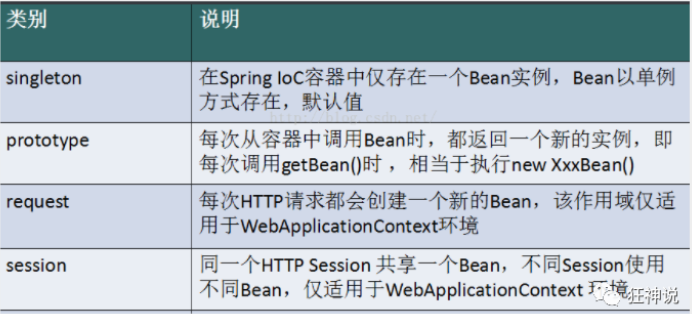
4.1Spring中Bean的几种装配方式
- XML显式装配
- Java显式装配
- 隐式自动装配
4.2 ByName自动装配
当一个bean节点带有 autowire byName的属性时。
- 将查找其类中所有的set方法名,例如setCat,获得将set去掉并且首字母小写的字符串,即cat。
- 去spring容器中寻找是否有此字符串名称id的对象。
- 如果有,就取出注入;如果没有,就报空指针异常。
<bean id="student" class="Student" autowire="byName">

   <property name="name" value="lihong"/>

</bean>
4.3 ByTpye自动装配
使用autowire byType首先需要保证:同一类型的对象,在spring容器中唯一。如果不唯一,会报不唯一的异常。
<bean id="user" class="com.kuang.pojo.User" autowire="byType">

   <property name="str" value="qinjiang"/>

</bean>
4.4 注解实现自动装配
使用前需要加注解的配置依赖
xmlns:context="http://www.springframework.org/schema/context"

<!--添加到schemaLocation目录中-->

http://www.springframework.org/schema/context

http://www.springframework.org/schema/context/spring-context.xsd

<!--开启属性注解支持-->

<context:annotation-config/>
4.4.1 @Autowired
@Autowired默认按类型自动转配,不支持id匹配
需要导入 spring-aop的包
xmlns:aop="http://www.springframework.org/schema/aop"

<!--添加到schemaLocation目录中-->

http://www.springframework.org/schema/aop

http://www.springframework.org/schema/aop/spring-aop.xsd
如果允许对象为null,设置required = false,默认为true
@Autowired(required = false)
4.4.2 @Qualifier
@Autowired是根据类型自动装配的,加上@Qualifier则可以根据byName的方式自动装配
@Qualifier不能单独使用。
@Autowired

@Qualifier(value = "beanId")
4.4.3 @Resource
- @Resource在指定name属性的情况下,先按该属性进行name方式查找装配 @Resource(name = "beanId")
- 其次再进行默认的name方式进行装配;
- 其次按type的方式自动装配。
- 都不成功,则报异常
5.注解开发和纯Java方式实现Xml配置
5.1注解开发
使用注解开发需要提前做两件预备工作
- 导入aop包(Spring4之后)
- 在xml配置中指定扫描包
<context:component-scan base-package="包路径"/>
注解开发方式
@Component("user")// 相当于配置文件中 <bean id="user" class="当前注解的类"/>

@Scope("XXX")//配置Bean的作用域

public class User {

   @Value("姬如千泷")//属性注入

   public String name;

   //@Value("姬如千泷")也可以在构造方法上注入属性

   public void setName(String name) {

       this.name = name;

  }

}
5.2 java方式实现xml配置
JavaConfig 原来是 Spring 的一个子项目,它通过 Java 类的方式提供 Bean 的定义信息,在 Spring4 的版本, JavaConfig 已正式成为 Spring4 的核心功能 。
- 实体类加组件注解
@Component  //将这个类标注为Spring的一个组件,放到容器中!

public class Dog {

   @Value("小黄")

   public String name;

}
- 编写配置类
@Configuration  //代表这是一个配置类

@Import(MyConfig2.class)  //导入合并其他配置类,类似于配置文件中的 inculde 标签

public class MyConfig {

   @Bean //等价于注册一个bean,这里的返回值类型就是Bean的类型,方法名等价于bean的id

   public Dog dog(){

       return new Dog();

  }

}
6.代理模式
6.1静态代理
- 抽象角色 : 一般使用接口或者抽象类来实现
- 真实角色 : 被代理的角色
- 代理角色 : 代理真实角色 ; 代理真实角色后 , 一般会做一些附属的操作
- 客户 : 使用代理角色来进行一些操作
静态代理有诸多好处,比如使真实角色的功能更加纯粹,业务分工明显,可扩展性增强等等。但当面对具有大量真实角色的项目时,对每个真实角色都要维护一个代理类,实属麻烦,为此,产生了动态代理。
6.2动态代理
动态代理的代理类是动态生成的 . 静态代理的代理类是我们提前写好的,因此,一个动态代理可以代理多个接口
动态代理分为两类 : 一类是基于接口动态代理 , 一类是基于类的动态代理
- 基于接口的动态代理----JDK动态代理
- 基于类的动态代理--cglib
- 现在用的比较多的是 javasist 来生成动态代理 . 百度一下javasist
- 我们这里使用JDK的原生代码来实现,其余的道理都是一样的
7.Spring实现AOP(面向切面编程)
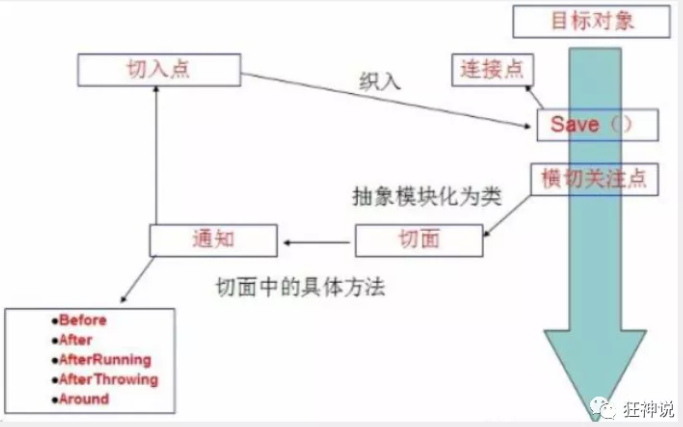
使用AOP织入,首先需要导入一个依赖包
<!-- https://mvnrepository.com/artifact/org.aspectj/aspectjweaver -->

<dependency>

   <groupId>org.aspectj</groupId>

   <artifactId>aspectjweaver</artifactId>

   <version>1.9.4</version>

</dependency>
7.1使用Spring默认api实现
- 编写一个扩展服务类,前置增强
//实现前置接口

public class BeforeService implements MethodBeforeAdvice {

   //method : 要执行的目标对象的方法

   //objects : 被调用的方法的参数

   //Object : 要通知的目标对象

   @Override

   public void before(Method method, Object[] objects, Object o) throws Throwable {

       System.out.println( o.getClass().getName() + "的" + method.getName() + "方法被执行了");

  }

}
- 在xml中注册服务类和配置aop
<beans>

<bean id="beforeService" class="BeforeService"/>

   <!--aop的配置-->

   <aop:config>

       <!--切入点 expression:表达式匹配要执行的方法,.*(..)代表所有字方法任意参数-->

       <aop:pointcut id="pointcut" expression="execution(* 实体类的路径.*(..))"/>

       <!--执行环绕; advice-ref执行方法 . pointcut-ref切入点-->

       <aop:advisor advice-ref="beforeService" pointcut-ref="pointcut"/>

   </aop:config>

</beans>
7.2 自定义类实现
- 编写一个自己的服务类
public class DiyPointcut {

//自己编写的服务类可以一次性集成多个服务

   public void before(){

       System.out.println("---------方法执行前---------");

  }

   public void after(){

       System.out.println("---------方法执行后---------");

  }

}
- 在xml中配置服务类和aop
<!--注册bean-->

<bean id="diy" class="com.kuang.config.DiyPointcut"/>

<!--aop的配置-->

<aop:config>

   <aop:aspect ref="diy">

       <aop:pointcut id="diyPonitcut" expression="execution(* 实体类路径.*(..))"/>

       <aop:before pointcut-ref="diyPonitcut" method="before"/>

       <aop:after pointcut-ref="diyPonitcut" method="after"/>

   </aop:aspect>

</aop:config>
7.3 使用注解实现
- 编写使用注解的服务类
@Aspect

public class AnnotationPointcut {

   @Before("execution(* 实体类路径.*(..))")

   public void before(){

       System.out.println("---------方法执行前---------");

  }
- 在xml中注册bean,并增加支持注解的配置
<bean id="annotationPointcut" class="AnnotationPointcut"/>

<aop:aspectj-autoproxy/>
8.Spring整合Mybatis
除了mybatis(mybatis、mysql-connector-java)和spring(spring-webmvc、spring-jdbc、aspectjweaver)的相关依赖包外,还需导入mybatis-spring依赖包
<dependency>

   <groupId>org.mybatis</groupId>

   <artifactId>mybatis-spring</artifactId>

   <version>2.0.2</version>

</dependency>
- 使用spring配置mybatis的数据源
<!--配置数据源:数据源有非常多,可以使用第三方的,也可使使用Spring的-->
<bean id="dataSource" class="org.springframework.jdbc.datasource.DriverManagerDataSource">
<property name="driverClassName" value="com.mysql.jdbc.Driver"/>
<property name="url" value="jdbc:mysql://localhost:3306/mybatis?useSSL=true&useUnicode=true&characterEncoding=utf8"/>
<property name="username" value="root"/>
<property name="password" value="123456"/>
</bean>
- 使用spring配置mybatis的SqlSessionFactory
<bean id="sqlSessionFactory" class="org.mybatis.spring.SqlSessionFactoryBean">

 <property name="dataSource" ref="dataSource" />

</bean>
- 使用spring创建mybatis的SqlSession对象(使用构造器注入),在Spring中称作一个模板对象SqlSessionTemplate
<bean id="sqlSession" class="org.mybatis.spring.SqlSessionTemplate">

 <constructor-arg index="0" ref="sqlSessionFactory" />

</bean>
- 与Mybatis不同的是,spring整合需要有一个实现了业务接口的实体类
- 方式一(自主配置SqlSessionTemplate)
public class UserDaoImpl implements UserDao {

//将SqlSessionTemplate设置为私有属性

 private SqlSessionTemplate sqlSession;

 public void setSqlSession(SqlSessionTemplate sqlSession) {

   this.sqlSession = sqlSession;

}

 public User getUser(String userId) {

   return sqlSession.getMapper(UserMapper.class).

}
<!--注册实体类,将注册的SqlSessionTemplate对象丢进去-->

<bean id="userDao" class="com.kuang.dao.UserDaoImpl">

   <property name="sqlSession" ref="sqlSession"/>

</bean>
- 方式二(使用spring提供的方法类SqlSessionDaoSupport)
//该方法类可直接获取到

public class UserDaoImpl extends SqlSessionDaoSupport implements UserMapper {

   public List<User> getUser() {

       return getSqlSession().getMapper(UserMapper.class).getUser();

  }

}
<!--注册实体类,注意这里注入的是sqlSessionFactory对象-->

<bean id="userDao" class="com.kuang.dao.UserDaoImpl">

   <property name="sqlSessionFactory" ref="sqlSessionFactory" />

</bean>
9.spring事务管理
9.1 编程式事务
一般使用try-catch捕捉并处理,但会修改源代码,不建议使用
9.2声明式事务
将事务管理代码从业务方法中分离出来,以声明的方式来实现事务管理
使用spring管理事务前,需要导入配置约束
xmlns:tx="http://www.springframework.org/schema/tx"

http://www.springframework.org/schema/tx

http://www.springframework.org/schema/tx/spring-tx.xsd">
- 注册事务
<bean id="transactionManager" class="org.springframework.jdbc.datasource.DataSourceTransactionManager">

       <property name="dataSource" ref="dataSource" />

</bean>
- 配置事务
<!--配置事务通知-->

<tx:advice id="txAdvice" transaction-manager="transactionManager">

   <tx:attributes>

       <!--配置哪些方法使用什么样的事务,配置事务的传播特性-->

       <tx:method name="add" propagation="REQUIRED"/>

       <tx:method name="delete" propagation="REQUIRED"/>

       <tx:method name="update" propagation="REQUIRED"/>

       <tx:method name="search*" propagation="REQUIRED"/>

       <tx:method name="get" read-only="true"/>

       <tx:method name="*" propagation="REQUIRED"/>

   </tx:attributes>

</tx:advice>
- aop织入事务
<!--配置aop织入事务-->

<aop:config>

   <aop:pointcut id="txPointcut" expression="execution(* 事务实体类包路径.*.*(..))"/>

   <aop:advisor advice-ref="txAdvice" pointcut-ref="txPointcut"/>

</aop:config>
SSM框架——Spring的更多相关文章
- 详解intellij idea搭建SSM框架(spring+maven+mybatis+mysql+junit)(下)
在上一篇(详解intellij idea 搭建SSM框架(spring+maven+mybatis+mysql+junit)(上))博文中已经介绍了关于SSM框架的各种基础配置,(对于SSM配置不熟悉 ...
- Maven+SSM框架(Spring+SpringMVC+MyBatis) - Hello World(转发)
[JSP]Maven+SSM框架(Spring+SpringMVC+MyBatis) - Hello World 来源:http://blog.csdn.net/zhshulin/article/de ...
- [JSP]Maven+SSM框架(Spring+SpringMVC+MyBatis) - Hello World
来源:http://blog.csdn.net/zhshulin/article/details/37956105?utm_source=tuicool&utm_medium=referral ...
- SSM框架——Spring+SpringMVC+Mybatis的搭建教程
一:概述 SSM框架在项目开发中经常使用到,相比于SSH框架,它在仅几年的开发中运用的更加广泛. Spring作为一个轻量级的框架,有很多的拓展功能,最主要的我们一般项目使用的就是IOC和AOP. S ...
- 详解intellij idea搭建SSM框架(spring+maven+mybatis+mysql+junit)(上)
SSM(Spring+SpringMVC+MyBatis)框架集由Spring.SpringMVC.MyBatis三个开源框架整合而成,常作为数据源较简单的web项目的框架. 其中spring是一个轻 ...
- Maven 搭建 SSM框架——Spring+SpringMVC+Mybatis的搭建教程
一:概述 SSM框架在项目开发中经常使用到,相比于SSH框架,它在仅几年的开发中运用的更加广泛. Spring作为一个轻量级的框架,有很多的拓展功能,最主要的我们一般项目使用的就是IOC和AOP.Sp ...
- SSM框架——Spring+SpringMVC+Mybatis的搭建
1.基本概念 1.1.Spring Spring是一个开源框架,Spring是于2003 年兴起的一个轻量级的Java 开发框架,由Rod Johnson 在其著作Expert One-On-One ...
- ssm框架 spring的主配置文件 spring-mvc主配置文件 web.xml配置文件(基础的配置文件)
1.spring主配置文件 <?xml version="1.0" encoding="UTF-8"?> <beans xmlns=" ...
- SSM框架—Spring+SpringMVC+MyBatis
1.环境搭建 1.1概念 Spring是一个Java应用的开源框架,Bean/Context/Core/IOC/AOP/MVC等是其重要组件,IOC控制反转,AOP面向切面编程,各种注入方式,实现方式 ...
- SSM框架--Spring+SpringMVC+Mybatis (IDEA)搭建
使用idea创建一个maven项目( 这里演示 的是 web项目) 点击 Finish 然后开始配置 pom.xml文件(添加各种依赖jar包) 先去找 spring 所需的 jar包 jar包中心仓 ...
随机推荐
- JUC(7)四大函数式接口
文章目录 1.四大函数式接口(必须掌握) 1.1 function 1.2 Predicate 1.3 Consumer 1.4 Supplier 1.四大函数式接口(必须掌握) 1.lambda表达 ...
- 了解 Flutter 开发者们的 IDE 使用情况
作者 / JaYoung Lee, UX Researcher at Google Google 的 Flutter 团队负责构建和维护 Android Studio (基于 IntelliJ-IDE ...
- golang开发一个简单的grpc
0.1.索引 https://waterflow.link/articles/1665674508275 1.什么是grpc 在 gRPC 中,客户端应用程序可以直接调用不同机器上的服务器应用程序上的 ...
- 2.-url和视图函数
一.URL-结构 1.定义:统一资源定位符 Uniform Resource Locator 2.作用:用来表示互联网上某个资源地址 3.URL的一般语法格式为(注:[]代码其中的内容可以省略): 格 ...
- 记录一次Oracle导入数据库失败的解决办法,最终报错:UDI-04045、ORA-04045、ORA-01775
费了很大的工夫,终于解决了.做个记录. ******************************************************************************** ...
- js高级基础部分
基于尚硅谷的尚硅谷JavaScript高级教程提供笔记撰写,加入一些个人理解 github源码 博客下载 数据类型的分类和判断 主要问题 分类 基本(值)类型 Number ----- 任意数值 -- ...
- TKK: 更新 TKK 失败,请检查网络连接 idea翻译错误-IDEA翻译失败-Translation用不了
IDEA 提示:更新 TKK 失败,请检查网络连接 解决方法: 1.进入 C:\Windows\System32\drivers\etc 找到 hosts文件修改 注意:如果用记事本打开不能修改,则修 ...
- 2022春每日一题:Day 35
题目:[NOI Online #1 提高组] 冒泡排序 看到范围这么大,求逆序对,有修改,估计也只能树状数组了,考查冒泡排序性质,排第i次冒泡排序,总逆序对个数会减少i的逆序对个数,然后交换两个数,他 ...
- Kubernetes基础_Service暴露的两种方式
一.前言 kubernetes集群中,pod是多变的,可以被新建或删除,而且ip不稳定,不方便集群外部访问,所以提供了一种新的资源 Service ,就是就是 a set of Pod ,作用是提供一 ...
- 两行CSS让页面提升了近7倍渲染性能!
前言 对于前端人员来讲,最令人头疼的应该就是页面性能了,当用户在访问一个页面时,总是希望它能够快速呈现在眼前并且是可交互状态.如果页面加载过慢,你的用户很可能会因此离你而去.所以页面性能对于前端开发者 ...