
使用antd UI 制作菜单
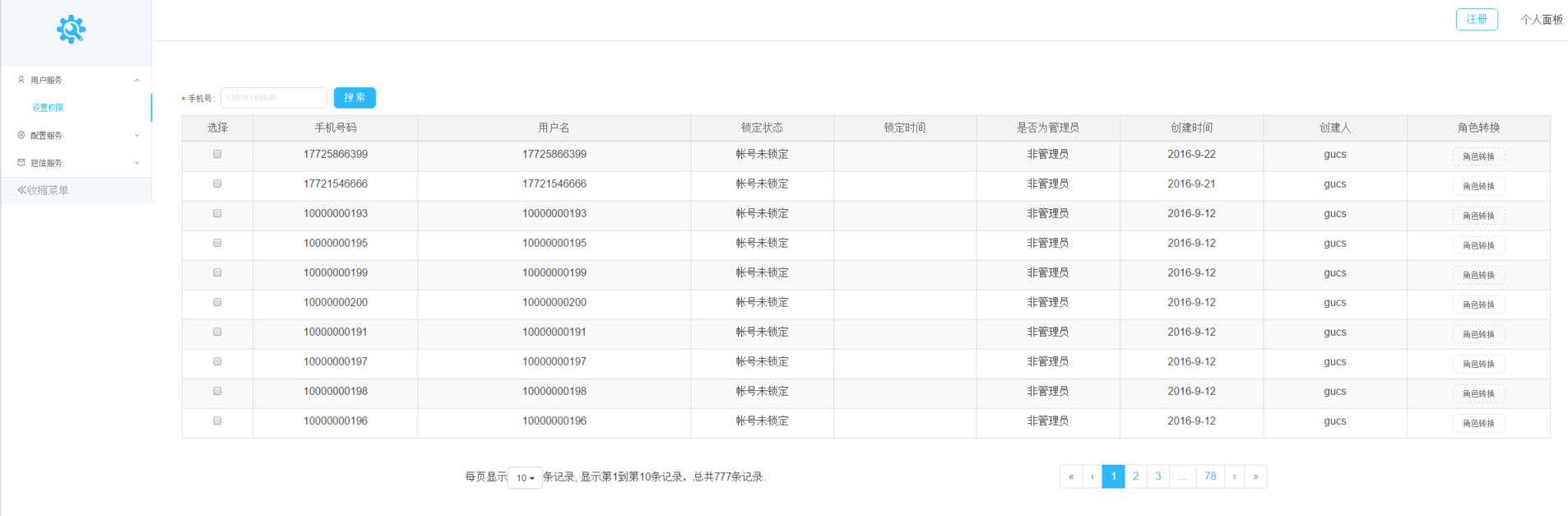
antd 主页地址:https://ant.design/docs/react/introduce
在使用过程中,不能照搬antd的组件代码,因为有些并不合适。首先,菜单并没有做跳转功能,仅仅是菜单,需要在它的基础方法中添加我们的业务代码。
/*菜单组件,所有的方法都要bind this*/

import React,{Component} from 'react';

import {render} from 'react-dom';

import {Link,browserHistory} from 'react-router';

import Menu from 'antd/lib/menu';

import Icon from 'antd/lib/icon';

const SubMenu = Menu.SubMenu;

const MenuItemGroup = Menu.ItemGroup;

import {user_search_path,

        application_search_path,navigation_search,advertising_search} from 'config';

export default class Sidebar extends Component{

    constructor(props){

        super(props);

        this.state = {

            current: '1',

            openKeys: []

        }

    }

    handleClick(e) {

       /*这里要做判断,判断是点击哪个菜单,就跳转到相应的菜单内容,使用router进行跳转*/

        if(e.key == "1"){

            browserHistory.push(user_search_path);

        }else if(e.key == '2'){

            browserHistory.push(application_search_path);

        }else if(e.key == '3'){

            browserHistory.push(navigation_search);

        }else if(e.key == '4'){

            browserHistory.push(advertising_search);

        }

        this.setState({

            current: e.key,

            openKeys: e.keyPath.slice(1)

        });

    }

    onToggle(info) {

        console.log('onToggle', info);

        this.setState({

            openKeys: info.open ? info.keyPath : info.keyPath.slice(1)

        });

    }

    getKeyPath(key) {

        const map = {

            sub1: ['sub1'],

            sub2: ['sub2'],

            sub3: ['sub2', 'sub3'],

            sub4: ['sub4'],

        };

        return map[key] || [];

    }

    render(){

        return(

            <div>

                <Menu

                    mode="inline"

                    openKeys={this.state.openKeys}

                    selectedKeys={[this.state.current]}

                    style={{ width: 230 }}

                    onOpen = {this.onToggle.bind(this)}   /*打开菜单*/

                    onClose = {this.onToggle.bind(this)}  /*关闭菜单*/

                    onClick={this.handleClick.bind(this)} /*触发菜单*/

                    >

                    <SubMenu key="sub1" title={<span><Icon type="user" /><span>用户服务</span></span>}>

                        <Menu.Item key="1">设置权限</Menu.Item>

                    </SubMenu>

                    <SubMenu key="sub2" title={<span><Icon type="setting" /><span>配置服务</span></span>}>

                        <Menu.Item key="2">app版本查询</Menu.Item>

                        <SubMenu key="sub3" title="app配置版本查询">

                            <Menu.Item key="3">导航配置查询</Menu.Item>

                            <Menu.Item key="4">广告配置查询</Menu.Item>

                        </SubMenu>

                        <Menu.Item key="5">app changeLog</Menu.Item>

                    </SubMenu>

                    <SubMenu key="sub4" title={<span><Icon type="mail" /><span>短信服务</span></span>}>

                    </SubMenu>

                </Menu>

            </div>

        );

    }

}
第二步,通过页面加载组件Parent.js,固定菜单与菜单内容的位置
import React,{Component} from 'react';

import {render} from 'react-dom';

import Icon from 'antd/lib/icon';

import jiChu from '../../../build/images/jichu.png';

import HeaderRight from '../login/HeaderRight.js';

import SearchUser from '../login/SearchUser.js';

import Sidebar from '../sidebar/Sidebar.js';

import style from '../../../build/css/login.css';

export default class Parent extends Component{

    constructor(props){

        super(props);

    }

    render(){

        const headerUserPanel = (<HeaderRight {...this.props} />);

        const search = (<SearchUser {...this.props} />);

        const sidebars = (<Sidebar {...this.props} />);   /*菜单组件*/

        return(

            <div className="main-view">

                <div className="main-sidebar">

                    <div className="sidebar-wrapper">

                        <div className="sidebar">

                            <div className="logo">

                                <img src={jiChu} className="logoPic" />

                            </div>

                            <div className="sidebar-nav">

                                {sidebars}

                            </div>

                            <div className="sidebar-footer">

                                <span><Icon type="double-left" /><span>收缩菜单</span></span>

                            </div>

                        </div>

                    </div>

                </div>

                <div className="main-wrapper">

                    <div className="main-nav-bar">

                        <div className="navbar">

                            {headerUserPanel}

                        </div>

                        <div className="main-body">

                            <div className="main-content">

                                {this.props.children}             /*菜单组件对应内容*/

                            </div>

                        </div>

                    </div>

                </div>

            </div>

        );

    }

}
最后一步,在路由中通过path将页面与路径关联,这样我们在菜单组件中的跳转就是通过这一步控制
import React from 'react';

import {render} from 'react-dom';

import { Router , Redirect, Route , IndexRoute , browserHistory } from 'react-router';

import { Provider } from 'react-redux'

const store = configureStore();

render((

    <Provider store={store}>

        <Router history={browserHistory}>

            <Route path={user_service_path} component={Parent}>

            <Route path={user_sidebar_bath} component={Sidebar}></Route>

            <Route path={application_search_path} component={AdvertisementTablePannelContainer}></Route>

    </Provider>

), document.getElementById('root'));
完毕!
使用antd UI 制作菜单的更多相关文章
- [UI]抽屉菜单DrawerLayout分析(一)
本文转载于:http://www.cnblogs.com/avenwu/archive/2014/04/16/3669367.html 侧拉菜单作为常见的导航交互控件,最开始在没有没有android官 ...
- Adobe Edge Animate –使用css制作菜单
Adobe Edge Animate –使用css制作菜单 版权声明: 本文版权属于 北京联友天下科技发展有限公司. 转载的时候请注明版权和原文地址. 效果图:
- [UI]抽屉菜单DrawerLayout分析(三)
在[UI]抽屉菜单DrawerLayout分析(一)和[UI]抽屉菜单DrawerLayout分析(二)中分别介绍了DrawerLayout得基本框架结构和ViewDragerHelper的作用以及手 ...
- Jquery.Treeview+Jquery UI制作Web文件预览
效果图: 前台Html: <%@ Page Language="C#" AutoEventWireup="true" CodeBehind="D ...
- React 版 V2EX 社区( react & react-router & axios & antd ui)
目录 项目简介 在线演示 截图演示 踩坑 项目简介(1/4) Github: https://github.com/bergwhite/v2ex-react 项目使用React.Reac-router ...
- Flutter实战视频-移动电商-55.购物车_底部结算栏UI制作
55.购物车_底部结算栏UI制作 主要做下面结算这一栏目 cart_bottom.dart页面 先设置下内边距 拆分成三个子元素 全选 因为有一个文本框和一个全选的text文本,所以这里也用了Row布 ...
- WPF利用radiobutton制作菜单按钮
原文:WPF利用radiobutton制作菜单按钮 版权声明:欢迎转载.转载请注明出处,谢谢 https://blog.csdn.net/wzcool273509239/article/details ...
- 学习CSS制作菜单列表,举一反三
1.普通的二三级菜单 <!DOCTYPE html> <html> <head> <meta http-equiv="Content-Type&qu ...
- 使用antd UI组件有感
公司使用的的react.js的版本提14.7的,JS版本使用的是ES6语法,因此在使用antd过程中,有些许不愉快的记录,分享给大家,一起学习: 如果是react 14.7版本时,使用getField ...
随机推荐
- Windows TCP连接数限制解决
reg add "HKEY_LOCAL_MACHINE\SYSTEM\CurrentControlSet\Services\Tcpip\Parameters" /v "M ...
- Android开发学习——android体系结构
Android的体系结构采用了分层架构的思想, 从上层到底层共包括四层,分别是应用程序程序层.应用框架层.系统库和Android运行时和Linux内核. 一 应用程序层 该层提供一些核心应用程序包,例 ...
- Java Web中请求转发和请求包含
1.都是在一个请求中跨越多个Servlet 2.多个Servlet在一个请求中,他们共享request对象.就是在AServle中setAttribute()保存数据在BServlet中由getAtt ...
- IOS开发基础知识--碎片37
1:iOS 使用NJKWebViewProgress做webview进度条 引入头文件: #import "NJKWebViewProgressView.h" #import &q ...
- Shou.TV 招聘【北京】— — 生效中
一.团队 一个牛逼又有理想的团队,Vitamio 团队原班人马,现在总共 17 人( 9 名开发),拥有成熟的技术团队以及行业一流的研发实力,特别是在移动领域视频编解码.云端处理等资深视频行业经验. ...
- 文件的上传(如何兼容火狐与IE)与国际化的原理
1.文件的上传 [1] 简介 > 将本地的文件上传到服务器中 > 用户需要通过一个表单将文件上传到服务器中 [2] 表单的设置 ...
- 微软源代码管理工具TFS2013安装与使用详细图文教程(Vs2013)
这篇文章联合软件小编主要介绍了微软源代码管理工具TFS2013安装与使用图文教程,本文详细的给出了TFS2013的安装配置过程.使用教程,需要的朋友可以参考下 最近公司新开发一个项目要用微软的TFS2 ...
- C#知识点整理
1.我们在Main()函数中,调用Test()函数,我们管Main()函数称之为调用者, 管Test()函数称之为被调用者. 如果被调用者想要得到调用者的值: 1).传递参数. 2).使用静态字段来模 ...
- RMAN备份脚本一列分享
在ORACLE数据库中,RMAN备份的脚本非常多,下面介绍一例shell脚本如何通过RMAN备份,以及FTP上传RMAN备份文件以及归档日志文件的脚本. fullback.sh 里面调用RMAN命令做 ...
- Hadoop2.5.0 搭建实录
目录: 第一步:准备相关材料 第二步:虚拟机环境搭建 第三步:用户信息 第四步 安装.配置Java环境 第五步 Zookeeper安装配置 第六步 Hadoop安装.配置 第七步:HBase安装部署 ...