
Spring Boot 中处理跨域
HTML 5中新增的跨域资源访问(Cross-Origin Resource Sharing)特性可以让我们在开发后端系统的时候决定资源是否允许被跨域访问。所谓跨域指的是域名不同或者端口不同或者协议不同,比如当从mrbrid.cc网站访问mrbird.cc:8080网站资源就会存在跨域问题。Spring从4.2版本开始就提供了跨域的支持,开箱即用。这里介绍如何在Spring Boot开发中解决跨域的问题,主要分为注解驱动和接口编程的方式。
模拟跨域
要解决跨域问题,我们就得先模拟一个跨域情景。新建Spring Boot项目,版本为2.1.0.RELEASE,并引如下依赖:
<dependency>
    <groupId>org.springframework.boot</groupId>
    <artifactId>spring-boot-starter-web</artifactId>
</dependency>
<dependency>
    <groupId>org.springframework.boot</groupId>
    <artifactId>spring-boot-starter-thymeleaf</artifactId>
</dependency>
项目结构如下所示:

在com.example.demo路径下新建controller包,并创建TestController:
@Controller
public class TestController {
@RequestMapping("index")
public String index () {
return "index";
}
@RequestMapping("hello")
@ResponseBody
public String hello(){
return "hello";
}
}
然后在resources/templates下新建index.html:
<!DOCTYPE html>
<html lang="en">
<head>
    <meta charset="UTF-8">
    <title>跨域测试</title>
    <script src="http://libs.baidu.com/jquery/1.11.3/jquery.min.js"></script>
</head>
<body>
<div id="hello"></div>
</body>
<script>
    $(function () {
        $.get("http://test.mrbird.cc:8080/hello", function (data) {
            $("#hello").text(data);
        })
    })
</script>
</html>
编辑本地hosts文件,将http://test.mrbird.cc网址映射到127.0.0.1上:
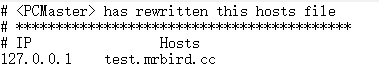
启动项目访问http://localhost:8080/,会发现页面并没有成功显示hello,并且F12观察浏览器控制台会发现其报错了:

这是因为我们在http://localhost:8080/域名下试图访问http://test.mrbird.cc:8080下的hello接口,这就存在跨域问题,接下来我们来解决这个问题。
注解驱动
Spring 4.2后提供了@CrossOrigin注解,该注解可以标注于方法或者类上,包含了以下属性:
| 属性 | 含义 |
|---|---|
| value | 指定所支持域的集合,*表示所有域都支持,默认值为*。这些值对应HTTP请求头中的Access-Control-Allow-Origin |
| origins | 同value |
| allowedHeaders | 允许请求头中的header,默认都支持 |
| exposedHeaders | 响应头中允许访问的header,默认为空 |
| methods | 支持请求的方法,比如GET,POST,PUT等,默认和Controller中的方法上标注的一致。 |
| allowCredentials | 是否允许cookie随请求发送,使用时必须指定具体的域 |
| maxAge | 预请求的结果的有效期,默认30分钟 |
我们来改造TestController中的hello方法:
@RequestMapping("hello")
@ResponseBody
@CrossOrigin(value = "*")
public String hello() {
    return "hello";
}
表示允许所有域都支持,重启项目,再次访问http://localhost:8080/:
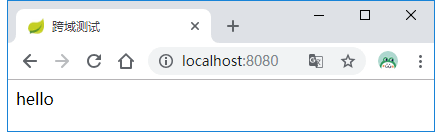
接口编程
除了使用@CrossOrigin注解外,我们可以使用接口编程的方式进行统一配置。
在com.example.demo路径下新建config包,然后创建WebConfigurer,实现WebMvcConfigurer,重写addCorsMappings默认实现:
@Configuration
public class WebConfigurer implements WebMvcConfigurer {
@Override
public void addCorsMappings(CorsRegistry registry) {
registry.addMapping("/**")
.allowedOrigins("*")
.allowedMethods("GET");
}
}
上面配置表示允许所有请求支持跨域访问,并且不限定域,但是支持持GET方法。将hello方法上的@CrossOrigin注解注释掉,重启项目,再次访问http://localhost:8080/,结果也是OK的。
过滤器实现
查看官方文档,发现其还提供了基于过滤器的实现方式:
@Bean
public FilterRegistrationBean corsFilter() {
    UrlBasedCorsConfigurationSource source = new UrlBasedCorsConfigurationSource();
    CorsConfiguration config = new CorsConfiguration();
    config.setAllowCredentials(true);
    config.addAllowedOrigin("*");
    source.registerCorsConfiguration("/**", config);
    FilterRegistrationBean bean = new FilterRegistrationBean(new CorsFilter(source));
    bean.setOrder(0);
    return bean;
}
Actuator跨域
如果项目里集成了Actuator相关功能,其暴露的接口也支持跨域,只需要在配置文件中添加如下配置即可:
ENDPOINTS CORS CONFIGURATION (CorsEndpointProperties)
management.endpoints.web.cors.allow-credentials= # Whether credentials are supported. When not set, credentials are not supported.
management.endpoints.web.cors.allowed-headers= # Comma-separated list of headers to allow in a request. '*' allows all headers.
management.endpoints.web.cors.allowed-methods= # Comma-separated list of methods to allow. '*' allows all methods. When not set, defaults to GET.
management.endpoints.web.cors.allowed-origins= # Comma-separated list of origins to allow. '*' allows all origins. When not set, CORS support is disabled.
management.endpoints.web.cors.exposed-headers= # Comma-separated list of headers to include in a response.
management.endpoints.web.cors.max-age=1800s # How long the response from a pre-flight request can be cached by clients. If a duration suffix is not specified, seconds will be used.
Spring Boot 中处理跨域的更多相关文章
- spring boot:解决cors跨域问题的两种方法(spring boot 2.3.2)
一,什么是CORS? 1,CORS(跨域资源共享)(CORS,Cross-origin resource sharing), 它是一个 W3C 标准中浏览器技术的规范, 它允许浏览器向非同一个域的服务 ...
- Java Spring boot 2.0 跨域问题
跨域 一个资源会发起一个跨域HTTP请求(Cross-site HTTP request), 当它请求的一个资源是从一个与它本身提供的第一个资源的不同的域名时 . 比如说,域名A(http://dom ...
- spring boot之配置跨域
在启动类中配置 @Bean public WebMvcConfigurer corsConfigurer() { return new WebMvcConfigurer() { @Override p ...
- spring boot项目配置跨域
1.在项目启动入口类实现 WebMvcConfigurer 接口: @SpringBootApplication public class Application implements WebMvcC ...
- 关于 Spring Security OAuth2 中 CORS 跨域问题
CORS 是一个 W3C 标准,全称是”跨域资源共享”(Cross-origin resource sharing).它允许浏览器向跨源服务器,发出XMLHttpRequest请求,从而克服了 AJA ...
- Spring Boot中通过CORS解决跨域问题
今天和小伙伴们来聊一聊通过CORS解决跨域问题. 同源策略 很多人对跨域有一种误解,以为这是前端的事,和后端没关系,其实不是这样的,说到跨域,就不得不说说浏览器的同源策略. 同源策略是由Netscap ...
- Spring Boot中使用 Spring Security 构建权限系统
Spring Security是一个能够为基于Spring的企业应用系统提供声明式的安全访问控制解决方案的安全框架.它提供了一组可以在Spring应用上下文中配置的Bean,为应用系统提供声明式的安全 ...
- Spring Boot中只能有一个WebMvcConfigurationSupport配置类
首先将结论写文章的最前面,一个项目中只能有一个继承WebMvcConfigurationSupport的@Configuration类(使用@EnableMvc效果相同),如果存在多个这样的类,只有一 ...
- Springboot中关于跨域问题的一种解决方法
前后端分离开发中,跨域问题是很常见的一种问题.本文主要是解决 springboot 项目跨域访问的一种方法,其他 javaweb 项目也可参考. 1.首先要了解什么是跨域 由于前后端分离开发中前端页面 ...
- Spring Boot 中 Redis 的使用
Spring Boot 对常用的数据库支持外,对 Nosql 数据库也进行了封装自动化,如Redis.MongoDB等,本文主要介绍Redis的使用. Redis 介绍 Redis 是目前业界使用最广 ...
随机推荐
- mybatis的自定义类型转化器如何使用
<?xml version="1.0" encoding="UTF-8"?> <!DOCTYPE mapper PUBLIC "-/ ...
- OSPF的安全认证
OSPF的安全认证 OSPF通过LSA报文同步状态信息,协议根据LSA提供的状态信息,快速实行全网路由的建立.也就是一通百通,一变则变.坏处就是有人搞破坏,一坏则百坏.为防止网络破坏活动,实行认证(明 ...
- 【广告】UEOI 招聘减章
欢迎加入UEOI! 招聘目标:>=25人 各位++rp.
- css设置背景图(背景图太大导致图片显示不全)
.bg{background:url('/back.png');filter:"progid:DXImageTransform.Microsoft.AlphaImageLoader(sizi ...
- sed 命令添加字符串
指定行替换字符串: sed '1,$ s/you/she/g' a.txt :(对源文件添加的话就用-i参数)-i参数是对源文件进行修改: 1 i 在第一行前面添加: 2 i 在第二行前面添加: $a ...
- mvc和ef如何连接
1.一般加上ef步骤:引入ef包,新建自己的context并继承自DbContext,构造函数里写上链接字符串,属性都是表集合.如何使用:程序中UserContext un = new UserCon ...
- Advent of Code 2015: Day 10
JP's Blog GITHUB * FLICKR * RESUME Search Programming Reviews Photography Maker Writing Research RS ...
- Vue 更改数组中的值,页面不刷新问题。解决方法+原理说明
一.Vue 更改数组中的值,页面不刷新问题 data{ hobby:["打游戏","想静静","发呆"] } 1.错误写法(页面不刷新): ...
- PHP统计在线用户数量
一段经典的php统计在线用户数量的代码,一起学习分享. <?php /** * Created by PhpStorm. * User: jifei * Date: 15/11/24 * ...
- httpcanary高级版--不闪退!!!!
地址 https://wwm.lanzouw.com/iOf7Hz11s4j 密码:45of