
【深入学习.Net】.泛型集合【体检管理系统】
基于泛型List的体检管理系统(蜗牛爬坡)
第五章【体检管理系统】
一、项目展示图(基于.net core6.0)
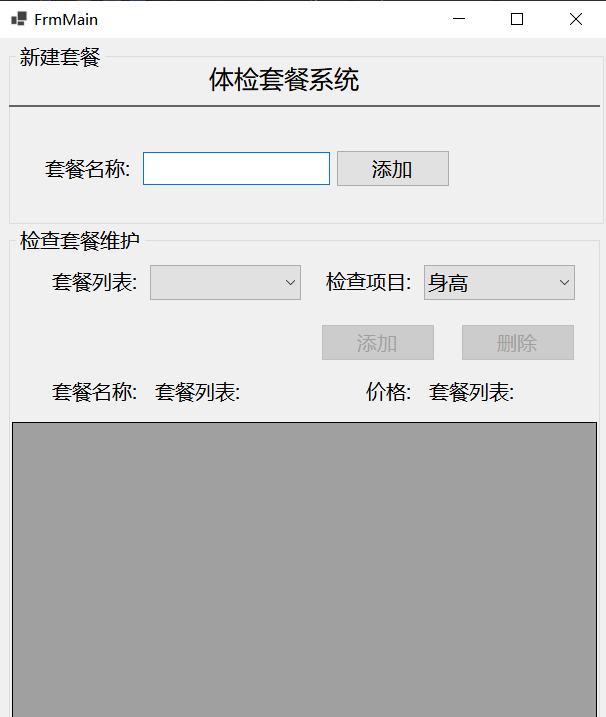
二、首先准备两个Model类
- HealthCheckItem(项目类):Name(项目名称)、Description(项目描述)、Price(当前项目价格)
- HealthCheckSet(套餐类):Name(套餐名称)、Items(套餐项目集合)、Price(套餐项目总价格)
- 代码如下


 1 /// <summary>

 2     /// 检查项目类

 3     /// </summary>

 4     public class HealthCheckItem

 5     {

 6         public HealthCheckItem(string name, string description, decimal price)

 7         {

 8             Name = name;

 9             Description = description;

10             Price = price;

11         }

12

13         /// <summary>

14         /// 项目名称

15         /// </summary>

16         public string Name { get; set; }

17         /// <summary>

18         /// 项目描述

19         /// </summary>

20         public string Description { get; set; }

21         /// <summary>

22         /// 项目价格

23         /// </summary>

24         public decimal Price { get; set; }

25     }
 1     /// <summary>

 2     /// 套餐类

 3     /// </summary>

 4     public class HealthCheckSet

 5     {

 6         /// <summary>

 7         /// 套餐名称

 8         /// </summary>

 9         public string Name { get; set; }

10

11         /// <summary>

12         ///套餐包含的项目

13         /// </summary>

14         public List<HealthCheckItem> Items { get; set; }

15

16         /// <summary>

17         /// 包含项目的总价

18         /// </summary>

19         public decimal Price { get; set; }

20

21         /// <summary>

22         /// 计算总价的方法

23         /// </summary>

24         public void CalcPrice()

25         {

26             decimal totalPrice = 0;

27             foreach (var item in Items)

28             {

29                totalPrice+=item.Price;

30             }

31             this.Price = totalPrice;

32         }

33

34         public HealthCheckSet()

35         {

36             Items = new List<HealthCheckItem>();

37         }

38         public HealthCheckSet(string name, List<HealthCheckItem> items)

39         {

40             Name = name;

41             Items = items;

42         }

43     }
三、首先创建两个项目对象集合,在添加多个初始项目对象
1    private List<HealthCheckItem> AllItems = new List<HealthCheckItem>(); //所有项目对象集合

2         private List<HealthCheckItem> items = new List<HealthCheckItem>();// 套餐项目集合

3         private HealthCheckItem item1, item2, item3, item4, item5, item6, item7; //初始项目
四、创建套餐对象、和套餐对象集合
1  private HealthCheckSet healthSet; //初始套餐对象

2         private List<HealthCheckSet> healthSets = new List<HealthCheckSet>(); //套餐对象集合
五、直接上代码(Tips:本项目无需点击添加相应控件事件)
  1         public FrmMain()

  2         {

  3             InitializeComponent();

  4             Load += FrmMain_Load;

  5         }

  6

  7         /// <summary>

  8         /// 窗体加载事件

  9         /// </summary>

 10         /// <param name="sender"></param>

 11         /// <param name="e"></param>

 12         private void FrmMain_Load(object? sender, EventArgs e)

 13         {

 14             btnAdd.Enabled = false;

 15             btnDelete.Enabled = false;

 16             ComboBox();

 17             HealthTao();

 18             btnNameAdd.Click += BtnNameAdd_Click;

 19             btnAdd.Click += BtnAdd_Click;

 20             cbNameList.SelectedIndexChanged += CbNameList_SelectedIndexChanged;

 21             btnDelete.Click += BtnDelete_Click;

 22         }

 23         /// <summary>

 24         /// 删除事件

 25         /// </summary>

 26         /// <param name="sender"></param>

 27         /// <param name="e"></param>

 28         private void BtnDelete_Click(object? sender, EventArgs e)

 29         {

 30             if (dataGridView1.SelectedRows.Count > 0)

 31             {

 32                 int index = dataGridView1.SelectedRows[0].Index;

 33                 healthSets[cbNameList.SelectedIndex].Items.RemoveAt(index);

 34                 dataGridView1.DataSource = null;

 35                 Add();

 36             }

 37             else

 38             {

 39                 MessageBox.Show("表中没有该选项!");

 40                 cbHealthList.SelectedIndex = 0;

 41             }

 42         }

 43

 44         /// <summary>

 45         /// 套餐列表选中改变事件

 46         /// </summary>

 47         /// <param name="sender"></param>

 48         /// <param name="e"></param>

 49         private void CbNameList_SelectedIndexChanged(object? sender, EventArgs e)

 50         {

 51             if(cbNameList.Text != String.Empty)

 52             {

 53                 btnAdd.Enabled = true;

 54                 btnDelete.Enabled = true;

 55                 dataGridView1.DataSource = null;

 56                 Add();

 57                 lbName.Text = cbNameList.Text;

 58             }

 59         }

 60         /// <summary>

 61         /// 套餐添加项目事件

 62         /// </summary>

 63         /// <param name="sender"></param>

 64         /// <param name="e"></param>

 65         private void BtnAdd_Click(object? sender, EventArgs e)

 66         {

 67             if (dataGridView1.SelectedRows.Count <= 0)

 68             {

 69                 cbHealthList.SelectedIndex = 0;

 70             }

 71             if (cbNameList.Text != String.Empty)

 72             {

 73                 var name = cbNameList.Text;

 74                 var heal = cbHealthList.Text;

 75                 int index = cbHealthList.SelectedIndex;

 76                 if ((healthSets[cbNameList.SelectedIndex].Items.Any(m => m.Name == heal)))

 77                 {

 78                     MessageBox.Show("已添加过该项目");

 79                 }

 80                 else

 81                 {

 82                     dataGridView1.DataSource = null;

 83                     healthSets[cbNameList.SelectedIndex].Items.Add(AllItems[index]);

 84                     Add();

 85                     MessageBox.Show("添加成功!");

 86                     int healIndex = cbHealthList.SelectedIndex;

 87                     if (healIndex < cbHealthList.Items.Count - 1)

 88                     {

 89                         cbHealthList.SelectedIndex = healIndex + 1;

 90                     }

 91                     else

 92                     {

 93                         cbHealthList.SelectedIndex = 0;

 94                     }

 95                 }

 96             }

 97             else

 98             {

 99                 MessageBox.Show("请选择相应套餐!");

100             }

101         }

102         /// <summary>

103         /// 添加套餐点击事件

104         /// </summary>

105         /// <param name="sender"></param>

106         /// <param name="e"></param>

107         private void BtnNameAdd_Click(object? sender, EventArgs e)

108         {

109             if (tbName.Text.Trim() != String.Empty)

110             {

111                 healthSet = new HealthCheckSet();

112                 healthSet.Name = tbName.Text;

113                 if (!healthSets.Any(m => m.Name == tbName.Text))

114                 {

115                     cbNameList.Items.Add(healthSet.Name);

116                     healthSets.Add(healthSet);

117                     tbName.Text = String.Empty;

118                     dataGridView1.DataSource = null;

119                     int index = cbNameList.FindString(healthSet.Name);

120                     cbNameList.SelectedIndex = index;

121                     MessageBox.Show("添加成功!");

122                 }

123                 else

124                 {

125                     MessageBox.Show("已存在该套餐了!");

126                     tbName.Text = String.Empty;

127                 }

128             }

129             else

130             {

131                 MessageBox.Show("请输入套餐名称!");

132             }

133

134         }

135         /// <summary>

136         /// 下拉框绑定

137         /// </summary>

138         private void ComboBox()

139         {

140             item1 = new HealthCheckItem("身高", "用于检查身高", 5);

141             item2 = new HealthCheckItem("体重", "用于检查体重", 15);

142             item3 = new HealthCheckItem("视力", "用于检查视力", 5);

143             item4 = new HealthCheckItem("听力", "用于检查听力", 10);

144             item5 = new HealthCheckItem("肝功能", "用于检查肝功能", 45);

145             item6 = new HealthCheckItem("B超", "用于检查B超", 55);

146             item7 = new HealthCheckItem("心电图", "用于检查心脏", 65);

147             AllItems.Add(item1);

148             AllItems.Add(item2);

149             AllItems.Add(item3);

150             AllItems.Add(item4);

151             AllItems.Add(item5);

152             AllItems.Add(item6);

153             AllItems.Add(item7);

154             foreach (var item in AllItems)

155             {

156                 cbHealthList.Items.Add(item.Name);

157             }

158             cbHealthList.SelectedIndex = 0;

159

160         }

161

162         /// <summary>

163         /// 初始套餐/项目对象

164         /// </summary>

165         private void HealthTao()

166         {

167             items.Add(item1);

168             items.Add(item2);

169             items.Add(item3);

170             items.Add(item4);

171             healthSet = new HealthCheckSet("入学套餐", items);

172             healthSets.Add(healthSet);

173             cbNameList.Items.Add(healthSet.Name);

174             healthSet.CalcPrice();

175         }

176

177         /// <summary>

178         /// 表格刷新共用方法

179         /// </summary>

180         private void Add()

181         {

182             healthSets[cbNameList.SelectedIndex].CalcPrice();

183             lbPrice.Text = healthSets[cbNameList.SelectedIndex].Price.ToString("C2");

184             dataGridView1.DataSource = healthSets[cbNameList.SelectedIndex].Items;

185             dataGridView1.Columns["Name"].HeaderText = "项目名称";

186             dataGridView1.Columns["Description"].HeaderText = "项目描述";

187             dataGridView1.Columns["Price"].HeaderText = "项目价格";

188         }

189     }
六、小结:本项目采用泛型集合实现,进一步对控件的使用和深入学习面向对象的编程思想,有更深的学习和了解
【深入学习.Net】.泛型集合【体检管理系统】的更多相关文章
- LINQ学习系列-----3.1 查询非泛型集合
一.问题起源 LINQ to object在设计时,是配合IEnumerable<T>接口的泛型集合类型使用的,例如字典.数组.List<T>等,但是对于继承了IEnumera ...
- WebAPI调用笔记 ASP.NET CORE 学习之自定义异常处理 MySQL数据库查询优化建议 .NET操作XML文件之泛型集合的序列化与反序列化 Asp.Net Core 轻松学-多线程之Task快速上手 Asp.Net Core 轻松学-多线程之Task(补充)
WebAPI调用笔记 前言 即时通信项目中初次调用OA接口遇到了一些问题,因为本人从业后几乎一直做CS端项目,一个简单的WebAPI调用居然浪费了不少时间,特此记录. 接口描述 首先说明一下,基于 ...
- LINQ学习系列-----3.1 查询非泛型集合和多个分组
一.查询非泛型集合 1.问题起源 LINQ to object在设计时,是配合IEnumerable<T>接口的泛型集合类型使用的,例如字典.数组.List<T>等,但是对于继 ...
- 泛型学习第三天——C#读取数据库返回泛型集合 把DataSet类型转换为List<T>泛型集合
定义一个类: public class UserInfo { public System.Guid ID { get; set; } public string LoginName ...
- 【学习笔记】C#中的泛型和泛型集合
一.什么是泛型? 泛型是C#语言和公共语言运行库(CLR)中的一个新功能,它将类型参数的概念引入.NET Framework.类型参数使得设计某些类和方法成为可能,例如,通过使用泛型类型参数T,可以大 ...
- c#利用泛型集合,为自己偷偷懒。
有人说"越懒"的程序员进步的越快!其实还挺有道理.亲身体验,从刚出来工作到现在,自己变"懒"了许多,但感觉写出来的代码确有了不少提升.刚开始啊,同样的代码,赋值 ...
- 编写高质量代码改善C#程序的157个建议[泛型集合、选择集合、集合的安全]
前言 软件开发过程中,不可避免会用到集合,C#中的集合表现为数组和若干集合类.不管是数组还是集合类,它们都有各自的优缺点.如何使用好集合是我们在开发过程中必须掌握的技巧.不要小看这些技巧,一旦在开 ...
- ConvertHelper与泛型集合
在机房重构时.我们常常会用到ConvertHelper. 它把从数据库中查询到的dateTable(也是一个暂时表)转化为泛型,然后再填充到DataGridView控件中. ConvertHelper ...
- C# 找出泛型集合中的满足一定条件的元素 List.Wher()
在学习的过程中,发现泛型集合List<T>有一个Where函数可以筛选出满足一定条件的元素,结合Lambda表达式使用特别方便,写出来与大家分享. 1.关于Func<> Fun ...
随机推荐
- 手绘图解java类加载原理
摘要:这也许是全网"最大"."最细"."最深"的java类加载原理图解了. 本文分享自华为云社区<[读书会第12期]这也许是全网&qu ...
- HMS Core AR Engine 2D图片/3D物体跟踪技术 助力打造更智能AR交互体验
AR技术已经被广泛应用于营销.教育.游戏.展览等场景.通过2D图像跟踪技术和3D物体跟踪技术,用户只需使用一台手机进行拍摄,即可实现海报.卡牌等平面物体以及文物.手办等立体物体的AR效果.尽管近年来2 ...
- 软件构造Lab1实验要点总结
本实验通过解决三个问题,训练了基本的Java编程技能,并给出了Eclipse+Jdk+Junit的配置方案,以及对使用git进行项目管理的方式. 1.因此,本实验的第一个要点是配置环境.具体配置环境过 ...
- 在CabloyJS中将Webpack生成的文件自动上传到阿里云OSS
背景 阿里云OSS提供了一个Webpack插件,可在Webpack打包结束后将webpack生成的文件自动上传到阿里云OSS中 下面看看在CabloyJS中如何使用该插件 新建项目,并配置MySQL连 ...
- 在Winform开发中,使用Async-Awati异步任务处理代替BackgroundWorker
在Winform开发中有时候我们为了不影响主UI线程的处理,以前我们使用后台线程BackgroundWorker来处理一些任务操作,不过随着异步处理提供的便利性,我们可以使用Async-Awati异步 ...
- 简述电动汽车的发展前景及3D个性化定制需求
李彦宏前几天又搞事,他宣布百度要开始造电动汽车了!百度市值更是因此一夜暴涨了700亿. 这熟悉的配方,好像在乔布斯.库克那里也见过. 苹果的"iCar"(或者是Apple Car) ...
- Mac安装Brew包管理系统
Mac安装Brew包管理系统 前言 为什么需要安装brew 作为一个开发人员, 习惯了使用centos的yum和ubuntu的apt, 在mac中有没有这两个工具的平替? 有, 就是Brew. Bre ...
- Vue路由的模块自动化与统一加载
首先呢,我们来看看一般项目路由是怎么划分的. 为什么这么划分呢?如果大项目业务非常多,单纯的单页面很难维护,我们只有这样规范化,才能高效率. 模块自动化与统一加载的好处: 规范化命名(模块名.业务名. ...
- hive完整搭建
安装 MySQL 服务的详细步骤如下: 1. 解压安装包 现在已经为大家下载好了 MySQL 5.7.25 的安装包,存放在 /root/software 目录下.首先进入此目录下,然后使用tar - ...
- CentOS中实现基于Docker部署BI数据分析
作为一个专业小白,咱啥都不懂. linux不懂,docker不懂. 但是我还想要完成领导下达的任务:在linux中安装docker后部署数据可视化工具.作为一名敬业 的打工人摆烂不可以,躺平不可以,弱 ...