
Android第1-2周作业
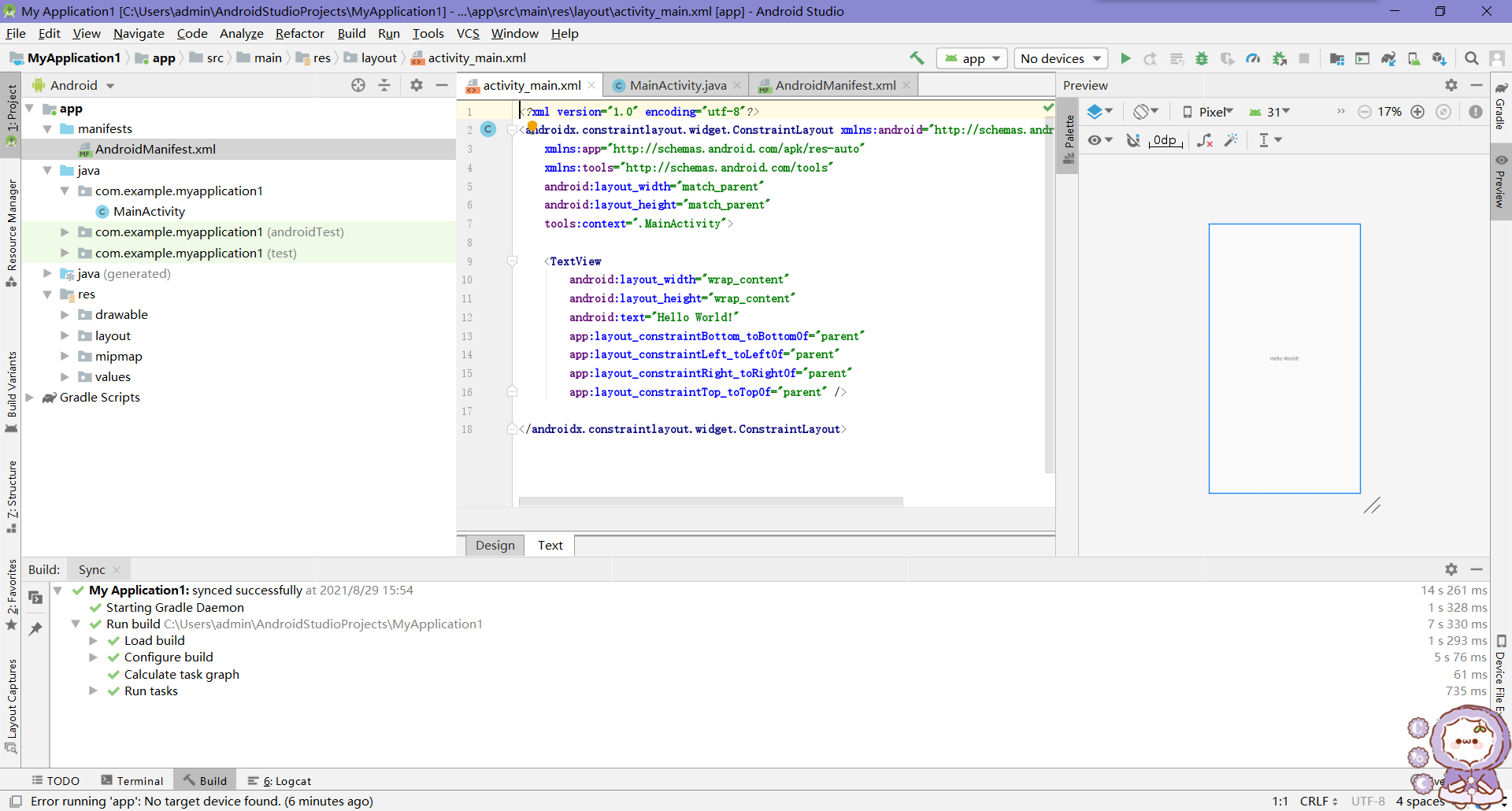
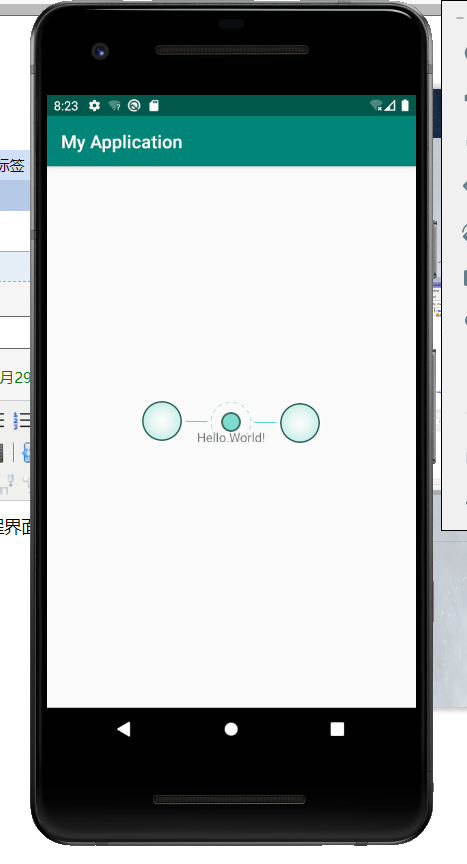
作业1:安装环境,截图编程界面,截图运行界面
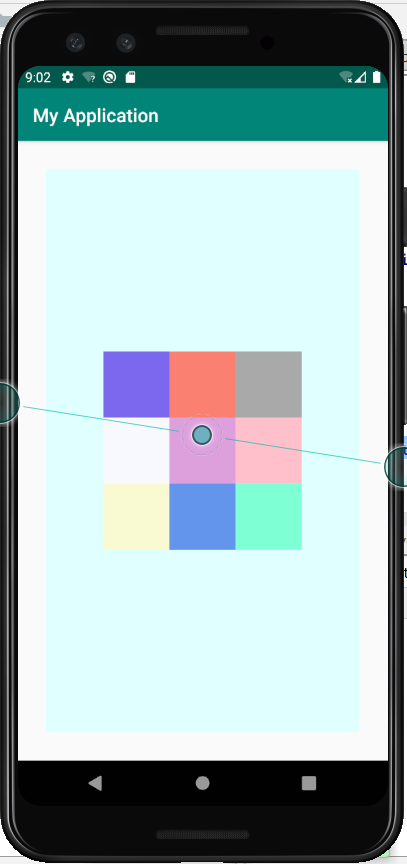
作业2:九宫格
<?xml version="1.0" encoding="utf-8"?>

<RelativeLayout

    xmlns:android="http://schemas.android.com/apk/res/android"

    android:id="@+id/rl_1"

    android:layout_width="match_parent"

    android:layout_height="match_parent"

    android:background="#E0FFFF"

    android:layout_margin="30dp"

    android:orientation="horizontal">

    <View

        android:id="@+id/v_1"

        android:layout_width="70dp"

        android:layout_height="70dp"

        android:background="#DDA0DD"

        android:layout_centerInParent="true"/>

    <View

        android:id="@+id/v_2"

        android:layout_width="70dp"

        android:layout_height="70dp"

        android:background="#FFC0CB"

        android:layout_centerInParent="true"

        android:layout_toRightOf="@+id/v_1"/>

    <View

        android:id="@+id/v_3"

        android:layout_width="70dp"

        android:layout_height="70dp"

        android:background="#F8F8FF"

        android:layout_centerInParent="true"

        android:layout_toLeftOf="@+id/v_1"/>

    <View

        android:id="@+id/v_4"

        android:layout_width="70dp"

        android:layout_height="70dp"

        android:background="    #6495ED"

        android:layout_centerInParent="true"

        android:layout_below="@+id/v_1"/>

    <View

        android:id="@+id/v_5"

        android:layout_width="70dp"

        android:layout_height="70dp"

        android:background="#7FFFD4"

        android:layout_centerInParent="true"

        android:layout_below="@+id/v_1"

        android:layout_toRightOf="@+id/v_4"/>

    <View

        android:id="@+id/v_6"

        android:layout_width="70dp"

        android:layout_height="70dp"

        android:background="    #FAFAD2"

        android:layout_centerInParent="true"

        android:layout_below="@+id/v_1"

        android:layout_toLeftOf="@+id/v_4"/>

    <View

        android:id="@+id/v_7"

        android:layout_width="70dp"

        android:layout_height="70dp"

        android:background="#FA8072"

        android:layout_centerInParent="true"

        android:layout_above="@id/v_1"/>

    <View

        android:id="@+id/v_8"

        android:layout_width="70dp"

        android:layout_height="70dp"

        android:background="#A9A9A9"

        android:layout_centerInParent="true"

        android:layout_above="@id/v_1"

        android:layout_toRightOf="@+id/v_7"/>

    <View

        android:id="@+id/v_9"

        android:layout_width="70dp"

        android:layout_height="70dp"

        android:background="#7B68EE"

        android:layout_centerInParent="true"

        android:layout_above="@id/v_1"

        android:layout_toLeftOf="@+id/v_7"/>

</RelativeLayout>
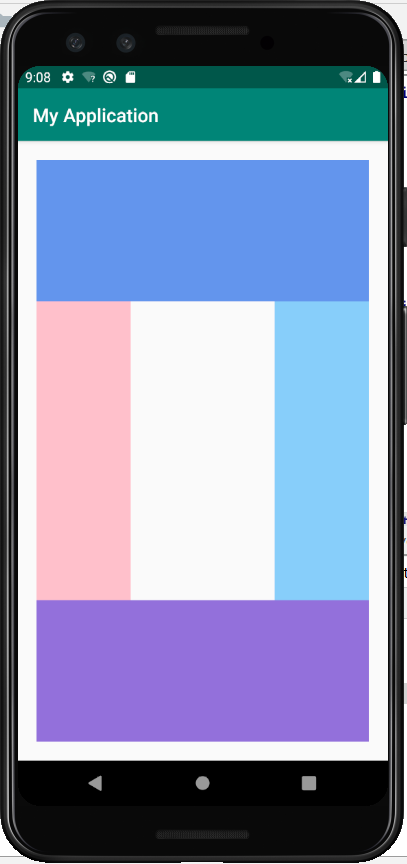
作业3:布局界面(QQ群截图)
<?xml version="1.0" encoding="utf-8"?>

<RelativeLayout xmlns:android="http://schemas.android.com/apk/res/android"

    xmlns:app="http://schemas.android.com/apk/res-auto"

    xmlns:tools="http://schemas.android.com/tools"

    android:id="@+id/rl_1"

    android:layout_width="match_parent"

    android:layout_height="match_parent"

    android:layout_margin="20dp"

    android:orientation="horizontal">

    <View

        android:id="@+id/v_1"

        android:layout_width="match_parent"

        android:layout_height="150dp"

        android:background="#6495ED"

        android:layout_alignParentTop="true"/>

    <View

        android:id="@+id/v_2"

        android:layout_width="match_parent"

        android:layout_height="150dp"

        android:background="#9370DB"

        android:layout_centerInParent="true"

        android:layout_alignParentBottom="true"/>

    <View

        android:id="@+id/v_3"

        android:layout_width="100dp"

        android:layout_height="500dp"

        android:background="#FFC0CB"

        android:layout_below="@id/v_1"

        android:layout_above="@id/v_2"

        android:layout_alignParentLeft="true"

        />

    <View

        android:id="@+id/v_4"

        android:layout_width="100dp"

        android:layout_height="500dp"

        android:background="#87CEFA"

        android:layout_below="@id/v_1"

        android:layout_above="@id/v_2"

        android:layout_alignParentRight="true"/>

</RelativeLayout>
作业3:制作登录界面(要求至少2个edittext,1个button,最好有一个imageview要求美观)
Android第1-2周作业的更多相关文章
- Android第五六周作业
1.返回键实现对话框弹出是否退出应用程序 package com.example.zuoye1; import androidx.appcompat.app.AlertDialog; import a ...
- 2017-2018-1 我爱学Java 第六七周 作业
团队六七周作业 完善版需求规格说明书 制定团队编码规范 数据库设计 后端架构设计 TODOList 参考资料 完善版需求规格说明书 <需求规格说明书>初稿不足之处: 1.开发工具写错 2. ...
- 2017-2018-2 1723《程序设计与数据结构》第十一周作业 & 实验三 & (总体)第三周结对编程 总结
作业地址 第十一次作业:https://edu.cnblogs.com/campus/besti/CS-IMIS-1723/homework/1933 (作业界面已评分,可随时查看,如果对自己的评分有 ...
- 2017-2018 第一学期201623班《程序设计与数据结构》-第2&3周作业问题总结
一.作业内容 第二周作业 http://www.cnblogs.com/rocedu/p/7484252.html#WEEK02 第三周作业 作业一定按教学进程中的模板提交 本周学习任务 点评结对同学 ...
- 2017-2018-1 Java小组-1623 第二周作业
2017-2018-1 Java小组-1623 第二周作业 关于游戏软件的问题 讨论结果 20162301张师瑜 20162305李昱兴 20162306陈是奇 20162308马平川 2016231 ...
- 2017-2018-1 JaWorld 第三周作业
2017-2018-1 JaWorld 第三周作业 团队展示 队员学号 队名 团队项目描述 队员风采 团队的特色 团队合照 团队初步合作 前两周的反思与总结 需要改进的地方 团队选题 *采访老师或有开 ...
- 2017-2018-1 JAVA实验站 第二周作业
2017-2018-1 JAVA实验站 第二周作业 小组成员: 组长 20162318张泰毓 成员 20162303石亚鑫 20162304张浩林 20162307张韵琪 20162321王彪 201 ...
- 2017-2018-1 JAVA实验站 第三周作业
2017-2018-1 JAVA实验站 第三周作业 团队展示 队名 JAVA实验站 拟作的团队项目描述 (2048)增加其他模式,使得2048更加丰富多彩 团队的首次合照 团队的特色描述 团队内部很团 ...
- JAVA第三周作业(从键盘输入若干数求和)
JAVA第三周作业(从键盘输入若干数求和) 在新的一周,我学习了JAVA的IO编程.下面的代码实现了从键盘输入若干数求和的目标.import java.util.Scanner; public cla ...
随机推荐
- Rocket Mq 常用API 及简单运维
RocketMQ 常用API 消息 消息消费模式 消息消费模式由消费者来决定,可以由消费者设置MessageModel来决定消息模式. 消息模式默认为集群消费模式 consumer.setMessag ...
- java中遗留的小问题
一.类型转换 short s = 1; s = s + 1; //false,因为1是int类型,会损失精度 short s = 1; s += 1; //true,因为+=有自带强转 二.逻辑运算符 ...
- 二叉树,红黑树,B+树
在实际使用时会根据链表和有序数组等数据结构的不同优势进行选择.有序数组的优势在于二分查找,链表的优势在于数据项的插入和数据项的删除.但是在有序数组中插入数据就会很慢,同样在链表中查找数据项效率就很低. ...
- 对象头源码讲解,原来,指向objectMonitor的指针在这里
markword 注释 该文件目录在: \openjdk-jdk8u\hotspot\src\share\vm\oops\markOop.hpp #ifndef SHARE_VM_OOPS_MARKO ...
- spring源码-ioc容器周期
Spring容器的refresh 创建刷新: 1-prepareRefresh刷新前的预处理: initPropertySources 初始化一些属性配置,原来是空的,子类自定义的属性设置方法 g ...
- java的arrays
java.util.Arrays 是一个于数组相关的工具类,里面提供大佬的静态方法,用来实现数组常见的操作 public staic String toString(数组) 将参数数组编程字符串,默 ...
- Vue Avoided redundant navigation to current location Error
这个报错的根源就是vue-router组件,错误内容翻译一下是: Avoided redundant navigation to current location === 避免冗余导航到当前位置 这个 ...
- Less使用@import进行Mixins
Import 指令 从其他样式表导入样式 在标准CSS中,@ import at-rules必须在所有其他类型的规则之前.但Less.js并不关心你放置@import语句的位置 Example: .f ...
- Java 中,受检查异常 和 不受检查异常的区别?
受检查异常编译器在编译期间检查.对于这种异常,方法强制处理或者通过 throws 子句声明.其中一种情况是 Exception 的子类但不是 RuntimeException 的子类.非受检查是 Ru ...
- jsp:useBean报错The value for the useBean class attribute X is invalid
一.解决方法 1.先检查<jsp:useBean id="dog" class="cn.edu.dgut.el.tools.Dog" scope=&quo ...