
二、mycat15种分片规则
一、分片枚举
通过在配置文件中配置可能的枚举 id,自己配置分片,本规则适用于特定的场景,比如有些业务需要按照省份或区县来做保存,而全国省份区县固定的,这类业务使用本条规则,配置如下:
<tableRule name="sharding-by-intfile">

  <rule>

    <columns>user_id</columns>

    <algorithm>hash-int</algorithm>

  </rule>

</tableRule>

<function name="hash-int" class="io.mycat.route.function.PartitionByFileMap">

  <property name="mapFile">partition-hash-int.txt</property>

  <property name="type">0</property>

  <property name="defaultNode">0</property>

</function>
配置说明
| 标签属性 | 说明 |
| ----------- | -----------------------------------------------------------|
| columns | 标识将要分片的表字段 |
| algorithm | 分片函数 |
| mapFile | 标识配置文件名称 |
| type | 默认值为 0,0 表示 Integer,非零表示 String |
| defaultNode | 默认节点:小于 0 表示不设置默认节点,大于等于 0 设置默认节点 |
partition-hash-int.txt 配置:
10000=0

10010=1

DEFAULT_NODE=1      //默认节点
二、固定分片 hash 算法
本条规则类似于十进制的求模运算,区别在于是二进制的操作,是取 id 的二进制低 10 位,即 id 二进制 &1111111111。
此算法的优点在于如果按照 10 进制取模运算,在连续插入 1-10 时候 1-10 会被分到 1-10 个分片,增大了插入的事务控制难度,而此算法根据二进制则可能会分到连续的分片,减少插入事务事务控制难度。
<tableRule name="rule1">

  <rule>

    <columns>user_id</columns>

    <algorithm>func1</algorithm>

  </rule>

</tableRule>

<function name="func1" class="io.mycat.route.function.PartitionByLong">

  <property name="partitionCount">2,1</property>

  <property name="partitionLength">256,512</property>

</function>
配置说明
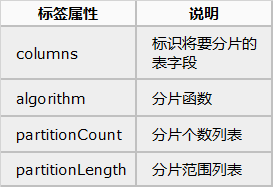
分区长度:
默认为最大 2^n=1024 ,即最大支持 1024 分区。
约束:
count,length 两个数组的长度必须是一致的;
1024 = sum((count[i]*length[i]))
count 和 length 两个向量的点积恒等于 1024。
如果需要平均分配设置:平均分为 4 分片,partitionCount*partitionLength=1024。
<function name="func1" class="io.mycat.route.function.PartitionByLong">

    <property name="partitionCount">4</property>

    <property name="partitionLength">256</property>

</function>
三、范围约定
此分片适用于,提前规划好分片字段某个范围属于哪个分片。
<tableRule name="auto-sharding-long">

    <rule>

        <columns>user_id</columns>

        <algorithm>rang-long</algorithm>

    </rule>

</tableRule>

<function name="rang-long" class="io.mycat.route.function.AutoPartitionByLong">

    <property name="mapFile">autopartition-long.txt</property>

    <property name="defaultNode">0</property>

</function>
配置说明:
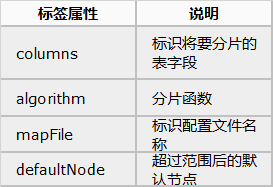
所有的节点配置都是从 0 开始,及 0 代表节点 1,此配置非常简单,即预先制定可能的 id 范围到某个分片:
# range start-end ,data node index

# K=1000,M=10000.

0-500M=0

500M-1000M=1

1000M-1500M=2

或

0-10000000=0

10000001-20000000=1
四、取模
此规则为对分片字段求摸运算。
<tableRule name="mod-long">

    <rule>

        <columns>user_id</columns>

        <algorithm>mod-long</algorithm>

    </rule>

</tableRule>

<function name="mod-long" class="io.mycat.route.function.PartitionByMod">

    <!-- how many data nodes -->

    <property name="count">3</property>

</function>
配置说明:
| 标签属性 | 说明 |
| --------- | -------------------- |
| columns | 标识将要分片的表字段 |
| algorithm | 分片函数 |
| count | 分片数量 |
根据 id 进行十进制求模预算,相比固定分片 hash,此种在批量插入时可能存在批量插入单事务插入多数据分片,增大事务一致性难度。
五、按日期(天)分片
此规则为按天分片。
<tableRule name="sharding-by-date">

    <rule>

        <columns>create_time</columns>

        <algorithm>sharding-by-date</algorithm>

    </rule>

</tableRule>

<function name="sharding-by-date" class="io.mycat.route.function.PartitionByDate">

    <property name="dateFormat">yyyy-MM-dd</property>

    <property name="sBeginDate">2014-01-01</property>

    <property name="sEndDate">2014-01-02</property>

    <property name="sPartionDay">10</property>

</function>
配置说明:
| 标签属性 | 说明 |
| ----------- | -------------------------------------------------- |
| columns | 标识将要分片的表字段 |
| algorithm | 分片函数 |
| dateForma | 日期格式 |
| sBeginDate | 开始日期 |
| sEndDate | 结束日期 |
| sPartionDay | 分区天数,即默认从开始日期算起,分隔 10 天一个分区 |
如果配置了 sEndDate 则代表数据达到了这个日期的分片后循环从开始分片插入。
注意
在查询时,如果需要查询时间段应该使用between...and,使用>=或者<=会查询所有分片。
六、取模范围约束
此种规则是取模运算与范围约束的结合,主要为了后续数据迁移做准备,即可以自主决定取模后数据的节点分布。
<tableRule name="sharding-by-pattern">

    <rule>TopESA - Win Cpp

        <columns>user_id</columns>

        <algorithm>sharding-by-pattern</algorithm>

    </rule>

</tableRule>

<function name="sharding-by-pattern" class="io.mycat.route.function.PartitionByPattern">

    <property name="patternValue">256</property>

    <property name="defaultNode">2</property>

    <property name="mapFile">partition-pattern.txt</property>

</function>
partition-pattern.txt
# id partition range start-end ,data node index

###### first host configuration

1-32=0

33-64=1

65-96=2

97-128=3

######## second host configuration

129-160=4

161-192=5

193-224=6

225-256=7

0-0=7
配置说明:
| 标签属性 | 说明 |
| ------------ | -------------------- |
| columns | 标识将要分片的表字段 |
| algorithm | 分片函数 |
| patternValue | 求模基数 |
| defaoultNod | 默认节点 |
| mapFile | 配置文件路径 |
配置文件中,1-32 即代表 id%256 后分布的范围,如果在 1-32 则在分区 1,其他类推
如果 id 非数字,则会分配在 defaoultNode 默认节点。
七、截取数字做 hash 求模范围约束
此种规则类似于取模范围约束,此规则支持数据符号字母取模。
<tableRule name="sharding-by-prefixpattern">

    <rule>

        <columns>user_id</columns>

        <algorithm>sharding-by-prefixpattern</algorithm>

    </rule>

</tableRule>

<function name="sharding-by-pattern" class="io.mycat.route.function.PartitionByPrefixPattern">

    <property name="patternValue">256</property>

    <property name="prefixLength">5</property>

    <property name="mapFile">partition-pattern.txt</property>

</function>
配置说明:
| 标签属性 | 说明 |
| ------------ | -------------------- |
| columns | 标识将要分片的表字段 |
| algorithm | 分片函数 |
| patternValue | 求模基数 |
| prefixLength | ASCII 截取的位数 |
| mapFile | 配置文件路径 |
partition-pattern.txt
# range start-end ,data node index

# ASCII

# 8-57=0-9 阿拉伯数字

# 64、65-90=@、A-Z

# 97-122=a-z

###### first host configuration

1-4=0

5-8=1

9-12=2

13-16=3

###### second host configuration

17-20=4

21-24=5

25-28=6

29-32=7

0-0=7
配置文件中,1-32 即代表 id%256 后分布的范围,如果在 1-32 则在分区 1,其他类推。
此种方式类似取模范围约束,只不过采取的是将列种获取前 prefixLength 位列所有 ASCII 码的和进行求模。
sum%patternValue ,获取的值,在范围内的分片数
八、应用指定
此规则是在运行阶段有应用自主决定路由到那个分片。
<tableRule name="sharding-by-substring">

    <rule>

        <columns>user_id</columns>

        <algorithm>sharding-by-substring</algorithm>

    </rule>

</tableRule>

<function name="sharding-by-substring" class="io.mycat.route.function.PartitionDirectBySubString">

    <property name="startIndex">0</property><!-- zero-based -->

    <property name="size">2</property>

    <property name="partitionCount">8</property>

    <property name="defaultPartition">0</property>

</function>
配置说明:
| 标签属性 | 说明 |
| ---------------- | -------------------- |
| columns | 标识将要分片的表字段 |
| algorithm | 分片函数 |
| partitionCount | 分区数 |
| defaultPartition | 默认分区 |
此方法为直接根据字符子串(必须是数字)计算分区号(由应用传递参数,显式指定分区号)。
例如:id=05-100000002,在此配置中代表根据 id 中从 startIndex=0,开始,截取 siz=2 位数字即 05,05 就是获取的分区,如果没传默认分配到 defaultPartition。
九、截取数字 hash 解析
此规则是截取字符串中的 int 数值 hash 分片。
<tableRule name="sharding-by-stringhash">

    <rule>

        <columns>user_id</columns>

        <algorithm>sharding-by-stringhash</algorithm>

    </rule>

</tableRule>

<function name="sharding-by-stringhash" class="io.mycat.route.function.PartitionByString">

    <property name="partitionLength">512</property><!-- zero-based -->

    <property name="partitionCount">2</property>

    <property name="hashSlice">0:2</property>

</function>
配置说明:
| 标签属性 | 说明 |
| --------------- | ----------------------------------------- |
| columns | 标识将要分片的表字段 |
| algorithm | 分片函数 |
| partitionLength | 字符串hash求模基数 |
| partitionCount | 分区数 |
| hashSlice | 预算位,即根据子字符串中 int 值 hash 运算。 0 means str.length(), -1 means str.length()-1|
注意
hashSlice可以理解为substring(start,end),start为0则只表示0;
例1:值“45abc”,hash预算位0:2 ,取其中45进行计算
例2:值“aaaabbb2345”,hash预算位-4:0 ,取其中2345进行计算
十、一致性 hash
一致性 hash 预算有效解决了分布式数据的扩容问题。
<tableRule name="sharding-by-murmur">

    <rule>

        <columns>user_id</columns>

        <algorithm>murmur</algorithm>

    </rule>

</tableRule>

<function name="murmur" class="io.mycat.route.function.PartitionByMurmurHash">

    <!-- 默认是 0 -->

    <property name="seed">0</property>

    <!-- 要分片的数据库节点数量,必须指定,否则没法分片 -->

    <property name="count">2</property>

    <!-- 一个实际的数据库节点被映射为这么多虚拟 节点,默认是 160 倍,也就是虚拟节点数是物理节点数的 160 倍 -->

    <property name="virtualBucketTimes">160</property>

    <!-- 节点的权重,没有指定权重的节点默认是 1。以 properties 文件的格式填写,以从 0 开始到 count-1 的整数值也就是节点索引为 key,以节点权重值为值。所有权重值必须是正整数,否则以 1 代替 -->

    <property name="weightMapFile">weightMapFile</property>

    <!-- 用于测试时观察各物理节点与虚拟节点的分布情况,如果指定了这个属性,会把虚拟节点的 murmur hash 值与物理节 点的映射按行输出到这个文件,没有默认值,如果不指定,就不会输出任何东西 -->

    <property name="bucketMapPath">/etc/mycat/bucketMapPath</property>

</function>
十一、按单月小时拆分
此规则是单月内按照小时拆分,最小粒度是小时,可以一天最多 24 个分片,最少 1 个分片,一个月完后下月从头开始循环。每个月月尾,需要手工清理数据。
<tableRule name="sharding-by-hour">

    <rule>

        <columns>create_time</columns>

        <algorithm>sharding-by-hour</algorithm>

    </rule>

</tableRule>

<function name="sharding-by-hour" class="io.mycat.route.function.LatestMonthPartion">

    <property name="splitOneDay">24</property>

</function>
配置说明:
| 标签属性 | 说明 |
| ----------- | -------------------------------------------- |
| columns | 标识将要分片的表字段(字符串类型yyyyMMddHH) |
| algorithm | 分片函数 |
| splitOneDay | 一天切分的分片数 |
注意
分片字段必须为字符串格式,否则分片不成功,默认存到第一个分片里面;
保存的时间格式必须为‘yyyymmddHH’格式,不能多也不能少字符,否则分片不成功,默认存到第一个分片里面;
十二、范围求模分片
先进行范围分片计算出分片组,组内再求模。
优点可以避免扩容时的数据迁移,又可以一定程度上避免范围分片的热点问题。
综合了范围分片和求模分片的优点,分片组内使用求模可以保证组内数据比较均匀,分片组之间是范围分片,可以兼顾范围查询。
最好事先规划好分片的数量,数据扩容时按分片组扩容,则原有分片组的数据不需要迁移。由于分片组内数据比较均匀,所以分片组内可以避免热点数据问题。
<tableRule name="auto-sharding-rang-mod">

    <rule>

        <columns>id</columns>

        <algorithm>rang-mod</algorithm>

    </rule>

</tableRule>

<function name="rang-mod" class="io.mycat.route.function.PartitionByRangeMod">

    <property name="mapFile">partition-range-mod.txt</property>

    <property name="defaultNode">21</property>

</function>
配置说明:
| 标签属性 | 说明 |
| ----------- | ------------------------------------------- |
| columns | 标识将要分片的表字段 |
| algorithm | 分片函数 |
| mapFile | 配置文件路径 |
| defaultNode | 超过范围后的默认节点顺序号,节点从 0 开始。 |
partition-range-mod.txt
# 以下配置一个范围代表一个分片组,=号后面的数字代表该分片组所拥有的分片的数量。

# range start-end ,data node group size

0-200M=5 //代表有 5 个分片节点

200M1-400M=1

400M1-600M=4

600M1-800M=4

800M1-1000M=6
注意
如上0-200M存入到5个分片中,开始范围-结束范围=该分片组有多少个分片。如果超过配置范围需要增加分片组。
十三、日期范围HASH分片
思想与范围求模一致,当由于日期在取模会有数据集中问题,所以改成 hash 方法。
先根据日期分组,再根据时间 hash 使得短期内数据分布的更均匀。
优点可以避免扩容时的数据迁移,又可以一定程度上避免范围分片的热点问题。要求日期格式尽量精确些,不然达不到局部均匀的目的
<tableRule name="range-date-hash">

    <rule>

        <columns>col_date</columns>

        <algorithm>range-date-hash</algorithm>

    </rule>

</tableRule>

<function name="range-date-hash" class="io.mycat.route.function.PartitionByRangeDateHash">

    <property name="sBeginDate">2014-01-01 00:00:00</property>

    <property name="sPartionDay">365</property>

    <property name="dateFormat">yyyy-MM-dd HH:mm:ss</property>

    <property name="groupPartionSize">3</property>

</function>
配置说明:
| 标签属性 | 说明 |
| ---------------- | -------------------- |
| columns | 标识将要分片的表字段 |
| algorithm | 分片函数 |
| sBeginDate | 开始日期 |
| sPartionDay | 多少天一个分片 |
| dateFormat | 日期格式 |
| groupPartionSize | 分片组的大小 |
注意
从sBeginDate时间开始计算,每sPartionDay天的数据为一个分片组,每个分片组可以分布在groupPartionSize个分片上面。上面的例子最多可以有三天进行分片,如果超出则会抛出以下异常。
Cause: com.mysql.jdbc.exceptions.jdbc4.MySQLSyntaxErrorException: Can't find a valid data node for specified node index :ALAN_TEST -> RANGE_DATE -> 2019-01-11 12:00:00 -> Index : 4

The error may involve com.mycat.test.model.AlanTest.insert-Inline

The error occurred while setting parameters
十四、冷热数据分片
根据日期查询日志数据 冷热数据分布 ,最近 n 个月的到实时交易库查询,超过 n 个月的按照 m 天分片。
<tableRule name="sharding-by-date">

    <rule>

        <columns>create_time</columns>

        <algorithm>sharding-by-hotdate</algorithm>

    </rule>

</tableRule>

<function name="sharding-by-hotdate" class="io.mycat.route.function.PartitionByHotDate">

    <property name="dateFormat">yyyy-MM-dd</property>

    <property name="sLastDay">10</property>

    <property name="sPartionDay">30</property>

</function>
配置说明:
| 标签属性 | 说明 |
| ----------- | -------------------------------- |
| columns | 标识将要分片的表字段 |
| algorithm | 分片函数 |
| dateFormat | 日期格式 |
| sLastDay | 热数据的时间 |
| sPartionDay | 冷数据的分片天数(按照天数分片) |
注意
冷数据按照这个范围进行分片,例如上面的规则配置,今天是2019年1月21日,往前推10天为2019年1月12日,则2019年1月12日之前的数据为冷数据,该批冷数据的分片规则为30天一个分片,即2018-12-12至2019-01-11的数据放入第1个分片,2018-11-12至2018-12-11的数据放入第2个分片...以此类推,如果数据库分区不够,则在保存的时候会抛出以下异常
Caused by: com.mysql.jdbc.exceptions.jdbc4.MySQLSyntaxErrorException: Can't find a valid data node for specified node index :ALAN_TEST -> CREATE_DATE -> 2018-11-09 12:00:00 -> Index : 3
十五、自然月分片
按月份列分区 ,每个自然月一个分片,格式 between 操作解析的范例。
<tableRule name="sharding-by-month">

    <rule>

        <columns>create_time</columns>

        <algorithm>sharding-by-month</algorithm>

    </rule>

</tableRule>

<function name="sharding-by-month" class="io.mycat.route.function.PartitionByMonth">

    <property name="dateFormat">yyyy-MM-dd</property>

    <property name="sBeginDate">2014-01-01</property>

</function>
配置说明:
| 标签属性 | 说明 |
| ---------- | -------------------- |
| columns | 标识将要分片的表字段 |
| algorithm | 分片函数 |
| dateFormat | 日期格式 |
| sBeginDate | 开始日期(无默认值) |
| "sEndDate | 结束日期(无默认值) |
注意
- 默认设置,节点数量必须是12个,每12个月循环从开始分片插入
- 如配置了sBeginDate="2019-01"月是第0个分片,从该时间按月递增,无最大节点
- 配置了sBeginDate = "2015-01-01"sEndDate = "2015-12-01"该配置可以看成和第一个一致
- 配置了sBeginDate = "2015-01-01"sEndDate = "2015-03-01"该配置标识只有 3 个节点;很难与月份对应上;平均分散到 3 个节点上
转载 https://www.cnblogs.com/alan319/p/10556979.html
二、mycat15种分片规则的更多相关文章
- MyCat分片规则--笔记(二)
概述 myCat实现分库分表的策略,对数据量的处理带来很大的便利,这里主要整理下MyCat的使用以及常用路由算法,针对MyCat里面的事务.集群后续再做整理:另外内容整理,不免会参考技术大牛的博客,内 ...
- Mycat水平拆分之十种分片规则
水平切分分片实现 配置schema.xml 在同一个mysql数据库中,创建了三个数据库 testdb1,testdb2,testdb3.并在每个库中都创建了user表 <?xml ...
- NoSQL生态系统——hash分片和范围分片两种分片
13.4 横向扩展带来性能提升 很多NoSQL系统都是基于键值模型的,因此其查询条件也基本上是基于键值的查询,基本不会有对整个数据进行查询的时候.由于基本上所有的查询操作都是基本键值形式的,因此分片通 ...
- MyCat 学习笔记 第十二篇.数据分片 之 分片事务处理
1 环境说明 VM 模拟3台MYSQL 5.6 服务器 VM1 192.168.31.187:3307 VM2 192.168.31.212:3307 VM3 192.168.31.150: 330 ...
- MyCat 介绍、分片规则、调优的内容收集
一.MyCat的简介 MyCat高可用.负载均衡架构图: 详细知识点: MySQL分布式集群之MyCAT(一)简介(修正) 二.MyCat的schema.xml讲解 详细知识点:MySQL分布式集群 ...
- Mysql系列六:(Mycat分片路由原理、Mycat常用分片规则及对应源码介绍)
一.Mycat分片路由原理 我们先来看下面的一个SQL在Mycat里面是如何执行的: , ); 有3个分片dn1,dn2,dn3, id=5000001这条数据在dn2上,id=10000001这条数 ...
- mycat系列-Mycat 分片规则
分片规则概述 在数据切分处理中,特别是水平切分中,中间件最终要的两个处理过程就是数据的切分.数据的聚合.选择合适的切分规则,至关重要,因为它决定了后续数据聚合的难易程度,甚至可以避免跨库的数据聚合处理 ...
- Mycat分片规则详解
1.分片枚举 通过在配置文件中配置可能的枚举 id,自己配置分片,本规则适用于特定的场景,比如有些业务需要按照省份或区县来做保存,而全国省份区县固定的,这类业务使用本条规则,配置如下: <tab ...
- mycat常用的分片规则
一.枚举法<tableRule name="sharding-by-intfile"> <rule> <columns>user ...
随机推荐
- [Java]Thinking in Java 练习2.10
题目 编写一个程序,打印出从命令行获得的三个参数.为此,需要确定命令行数组中String的下标. 代码 1 public class Ex2_10 { 2 public static void mai ...
- idea教程--面板介绍
面板说明
- Leaflet:控件Control相关
Leaflet官方文档中只给出了4种控件:Zoom.Attribution.Layers.Scale:它们都是继承自Control类,具体可以参考Control. Control Zoom.Scale ...
- docker入门-Dockerfile入门
1.dockerfile 构建基础命令 2. 构建镜像命令 Usage: docker image build [OPTIONS] PATH | URL | -Options:-t, --tag li ...
- pyqt(三)
六.按钮控件 QPushButton 常见的按钮实现类包括:QPushButton.QRadioButton和QCheckBox QPushButton是最普通的按钮控件,可以响应一些用户的事件 fr ...
- Linux安装JDK8环境
1.下载JDK包 点击同意下载后,会让你注册oracel账号,登录了才能下载 2.上传到linux服务器,然后解压 解压命令(注意jdk的版本名称不一定相同): tar -zxvf jdk-8u181 ...
- ESXI 虚拟化误删除管理端口Management Network (vmk0),导致无法访问后台解决方案
按F2开启控制台shell,启用后返回.按Alt+F1打开终端. 输入 esxcfg-vmknic -a -i 192.168.1.10 -n 255.255.255.0 "Manageme ...
- vue+echarts可视化大屏,全国地图下钻,页面自适应
之前写过一篇关于数据大屏及地图下钻的文章 https://www.cnblogs.com/weijiutao/p/13977011.html ,但是存在诸多问题,如地图边界线及行政区划老旧,无法自适应 ...
- CF698C题解
为什么 \(n,k \leq 20\)? 我还以为是什么 \(n,k \leq 10^6\) 的厉害题/qd 看到这个队列操作很迷惑,但是仔细看看要操作 \(10^{100}\) 遍,所以我们可以直接 ...
- Net Framework 中托管代码与非托管代码的区别
托管代码与非托管代码的区别 1 简单的说,就是代码被编译成MSIL后在.net的Framework下运行,同操作系统底层的交互都交给framework去做. 所谓非托管代码就是脱离了Framework ...