
8、IDEA提交代码出现: Fetch failed fatal: Could not read from remote repository
第一步、确认Git公钥/密钥是否生成:
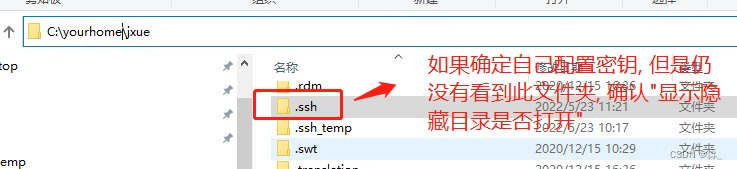
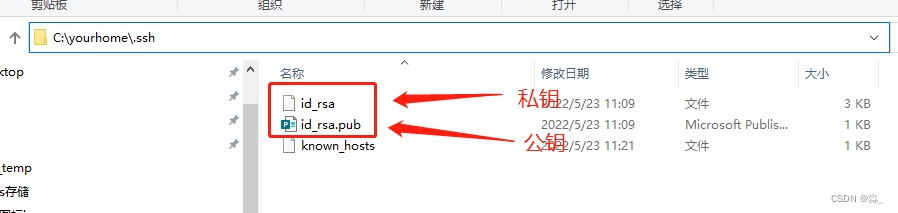
1、 首先查看本地是否生成git密钥,一般在C盘home目录下:【C:你自己的home目录\.ssh】
第二步:添加Git密钥:
右键->Git base here(前提是已经安装GIt), 具体如何安装Git, 请自行安装
按顺序执行命令
1、git config --global user.name "名称" 添加用户名配置

2、git config --global user.email "git邮箱'' 添加git邮箱配置

3、ssh-keygen -t rsa -C "git邮箱" 根据git邮箱生成公钥密钥, 此步骤切记不要输入密码, 因为idea连接的时候不需要密码. 后续步骤直接回车, 具体请参考截图.
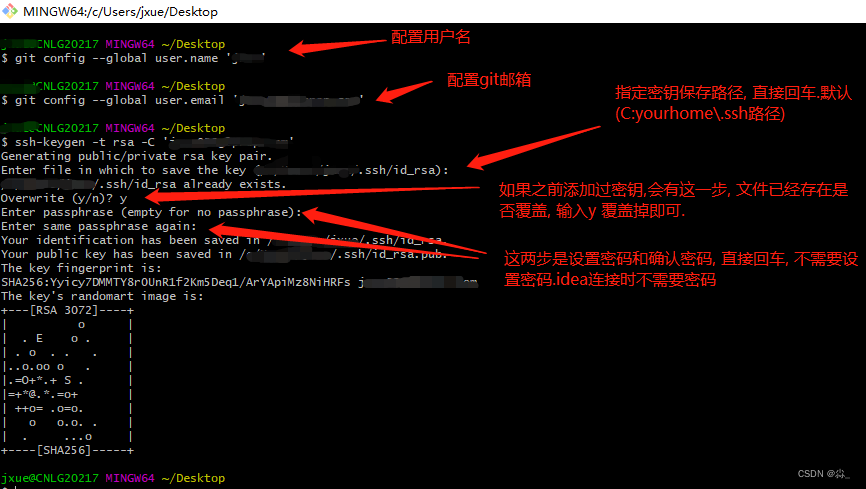
完成以上步骤后, 已经生成密钥。
第三步:Git添加公钥:
将.ssh 的id_rsa.pub文件用编辑器打开, 复制里面的内容添加到git的公钥配置
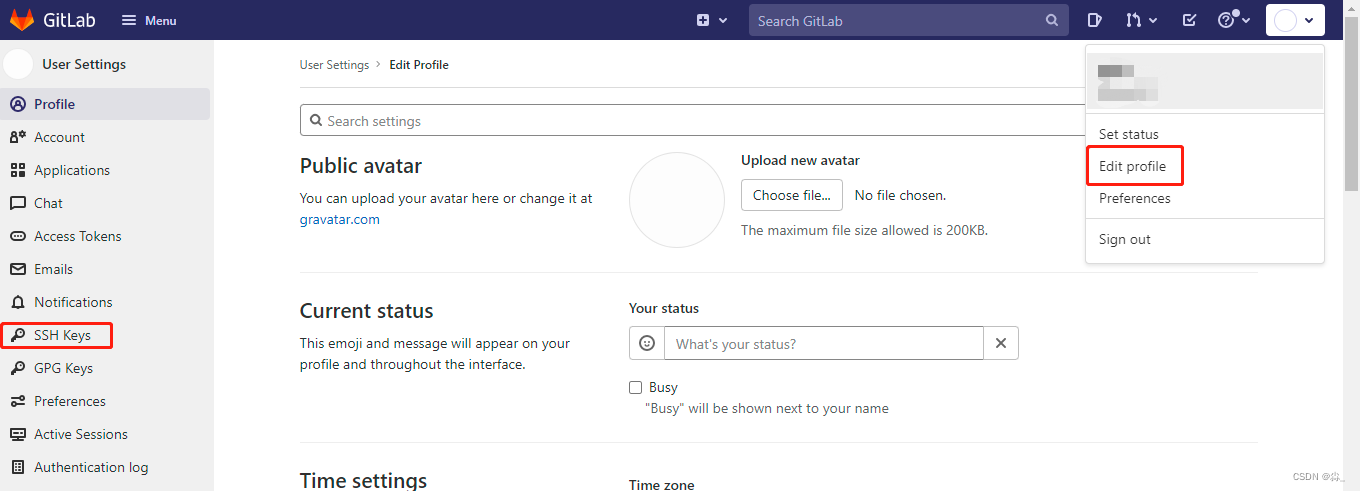
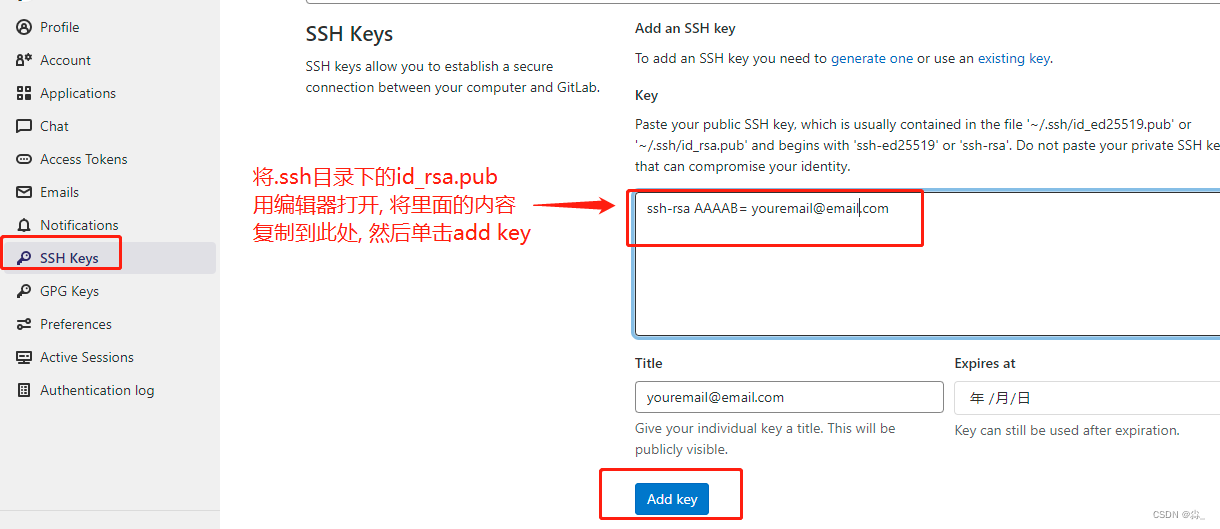
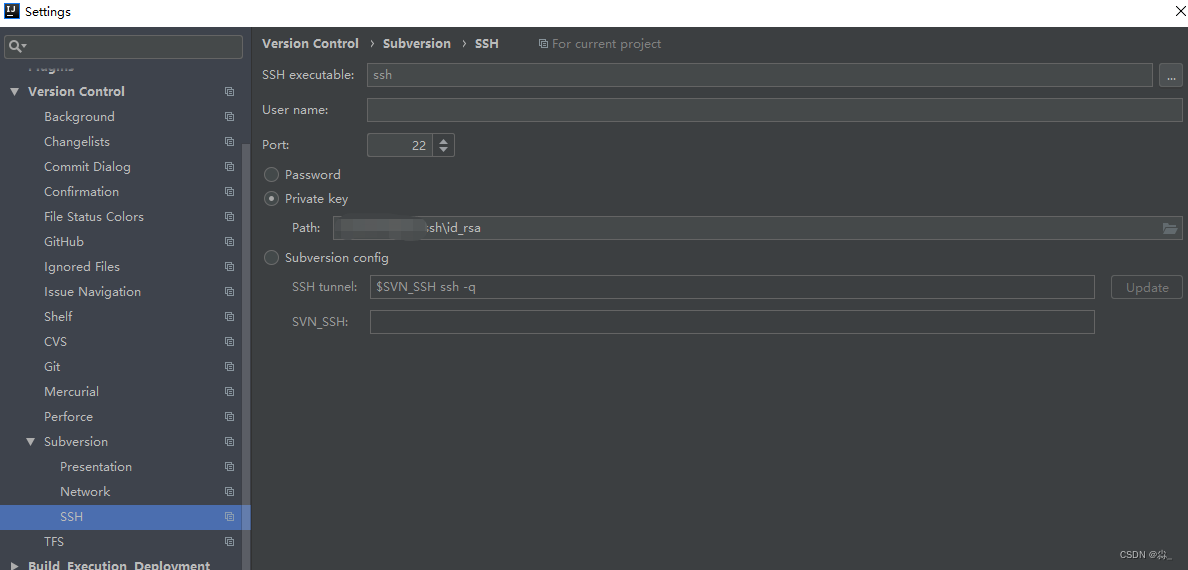
第四步:确认IDEA是否添加私钥:
File->setting->搜索SSH->选择private key 选择你的私钥文件
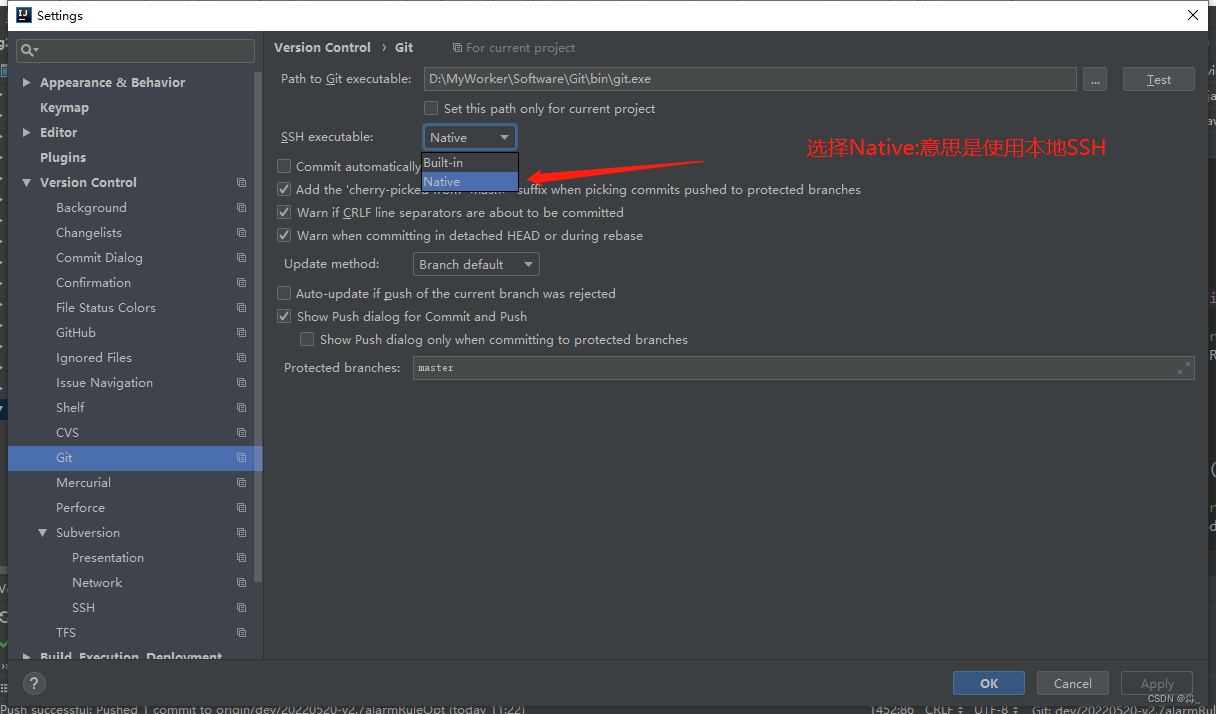
第五步:确认IDEA的Git配置是否是本地:
File ->setting->搜说git->修改SSH excutable 为Native(PS: 操作完如果还是不能提交可以按照第六步重启一下Idea)
最开始没有重启IDEA, 操作完还是不行, 后面重启了一下可以了. 但是后面为了验证是否需要重启IDEA切换了几次, 发现不重启也没问题. 所以如果按照以上步骤仍然没有效果可以重启一下IDEA试试。
第六步: 重启IDEA
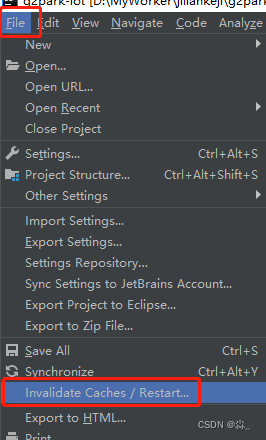
以上步骤操作完成, 就可以使用IDEA正常提交代码了
搜索
复制
8、IDEA提交代码出现: Fetch failed fatal: Could not read from remote repository的更多相关文章
- Push failed: Failed with error: fatal: Could not read from remote repository.
GitLab push远端,出现错误提示:Push failed: Failed with error: fatal: Could not read from remote repository. 原 ...
- gitlab 拉代码提示:Your Account has been blocked. fatal: Could not read from remote repository. 最佳解决方案
今天在脚本服务器上拉取代码,突然发现拉不了代码了,提示: GitLab: Your account has been blocked. fatal: Could not read from remot ...
- 【git基础】Permission denied (publickey). fatal: Could not read from remote repository
运行以下git命令的时候出现错误 git push -u origin master error The authenticity of host 'github.com (13.250.177.22 ...
- fatal:'origin' does not appear to be a git repository fatal:Could not read from remote repository
天gitlab中遇到的问题: 当 git push origin branch_name时遇到报错如下: fatal:'origin' does not appear to be a git repo ...
- git pull 出错 fatal: Could not read from remote repository.Please make sure you have the correct access rights.and the repository exists.
Warning: Permanently added the RSA host key for IP address '192.30.252.131' to the list of known hos ...
- git提示错误关于错误:ssh: Could not resolve hostname github.com: Name or service not known.fatal: Could not read from remote repository.
关于 Git 使用中出现的错误 饥人谷_楠柒 关注 2016.11.02 15:33* 字数 746 阅读 3607评论 5喜欢 10赞赏 1 关于错误:ssh: Could not resolve ...
- Permission denied (publickey). fatal: Could not read from remote repository.
博主在github上下载tiny face的的源代码的时候,遇到git clone命令为:git clone --recursive git@github.com:peiyunh/tiny.git 而 ...
- On branch master nothing to commit, working tree clean ERROR: Repository not found. fatal: Could not read from remote repository.
将gitbash部署hexo到github:hexo deploy 报以下错误: Administrator@liu MINGW64 /Hexo $ hexo d INFO Deploying: gi ...
- github下载报错:Permission denied (publickey). fatal: Could not read from remote repository.
Permission denied (publickey). fatal: Could not read from remote repository. 博主在github上下载tiny face的的 ...
随机推荐
- PHP全栈开发(三):CentOS 7 中 PHP 环境搭建及检测
简单回顾一下我们在(一).(二)中所做的工作. 首先我们在(一)中设置了CentOS 7的网络. 其实这些工作在CentOS 6中都是很容易的,因为有鸟哥的Linux私房菜这样好的指导. 但是这些操作 ...
- ysoserial commonscollections6 分析
利用链如下: 其中LazyMap.get()->ChainedTransformer.transform()-InvokerTransformer.transform()与CC1链一致. /* ...
- Hbase创建表参数说明
Hbase创建表操作及参数说明 1.创建命名空间 create_namespace 'test' 2.创建user表,列族:info create 'test:user', 'info' 3.查看表结 ...
- 后端框架的学习----mybatis框架(7、使用注解开发)
7.使用注解开发 1.注解在接口上实现 /** * 查询用户 */ @Select("select * from user") public List<User> ge ...
- llinux下mysql建库、新建用户、用户授权、修改用户密码
1.创建新的数据库 1.1.root用户登录mysql mysql -u root -p 1.2.查看现有数据库 show databases; 1.3.新建数据库,此命名为cjc create ...
- GNN 101
GNN 101 姚伟峰 http://www.cnblogs.com/Matrix_Yao/ GNN 101 Why Graph无处不在 Graph Intelligence helps It's t ...
- Jupyter基本使用
https://www.cnblogs.com/zhrb/p/12174167.html 用来取代Jupyter Notebook的一个基于Web的用户交互式用户界面.相当于增强版的Jupyter N ...
- python 类相关 下划线相关 __init__
类 1.静态方法 class C(object): @staticmethod def f(): print('runoob'); C.f(); # 静态方法无需实例化 cobj = C() cobj ...
- Codeforces Round #833 (Div. 2) A-D.md
比赛链接 A 题解 知识点:数学. 注意到 \(n\) 为奇数时,不考虑连续性,一共有 \(\lceil \frac{n}{2} \rceil ^2\) 个格子,接下来证明一定能凑成方块. 从下往上从 ...
- C#多线程之线程高级(下)
四.Monitor信号构造 信号构造本质:一个线程阻塞直到收到另一个线程发来的通知. 当多线程Wait同一对象时,就形成了一个"等待队列(waiting queue)",和用于等待 ...