
springboot:使用异步注解@Async的前世今生
在前边的文章中,和小伙伴一起认识了异步执行的好处,以及如何进行异步开发,对,就是使用@Async注解,在使用异步注解@Async的过程中也存在一些坑,不过通过正确的打开方式也可以很好的避免,今天想和大家分享下@Async的原理,开始前先温习下之前的文章哦,
springboot:使用异步注解@Async获取执行结果的坑
springboot:嵌套使用异步注解@Async还会异步执行吗
一、引言
在前边说到在使用@Async的时候,在一个类中两个@Async的方法嵌套使用会导致异步失败,下面把场景重现下,
AsyncContoller.java
package com.example.myDemo.controller;

import com.example.myDemo.service.AsyncService;

import org.springframework.beans.factory.annotation.Autowired;

import org.springframework.stereotype.Controller;

import org.springframework.web.bind.annotation.GetMapping;

import org.springframework.web.bind.annotation.ResponseBody;

import java.util.concurrent.ExecutionException;

@Controller

public class AsyncController {

    @Autowired

    private AsyncService asyncService;

    @GetMapping("/aysnc")

    @ResponseBody

    public String asyncMethod(){

        try {

            Long start=System.currentTimeMillis();

            //调用method3方法,该方法中嵌套了一个异步方法

            String str3=asyncService.method3().get();

            Long end=System.currentTimeMillis();

            System.out.println("执行时长:"+(end-start));

        } catch (ExecutionException | InterruptedException e) {

            e.printStackTrace();

        }

        return "hello @Async";

    }

}
下面是method3方法
package com.example.myDemo.service;

import org.springframework.scheduling.annotation.Async;

import org.springframework.scheduling.annotation.AsyncResult;

import org.springframework.stereotype.Service;

import java.util.concurrent.Future;

@Service

@Async

public class AsyncService {

    /**

     * 第一个异步方法,睡眠10s返回字符串

     *

     * @return

     */

    public Future<String> method() {

        try {

            Thread.sleep(10 * 1000);

        } catch (InterruptedException e) {

            e.printStackTrace();

        }

        return new AsyncResult("I am method");

    }

    /**

     * 第三个异步方法,在该异步方法中调用了另外一个异步方法

     * @return

     */

    public Future<String> method3(){

        try{
            //睡眠10s

            Thread.sleep(10*1000);

            System.out.println(this);
            //method方法也是睡眠10s

            this.method();

        }catch (InterruptedException e) {

            e.printStackTrace();

        }

        return new AsyncResult<>("two async method");

    }

}
上面便是method3方法,以及嵌套在method3方法中的method方法,这两个方法体上均没有标注@Async,只是在这个类上使用了@Async注解,那么该类中的所有方法都是异步的。
执行结果如下,
2022-04-30 15:29:47.711  INFO 16836 --- [nio-8080-exec-1] o.s.web.servlet.DispatcherServlet        : Completed initialization in 4 ms

com.example.myDemo.service.AsyncService@7e316231

执行时长:20028
从上面可以看到整个方法的执行时长是20多秒,那么就说明这种同一个类中的嵌套调用,@Async是失效的。
二、解决方式
1、把嵌套方法抽到另一个类中
这种方式就是把嵌套的异步方法method抽取到另外一个类中,下面我们来看下,
OtherService.java
package com.example.myDemo.service;

import org.springframework.scheduling.annotation.Async;

import org.springframework.scheduling.annotation.AsyncResult;

import org.springframework.stereotype.Service;

import java.util.concurrent.Future;

@Service

@Async

public class OtherAsyncService {

    public Future<String> method() {

        try {

            Thread.sleep(10 * 1000);

        } catch (InterruptedException e) {

            e.printStackTrace();

        }

        return new AsyncResult("I am method");

    }

}
那么AsyncService.java则变成下面的样子
package com.example.myDemo.service;

import org.springframework.beans.factory.annotation.Autowired;

import org.springframework.scheduling.annotation.Async;

import org.springframework.scheduling.annotation.AsyncResult;

import org.springframework.stereotype.Service;

import java.util.concurrent.Future;

@Service

@Async

public class AsyncService {

    //注入OtherService

    @Autowired

    private OtherAsyncService otherAsyncService;

    /**

     * 第三个异步方法,在该异步方法中调用了另外一个异步方法

     * @return

     */

    public Future<String> method3(){

        try{

            Thread.sleep(10*1000);

            System.out.println(this);

           //调用OtherAsyncService的method方法

            otherAsyncService.method();

        }catch (InterruptedException e) {

            e.printStackTrace();

        }

        return new AsyncResult<>("two async method");

    }

}
下面看执行的结果,
2022-04-30 15:44:18.914  INFO 16768 --- [nio-8080-exec-1] o.s.web.servlet.DispatcherServlet        : Completed initialization in 5 ms

com.example.myDemo.service.AsyncService@689927ef

执行时长:10016
执行时长10s多点,符合预期。
2、自己注入自己
这种方式很有意思,我斗胆给它取名为“自己注入自己”,在AsyncService类中注入一个AsyncService的实例,如下
package com.example.myDemo.service;

import org.springframework.beans.factory.annotation.Autowired;

import org.springframework.scheduling.annotation.Async;

import org.springframework.scheduling.annotation.AsyncResult;

import org.springframework.stereotype.Service;

import java.util.concurrent.Future;

@Service

@Async

public class AsyncService {

   //这里注入的是AsyncService的实例
    @Lazy

    @Autowired

    private AsyncService otherAsyncService;

    /**

     * 第一个异步方法,睡眠10s返回字符串

     *

     * @return

     */

    public Future<String> method() {

        try {

            Thread.sleep(10 * 1000);

        } catch (InterruptedException e) {

            e.printStackTrace();

        }

        return new AsyncResult("I am method");

    }

    /**

     * 第三个异步方法,在该异步方法中调用了另外一个异步方法

     * @return

     */

    public Future<String> method3(){

        try{

            Thread.sleep(10*1000);

            System.out.println(this);

            otherAsyncService.method();

        }catch (InterruptedException e) {

            e.printStackTrace();

        }

        return new AsyncResult<>("two async method");

    }

}
小伙伴们注意,我是在AsyncService类中又注入了一个AsyncService的实例,在method3方法中调用的是AsyncSerevice的方法method,要区别于下面的调用方式
this.method();
下面看下执行结果,
2022-04-30 15:55:30.635  INFO 9788 --- [nio-8080-exec-1] o.s.web.servlet.DispatcherServlet        : Completed initialization in 5 ms

com.example.myDemo.service.AsyncService@2ac186f8

执行时长:10015
好了,我们看到执行时长为10s多点,也就是说异步是生效的,在这种方式中要注意注入的对象必须添加@Lazy注解,否则启动会报错哦。
三、原理揭秘
上面已经把嵌套使用的误区和解决方式已经总结完了,下面到了要揭开@Async面纱的时候了,最好的方式是debug,看下面@Async的debug的过程
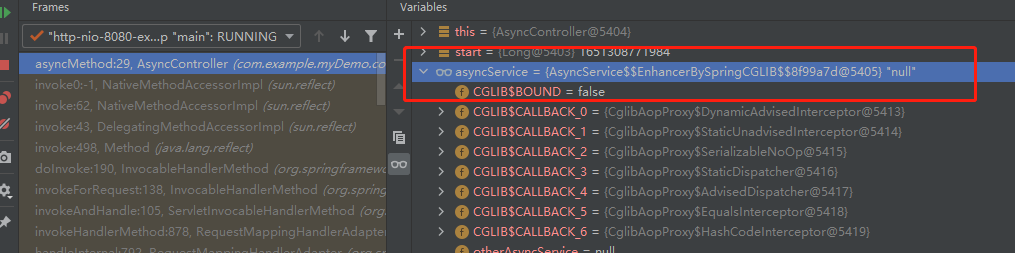
可以看到在AsyncController中asyncService是一个代理对象,且使用的方式是cglib,那么也就是会把其中的方法进行代理,类似下面的代码
before();

method3();

after();
也就是对method3进行了代理,这里的代理指的是把mthod3方法封装成一个task,交给线程池去执行,那么在method3中的this.method()这句调用,也就是普通调用了,是同步的,为什么这样说,因为这里的this代表的是AsyncService这个实例对象,

但是如果换成"自己注入自己的方式",例如下图,
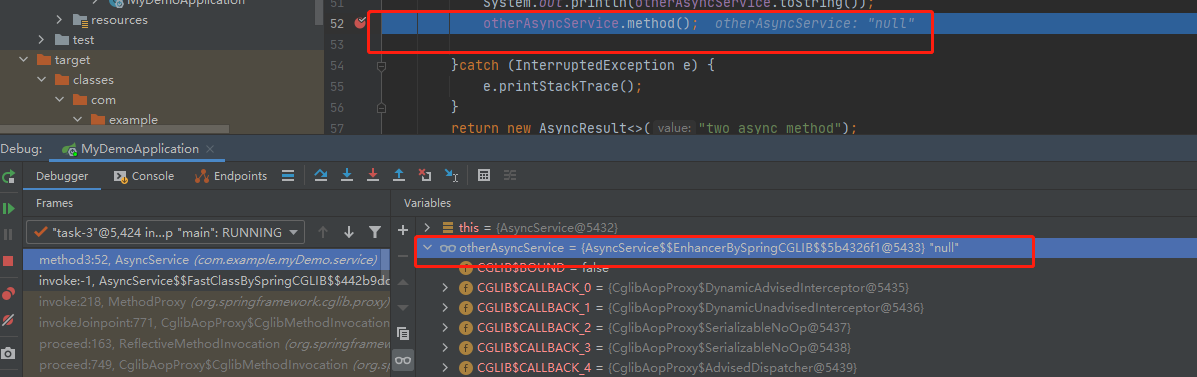
可以看到还是一个AsyncService的cglib代理对象,所以完美解决了嵌套调用的问题。
四、总结
本文分析了@Async注解的实现原理及如何使用正确使用嵌套调用,
1、@Async注解底层使用的是代理,标记为@Async所在的类在实际调用时是一个代理类;
2、合理使用@Async方法的嵌套,可以把嵌套方法抽到另外一个类中;
3、如果在本类中使用嵌套方法,那么需要自己注入自己,切记加上@Lazy注解;
推荐阅读
springboot:使用异步注解@Async获取执行结果的坑
springboot:嵌套使用异步注解@Async还会异步执行吗

springboot:使用异步注解@Async的前世今生的更多相关文章
- springboot:使用异步注解@Async的那些坑
springboot:使用异步注解@Async的那些坑 一.引言 在java后端开发中经常会碰到处理多个任务的情况,比如一个方法中要调用多个请求,然后把多个请求的结果合并后统一返回,一般情况下调用其他 ...
- springboot:嵌套使用异步注解@Async还会异步执行吗
一.引言 在前边的文章<[springboot:使用异步注解@Async的那些坑>中介绍了使用@Async注解获取任务执行结果的错误用法,今天来分享下另外一种常见的错误. 二.代码演示 下 ...
- Spring中异步注解@Async的使用、原理及使用时可能导致的问题
前言 其实最近都在研究事务相关的内容,之所以写这么一篇文章是因为前面写了一篇关于循环依赖的文章: <面试必杀技,讲一讲Spring中的循环依赖> 然后,很多同学碰到了下面这个问题,添加了S ...
- springboot之异步调用@Async
原文:http://www.cnblogs.com/xuwenjin/p/8858050.html 引言: 在Java应用中,绝大多数情况下都是通过同步的方式来实现交互处理的:但是在处理与第三方系统交 ...
- springboot:异步调用@Async
在后端开发中经常遇到一些耗时或者第三方系统调用的情况,我们知道Java程序一般的执行流程是顺序执行(不考虑多线程并发的情况),但是顺序执行的效率肯定是无法达到我们的预期的,这时就期望可以并行执行,常规 ...
- 关于Dubbo和Spring异步注解@Async的冲突
项目中难免会有异步处理的需求,像异步记录日志啦,异步发送邮件啦,而Dubbo又是现在主流的分布式框架,所有异步+Dubbo的组合是再所难免的 但博主是实践中发现Dubbo的服务并不能很好的跟Sprin ...
- Java中异步注解@Async的陷阱
或许,你在Java后端添加异步过程时会这样处理,然后摇摇大摆.灰溜溜地闪,而实际的运行结果却并不是我们期望的那样.那么,现在就将试验结果记录如下,以便少走弯路. (一)在Controller层的公开接 ...
- SpringBoot使用异步线程池实现生产环境批量数据推送
前言 SpringBoot使用异步线程池: 1.编写线程池配置类,自定义一个线程池: 2.定义一个异步服务: 3.使用@Async注解指向定义的线程池: 这里以我工作中使用过的一个案例来做描述,我所在 ...
- @Async异步注解与SpringBoot结合使用
当你在service层需要启动异步线程去执行某些分支任务,又不希望显式使用Thread等线程相关类,只想专注于实现业务逻辑代码开发,可以使用@Async异步注解. 1. 使用@Async 异步注解 C ...
随机推荐
- 推荐几个免费的在线学习IT技能视频网站:
1.慕课网:http://www.imooc.com/course/list 2.极客学院:http://www.jikexueyuan.com/ 3.百度传课:http://www.chuanke. ...
- (转载)mos管电压规格是什么,什么是VMOS管栅极
电压规格:VDSS.VDS.BVDSS.V(BR)DSS VDSS中的"V"表示电压,前面的"D"."S"表示"Drain&quo ...
- 什么是消费者驱动的合同(CDC)?
这基本上是用于开发微服务的模式,以便它们可以被外部系统使用.当我们处理 微服务时,有一个特定的提供者构建它,并且有一个或多个使用微服务的消费者. 通常,提供程序在 XML 文档中指定接口.但在消费者驱 ...
- 学习heartbeat-02安装及配置
2.部署Heartbeat高可用需求 2.1 操作系统 CentOS-6.8-x86_64 2.2 Heartbeat服务主机资源准备 主服务器A: 主机名:heartbeat-1-130 eth0网 ...
- kali Linux 渗透测试 | ARP 欺骗
目录 ARP 欺骗及其原理 ARP 欺骗实施步骤 必备工具安装 nmap 工具 dsniff 工具 driftnet 工具 ettercap 工具 ARP 欺骗测试 ARP 断网攻击 ARP 欺骗(不 ...
- (Math.round(num*100)/100).toFixed(2); 将输入的数字变成保留两位小数
<input type="number" @input="onInputPrice" @blur="onPrice" data-id= ...
- 【小程序开发】 点击button按钮,引导用户授权
一. 前言 小程序官方文档,上面说明 wx.getUserInfo(OBJECT) 注意:此接口有调整,使用该接口将不再出现授权弹窗,请使用 <button open-type="ge ...
- PAT B1076 Wifi密码
题目描述: 下面是微博上流传的一张照片:"各位亲爱的同学们,鉴于大家有时需要使用 wifi,又怕耽误亲们的学习,现将 wifi 密码设置为下列数学题答案:A-1:B-2:C-3:D-4:请同 ...
- 关于表达式&& 和 || 有多项的时候的取值
&& 表达式只有两项的时候,如果表达式为false, 返回为false 的那一个 ,为true的时候 返回最后一个值 || 只有两项的时候,返回为true 的那一个;都为fal ...
- box-shadow 阴影的高级用法,多个阴影叠加
box-shadow的这些用法你知道吗? $shadowH: ''; @for $i from 1 through 12 { $shadowH: #{$shadowH}, 0 ($i * 30px) ...