
[Linux]常用命令之【hostname】
1: 个人的片面理解: hostname是主机名(的"昵称"),而非域名。一般设置hostname,来标识当前机器的主要用途、以区别与其它机器
2: hostname的严格定义: Hostname用于显示系统的DNS名称,以及显示或设置系统的主机名或NIS域名。
Hostname is used to display the system's DNS name, and to display or set its hostname or NIS domain name.
1 查看 hostname
- 方法1: hostname
hostname
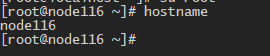
2 修改 hostname
- 方法1: hostnamectl
无需重启只需新开会话便可变为新的主机名.
hostnamectl set-hostname 新的主机名

- 方法2: hostname
无需重启只需新开会话便可变为新的主机名.
hostname 新主机名
- 方法3: /etc/hostname
vi /etc/hostname

    node116 编辑主机名

vi /etc/sysconfig/network

  192.168.1.116 node116 # 添加IP和hostname对应关系

reboot

   重启后生效
3 hostname命令详解
# man hostname

HOSTNAME(1)                                                                  Linux Programmer's Manual                                                                  HOSTNAME(1)

NAME

       hostname - show or set the system's host name

       domainname - show or set the system's NIS/YP domain name

       ypdomainname - show or set the system's NIS/YP domain name

       nisdomainname - show or set the system's NIS/YP domain name

       dnsdomainname - show the system's DNS domain name

SYNOPSIS

       hostname [-a|--alias] [-d|--domain] [-f|--fqdn|--long] [-A|--all-fqdns] [-i|--ip-address] [-I|--all-ip-addresses] [-s|--short] [-y|--yp|--nis]

       hostname [-b|--boot] [-F|--file filename] [hostname]

       hostname [-h|--help] [-V|--version]

       domainname [nisdomain] [-F file]

       ypdomainname [nisdomain] [-F file]

       nisdomainname [nisdomain] [-F file]

       dnsdomainname

DESCRIPTION

       Hostname is used to display the system's DNS name, and to display or set its hostname or NIS domain name.

   GET NAME

       When called without any arguments, the program displays the current names:

       hostname will print the name of the system as returned by the gethostname(2) function.

       domainname will print the NIS domainname of the system.  domainname uses the gethostname(2) function, while ypdomainname and nisdomainname use the yp_get_default_domain(3).

       dnsdomainname  will  print the domain part of the FQDN (Fully Qualified Domain Name). The complete FQDN of the system is returned with hostname --fqdn (but see the warnings

       in section THE FQDN below).

       The function gethostname(2) is used to get the hostname.  When the hostname -a, -d, -f or -i is called will gethostbyname(3) be called.  The  difference  in  gethostname(2)

       and  gethostbyname(3) is that gethostbyname(3) is network aware, so it consults /etc/nsswitch.conf and /etc/host.conf to decide whether to read information in /etc/hostname

       or /etc/hosts

   SET NAME

       When called with one argument or with the --file option, the commands set the host name or the NIS/YP domain name.  hostname uses the sethostname(2) function, while all  of

       the  three  domainname,  ypdomainname  and  nisdomainname  use setdomainname(2).  Note, that this is effective only until the next reboot.  Edit /etc/hostname for permanent

       change.

       Note, that only the super-user can change the names.

       It is not possible to set the FQDN or the DNS domain name with the dnsdomainname command (see THE FQDN below).

       The host name is usually set once at system startup (normally by reading the contents of a file which contains the host name, e.g.  /etc/hostname).

   THE FQDN

       The FQDN (Fully Qualified Domain Name) of the system is the name that the resolver(3) returns for the host name, such as, ursula.example.com.  It is  usually  the  hostname

       followed by the DNS domain name (the part after the first dot).  You can check the FQDN using hostname --fqdn or the domain name using dnsdomainname.

       You cannot change the FQDN with hostname or dnsdomainname.

       The  recommended method of setting the FQDN is to make the hostname be an alias for the fully qualified name using /etc/hosts, DNS, or NIS. For example, if the hostname was

       "ursula", one might have a line in /etc/hosts which reads

              127.0.1.1    ursula.example.com ursula

       Technically: The FQDN is the name getaddrinfo(3) returns for the host name returned by gethostname(2).  The DNS domain name is the part after the first dot.

       Therefore it depends on the configuration of the resolver (usually in /etc/host.conf) how you can change it. Usually the hosts file is parsed before DNS or NIS,  so  it  is

       most common to change the FQDN in /etc/hosts.

       If  a  machine  has  multiple network interfaces/addresses or is used in a mobile environment, then it may either have multiple FQDNs/domain names or none at all. Therefore

       avoid using hostname --fqdn, hostname --domain and dnsdomainname.  hostname --ip-address is subject to the same limitations so it should be avoided as well.

OPTIONS

       -a, --alias

              Display the alias name of the host (if used). This option is deprecated and should not be used anymore.

       -A, --all-fqdns

              Displays all FQDNs of the machine. This option enumerates all configured network addresses on all configured network interfaces, and translates them  to  DNS  domain

              names. Addresses that cannot be translated (i.e. because they do not have an appropriate reverse DNS entry) are skipped. Note that different addresses may resolve to

              the same name, therefore the output may contain duplicate entries. Do not make any assumptions about the order of the output.

       -b, --boot

              Always set a hostname; this allows the file specified by -F to be non-existant or empty, in which case the default hostname localhost will be used  if  none  is  yet

              set.

       -d, --domain

              Display  the  name  of  the  DNS domain.  Don't use the command domainname to get the DNS domain name because it will show the NIS domain name and not the DNS domain

              name. Use dnsdomainname instead. See the warnings in section THE FQDN above, and avoid using this option.

       -f, --fqdn, --long

              Display the FQDN (Fully Qualified Domain Name). A FQDN consists of a short host name and the DNS domain name. Unless you are using bind or NIS for host  lookups  you

              can  change  the  FQDN  and  the DNS domain name (which is part of the FQDN) in the /etc/hosts file. See the warnings in section THE FQDN above, and avoid using this

              option; use hostname --all-fqdns instead.

       -F, --file filename

              Read the host name from the specified file. Comments (lines starting with a `#') are ignored.

       -i, --ip-address

              Display the network address(es) of the host name. Note that this works only if the host name can be  resolved.  Avoid  using  this  option;  use  hostname  --all-ip-

              addresses instead.

       -I, --all-ip-addresses

              Display  all  network  addresses  of  the host. This option enumerates all configured addresses on all network interfaces. The loopback interface and IPv6 link-local

              addresses are omitted. Contrary to option -i, this option does not depend on name resolution. Do not make any assumptions about the order of the output.

       -s, --short

              Display the short host name. This is the host name cut at the first dot.

       -V, --version

              Print version information on standard output and exit successfully.

       -y, --yp, --nis

              Display the NIS domain name. If a parameter is given (or --file name ) then root can also set a new NIS domain.

       -h, --help

              Print a usage message and exit.

NOTES

       The address families hostname tries when looking up the FQDN, aliases and network addresses of the host are determined by the configuration of your resolver.  For instance,

       on GNU Libc systems, the resolver can be instructed to try IPv6 lookups first by using the inet6 option in /etc/resolv.conf.

FILES

his file is read at boot time by the system initialization scripts to set the hostname.

       /etc/hosts Usually, this is where one sets the domain name by aliasing the host name to the FQDN.

AUTHORS

       Peter Tobias, <tobias@et-inf.fho-emden.de>

       Bernd Eckenfels, <net-tools@lina.inka.de> (NIS and manpage).

       Michael Meskes, <meskes@debian.org>
X 参考文献
[Linux]常用命令之【hostname】的更多相关文章
- linux——常用命令与脚本
linux常用命令 --文件管理pwd --查看当前目录cd --切换当前目录ls --列出当前目录下的所有文件touch --创建文件mkdir --建立目录rmdir --删除空目录rm --删除 ...
- linux 常用命令大全
linux 常用命令大全 系统信息 arch 显示机器的处理器架构(1) uname -m 显示机器的处理器架构(2) uname -r 显示正在使用的内核版本 dmidecode -q 显示硬件系统 ...
- Linux 常用命令笔记
Linux 常用命令笔记 1. locate locate:用来定位文件的位置,如:locate a.txt 但是这个命令有延迟,也就是新建的文件不一定能搜索到,如果非要找到新建的文件可以使用 upd ...
- Linux常用命令速查备忘
Linux常用命令速查备忘 PS:备忘而已,详细的命令参数说明自己man 一. 启动,关机,登入,登出相关命令 [login] 登录 [logout] 登出 [exit] 登出 [shutdown ...
- Linux 常用命令使用方法大搜刮
Linux 常用命令使用方法大搜刮 1.# 表示权限用户(如:root),$ 表示普通用户 开机提示:Login:输入用户名 password:输入口令 用户是系统注册用户成功登陆后,可以进入 ...
- [置顶] linux常用命令手册
前言:整理了一份linux常用命令手册,与大家分享.这是一些比较常用的命令. 我已经整理成一份PDF带书签的手册,可以到CSDN免费下载. 下载地址:http://download.csdn.net/ ...
- linux常用命令 、查看日志、web排查
linux常用命令 ps aux|grep xxx (比如 ps aux|grep tomcat ps aux|grep tomcat-portalvip ps aux|grep nginx 等) r ...
- Linux常用命令大全(非常全!!!)
Linux常用命令大全(非常全!!!) 最近都在和Linux打交道,感觉还不错.我觉得Linux相比windows比较麻烦的就是很多东西都要用命令来控制,当然,这也是很多人喜欢linux的原因,比较短 ...
- 【转载】Linux常用命令
Linux常用命令大全(非常全!!!) 转载出处:https://www.cnblogs.com/yjd_hycf_space/p/7730690.html 系统信息 arch 显示机器的处理器架构( ...
- Linux常用命令大全(转)
(转)Linux常用命令大全(非常全!!!) 最近都在和Linux打交道,感觉还不错.我觉得Linux相比windows比较麻烦的就是很多东西都要用命令来控制,当然,这也是很多人喜欢linux的原因, ...
随机推荐
- CentOS 8.x下编译php 7.4、php5.6、php5.3多版本报错处理教程
一.编译安装php 7.4.x 参考CentOS 8.0.1905编译安装Nginx1.16.1+MySQL8.0.18+PHP7.3.10 1.安装编译工具及库文件(使用yum命令安装) yum i ...
- 洛谷P1203 坏掉的项链
洛谷P1203 坏掉的项链 首先看到这题的数据样例,3<=n<=350,不是水水暴搜就过了嘛 不难想到暴力解,先破环成链 因为可能有全部都可换成一种颜色的情况,考虑每次遇到s[i]==s[ ...
- 监控室NTP/GPS同步时钟解决方案
深圳市立显电子有限公司,专业LED时钟生产厂家!--------[点击进入] 车站.机场.学校等场所监控室布置要求: 1.宜选择建筑物中环境噪声较小的声场所.如车站票务中心后台.机场保安值班室. ...
- Oracle学习-----基本SQL select语句
一.基本select语句 SELECT 标识 选择那些列 FROM 标识从哪个表中选择 select * 标识 全部选择 select department_id, location_id ...
- LEETCODE 数组嵌套
题目:数组嵌套 索引从0开始长度为N的数组A,包含0到N - 1的所有整数.找到最大的集合S并返回其大小,其中 S[i] = {A[i], A[A[i]], A[A[A[i]]], ... }且遵守以 ...
- dotnet Core 在linux 下设置成Service
1.新建.service文件 cd /etc/systemd/system //进入改目录 touch Core.service // 新建Core服务文件 vi Core.service // 编辑 ...
- 6、jmeter的配置元件:参数化--CSV文件
1.参数化一些数据,就需要用到csv文件 Filename:文件位置和文件名 (和jmeter同一个目录就不需要写哪个盘 直接写文件名字就可以了) File encoding:编码 Variable ...
- Spring Framework学习总结
一.Spring 概述 Spring 有两个核心部分: IoC 和 AOP. Spring 是一种基于 Bean 的编程技术,它深刻地改变着 Java 开发世界.Spring 使用简单.基本的 Jav ...
- Ubuntu VMWare安装纪要
一.VMware虚拟机下载与安装 版本:VMware Workstation 16 Pro 二.Ubuntu下载与安装 版本:ubuntu-20.04.2.0-desktop-amd64.iso 三. ...
- MS-08-067 windows smb服务 远程命令执行漏洞
漏洞概要 MS-08-067是Windows平台中smb服务445端口的远程代码执行漏洞 利用成功可以远程控制主机 影响范围为:windows2000.xp.server 2003.server 20 ...