
Beats processors
文章转载自:https://elasticstack.blog.csdn.net/article/details/111321105
我们通常的做法是使用 Elasticsearch 的 ingest node 或者 Logstash 来对数据进行清洗。这其中包括删除,添加,丰富,转换等等。但是针对每个 beats 来讲,它们也分别有自己的一组 processors 来可以帮我们处理数据。我们可以访问 Elastic 的官方网站来查看针对 filebeat 的所有 processors。 也就是说,我们可以在配置 beats 的时候并同时配置相应的 processors 来对数据进行处理。每个 processor 能够修改经过它的事件。
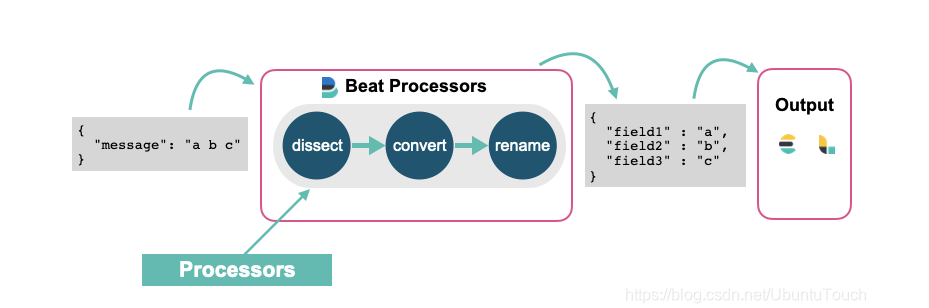
如果你想了解 ingest pipeline 是如何清洗这些事件的,请阅读我之前的文章 “Elastic可观测性 - 运用 pipeline 使数据结构化”。在之前文章 “深入理解 Dissect ingest processor” 中,我讲述了 dissect ingest processor 的应用。在今天的文章中,我将使用同样的 beat processor 来说明如何对数据进行格式化。
使用 filebeat 来对数据进行处理
在今天的实验中,我们将使用如下是例子来进行。我们创建一个叫做 sample.log 的文件,其内容如下:
sample.log
"321 - App01 - WebServer is starting"

"321 - App01 - WebServer is up and running"

"321 - App01 - WebServer is scaling 2 pods"

"789 - App02 - Database is will be restarted in 5 minutes"

"789 - App02 - Database is up and running"

"789 - App02 - Database is refreshing tables"
由于 filebeat 是以换行符来识别每一行的数据的,所以我在文件的最后一行也加上了一个换行符以确保最后一行的数据能被导入。
我们创建一个叫做 filebeat_processors.yml 的 filebeat 配置文件:
filebeat_processors.yml
它的内容如下:
filebeat.inputs:

- type: log

  enabled: true

  paths:

    - /Users/liuxg/data/beatsprocessors/sample.log

processors:

 - drop_fields:

     fields: ["ecs", "agent", "log", "input", "host"]

 - dissect:

     tokenizer: '"%{pid|integer} - %{service.name} - %{service.status}"'

     field: "message"

     target_prefix: ""

setup.template.enabled: false

setup.ilm.enabled: false

output.elasticsearch:

  hosts: ["localhost:9200"]

  index: "sample"

  bulk_max_size: 1000
请注意你需要依据自己 sample.log 的位置修改上面的 paths 中的路径。
在上面,我们使用了 drop_fields 以及 dissect 两个 processor。我们使用如下的命令来运行 filebeat:
./filebeat -e -c ~/data/beatsprocessors/filebeat_processors.yml
同样地,我们需要根据自己的配置文件路径修改上面的路径。
运行完上面的命令后,我们可以在 Kibana 中进行查询 sample 索引的内容:
GET sample/_search
{

  "took" : 0,

  "timed_out" : false,

  "_shards" : {

    "total" : 1,

    "successful" : 1,

    "skipped" : 0,

    "failed" : 0

  },

  "hits" : {

    "total" : {

      "value" : 6,

      "relation" : "eq"

    },

    "max_score" : 1.0,

    "hits" : [

      {

        "_index" : "sample",

        "_type" : "_doc",

        "_id" : "qrBscHYBpymojx8hDWuV",

        "_score" : 1.0,

        "_source" : {

          "@timestamp" : "2020-12-17T11:18:16.540Z",

          "message" : "\"321 - App01 - WebServer is starting\"",

          "service" : {

            "name" : "App01",

            "status" : "WebServer is starting"

          },

          "pid" : 321

        }

      },

      {

        "_index" : "sample",

        "_type" : "_doc",

        "_id" : "q7BscHYBpymojx8hDWuV",

        "_score" : 1.0,

        "_source" : {

          "@timestamp" : "2020-12-17T11:18:16.541Z",

          "pid" : 321,

          "message" : "\"321 - App01 - WebServer is up and running\"",

          "service" : {

            "name" : "App01",

            "status" : "WebServer is up and running"

          }

        }

      },

      {

        "_index" : "sample",

        "_type" : "_doc",

        "_id" : "rLBscHYBpymojx8hDWuV",

        "_score" : 1.0,

        "_source" : {

          "@timestamp" : "2020-12-17T11:18:16.541Z",

          "message" : "\"321 - App01 - WebServer is scaling 2 pods\"",

          "service" : {

            "name" : "App01",

            "status" : "WebServer is scaling 2 pods"

          },

          "pid" : 321

        }

      },

      {

        "_index" : "sample",

        "_type" : "_doc",

        "_id" : "rbBscHYBpymojx8hDWuV",

        "_score" : 1.0,

        "_source" : {

          "@timestamp" : "2020-12-17T11:18:16.541Z",

          "message" : "\"789 - App02 - Database is will be restarted in 5 minutes\"",

          "pid" : 789,

          "service" : {

            "name" : "App02",

            "status" : "Database is will be restarted in 5 minutes"

          }

        }

      },

      {

        "_index" : "sample",

        "_type" : "_doc",

        "_id" : "rrBscHYBpymojx8hDWuV",

        "_score" : 1.0,

        "_source" : {

          "@timestamp" : "2020-12-17T11:18:16.541Z",

          "service" : {

            "name" : "App02",

            "status" : "Database is up and running"

          },

          "pid" : 789,

          "message" : "\"789 - App02 - Database is up and running\""

        }

      },

      {

        "_index" : "sample",

        "_type" : "_doc",

        "_id" : "r7BscHYBpymojx8hDWuV",

        "_score" : 1.0,

        "_source" : {

          "@timestamp" : "2020-12-17T11:18:16.541Z",

          "service" : {

            "status" : "Database is refreshing tables",

            "name" : "App02"

          },

          "message" : "\"789 - App02 - Database is refreshing tables\"",

          "pid" : 789

        }

      }

    ]

  }

}
显然,我们得到了一个结构化的索引。在上面,我们对 pid 还进行了从字符串到整型值的转换。
我们甚至可以重新对一个字段命名,比如:
filebeat_processors.yml
filebeat.inputs:

- type: log

  enabled: true

  paths:

    - /Users/liuxg/data/beatsprocessors/sample.log

processors:

 - drop_fields:

     fields: ["ecs", "agent", "log", "input", "host"]

 - dissect:

     tokenizer: '"%{pid|integer} - %{service.name} - %{service.status}"'

     field: "message"

     target_prefix: ""

 - rename:

     fields:

        - from: "pid"

          to: "PID"

     ignore_missing: false

     fail_on_error: true

setup.template.enabled: false

setup.ilm.enabled: false

output.elasticsearch:

  hosts: ["localhost:9200"]

  index: "sample"

  bulk_max_size: 1000
重新运行上面的配置文件,我们发现:
{

  "took" : 0,

  "timed_out" : false,

  "_shards" : {

    "total" : 1,

    "successful" : 1,

    "skipped" : 0,

    "failed" : 0

  },

  "hits" : {

    "total" : {

      "value" : 6,

      "relation" : "eq"

    },

    "max_score" : 1.0,

    "hits" : [

      {

        "_index" : "sample",

        "_type" : "_doc",

        "_id" : "UrB5cHYBpymojx8h7oCK",

        "_score" : 1.0,

        "_source" : {

          "@timestamp" : "2020-12-17T11:33:26.114Z",

          "service" : {

            "status" : "WebServer is starting",

            "name" : "App01"

          },

          "message" : "\"321 - App01 - WebServer is starting\"",

          "PID" : 321

        }

      },

   ...
之前的 pid 已经转换为 PID 字段。
我们还可以通过脚本来实现对事件的处理,比如:
filebeat_processors.yml
filebeat.inputs:

- type: log

  enabled: true

  paths:

    - /Users/liuxg/data/beatsprocessors/sample.log

processors:

 - drop_fields:

     fields: ["ecs", "agent", "log", "input", "host"]

 - dissect:

     tokenizer: '"%{pid|integer} - %{service.name} - %{service.status}"'

     field: "message"

     target_prefix: ""

 - rename:

     fields:

        - from: "pid"

          to: "PID"

     ignore_missing: false

     fail_on_error: true

 - script:

     lang: javascript

     id: my_filter

     params:

        pid: 789

     source: >

       var params = {pid: 0};

       function register(scriptParams) {

          params = scriptParams;

       }

       function process(event) {

          if (event.Get("PID") == params.pid) {

              event.Cancel();

          }

       }

setup.template.enabled: false

setup.ilm.enabled: false

output.elasticsearch:

  hosts: ["localhost:9200"]

  index: "sample"

  bulk_max_size: 1000
在上面,当 PID 的值为 789 时,我们将过滤这个事件。重新运行 filebeat:
{

  "took" : 0,

  "timed_out" : false,

  "_shards" : {

    "total" : 1,

    "successful" : 1,

    "skipped" : 0,

    "failed" : 0

  },

  "hits" : {

    "total" : {

      "value" : 3,

      "relation" : "eq"

    },

    "max_score" : 1.0,

    "hits" : [

      {

        "_index" : "sample",

        "_type" : "_doc",

        "_id" : "5bCBcHYBpymojx8hrIup",

        "_score" : 1.0,

        "_source" : {

          "@timestamp" : "2020-12-17T11:41:53.478Z",

          "PID" : 321,

          "service" : {

            "status" : "WebServer is starting",

            "name" : "App01"

          },

          "message" : "\"321 - App01 - WebServer is starting\""

        }

      },

      {

        "_index" : "sample",

        "_type" : "_doc",

        "_id" : "5rCBcHYBpymojx8hrIup",

        "_score" : 1.0,

        "_source" : {

          "@timestamp" : "2020-12-17T11:41:53.479Z",

          "message" : "\"321 - App01 - WebServer is up and running\"",

          "service" : {

            "status" : "WebServer is up and running",

            "name" : "App01"

          },

          "PID" : 321

        }

      },

      {

        "_index" : "sample",

        "_type" : "_doc",

        "_id" : "57CBcHYBpymojx8hrIup",

        "_score" : 1.0,

        "_source" : {

          "@timestamp" : "2020-12-17T11:41:53.479Z",

          "service" : {

            "status" : "WebServer is scaling 2 pods",

            "name" : "App01"

          },

          "message" : "\"321 - App01 - WebServer is scaling 2 pods\"",

          "PID" : 321

        }

      }

    ]

  }

}
我们发现所有关于 PID 为789 的事件都被过滤掉了。
我们设置可以通过 script 的方法为事件添加一个 tag。当然由于这是一种 Javascript 的脚本编程,我们甚至可以依据一些条件对事件添加不同的 tag。
filebeat_processors.yml
filebeat.inputs:

- type: log

  enabled: true

  paths:

    - /Users/liuxg/data/beatsprocessors/sample.log

processors:

 - drop_fields:

     fields: ["ecs", "agent", "log", "input", "host"]

 - dissect:

     tokenizer: '"%{pid|integer} - %{service.name} - %{service.status}"'

     field: "message"

     target_prefix: ""

 - rename:

     fields:

        - from: "pid"

          to: "PID"

     ignore_missing: false

     fail_on_error: true

 - script:

     lang: javascript

     id: my_filter

     params:

        pid: 789

     source: >

       var params = {pid: 0};

       function register(scriptParams) {

          params = scriptParams;

       }

       function process(event) {

          if (event.Get("PID") == params.pid) {

              event.Cancel();

          }

          event.Tag("myevent")

       }

setup.template.enabled: false

setup.ilm.enabled: false

output.elasticsearch:

  hosts: ["localhost:9200"]

  index: "sample"

  bulk_max_size: 1000
在上面,我们添加了 event.Tag("myevent")。重新运行我们可以看到:
    "hits" : [

      {

        "_index" : "sample",

        "_type" : "_doc",

        "_id" : "C7CScHYBpymojx8hkKVy",

        "_score" : 1.0,

        "_source" : {

          "@timestamp" : "2020-12-17T12:00:20.365Z",

          "message" : "\"321 - App01 - WebServer is starting\"",

          "PID" : 321,

          "service" : {

            "name" : "App01",

            "status" : "WebServer is starting"

          },

          "tags" : [

            "myevent"

          ]

        }

      },
在上面,我们可以看到 tags 字段里有一个叫做 myevent 的值。
在今天的介绍中,我就当是抛砖引玉。更多关于 Filebeat 的 Beats processors,请参阅链接 https://www.elastic.co/guide/en/beats/filebeat/current/defining-processors.html#processors
在今天的文章中,我们介绍了一种数据处理的方式。这种数据处理可以在 beats 中进行实现,而不需要在 Elasticsearch 中的 ingest node 中实现。在实际的使用中,你需要依据自己的架构设计来实现不同的设计方案。
Beats processors的更多相关文章
- Beats: Filebeat和pipleline processors
简要来说: 使用filebeat读取log日志,在filebeat.yml中先一步处理日志中的个别数据,比如丢弃某些数据项,增加某些数据项. 按照之前的文档,是在filebeat.yml中操作的,具体 ...
- Beats:运用 Filebeat 来对微服务 API 进行分析
文章转载自:https://elasticstack.blog.csdn.net/article/details/118145104 需要学习的是httpjson请求的写法 使用 Filebeat 的 ...
- Beats:使用 Elastic Stack 记录 Python 应用日志
文章转载自:https://elasticstack.blog.csdn.net/article/details/112259500 日志记录实际上是每个应用程序都必须具备的功能.无论你选择基于哪种技 ...
- Beats:在 Beats 中实现动态 pipeline
转载自:https://blog.csdn.net/UbuntuTouch/article/details/107127197 在我们今天的练习中,我们将使用 Metricbeat 来同时监控 kib ...
- lib/sqlalchemy/cextension/processors.c:10:20: 致命错误: Python.h:没有那个文件或目录
本文地址:http://www.cnblogs.com/yhLinux/p/4063444.html $ sudo easy_install sqlalchemy [sudo] password fo ...
- Beats数据采集---Packetbeat\Filebeat\Topbeat\WinlogBeat使用指南
Beats是elastic公司的一款轻量级数据采集产品,它包含了几个子产品: packetbeat(用于监控网络流量). filebeat(用于监听日志数据,可以替代logstash-input-fi ...
- BSS Audio® Introduces Full-Bandwidth Acoustic Echo Cancellation Algorithm for Soundweb London Conferencing Processors
BSS Audio® Introduces Full-Bandwidth Acoustic Echo Cancellation Algorithm for Soundweb London Confer ...
- regardless of how many processors are devoted to a parallelized execution of this program
https://en.wikipedia.org/wiki/Amdah's_law Amdahl's law is often used in parallel computing to predic ...
- ELK beats通用配置说明(12th)
Beats配置文件是以YAML语法,该文件包含用于所有的beats的通用配置选项,以及其特点的选项.下面说说通用的配置,特定的配置要看各自beat文档. 通用的配置如下几部分: Shipper Out ...
随机推荐
- C语言课堂--现代编译环境搭建[2020年7月]
看过了很多专家吐槽目前的大学c语言教学问题多多: 教材难懂,消磨了学生的兴趣: 环境老旧,都2020了还有在用VC6甚至TurboC 2.0,语法不规范. 轮到自己上课,心想可不能再继续这样的c语言课 ...
- input函数的使用
input()函数的介绍 作用:接受来自用户的输入 返回值类型:输入值的类型为str 值得存储:使用=对输入得值进行存储 input()函数的基本使用 name = input('What's you ...
- 网格动物UVA1602
题目大意 输入n,w,h(1<=n<=10,1<=w,h<=n).求能放在w*h网格里的不同的n连块的个数(平移,旋转,翻转算一种) 首先,方法上有两个,一是打表,dfs构造连 ...
- Ubu18开机自启动-Systemd
参考链接: https://blog.csdn.net/qq_16268979/article/details/114771854 本文内容为个人测试记录,具体文件目录请以读者自己电脑为准,此处只是提 ...
- 题解【CodeForces 910A The Way to Home】
题目大意 一只青蛙现在在一个数轴上,它现在要从点 \(1\) 跳到点 \(n\) ,它每次可以向右跳不超过 \(d\) 个单位.比如,它可以从点 \(x\) 跳到点 \(x+a\)(\(1\le a\ ...
- 精心总结十三条建议,帮你创建更合适的MySQL索引
上篇文章讲到使用MySQL的Explain命令可以分析SQL性能瓶颈,优化SQL查询,以及查看是否用到了索引. 我们都知道创建索引可以提高查询效率,但是具体该怎么创建索引? 哪些字段适合创建索引? 哪 ...
- C#静态类、静态成员、静态方法
一.作用 静态类和非静态类重要的区别是在于静态类不能被实例化,也就是说不能使用 new 关键字创建静态类类型的变量,防止程序员写代码来实例化该静态类或者在类的内部声明任何实例字段或方法. 用于存放不 ...
- React报错之react component changing uncontrolled input
正文从这开始~ 总览 当input的值被初始化为undefined,但后来又变更为一个不同的值时,会产生"A component is changing an uncontrolled in ...
- while 循环、do- while 循环 和 for 循环之间的那点事
C语言自学之三种循环比较 使用循环计算1-2+3-4+5-6+--100的值? 在编辑器中给出了三种循环体结构的部分代码,请选择合适的循环结构补全代码实现此功能. 运行结果为: sum=- ...
- 8月Meetup | “数据调度+分析引擎”解锁企业数字化转型之路
编辑切换为居中 添加图片注释,不超过 140 字(可选) 大数据是一种规模大到在获取.存储.管理.分析方面大大超出了传统数据库软件工具能力范围的数据集合,而大数据作为企业运转的基础,只有经过提 ...