
go echo studygolang ___go_build_myT_go__1_.exe
https://github.com/studygolang/studygolang
[stat]
; 用户在线数据存到哪里:redis -> 表示存入 redis,这样支持多机部署
; online_store = redis

http://mysite:8088/captcha/YRa5C0yRg2I8TFhRZyDc.png
开启server服务
package main

import (
   "net/http"

   "github.com/labstack/echo"
)

func main() {
   e := echo.New()
   e.GET("/", func(c echo.Context) error {
      return c.String(http.StatusOK, "Hello, World!")
   })
   e.Logger.Fatal(e.Start(":1323"))
}
GOROOT=D:\Go #gosetup
GOPATH=D:\ctGO #gosetup
D:\Go\bin\go.exe build -i -o D:\MYTMPhere\___go_build_myT_go__1_.exe D:/ctGO/goEcho/myT.go #gosetup
"D:\GoLand 2017.3\bin\runnerw.exe" D:\MYTMPhere\___go_build_myT_go__1_.exe #gosetup
____ __
/ __/___/ / ___
/ _// __/ _ \/ _ \
/___/\__/_//_/\___/ v3.3.dev
High performance, minimalist Go web framework
e := echo.New()
/*
静态文件
Echo#Static(prefix, root string) 用一个 url 路径注册一个新的路由来提供静态文件的访问服务。root 为文件根目录。
这样会将所有访问/static/*的请求去访问assets目录。例如,一个访问/static/js/main.js的请求会匹配到assets/js/main.js这个文件。
*/
e.Static("/static", "assets")
/*
设置主页
Echo#File(path, file string) 使用 url 路径注册一个新的路由去访问某个静态文件。
*/
e.File("/", "public/index.html")
Go 语言之旅 https://tour.go-zh.org/moretypes/1
Go 拥有指针。指针保存了值的内存地址。
类型 *T 是指向 T 类型值的指针。其零值为 nil。
var p *int
& 操作符会生成一个指向其操作数的指针。
i := 42

p = &i
* 操作符表示指针指向的底层值。
fmt.Println(*p) // 通过指针 p 读取 i

*p = 21         // 通过指针 p 设置 i
这也就是通常所说的“间接引用”或“重定向”。
与 C 不同,Go 没有指针运算。
package main

import "fmt"

func main() {

	i, j := 42, 2701

	p := &i         // point to i

	fmt.Println(*p) // read i through the pointer

	*p = 21         // set i through the pointer

	fmt.Println(i)  // see the new value of i

	p = &j         // point to j

	*p = *p / 37   // divide j through the pointer

	fmt.Println(j) // see the new value of j

}
42

21

73

模板 - Go/Golang 框架 Echo 文档 http://go-echo.org/guide/templates/

D:\ctGO\goEcho\myT.go
package main

import (
   "net/http"

   "github.com/labstack/echo"
   "io"
   "html/template"
)

/*
1.实现 echo.Renderer 接口
*/
type Template struct {
   templates *template.Template
}

func (t *Template) Render(w io.Writer, name string, data interface{}, c echo.Context) error {
   return t.templates.ExecuteTemplate(w, name, data)
}

/*
4.在 action 中渲染模板
*/
func Hello(c echo.Context) error {
   return c.Render(http.StatusOK, "hello", "World")
}

func main() {
   /*
   2.预编译模板
   */
   t := &Template{
      templates: template.Must(template.ParseGlob("goEchopublic/views/*.html")),
   }

   /*
   3.注册模板
   */
   e := echo.New()
   e.Renderer = t
   e.GET("/hello", Hello)

   e.Logger.Fatal(e.Start(":1323"))
}
goEchopublic/views/*.html是相对于GOPATH的路径

D:\ctGO\goEchopublic\views\hello.html
<!DOCTYPE html>
<html lang="en">
<head>
    <meta charset="UTF-8">
    <title>HelloWorld</title>
</head>
<body>
{{define "hello"}}Hello, {{.}}!{{end}}

</body>
</html>
自定义上下文
package main

import (
   "net/http"

   "github.com/labstack/echo"
   "io"
   "html/template"
)

/*
1.实现 echo.Renderer 接口
*/
type Template struct {
   templates *template.Template
}

func (t *Template) Render(w io.Writer, name string, data interface{}, c echo.Context) error {
   return t.templates.ExecuteTemplate(w, name, data)
}

/*
4.在 action 中渲染模板
*/
func Hello(c echo.Context) error {
   return c.Render(http.StatusOK, "hello", "商机直投")
}

/*
自定义一个 context
Define a custom context
Context - Go/Golang 框架 Echo 文档 http://go-echo.org/guide/context/
*/

type CustomContext struct {
   echo.Context
}

func (c *CustomContext) Foo() {
   println("foo")
}

func (c *CustomContext) Bar() {
   println("bar")
}

func main() {
   /*
   2.预编译模板
   */
   t := &Template{
      templates: template.Must(template.ParseGlob("goEchopublic/views/*.html")),
   }

   /*
   3.注册模板
   */
   e := echo.New()
   e.Renderer = t

   /*
   创建一个中间件来扩展默认的 context
   Create a middleware to extend default context
   */

   e.Use(func(h echo.HandlerFunc) echo.HandlerFunc {
      return func(c echo.Context) error {
         cc := &CustomContext{c}
         return h(cc)
      }
   })
   /*
   这个中间件要在所有其它中间件之前注册到路由上。
   This middleware should be registered before any other middleware.
   */

   /*
   在业务处理中使用
   Use in handler
   */
   e.GET("/scriptAdmin", Hello)

   e.GET("/scriptAdminA", func(c echo.Context) error {
      cc := c.(*CustomContext)
      cc.Foo()
      cc.Bar()
      return cc.String(200, "OK")
   })

   e.Logger.Fatal(e.Start(":1323"))
}
host:1323/scriptAdmin
host:1323/scriptAdminA
echo.Context represents the context of the current HTTP request.
It holds request and response reference, path, path parameters, data, registered handler and APIs to read request and write response.
As Context is an interface, it is easy to extend it with custom APIs.
echo.Context 代表了当前 HTTP 请求的 context(上下文?这里看个人理解吧,就不翻译了)。
它含有请求和相应的引用,路径,路径参数,数据,注册的业务处理方法和读取请求和输出响应的API。
由于 Context 是一个接口,所以也可以很方便的使用自定义的 API 扩展。
D:\ctGO\goEcho\myT.go
package main

import (
   "net/http"

   "github.com/labstack/echo"
   "io"
   "html/template"
   "fmt"
)

/*
1.实现 echo.Renderer 接口
*/
type Template struct {
   templates *template.Template
}

func (t *Template) Render(w io.Writer, name string, data interface{}, c echo.Context) error {
   return t.templates.ExecuteTemplate(w, name, data)
}

/*
4.在 action 中渲染模板
*/
func Hello(c echo.Context) error {
   return c.Render(http.StatusOK, "hello", "chkUrl")
}

/*
自定义一个 context
Define a custom context
Context - Go/Golang 框架 Echo 文档 http://go-echo.org/guide/context/
*/

type CustomContext struct {
   echo.Context
}

func (c *CustomContext) Foo() {
   println("foo")
}

func (c *CustomContext) Bar() {
   println("bar")
}

type ScriptsStruct struct {
   Host       string
   Port       int
   Path       string
   ScriptName string
}

var ScriptsNamesList = [6]string{}
var s2 = ScriptsStruct{"123.123.123.123", 8088, "/myDir/", "spider.go"}

func (c *CustomContext) DumpScripts() {
   println("bar")
   s1 := ScriptsStruct{"123.123.123.123", 8088, "/myDir/", "spider.go"}
   fmt.Println(s1.Host)
}

func main() {
   /*
   2.预编译模板
   */
   t := &Template{
      templates: template.Must(template.ParseGlob("goEchopublic/views/*.html")),
   }

   /*
   3.注册模板
   */
   e := echo.New()
   e.Renderer = t

   /*
   创建一个中间件来扩展默认的 context
   Create a middleware to extend default context
   */

   e.Use(func(h echo.HandlerFunc) echo.HandlerFunc {
      return func(c echo.Context) error {
         cc := &CustomContext{c}
         return h(cc)
      }
   })
   /*
   这个中间件要在所有其它中间件之前注册到路由上。
   This middleware should be registered before any other middleware.
   */

   /*
   在业务处理中使用
   Use in handler
   */
   e.GET("/scriptAdmin01", Hello)

   e.GET("/scriptAdmin", func(c echo.Context) error {
      cc := c.(*CustomContext)
      cc.Foo()
      cc.Bar()
      cc.DumpScripts()
      fmt.Println(ScriptsNamesList)
      return c.Render(http.StatusOK, "hello", s2)

   })

   e.Logger.Fatal(e.Start(":1323"))
}
D:\ctGO\goEchopublic\views\hello.html
<!DOCTYPE html>
<html lang="en">
<head>
    <meta charset="UTF-8">
    <title></title>
</head>
<body>
{{define "hello"}}web脚本管理-{{.}}!{{.Host}}{{end}}
</body>
</html>

http://localhost:1323/scriptAdmin01
{"message":"Internal Server Error"}
http://localhost:1323/scriptAdmin

web脚本管理-{123.123.123.123 8088 /myDir/ spider.go}!123.123.123.123
静态文件加载
{{define "WeUI"}}

<!DOCTYPE html>
<html lang="zh-cmn-Hans">
<head>
    <meta http-equiv="Content-Type" content="text/html; charset=UTF-8">

    <meta name="viewport" content="width=device-width,initial-scale=1,user-scalable=0">
    <title>WeUI</title>
    <link rel="stylesheet" href="/static/WeUI_files/weui.css">
    <link rel="stylesheet" href="/static/WeUI_files/example.css">
</head>
<body>
web脚本管理-weui-{{.}}!{{.}}

<ul>
    <li>
        <div class="weui-flex js_category">
            <p class="weui-flex__item">表单</p>
            <img src="/static/images/icon_nav_form.png" alt="">
        </div>
        <div class="page__category js_categoryInner">
            <div class="weui-cells page__category-content">
                <a class="weui-cell weui-cell_access js_item" data-id="button" href="javascript:;">
                    <div class="weui-cell__bd">
                        <p>Button</p>
                    </div>
                    <div class="weui-cell__ft"></div>
                </a>
                <a class="weui-cell weui-cell_access js_item" data-id="input" href="javascript:;">
                    <div class="weui-cell__bd">
                        <p>Input</p>
                    </div>
                    <div class="weui-cell__ft"></div>
                </a>
                <a class="weui-cell weui-cell_access js_item" data-id="list" href="javascript:;">
                    <div class="weui-cell__bd">
                        <p>List</p>
                    </div>
                    <div class="weui-cell__ft"></div>
                </a>
                <a class="weui-cell weui-cell_access js_item" data-id="slider" href="javascript:;">
                    <div class="weui-cell__bd">
                        <p>Slider</p>
                    </div>
                    <div class="weui-cell__ft"></div>
                </a>
                <a class="weui-cell weui-cell_access js_item" data-id="uploader" href="javascript:;">
                    <div class="weui-cell__bd">
                        <p>Uploader</p>
                    </div>
                    <div class="weui-cell__ft"></div>
                </a>
            </div>
        </div>
    </li>
    <li>
        <div class="weui-flex js_category">
            <p class="weui-flex__item">基础组件</p>
            <img src="/static/images/icon_nav_layout.png" alt="">
        </div>
        <div class="page__category js_categoryInner">
            <div class="weui-cells page__category-content">
                <a class="weui-cell weui-cell_access js_item" data-id="article" href="javascript:;">
                    <div class="weui-cell__bd">
                        <p>Article</p>
                    </div>
                    <div class="weui-cell__ft"></div>
                </a>
                <a class="weui-cell weui-cell_access js_item" data-id="badge" href="javascript:;">
                    <div class="weui-cell__bd">
                        <p>Badge</p>
                    </div>
                    <div class="weui-cell__ft"></div>
                </a>
                <a class="weui-cell weui-cell_access js_item" data-id="flex" href="javascript:;">
                    <div class="weui-cell__bd">
                        <p>Flex</p>
                    </div>
                    <div class="weui-cell__ft"></div>
                </a>
                <a class="weui-cell weui-cell_access js_item" data-id="footer" href="javascript:;">
                    <div class="weui-cell__bd">
                        <p>Footer</p>
                    </div>
                    <div class="weui-cell__ft"></div>
                </a>
                <a class="weui-cell weui-cell_access js_item" data-id="gallery" href="javascript:;">
                    <div class="weui-cell__bd">
                        <p>Gallery</p>
                    </div>
                    <div class="weui-cell__ft"></div>
                </a>
                <a class="weui-cell weui-cell_access js_item" data-id="grid" href="javascript:;">
                    <div class="weui-cell__bd">
                        <p>Grid</p>
                    </div>
                    <div class="weui-cell__ft"></div>
                </a>
                <a class="weui-cell weui-cell_access js_item" data-id="icons" href="javascript:;">
                    <div class="weui-cell__bd">
                        <p>Icons</p>
                    </div>
                    <div class="weui-cell__ft"></div>
                </a>
                <a class="weui-cell weui-cell_access js_item" data-id="loadmore" href="javascript:;">
                    <div class="weui-cell__bd">
                        <p>Loadmore</p>
                    </div>
                    <div class="weui-cell__ft"></div>
                </a>
                <a class="weui-cell weui-cell_access js_item" data-id="panel" href="javascript:;">
                    <div class="weui-cell__bd">
                        <p>Panel</p>
                    </div>
                    <div class="weui-cell__ft"></div>
                </a>
                <a class="weui-cell weui-cell_access js_item" data-id="preview" href="javascript:;">
                    <div class="weui-cell__bd">
                        <p>Preview</p>
                    </div>
                    <div class="weui-cell__ft"></div>
                </a>
                <a class="weui-cell weui-cell_access js_item" data-id="progress" href="javascript:;">
                    <div class="weui-cell__bd">
                        <p>Progress</p>
                    </div>
                    <div class="weui-cell__ft"></div>
                </a>
            </div>
        </div>
    </li>
    <li>
        <div class="weui-flex js_category">
            <p class="weui-flex__item">操作反馈</p>
            <img src="/static/images/icon_nav_feedback.png" alt="">
        </div>
        <div class="page__category js_categoryInner">
            <div class="weui-cells page__category-content">
                <a class="weui-cell weui-cell_access js_item" data-id="actionsheet" href="javascript:;">
                    <div class="weui-cell__bd">
                        <p>Actionsheet</p>
                    </div>
                    <div class="weui-cell__ft"></div>
                </a>
                <a class="weui-cell weui-cell_access js_item" data-id="dialog" href="javascript:;">
                    <div class="weui-cell__bd">
                        <p>Dialog</p>
                    </div>
                    <div class="weui-cell__ft"></div>
                </a>
                <a class="weui-cell weui-cell_access js_item" data-id="msg" href="javascript:;">
                    <div class="weui-cell__bd">
                        <p>Msg</p>
                    </div>
                    <div class="weui-cell__ft"></div>
                </a>
                <a class="weui-cell weui-cell_access js_item" data-id="picker" href="javascript:;">
                    <div class="weui-cell__bd">
                        <p>Picker</p>
                    </div>
                    <div class="weui-cell__ft"></div>
                </a>
                <a class="weui-cell weui-cell_access js_item" data-id="toast" href="javascript:;">
                    <div class="weui-cell__bd">
                        <p>Toast</p>
                    </div>
                    <div class="weui-cell__ft"></div>
                </a>
            </div>
        </div>
    </li>
    <li>
        <div class="weui-flex js_category">
            <p class="weui-flex__item">导航相关</p>
            <img src="/static/images/icon_nav_nav.png" alt="">
        </div>
        <div class="page__category js_categoryInner">
            <div class="weui-cells page__category-content">
                <a class="weui-cell weui-cell_access js_item" data-id="navbar" href="javascript:;">
                    <div class="weui-cell__bd">
                        <p>Navbar</p>
                    </div>
                    <div class="weui-cell__ft"></div>
                </a>
                <a class="weui-cell weui-cell_access js_item" data-id="tabbar" href="javascript:;">
                    <div class="weui-cell__bd">
                        <p>Tabbar</p>
                    </div>
                    <div class="weui-cell__ft"></div>
                </a>
            </div>
        </div>
    </li>
    <li>
        <div class="weui-flex js_category">
            <p class="weui-flex__item">搜索相关</p>
            <img src="/static/images/icon_nav_search.png" alt="">
        </div>
        <div class="page__category js_categoryInner">
            <div class="weui-cells page__category-content">
                <a class="weui-cell weui-cell_access js_item" data-id="searchbar" href="javascript:;">
                    <div class="weui-cell__bd">
                        <p>Search Bar</p>
                    </div>
                    <div class="weui-cell__ft"></div>
                </a>
            </div>
        </div>
    </li>
    <li>
        <div class="weui-flex js_item" data-id="layers">
            <p class="weui-flex__item">层级规范</p>
            <img src="/static/images/icon_nav_z-index.png" alt="">
        </div>
    </li>
</ul>

</body>
</html>
{{end}}
package main

import (
   "net/http"

   "github.com/labstack/echo"
   "io"
   "html/template"
   "fmt"
)

/*
1.实现 echo.Renderer 接口
*/
type Template struct {
   templates *template.Template
}

func (t *Template) Render(w io.Writer, name string, data interface{}, c echo.Context) error {
   return t.templates.ExecuteTemplate(w, name, data)
}

/*
4.在 action 中渲染模板
*/
func Hello(c echo.Context) error {
   return c.Render(http.StatusOK, "WeUI", "chkUrl")
}

/*
自定义一个 context
Define a custom context
Context - Go/Golang 框架 Echo 文档 http://go-echo.org/guide/context/
*/

type CustomContext struct {
   echo.Context
}

func (c *CustomContext) Foo() {
   println("foo")
}

func (c *CustomContext) Bar() {
   println("bar")
}

type ScriptsStruct struct {
   Host       string
   Port       int
   Path       string
   ScriptName string
}

var ScriptsNamesList = [6]string{}
var s2 = ScriptsStruct{"123.123.123.123", 8088, "/myDir/", "spider.go"}

func (c *CustomContext) DumpScripts() {
   println("bar")
   s1 := ScriptsStruct{"123.123.123.123", 8088, "/myDir/", "spider.go"}
   fmt.Println(s1.Host)
}

func main() {
   /*
   2.预编译模板
   */
   t := &Template{
      templates: template.Must(template.ParseGlob("goEchopublic/views/*.html")),
   }

   /*
   3.注册模板
   */
   e := echo.New()
   e.Renderer = t

   /*
   静态文件
   Echo#Static(prefix, root string) 用一个 url 路径注册一个新的路由来提供静态文件的访问服务。root 为文件根目录。
   这样会将所有访问/static/*的请求去访问assets目录。例如,一个访问/static/js/main.js的请求会匹配到assets/js/main.js这个文件。
   */
   e.Static("/static", "assets")

   /*
   创建一个中间件来扩展默认的 context
   Create a middleware to extend default context
   */

   e.Use(func(h echo.HandlerFunc) echo.HandlerFunc {
      return func(c echo.Context) error {
         cc := &CustomContext{c}
         return h(cc)
      }
   })
   /*
   这个中间件要在所有其它中间件之前注册到路由上。
   This middleware should be registered before any other middleware.
   */

   /*
   在业务处理中使用
   Use in handler
   */
   e.GET("/scriptAdmin01", Hello)
   e.GET("/WeUI", func(c echo.Context) error {
      fmt.Println("test-")
      return c.Render(http.StatusOK, "WeUI", "data--")
   })
   e.GET("/scriptAdmin", func(c echo.Context) error {
      cc := c.(*CustomContext)
      cc.Foo()
      cc.Bar()
      cc.DumpScripts()
      fmt.Println(ScriptsNamesList)
      return c.Render(http.StatusOK, "hello", s2)
   })

   e.Logger.Fatal(e.Start(":1323"))
}

http://localhost:1323/WeUI
遍历循环
package main

import (
   "net/http"

   "github.com/labstack/echo"
   "io"
   "html/template"
   "fmt"
)

/*
1.实现 echo.Renderer 接口
*/
type Template struct {
   templates *template.Template
}

func (t *Template) Render(w io.Writer, name string, data interface{}, c echo.Context) error {
   return t.templates.ExecuteTemplate(w, name, data)
}

/*
4.在 action 中渲染模板
*/
func Hello(c echo.Context) error {
   return c.Render(http.StatusOK, "WeUI", "chkUrl")
}

/*
自定义一个 context
Define a custom context
Context - Go/Golang 框架 Echo 文档 http://go-echo.org/guide/context/
*/

type CustomContext struct {
   echo.Context
}

func (c *CustomContext) Foo() {
   println("foo")
}

func (c *CustomContext) Bar() {
   println("bar")
}

type ScriptStruct struct {
   Host       string
   Port       int
   Path       string
   ScriptName string
}

var s2 = ScriptStruct{"123.123.123.123", 8088, "/myDir/", "spider.go"}
var ScriptArr [6]ScriptStruct

func (c *CustomContext) DumpScripts() {
   println("bar")
   s1 := ScriptStruct{"123.123.123.123", 8088, "/myDir/", "spider.go"}
   ScriptArr[0] = s2
   fmt.Println(s1.Host)
}

func main() {
   /*
   2.预编译模板
   */
   t := &Template{
      templates: template.Must(template.ParseGlob("goEchopublic/views/*.html")),
   }

   /*
   3.注册模板
   */
   e := echo.New()
   e.Renderer = t

   /*
   静态文件
   Echo#Static(prefix, root string) 用一个 url 路径注册一个新的路由来提供静态文件的访问服务。root 为文件根目录。
   这样会将所有访问/static/*的请求去访问assets目录。例如,一个访问/static/js/main.js的请求会匹配到assets/js/main.js这个文件。
   */
   e.Static("/static", "assets")

   /*
   创建一个中间件来扩展默认的 context
   Create a middleware to extend default context
   */

   e.Use(func(h echo.HandlerFunc) echo.HandlerFunc {
      return func(c echo.Context) error {
         cc := &CustomContext{c}
         return h(cc)
      }
   })
   /*
   这个中间件要在所有其它中间件之前注册到路由上。
   This middleware should be registered before any other middleware.
   */

   /*
   在业务处理中使用
   Use in handler
   */
   e.GET("/scriptAdmin01", Hello)

   e.GET("/WeUI", func(c echo.Context) error {
      fmt.Println("test-")
      return c.Render(http.StatusOK, "WeUI", "data--")
   })

   e.GET("/scriptAdmin", func(c echo.Context) error {
      cc := c.(*CustomContext)
      cc.Foo()
      cc.Bar()
      cc.DumpScripts()
      fmt.Println(ScriptArr)
      return c.Render(http.StatusOK, "hello", s2)
   })

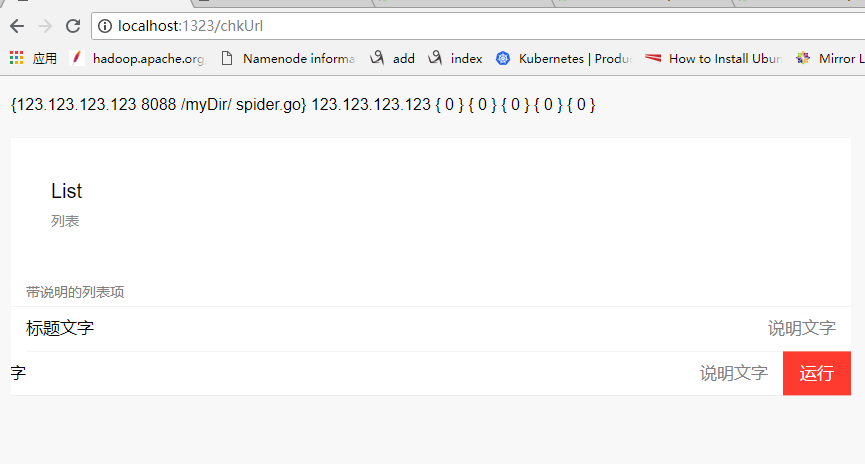
   e.GET("/chkUrl", func(c echo.Context) error {
      fmt.Println("test-chkUrl")
      cc := c.(*CustomContext)
      cc.DumpScripts()
      return c.Render(http.StatusOK, "chkUrl", ScriptArr)
   })

   e.Logger.Fatal(e.Start(":1323"))
}
{{define "chkUrl"}}
<!DOCTYPE html>
<html lang="zh-cmn-Hans">
<head>
    <meta http-equiv="Content-Type" content="text/html; charset=UTF-8">

    <meta name="viewport" content="width=device-width,initial-scale=1,user-scalable=0">
    <title>chkUrl--脚本管理</title>
    <link rel="stylesheet" href="/static/WeUI_files/weui.css">
    <link rel="stylesheet" href="/static/WeUI_files/example.css">
</head>
<body style="margin:1em ;">

{{range .}}
{{.}}
 {{.Host}}
{{end}}
<div class="weui-cells page__category-content">
    <div class="page__hd">
        <h1 class="page__title">List</h1>
        <p class="page__desc">列表</p>
    </div>
    <div class="page__bd">
        <div class="weui-cells__title">带说明的列表项</div>
        <div class="weui-cells">
            <div class="weui-cell">
                <div class="weui-cell__bd">
                    <p>标题文字</p>
                </div>
                <div class="weui-cell__ft">说明文字</div>
            </div>
            <div class="weui-cell weui-cell_swiped">
                <div class="weui-cell__bd" style="transform: translateX(-68px)">
                    <div class="weui-cell">
                        <div class="weui-cell__bd">
                            <p>标题文字</p>
                        </div>
                        <div class="weui-cell__ft">说明文字</div>
                    </div>
                </div>
                <div class="weui-cell__ft">
                    <a class="weui-swiped-btn weui-swiped-btn_warn" href="javascript:">运行</a>
                </div>
            </div>
        </div>
    </div>
</div>
</body>
</html>
{{end}}
go echo studygolang ___go_build_myT_go__1_.exe的更多相关文章
- uC/OS-II应用程序exe
ECHO OFFECHO *******************************************************************************ECHO * ...
- 使用JavaService.exe(amd64)发布java服务(jdk x64)
最近项目中需要使用java服务,但是java服务已经写好了,就等待部署到windows服务中,遇到了种种困难------在x64服务器中部署jdk x64编译的jar时,遇到了各种纠结. 本文找到了一 ...
- windows下使用批处理调用exe和服务
手动调用exe或者启动服务很麻烦,可以使用.bat批处理文件,双击运行即可.步骤如下:创建一个新的txt文件但是保存成.bat结尾的文件(选择用记事本打开编写命令),输入代码内容格式如下: @echo ...
- Tomcat的bin目录下startup.bat、Tomcat6.exe、Tomcat6w.exe区别
从官方下载了apache-tomcat-6.0.37-windows-x64.zip安装包,解压后bin目录下的startup.bat.Tomcat6.exe.Tomcat6w.exe 3个程序有何区 ...
- 怎样用批处理来执行多个exe文件
怎样用批处理来运行多个exe文件 @echo off start *****.exe start *****.exe start *****.exe start *****.exe 接着我们就能够运行 ...
- java调用exe,及调用bat不成功的解决办法
开门见山的说,文件目录如下 想调用123.exe,但是尝试了几次调用不到,然后写了个bat.初始内容如下 @echo off D: cd test "123.exe" 双击可以运行 ...
- win10 Vmware12装mac os X10.11虚拟机教程
1.下载安装VMware 12,具体教程在网上都能看见. 2.下载mac os的镜像,最好下载cdr格式的. 3.在导入虚拟机的时候,到选择客户机操作系统的时候,没有网上出现的Mac os,如下图所示 ...
- [转]关于SVN的操作批处理示例
为了一句话:不要动手做机器能够做的事情. 天天工作用svn,更新啥的打开目录啥的动作天天在重复.每次写些命令也蛮无聊的,不说了,看下面: @echo off rem 显示部分 @echo 注 意 事 ...
- windows7配置Nginx+php+mysql教程
windows7配置Nginx+php+mysql教程 最近在学习php,想把自己的学习经历记录下来,并写一些经验,仅供参考交流.此文适合那些刚刚接触php,想要学习并想要自己搭建Nginx+php+ ...
随机推荐
- 【kindeditor】kindeditor的使用
官网:http://kindeditor.net/demo.php 效果:
- scanf()总结--从网上收来的,感觉很好,用来提醒自己,c语言真是博大精深!!【转】
转自:http://www.cnblogs.com/xiaocai905767378/archive/2011/06/01/2067526.html scanf杂谈 不得不说C语言真 ...
- 快充 IC BQ25896 的 ICO (input current optimizer)
ICO (input current optimizer) 手機接上 adapter 後, 手機裡的 charger IC bq25896 開始向 adapter 抽取 current 供給 batt ...
- Yii初学者必看(转载)
Active Record (AR) 是一个流行的 对象-关系映射 (ORM) 技术. 每个 AR 类代表一个数据表(或视图),数据表(或视图)的列在 AR 类中体现为类的属性,一个 AR 实例则表示 ...
- AC日记——Andryusha and Socks Codeforces 780a
A. Andryusha and Socks time limit per test 2 seconds memory limit per test 256 megabytes input stand ...
- osstatus -9801 workerman websocket 小程序不带端口
帮事业部的同事,解决问题,坑总结 小程序出现,osstatus -9801 情况好多,说一下配置环境可解决的方法和问题 tls 1.2, php 5.6+, nginx, workerman 做的 w ...
- 焦作F Modular Production Line 费用流
题目链接 题解:这道题比赛的时候,学弟说是网络流,当时看N这么大,觉得网络流没法做,实际本题通过巧妙的建图,然后离散化. 先说下建图方式,首先每个覆盖区域,只有左右端点,如果我们只用左右端点的话,最多 ...
- BZOJ 4568 [Scoi2016]幸运数字(树链剖分 + 异或线性基)
题目链接 BZOJ 4568 考虑树链剖分+线段树维护每一段区域的异或线性基 对于每个询问,求出该点集的异或线性基.然后求一下这个线性基里面能异或出的最大值即可. #include <bits ...
- k8s资源清单定义入门
1.资源分类 a.workload型资源:service.pod.deployment.ReplicaSet.StatefulSet.Job.Cronjob; b.服务发现及服务均衡资源型资源:Ser ...
- RabbitMQ 延迟队列,消息延迟推送
目录 应用场景 消息延迟推送的实现 测试结果 应用场景 目前常见的应用软件都有消息的延迟推送的影子,应用也极为广泛,例如: 淘宝七天自动确认收货.在我们签收商品后,物流系统会在七天后延时发送一个消息给 ...