
【PyCharm编辑器】之报:Spellchecker inspection helps locate typos and misspelling in your code, comments and literals, and fix them in one click.问题
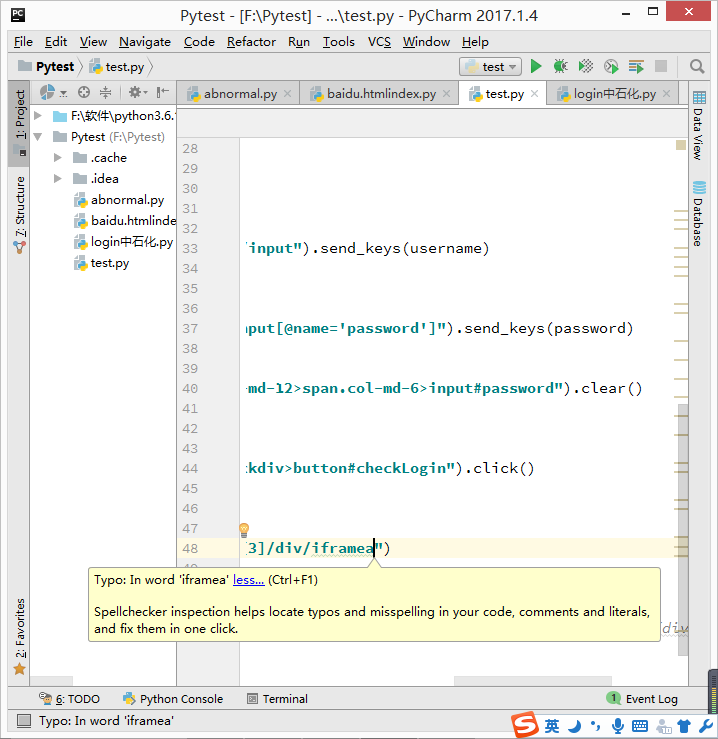
如上图,输入一个单词时会出现波浪线,报:Spellchecker inspection helps locate typos and misspelling in your code, comments and literals, and fix them in one click.
翻译:拼写检查器检查可以帮助查找拼写错误和拼写错误在您的代码、注释和文本、 并修复它们中一次点击。
解决办法:
选中这个单词,右键“Spelling”->“Save ‘miyuehu’ to dictionary...”(单词保存字典中)
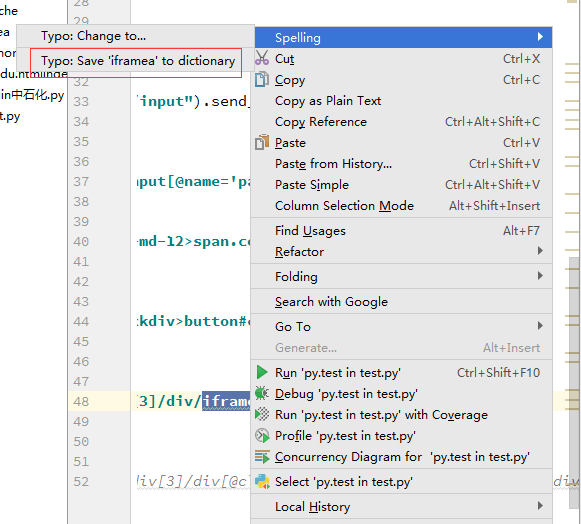
结果:单词不会出现波浪线了,参考原文《android studio对于错误拼写/不识别的英文单词,给予波浪提示。》
【PyCharm编辑器】之报:Spellchecker inspection helps locate typos and misspelling in your code, comments and literals, and fix them in one click.问题的更多相关文章
- Spellchecker inspection helps locate typos and misspelling in your code, comments and literals, and fix them in one click
Pycharm设置 Pycharm总是很多的拼写检查波拉线 Spellchecker inspection helps locate typos and misspelling in your cod ...
- 解决author波浪线Spellchecker inspection helps locate typos and misspelling in your code, comments and literals, and fix them in one click
自从把默认的头注释的author改成自己的名字以后越看越顺眼,但是发现名字下面一直有个波浪线,强迫症简直不能忍. 然后当你把鼠标放上去,再点击提示上的"more",会看到下面的提示 ...
- spellchecker inspection helps locate typeos and misspelling in your code, comments and literals, and fix them in one click
项目layout文件中出现 spellchecker inspection helps locate typos and misspelling in your code, comments and ...
- 解决Spellchecker inspection helps locate typos and misspelling in your code
idea出现这个是因为词库中没有这个单词,所以提示拼写错误 解决办法:双击下面有虚线的单词——>鼠标右键——>spelling——>save 'xxx' to distionary
- 借助取色工具ColorPix对Pycharm编辑器设定自己喜欢的代码颜色_20161202
1.Pycharm编辑器怎么设定自己喜欢的颜色,前几天看爬虫博客,看博主贴出的代码颜色很是喜欢,如下图,设置了好多次找不到他设定的颜色. 2.下班回家想起来之前做表的时候用到过一个取色工具ColorP ...
- PyCharm导入模块报No model named
PyCharm导入模块报No model named 引言 在PyCharm中同目录下import其他模块,出现No model named ...的报错,但实际可以运行的情况. 这很可能是因为PyC ...
- 单点登录(十一)-----遇到问题-----cas启用mongodb验证方式报错--Unable to locate Spring NamespaceHandler for XML schema na
cas启用mongodb验证方式报错--Unable to locate Spring NamespaceHandler for XML schema namespace [http://www.sp ...
- 解决:pycharm连接github报错 Can't login: Received fatal alert: protocol_version
如图1,进行测试连接的时候报错了 知乎的一位网友给了答案,详情参见知乎pycharm连接github报错,如何解决? "" Github 最近升级过协议,可能是你的 JRE 或者 ...
- pycharm安装 package报错:module 'pip' has no attribute 'main'
转自: <pycharm安装 package报错:module 'pip' has no attribute 'main'> https://www.cnblogs.com/Fordest ...
随机推荐
- DB迁移:从SQL Server 2005到MySQL
一.工具选择 依工作需要进行老产品升级,其中一项重要工作就是将SQL Server数据库改为MySQL数据库,故而在对<各种主流 SQLServer 迁移到 MySQL 工具对比>文章学习 ...
- vim的语法高亮及配置文件说明
本文主要针对那些刚刚入门的菜鸟,老手请自动忽略,谢谢. 一.安装vim: sudo pacman -S vim 随后根据提示输入超级用户密码即可完成安装 二.配置自己的语法高亮文件,主要是修改-/.v ...
- 在vscode中使用pylint-django插件解决pylint的一些不必要的错误提示【转】
转自:http://www.cnblogs.com/chaojihexiang/p/6417835.html 微软的vscode编辑器是一个好东西,通过vscode编辑python程序非常的方便.推荐 ...
- n!在k进制下的后缀0
问n! 转化成k进制后的位数和尾数的0的个数.[UVA 10061 How many zeros and how many digits?] Given a decimal integer numbe ...
- 全栈一路坑(4)——创建博客的API
上一篇博客:全站之路一路坑(3)——使用百度站长工具提交站点地图 这一篇要搭建一个API平台,一是为了给博客补充一些功能,二是为以后做APP提供数据接口. 首先需要安装Django REST Fram ...
- Mac环境下svn命令行的使用
在Windows环境中,我们一般使用TortoiseSVN来搭建svn环境.在Mac环境下,由于Mac自带了svn的服务器端和客户端功能,所以我们可以在不装任何第三方软件的前提下使用svn功能,不过还 ...
- EasyMvc入门教程-图形控件说明(21)线形图+柱状图+饼形图
本章将介绍一些基本但常用的图形:线型图,柱状图和饼形图. 以上三种图形对于的数据都是键值对数组,请参考第一个例子: @{ var data = new List<LineItem>(); ...
- 【前端GUI】——对一些优秀网页设计作品的分析&心得
前言:优秀的网站设计作品都有一些相似的地方,即使是美学,也一定会遵循着一定的规律. ONE 这一组,属于同类. 主题:点心. 背景:卡通动物形象. 色调:柔和,甜美. 点线面布局: 在这两个页面中,点 ...
- Netty通过心跳保持长链接
Netty自带心跳检测功能,IdleStateHandler,客户端在写空闲时主动发起心跳请求,服务器接受到心跳请求后给出一个心跳响应.当客户端在一定时间范围内不能够给出响应则断开链接. public ...
- 数据结构之---C语言实现图的数组(邻接矩阵)存储表示
//图的数组(邻接矩阵)存储表示 #include <stdio.h> #include <stdlib.h> #define MAX_VEX_NUM 50 typedef c ...