
WPF -Enum的三种绑定方法
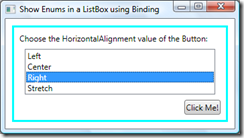
一、使用ObjectDataProvider
<Window

  xmlns="http://schemas.microsoft.com/winfx/2006/xaml/presentation"

  xmlns:x="http://schemas.microsoft.com/winfx/2006/xaml"

  xmlns:sys="clr-namespace:System;assembly=mscorlib"

  SizeToContent="WidthAndHeight"

  Title="Show Enums in a ListBox using Binding">

  <Window.Resources>

    <ObjectDataProvider MethodName="GetValues"

                        ObjectType="{x:Type sys:Enum}"

                        x:Key="AlignmentValues">

      <ObjectDataProvider.MethodParameters>

        <x:Type TypeName="HorizontalAlignment" />

      </ObjectDataProvider.MethodParameters>

    </ObjectDataProvider>

  </Window.Resources>

  <Border Margin="10" BorderBrush="Aqua"

          BorderThickness="3" Padding="8">

    <StackPanel Width="300">

      <TextBlock>Choose the HorizontalAlignment

                 value of the Button:</TextBlock>

      <ListBox Name="myComboBox" SelectedIndex="0" Margin="8"

               ItemsSource="{Binding Source={StaticResource

                                             AlignmentValues}}"/>

      <Button Content="Click Me!"

              HorizontalAlignment="{Binding ElementName=myComboBox,

                                            Path=SelectedItem}"/>

    </StackPanel>

  </Border>

</Window>
二、使用Converter
public class RadioButtonCheckedConverter: IValueConverter

{

    public object Convert(object value, Type targetType, object parameter,

        System.Globalization.CultureInfo culture)

    {

        return value.Equals(parameter);

    }

    public object ConvertBack(object value, Type targetType, object parameter,

        System.Globalization.CultureInfo culture)

    {

        return value.Equals(true) ? parameter : Binding.DoNothing;

    }

}
使用方法:
<RadioButton GroupName="EnumGroup"

    IsChecked="{Binding EnumProperty, Converter={StaticResource RadioButtonCheckedConverter},

    ConverterParameter={x:Static src:TestEnum.Option1}}">

</RadioButton>

<RadioButton GroupName="EnumGroup"

    IsChecked="{Binding EnumProperty, Converter={StaticResource RadioButtonCheckedConverter},

    ConverterParameter={x:Static src:TestEnum.Option2}}">

</RadioButton>

<RadioButton GroupName="EnumGroup"

    IsChecked="{Binding EnumProperty, Converter={StaticResource RadioButtonCheckedConverter},

    ConverterParameter={x:Static src:TestEnum.Option3}}">

</RadioButton>
三、使用扩展的Markup
[MarkupExtensionReturnType(typeof(IEnumerable))]

public class EnumValuesExtension : MarkupExtension

{

   public EnumValuesExtension()

   {

   }

   public EnumValuesExtension(Type enumType)

   {

       this.EnumType = enumType;

   }

   [ConstructorArgument("enumType")]

   public Type EnumType { get; set; }

   public override object ProvideValue(IServiceProvider serviceProvider)

   {

       if (this.EnumType == null)

           throw new ArgumentException("The enum type is not set");

       return Enum.GetValues(this.EnumType);

   }

}
使用方法:
<ListBox Name="myComboBox" SelectedIndex="0" Margin="8"

              ItemsSource="{my:EnumValues HorizontalAlignment}"/>
四、使用资源文件实现Enum本地化
为Enum类型自定义Attribute
从而实现Enum与资源关联
    /// <summary>

    /// Attribute for localization.

    /// </summary>

    [AttributeUsage(AttributeTargets.All,Inherited = false,AllowMultiple = true)]

    public sealed class LocalizableDescriptionAttribute : DescriptionAttribute

    {

        #region Public methods.

        // ------------------------------------------------------------------

        /// <summary>

        /// Initializes a new instance of the

        /// <see cref="LocalizableDescriptionAttribute"/> class.

        /// </summary>

        /// <param name="description">The description.</param>

        /// <param name="resourcesType">Type of the resources.</param>

        public LocalizableDescriptionAttribute

		(string description,Type resourcesType) : base(description)

        {

            _resourcesType = resourcesType;

        }

        #endregion

        #region Public properties.

        /// <summary>

        /// Get the string value from the resources.

        /// </summary>

        /// <value></value>

        /// <returns>The description stored in this attribute.</returns>

        public override string Description

        {

            get

            {

                if (!_isLocalized)

                {

                    ResourceManager resMan =

                         _resourcesType.InvokeMember(

                         @"ResourceManager",

                         BindingFlags.GetProperty | BindingFlags.Static |

                         BindingFlags.Public | BindingFlags.NonPublic,

                         null,

                         null,

                         new object[] { }) as ResourceManager;

                    CultureInfo culture =

                         _resourcesType.InvokeMember(

                         @"Culture",

                         BindingFlags.GetProperty | BindingFlags.Static |

                         BindingFlags.Public | BindingFlags.NonPublic,

                         null,

                         null,

                         new object[] { }) as CultureInfo;

                    _isLocalized = true;

                    if (resMan != null)

                    {

                        DescriptionValue =

                             resMan.GetString(DescriptionValue, culture);

                    }

                }

                return DescriptionValue;

            }

        }

        #endregion

        #region Private variables.

        private readonly Type _resourcesType;

        private bool _isLocalized;

        #endregion

    }
实现自定义的Converter
    /// <summary>

    /// This class simply takes an enum and uses some reflection to obtain

    /// the friendly name for the enum. Where the friendlier name is

    /// obtained using the LocalizableDescriptionAttribute, which holds the localized

    /// value read from the resource file for the enum

    /// </summary>

    [ValueConversion(typeof(object), typeof(String))]

    public class EnumToFriendlyNameConverter : IValueConverter

    {

        #region IValueConverter implementation

        /// <summary>

        /// Convert value for binding from source object

        /// </summary>

        public object Convert(object value, Type targetType,

                object parameter, CultureInfo culture)

        {

            // To get around the stupid WPF designer bug

            if (value != null)

            {

                FieldInfo fi = value.GetType().GetField(value.ToString());

                // To get around the stupid WPF designer bug

                if (fi != null)

                {

                    var attributes =

                        (LocalizableDescriptionAttribute[])

			fi.GetCustomAttributes(typeof

			(LocalizableDescriptionAttribute), false);

                    return ((attributes.Length > 0) &&

                            (!String.IsNullOrEmpty(attributes[0].Description)))

                               ?

                                   attributes[0].Description

                               : value.ToString();

                }

            }

            return string.Empty;

        }

        /// <summary>

        /// ConvertBack value from binding back to source object

        /// </summary>

        public object ConvertBack(object value, Type targetType,

			object parameter, CultureInfo culture)

        {

            throw new Exception("Cant convert back");

        }

        #endregion

    }
使用方法:
<ComboBox x:Name="cmbFoodType"

    ItemsSource="{Binding Source={StaticResource foodData}}"

    SelectedItem="{Binding Path=TestableClass.FoodType, Mode=TwoWay}" Height="Auto">

    <ComboBox.ItemTemplate>

        <DataTemplate>

            <Label  Content="{Binding   Path=.,Mode=OneWay,

                                Converter={StaticResource enumItemsConverter}}"

                    Height="Auto"

                    Margin="0"

                    VerticalAlignment="Center"/>

        </DataTemplate>

    </ComboBox.ItemTemplate>

</ComboBox>
参考
Binding and Using Friendly Enums in WPF
Displaying Enum Values using Data Binding
Binding Radio Buttons to a Single Property
WPF -Enum的三种绑定方法的更多相关文章
- 用Visual C++创建WPF项目的三种主要方法
用Visual C++创建WPF项目的三种主要方法 The problem with using XAML from C++ Because C++ doesn't support partial c ...
- JS面向对象(3) -- Object类,静态属性,闭包,私有属性, call和apply的使用,继承的三种实现方法
相关链接: JS面向对象(1) -- 简介,入门,系统常用类,自定义类,constructor,typeof,instanceof,对象在内存中的表现形式 JS面向对象(2) -- this的使用,对 ...
- C#使用DataSet Datatable更新数据库的三种实现方法
本文以实例形式讲述了使用DataSet Datatable更新数据库的三种实现方法,包括CommandBuilder 方法.DataAdapter 更新数据源以及使用sql语句更新.分享给大家供大家参 ...
- JavaScript 三种绑定事件方式之间的区别
JavaScript三种绑定事件的方式: 1. <div id="btn" onclick="clickone()"></div> // ...
- Binding 中 Elementname,Source,RelativeSource 三种绑定的方式
在WPF应用的开发过程中Binding是一个非常重要的部分. 在实际开发过程中Binding的不同种写法达到的效果相同但事实是存在很大区别的. 这里将实际中碰到过的问题做下汇总记录和理解. 1. so ...
- Liunx 环境下vsftpd的三种实现方法(超详细参数)
以下文章介绍Liunx 环境下vsftpd的三种实现方法 ftp://vsftpd.beasts.org/users/cevans/vsftpd-2.0.3.tar.gz,目前已经到2.0.3版本.假 ...
- Android开发 ---Button的OnClickListener的三种实现方法
button的OnClickListener的三种实现方法 onclick事件的定义方法,分为三种,分别为 1.在xml中进行指定方法: 2.在Actitivy中new出一个OnClickListen ...
- JavaScript三种绑定事件的方式
JavaScript三种绑定事件的方式: 1. <div id="btn" onclick="clickone()"></div> // ...
- Dom事件的三种绑定方式
1.事件 2. onclick, onblur, onfocus, 需求:请写出一个行为,样式,结构,相分离的页面. JS, CSS, HTML, 示例1,行为结构样式粘到一起的页面: & ...
随机推荐
- Winform开发框架之肖像显示保存控件的实现
我们在开发一些Winform程序的时候,除了常规的显示普通数据外,有的时候需要显示一些人员肖像或者一些车辆等物体的图片,一般这些内容较小,所以以二进制存储在数据库是一个不错的方案.但由于它们虽然很常用 ...
- C#File类常用的文件操作方法(创建、移动、删除、复制等)
File类,是一个静态类,主要是来提供一些函数库用的.静态实用类,提供了很多静态的方法,支持对文件的基本操作,包括创建,拷贝,移动,删除和 打开一个文件. File类方法的参量很多时候都是路径path ...
- Debian 7 安装配置总结
最近几天折腾了一下Debian 7 (gnome桌面DVD版,KDE桌面CD版最后会提到),总的来说收获还是挺大的,对比以前使用ubuntu,debian 7给我的感觉像是一个新生婴儿,不带多余的花俏 ...
- json中含有Unicode的处理办法 C#
public static class StringExtension { #region unicode 字符转义 /// <summary> /// 转换输入字符串中的任何转义字符.如 ...
- [转] js实现html table 行,列锁定
js实现html table 表头,指定列锁定 实现效果如下: 感兴趣的朋友可以直接复制出来运行看效果. <!DOCTYPE HTML PUBLIC "-//W3C//DTD XHTM ...
- 实现UITextView的placeholder
我们知道在iOS开发时,控件UITextField有个placeholder属性,UITextField和UITextView使用方法基本类似,有两个小区别:1.UITextField单行输入,而UI ...
- 网站已迁移至:https://tasaid.com/
个人网站:http://tasaid.com/ 主要文章在 个人网站 更新,尽可能在博客园同步更新. github:https://github.com/linkFly6 或者可以参与到我目前正在开发 ...
- string中Insert与Format效率对比、String与List中Contains与IndexOf的效率对比
关于string的效率,众所周知的恐怕是“+”和StringBuilder了,这些本文就不在赘述了.关于本文,请先回答以下问题(假设都是基于多次循环反复调用的情况下):1.使用Insert与Forma ...
- list集合的排序Comparator和Collections.sort
一个例子 package sortt; import java.util.ArrayList; import java.util.Collections; import java.util.Compa ...
- String类型传值以及对象传值
package Virtual; class Stan{ String mm = "hello"; } class Virtual { public static void mai ...