
HTML+JavaScript画函数图像
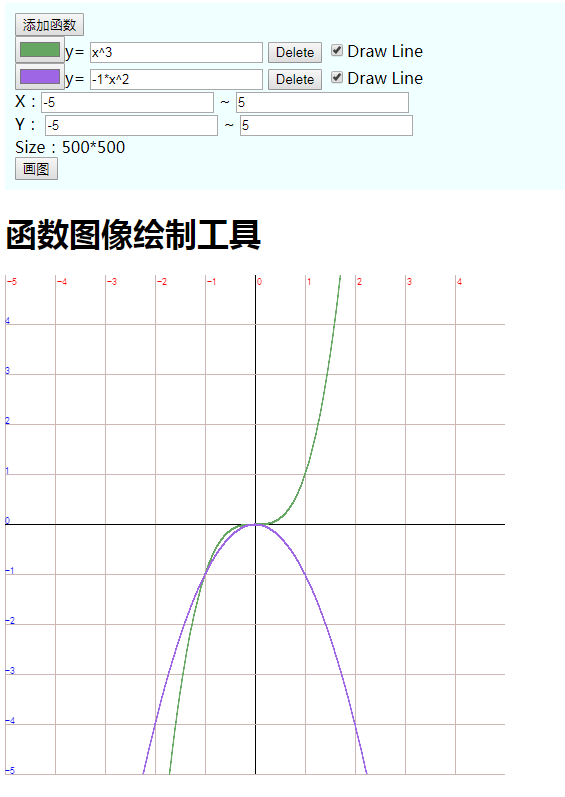
<!DOCTYPE html>

<html>

	<head>

		<meta charset="UTF-8">

		<title>函数图像绘制工具</title>

		<script type="text/javascript" src="js/funcImg.js"></script>

		<style>

			#div-img {

				/* 此决定画布的宽高 */

				width: 500px;

				height: 500px;

			}

			#input-controller {

				padding: 10px;

				background-color: azure;

			}

		</style>

	</head>

	<body>

		<div id="input-controller">

			<div id="function">

				<button onclick="Add()">添加函数</button>

				<span id="mod" style="display:none" name="0">

					<input type="color"/>y=

					<input type="text" value="x^3" name="Fun"/>

					<button onclick="Delete(this.parentNode)">Delete</button>

	                <input type="checkbox" onclick="reDraw()" checked="checked"/>Draw Line

				</span>

			</div>

			<div id="option">

				X:<input id="xLeftValue" /> ~

				<input id="xRightValue" />

				<br> Y:

				<input id="yLeftValue" /> ~

				<input id="yRightValue" />

				<br>

				<span id="show-size">Size:</span>

			</div>

			<button onclick="change()">画图</button>

		</div>

		<div id="main">

			<h1>函数图像绘制工具</h1>

			<div id="div-img">

				<canvas id="graph"></canvas>

			</div>

		</div>

	</body>

	<script>

		const FONT_STYLE = "10px 黑体";

		const MIN = 1e-4;

		const MAX = 1e8;

		const EPS = 1e-12;

		const CANVAS = $("graph");

		const CONTEXT_2D = CANVAS.getContext("2d");

		const FUN_IMG_WIDTH = CANVAS.parentNode.clientWidth;

		const FUN_IMG_HEIGHT = CANVAS.parentNode.clientHeight;

		var xLeftValue = -FUN_IMG_WIDTH / 100; // x最左的值

		var xRightValue = FUN_IMG_WIDTH / 100;

		var yLeftValue = -FUN_IMG_HEIGHT / 100;

		var yRightValue = FUN_IMG_HEIGHT / 100;

		var tableX, tableY, countX, countY;

		var funStage = 0,

			mouseX, mouseY;

		var tmp;

	</script>

	<script>

		CANVAS.width = FUN_IMG_WIDTH;

		CANVAS.height = FUN_IMG_HEIGHT;

		$("show-size").innerHTML = "Size:" + FUN_IMG_WIDTH + "*" + FUN_IMG_HEIGHT;

		CANVAS.onmousedown = function(ob) {

			mouseX = ob.layerX;

			mouseY = ob.layerY;

			funStage = 1;

		}

		CANVAS.onmousemove = function(ob) {

			if(funStage != 1) {

				return;

			}

			var NoX, NoY, det;

			NoX = ob.layerX;

			NoY = ob.layerY;

			det = (mouseX - NoX) / FUN_IMG_WIDTH * (xRightValue - xLeftValue);

			xLeftValue += det;

			xRightValue += det;

			det = (NoY - mouseY) / FUN_IMG_HEIGHT * (yRightValue - yLeftValue);

			yLeftValue += det;

			yRightValue += det;

			mouseX = NoX;

			mouseY = NoY;

			reDraw();

			update();

		}

		CANVAS.onmouseup = function(ob) {

			if(funStage == 1) {

				funStage = 0;

				reDraw();

			}

		}

		CANVAS.onmouseleave = function(ob) {

			if(funStage == 1) {

				funStage = 0;

				reDraw();

			}

		}

		CANVAS.onmousewheel = function(ob) {

			// 取消事件的默认动作

			ob.preventDefault();

			// 放大的比例

			var ScaleRate = 0.9;

			var detail;

			if(ob.wheelDelta) {

				detail = ob.wheelDelta;

			} else if(ob.detail) {

				detail = ob.detail;

			}

			if(detail > 0) {

				scale(ob.layerX, FUN_IMG_HEIGHT - 1 - ob.layerY, ScaleRate);

			} else {

				scale(ob.layerX, FUN_IMG_HEIGHT - 1 - ob.layerY, 1 / ScaleRate);

			}

			reDraw();

			update();

		}

		// 初始化

		reDraw();

		update();

		Add();

	</script>

</html>
funcImg.js
function $(id) {

	return document.getElementById(id);

}

function getRandomColor() {

	var color = '#' + ('00000' + (Math.random() * 0x1000000 << 0).toString(16)).substr(-6);

	return color;

}

function FunWork(f, x) {

	switch(f) {

		case "":

			{

				return x;

				break;

			}

		case "sin":

			{

				return Math.sin(x);

				break;

			}

		case "cos":

			{

				return Math.cos(x);

				break;

			}

		case "tan":

			{

				return Math.tan(x);

				break;

			}

		case "abs":

			{

				return Math.abs(x);

				break;

			}

		case "sqrt":

			{

				return Math.sqrt(x);

				break;

			}

		case "ln":

			{

				return Math.log(x);

				break;

			}

		case "log":

			{

				return Math.log(x) / Math.LN2;

				break;

			} //2为底

		case "lg":

			{

				return Math.log(x) / Math.LN10;

				break;

			} //10为底

		case "floor":

			{

				return Math.floor(x);

				break;

			}

		case "ceil":

			{

				return Math.ceil(x);

				break;

			}

		case "int":

			{

				return parseInt(x);

				break;

			}

		default:

			{

				return NaN;

				break;

			}

	}

}

function ChangeToPointY(y) {

	return FUN_IMG_HEIGHT - 1 - parseInt((y - yLeftValue) / (yRightValue - yLeftValue) * FUN_IMG_HEIGHT);

}

function isChar(c) {

	return(c >= 'a' && c <= 'z') || (c >= 'A' && c <= 'Z');

}

function isDigit(c) {

	return c >= '0' && c <= '9';

}

function priority(c) {

	switch(c) {

		case '(':

			return 0;

			break;

		case '+':

			return 1;

			break;

		case '-':

			return 1;

			break;

		case '*':

			return 2;

			break;

		case '/':

			return 2;

			break;

		case '^':

			return 3;

			break;

		default:

			return -1;

			break;

	}

}

// 是运算符

function isOpt(c) {

	return priority(c) != -1;

}

function singleCalc(c, a, b) {

	if(c == '+') {

		return a + b;

	} else

	if(c == '-') {

		return a - b;

	} else

	if(c == '*') {

		return a * b;

	} else

	if(c == '/') {

		return a / b;

	} else

	if(c == '^') {

		return Math.pow(a, b);

	} else {

		return NaN;

	}

}

function getTable() {

	tmp = (xRightValue - xLeftValue + EPS) / 20;

	tableX = 1;

	countX = 0;

	countY = 0;

	while(tableX < tmp) {

		tableX *= 10;

	}

	while(tableX / 10 > tmp) {

		tableX /= 10;

		countX++;

	}

	if(tableX >= 1) {

		countX = 0;

	}

	if(tableX / 5 > tmp) {

		tableX /= 5;

		countX++;

	} else if(tableX / 2 > tmp) {

		tableX /= 2;

		countX++;

	}

	var i = parseInt(xLeftValue / tableX) + (xLeftValue > 0)

	for(; i * tableX < xRightValue; i++) {

		if(i == 0) {

			// y轴

			CONTEXT_2D.fillStyle = "black";

		} else {

			// 普通竖线

			CONTEXT_2D.fillStyle = "#CDB7B5";

		}

		tmp = (i * tableX - xLeftValue) / (xRightValue - xLeftValue) * FUN_IMG_WIDTH;

		var _width = 1;

		var _height = FUN_IMG_HEIGHT;

		CONTEXT_2D.fillRect(tmp, 0, _width, _height);

		// 竖线上的数字

		CONTEXT_2D.fillStyle = "red";

		CONTEXT_2D.font = FONT_STYLE;

		var _text = (i * tableX).toFixed(countX);

		var _x = tmp + 2;

		var _y = 10;

		CONTEXT_2D.fillText(_text, _x, _y);

	}

	tmp = (yRightValue - yLeftValue + EPS) / 20;

	tableY = 1;

	while(tableY < tmp) {

		tableY *= 10;

	}

	while(tableY / 10 > tmp) {

		tableY /= 10, countY++;

	}

	if(tableY / 5 > tmp) {

		tableY /= 5, countY++;

	} else if(tableY / 2 > tmp) {

		tableY /= 2, countY++;

	}

	if(tableY >= 1) {

		countY = 0;

	}

	var i = parseInt(yLeftValue / tableY) + (yLeftValue > 0);

	for(; i * tableY < yRightValue; i++) {

		// 横线

		if(i == 0) {

			// x轴

			CONTEXT_2D.fillStyle = "black";

		} else {

			// 普通横线

			CONTEXT_2D.fillStyle = "#CDB7B5";

		}

		tmp = (i * tableY - yLeftValue) / (yRightValue - yLeftValue) * FUN_IMG_HEIGHT;

		CONTEXT_2D.fillRect(0, FUN_IMG_HEIGHT - 1 - tmp, FUN_IMG_WIDTH, 1);

		// 横线上的数字

		CONTEXT_2D.fillStyle = "blue";

		CONTEXT_2D.font = FONT_STYLE;

		CONTEXT_2D.fillText((i * tableY).toFixed(countY), 0, FUN_IMG_HEIGHT - 1 - tmp);

	}

}

function drawArc(x, y) {

	CONTEXT_2D.beginPath();

	// arc(弧形),画圆

	CONTEXT_2D.arc(x, y, 1, 0, Math.PI * 2);

	CONTEXT_2D.closePath();

	CONTEXT_2D.fill();

}

function drawLine(lx, ly, px, py) {

	CONTEXT_2D.beginPath();

	CONTEXT_2D.moveTo(lx, ly);

	CONTEXT_2D.lineTo(px, py);

	CONTEXT_2D.closePath();

	CONTEXT_2D.stroke(); // 绘制

}

function reDraw() {

	CONTEXT_2D.clearRect(0, 0, FUN_IMG_WIDTH, FUN_IMG_HEIGHT);

	getTable();

	getFunction();

}

function change() {

	xLeftValue = parseFloat($("xLeftValue").value);

	xRightValue = parseFloat($("xRightValue").value);

	yLeftValue = parseFloat($("yLeftValue").value);

	yRightValue = parseFloat($("yRightValue").value);

	reDraw();

}

function update() {

	$("xLeftValue").value = xLeftValue;

	$("xRightValue").value = xRightValue;

	$("yLeftValue").value = yLeftValue;

	$("yRightValue").value = yRightValue;

}

function scale(x, y, times) {

	if(x < 0 || x >= FUN_IMG_WIDTH || y < 0 || y >= FUN_IMG_HEIGHT) return;

	if(times < 1 && (xRightValue - xLeftValue < MIN || yRightValue - yLeftValue < MIN)) {

		return;

	}

	if(times > 1 && (xRightValue - xLeftValue > MAX || yRightValue - yLeftValue > MAX)) {

		return;

	}

	x = xLeftValue + (xRightValue - xLeftValue) / FUN_IMG_WIDTH * x;

	y = yLeftValue + (yRightValue - yLeftValue) / FUN_IMG_HEIGHT * y;

	xLeftValue = x - (x - xLeftValue) * times;

	xRightValue = x + (xRightValue - x) * times;

	yLeftValue = y - (y - yLeftValue) * times;

	yRightValue = y + (yRightValue - y) * times;

}

function Calc(fun, X, Value) {

	var number = new Array(),

		opt = new Array(),

		F = new Array(),

		now = 0,

		f = "",

		tmp, a, b, sign = 1,

		base = 0,

		j;

	for(var i = 0; i < fun.length; i++) {

		for(j = 0; j < X.length; j++)

			if(X[j] == fun[i]) {

				if(i == 0 || isOpt(fun[i - 1])) now = Value[j];

				else now *= Value[j];

				break;

			}

		if(j == X.length)

			if(fun[i] == '(') F.push(f), f = "", opt.push('(');

			else

		if(fun[i] == ')') {

			number.push(now * sign);

			now = 0;

			sign = 1;

			base = 0;

			while((tmp = opt.pop()) != '(') {

				b = number.pop();

				a = number.pop();

				tmp = singleCalc(tmp, a, b);

				number.push(tmp);

			}

			now = FunWork(F.pop(), number.pop());

		} else

		if(fun[i] == '.') base = 1;

		else

		if(fun[i] == '+' && (i == 0 || priority(fun[i - 1]) != -1));

		else

		if(fun[i] == '-' && (i == 0 || priority(fun[i - 1]) != -1)) sign = -1;

		else

		if(fun[i] == 'e')

			if(i == 0 || isOpt(fun[i - 1])) now = Math.E;

			else now *= Math.E;

		else

		if(fun[i] == 'p' && fun[i + 1] == 'i') {

			if(i == 0 || isOpt(fun[i - 1])) now = Math.PI;

			else now *= Math.PI;

			i += 1;

		} else

		if(isDigit(fun[i]))

			if(base == 0) now = now * 10 + (fun[i] - '0');

			else base /= 10, now += base * (fun[i] - '0');

		else

		if(isChar(fun[i])) f += fun[i];

		else if(isOpt(fun[i])) {

			number.push(now * sign);

			now = 0;

			sign = 1;

			base = 0;

			var s = priority(fun[i]);

			if(s == -1) return 0;

			while(s <= priority(opt[opt.length - 1])) {

				b = number.pop();

				a = number.pop();

				tmp = singleCalc(opt.pop(), a, b);

				number.push(tmp);

			}

			opt.push(fun[i]);

		}

	}

	number.push(now * sign);

	while(opt.length > 0) {

		b = number.pop();

		a = number.pop();

		tmp = singleCalc(opt.pop(), a, b);

		number.push(tmp);

	}

	return number.pop();

}

function getFunction() {

	// group:函数(可能是复数)

	var group = document.getElementsByName("Fun");

	var x, y;

	var lax, lay;

	var px, py

	var color, outSide, type

	var ValueL, ValueR, ValueS, isDrawLine, tmp, TMP;

	for(var k = 1; k < group.length; k++) {

		var _funcItem = group[k].parentNode;

		outSide = 1;

		//type = _funcItem.children[0].value;

		// 颜色

		color = _funcItem.children[0].value;

		// 函数表达式

		funcExpression = group[k].value;

		// 是否画线(默认画点)

		isDrawLine = _funcItem.children[3].checked;

		CONTEXT_2D.fillStyle = CONTEXT_2D.strokeStyle = color;

		for(var i = 0; i < FUN_IMG_WIDTH; i++) {

			x = xLeftValue + (xRightValue - xLeftValue) / FUN_IMG_WIDTH * i;

			y = Calc(funcExpression, ['x'], [x]);

			if(isNaN(y)) {

				continue;

			}

			px = i;

			py = ChangeToPointY(y);

			if(y >= yLeftValue && y < yRightValue) {

				// 画圆

				drawArc(px, py);

				if(isDrawLine) {

					drawLine(lax, lay, px, py);

				}

				outSide = 0;

			} else {

				if(isDrawLine) {

					if(!outSide) {

						drawLine(lax, lay, px, py);

					}

				} else {}

				outSide = 1;

			}

			lax = px;

			lay = py;

		}

	}

}

function Add() {

	var newInput = $("mod").cloneNode(true);

	newInput.style.display = "block";

	newInput.children[0].value = getRandomColor();

	$("function").appendChild(newInput);

}

function Delete(node) {

	node.parentNode.removeChild(node);

}
HTML+JavaScript画函数图像的更多相关文章
- Catlike学习笔记(1.2)-使用Unity画函数图像
『Catlike系列教程』第二篇来了~今天周六,早上(上午11点)醒来去超市买了一周的零食回来以后就玩了一整天游戏非常有负罪感.现在晚上九点天还亮着感觉像下午7点左右的样子好像还不是很晚...所以就写 ...
- [Java画图]画函数图像
利用Graphics类画任意显式函数图像,只需修改代码中的F()函数即可,另外调整timesx和timesy参数来分方向放大或缩小图像.需要重定义坐标系. package test; import j ...
- javascript自制函数图像生成器
出于某种目的想做这个东西,顺便可以提供给GMA的用户&&放在博客园. 实现上只是简单的描点,加上一个相邻两点连线的开关,完全没有技术含量.而且函数图像一旦多起来就会变卡. 瓶颈在隐函数 ...
- 用python画函数图像
import matplotlib.pyplot as plt import numpy as np x = np.linspace(0, 1, 50) # 从0到1,等分50分 y = 210*(x ...
- Catlike学习笔记(1.3)-使用Unity画更复杂的3D函数图像
第三篇来了-今天去参加了 Unite 2018 Berlin,感觉就是....非常困...回来以后稍微睡了下清醒了觉得是时候认真学习下了,不过讲的很多东西都是还没有发布或者只有 Preview 的版本 ...
- Javascript 随机数函数 学习之二:产生服从正态分布随机数
一.为什么需要服从正态分布的随机函数 一般我们经常使用的随机数函数 Math.random() 产生的是服从均匀分布的随机数,能够模拟等概率出现的情况,例如 扔一个骰子,1到6点的概率应该相等,但现实 ...
- javascript + jquery函数大全
JAVASCRIPT Array 函数 array创建数组 concat()连接两个或更多的数组,并返回结果. join()把数组中所有元素组成字符串. pop()删除并返回数组的最后一个元素 s ...
- python如何画三维图像?
python三维图像输出的代码如下所示:#画3D函数图像输出from mpl_toolkits.mplot3d import Axes3Dfrom matplotlib import cmimport ...
- JavaScript中函数函数的定义与变量的声明<基础知识一>
1.JavaScript中函数的三种构造方式 a.function createFun(){ } b.var createFun=function (){ } c.var createFun=new ...
随机推荐
- 打造跨平台.NET Core后台服务
续之前讲的在TopShelf上部署ASP.NET Core程序,作为后台服务运行,自从.NET Core 3.0出现以后,出现了自带的Generic Host,使得自托管服务变为可能.这种方式和Top ...
- 从eclipse迁移到ideal
个人用eclipse比较多,什么Luna,Neon,Mars.几乎每年都要研发出一个版本.目前所在的这家公司,维护的是一个10年的老项目,需求迭代频率比较高,业务代码臃肿而难理解,依赖关系不清晰,代码 ...
- STM32入门系列-使用C语言封装寄存器
前面文章介绍了存储器映射.寄存器和寄存器映射,这些都是为了介绍使用 C语言封装寄存器做铺垫.这里我们通过一个实例来对 C 语言封装寄存器进行介绍. 具体实例:控制 GPIOC 端口的第 0 管脚输出一 ...
- Java学习的第二十二天
1.异常处理 try...catch...finally... finally带return finally也可省略 try里面可以有try 多个异常用IllegalAgruementExceptio ...
- 通过一个很常用的场景来展示vue数据驱动的应用
需求:可以动态增减组合条件来进行数据查询. 界面运行效果如下图所示: 界面第一次加载时,默认会显示一个空的查询条件,如下图所示: 点击"加"图标,可以无限增加查询条件,也可以点击& ...
- [Codeforces 553E]Kyoya and Train(期望DP+Floyd+分治FFT)
[Codeforces 553E]Kyoya and Train(期望DP+Floyd+分治FFT) 题面 给出一个\(n\)个点\(m\)条边的有向图(可能有环),走每条边需要支付一个价格\(c_i ...
- 自定义MFC对话窗口的类名
默认情况下,MFC对话框的窗口类名为"#32770",如果想自定义窗口类名呢,需要两步: 1.修改rc文件 这一步需要直接编辑rc文件,使用任意记事本工具即可,找到窗口的相关定义, ...
- 转载:java web 项目中如何设置项目打开的默认页面
通过博客学到的两种方法总结: 一.在web.xml文件中加入: 此时项目打开的默认页面就是loginS.html 二.在WebContent文件夹下添加index.jsp文件,此时这个index.js ...
- 快速了解阿里微服务热门开源分布式事务框架——Seata
一.Seata 概述 Seata 是 Simple Extensible Autonomous Transaction Architecture 的简写,由 feascar 改名而来. Seata 是 ...
- 【转】Lisp的本质
Lisp的本质: http://www.csdn.net/article/2012-11-22/2812113-The-Nature-Of-Lisp###