
SpringBoot-06-模板引擎Thymeleaf
6. 模板引擎 Thymeleaf
Thyme leaf 英译为 百里香的叶子。
模板引擎
以前开发中使用的jsp就是一个模板引擎,但是springboot 以jar的方式,并且使用嵌入式的tomcat,所以默认不支持jsp。
Springboot推荐使用模板引擎,除了jsp,还有用的比较多的freemarker,包括springboot推荐的Thymeleaf。它们的思想都是一样的,如下:
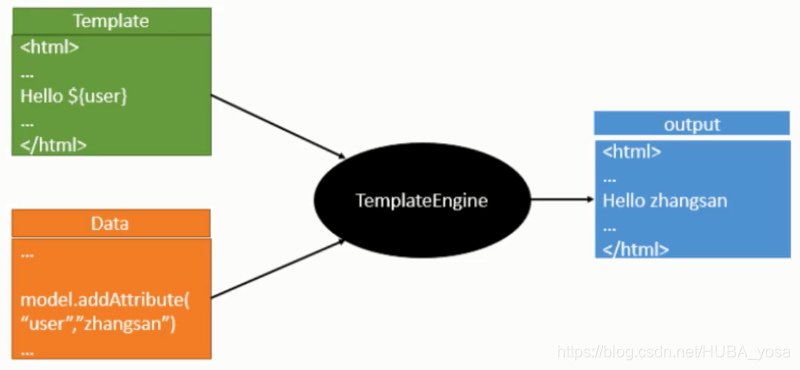
模板引擎的作用:
写一个页面模板,加上后台封装好的数据,交给模板引擎。它按照我们的数据进行表达式解析,填充到指定位置,最终生成想要的内容再写出去。
引入Thymeleaf
怎么引入呢,对于springboot来说,只是一个start的事情。我们在项目中引入一下。
提供三个网址:
Thymeleaf官网:https://www.thymeleaf.org/
Thymeleaf 在Github 的主页:https://github.com/thymeleaf/thymeleaf
Spring官方文档:https://docs.spring.io/spring-boot/docs/2.3.2.RELEASE/reference/htmlsingle/#using-boot-starter
找到对应的pom依赖:
<!-- https://mvnrepository.com/artifact/org.thymeleaf/thymeleaf-spring5 -->

<dependency>

    <groupId>org.thymeleaf</groupId>

    <artifactId>thymeleaf-spring5</artifactId>

    <version>3.0.11.RELEASE</version>

</dependency>

<!-- https://mvnrepository.com/artifact/org.thymeleaf.extras/thymeleaf-extras-java8time -->

<dependency>

    <groupId>org.thymeleaf.extras</groupId>

    <artifactId>thymeleaf-extras-java8time</artifactId>

    <version>3.0.4.RELEASE</version>

</dependency>
Maven会自动下载jar包,我们可以看到:

Thymeleaf分析
我们首先按照springboot的自动配置原理看一下Thymeleaf的自动配置规则,找到自动配置类:ThymeleafProperties
@ConfigurationProperties(prefix = "spring.thymeleaf")

public class ThymeleafProperties {

   private static final Charset DEFAULT_ENCODING = StandardCharsets.UTF_8;

   public static final String DEFAULT_PREFIX = "classpath:/templates/";

   public static final String DEFAULT_SUFFIX = ".html";

   private boolean checkTemplate = true;

   private boolean checkTemplateLocation = true;

   private String prefix = DEFAULT_PREFIX;

   private String suffix = DEFAULT_SUFFIX;

   private String mode = "HTML";

   private Charset encoding = DEFAULT_ENCODING;

}
我们可以看到默认的前后缀!
因此我们只需要把html页面放到类路径下的templates下,thymeleaf就可以帮我们自动渲染了。
使用Thymeleaf什么都不需要配置,只需要将他放在指定的文件夹下即可!
测试
测试步骤:
编写一个TestController
@Controller

public class TestController {

    @RequestMapping("/test")

    public String test(){

        return "test";

    }

}
编写一个测试页面 test.html放在templates目录下
<!DOCTYPE html>

<html lang="en">

<head>

    <meta charset="UTF-8">

    <title>Title</title>

</head>

<body>

<h1>test</h1>

</body>

</html>
启动项目请求测试
小结:
如果使用thymeleaf,只需要导入对应的依赖即可!
html放在templates目录下。
public static final String DEFAULT_PREFIX = "classpath:/templates/";

public static final String DEFAULT_SUFFIX = ".html";
Thymeleaf语法学习
要学习语法,参考官网文档为准,我们找到对应的版本看看:
【做一个简单的练习:我们需要查出一些数据,在页面中展示】步骤如下:
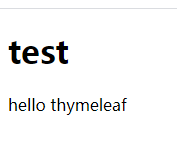
修改测试请求,增加数据传输
model.addAttribute("msg","hello thymeleaf");
我们要使用thymeleaf,需要在html文件中导入命名空间的约束,方便提示。我们可以去官方文档#3看一下命名空间:
<html xmlns:th="http://www.thymeleaf.org">
编写前端页面
<div th:text="${msg}">

</div>
启动测试
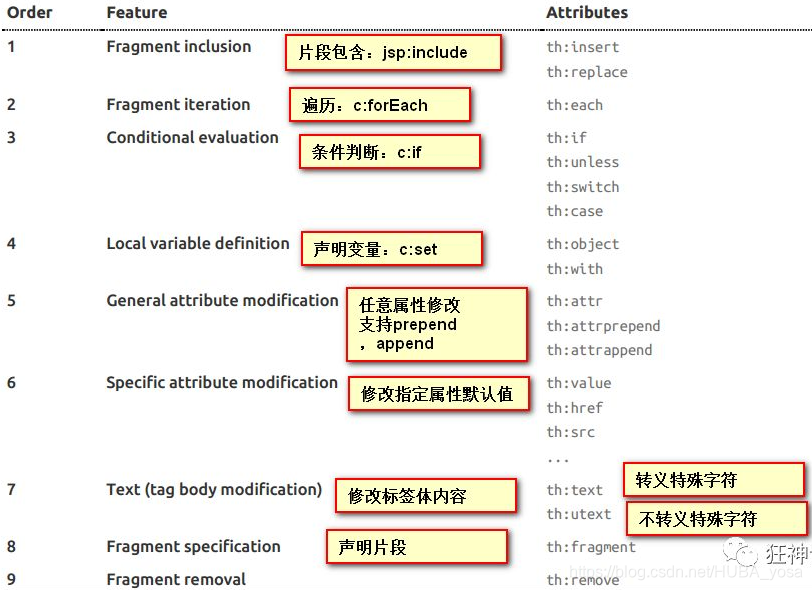
Thymeleaf的使用语法:
我们可以使用任意的th:attr来替换html中原生属性的值
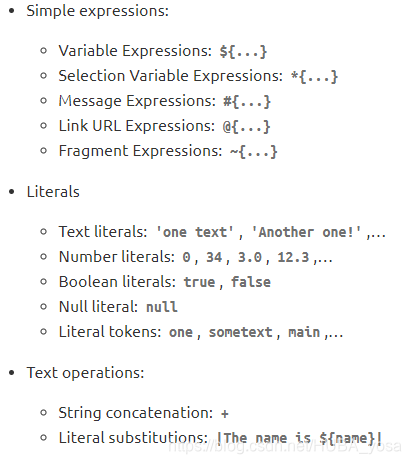
我们可以写哪些表达式?
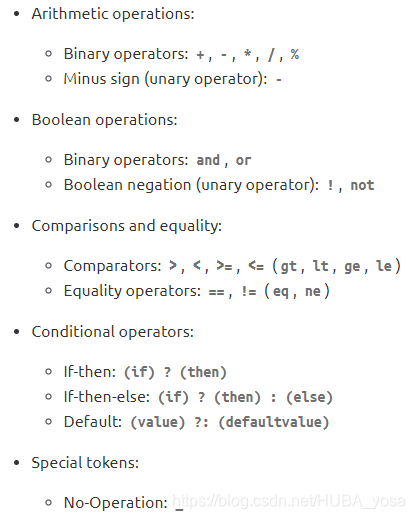
练习测试
编写一个controller,放一些数据
@Controller

public class TestController {

    @RequestMapping("/test")

    public String test(Model model) {

        model.addAttribute("msg","<h1>hello thymeleaf</h1>");

        model.addAttribute("users", Arrays.asList("111","222","333"));

        return "test";

    }

}
测试页面取出数据
<!DOCTYPE html>

<html lang="en" xmlns:th="http://www.thymeleaf.org">

<head>

    <meta charset="UTF-8">

    <title>Title</title>

</head>

<body>

<h1>test</h1>

<!--所有的html元素都可以被thymeleaf替换接管,th:+元素名,如th:class="" -->

<div th:text="${msg}"></div>

<div th:utext="${msg}"></div>

<hr>

<!--建议第一种写法-->

<h3 th:each="user : ${users}" th:text="${user}"></h3>

<hr>

<h3 th:each="user : ${users}" >[[${user}]]</h3>

</body>

</html>
启动项目测试!
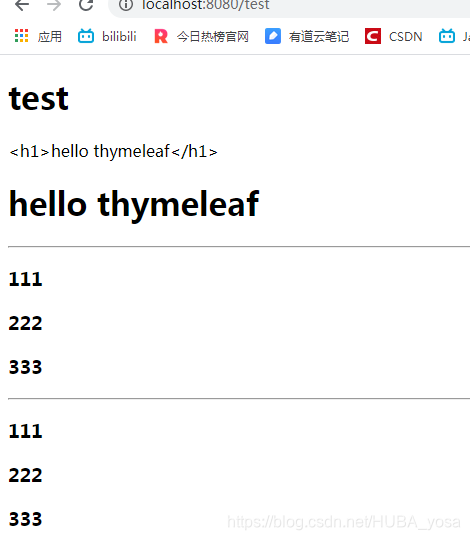
记住一句话:
需要使用什么,根据官方文档来查询,才是最重要的,要熟练使用官方文档!
SpringBoot-06-模板引擎Thymeleaf的更多相关文章
- SpringBoot:模板引擎 thymeleaf、ContentNegotiatingViewResolver、格式化转换器
目录 模板引擎 thymeleaf ContentNegotiatingViewResolver 格式化转换器 模板引擎 thymeleaf.ContentNegotiatingViewResolve ...
- springboot:Java模板引擎Thymeleaf介绍
Thymeleaf是一款用于渲染XML/XHTML/HTML5内容的模板引擎.类似JSP,Velocity,FreeMaker等,它也可以轻易的与Spring MVC等Web框架进行集成作为Web应用 ...
- Spring Boot (四)模板引擎Thymeleaf集成
一.Thymeleaf介绍 Thymeleaf是一种Java XML / XHTML / HTML5模板引擎,可以在Web和非Web环境中使用.它更适合在基于MVC的Web应用程序的视图层提供XHTM ...
- 新一代Java模板引擎Thymeleaf
新一代Java模板引擎Thymeleaf-spring,thymeleaf,springboot,java 相关文章-天码营 https://www.tianmaying.com/tutorial/u ...
- 8.SpringBoot 模板引擎 Thymeleaf
1.模板引擎原理 JSP.Velocity.Freemarker.Thymeleaf 都是模板引擎.SpringBoot推荐的Thymeleaf:语法更简单,功能更强大: Thymeleaf模板引擎 ...
- springboot集成模板引擎freemarker和thymeleaf
freemarkder和thymeleaf都是java的模板引擎,这里只介绍这两种模板引擎如何在sprongboot中配置: 1. freemarkder 1.1 在pom.xml中添加依赖包 < ...
- SpringBoot系列:Spring Boot使用模板引擎Thymeleaf
一.Java模板引擎 模板引擎(这里特指用于Web开发的模板引擎)是为了使用户界面与业务数据(内容)分离而产生的,它可以生成特定格式的文档,用于网站的模板引擎就会生成一个标准的HTML文档. 在jav ...
- SpringBoot入门系列(四)整合模板引擎Thymeleaf
前面介绍了Spring Boot的优点,然后介绍了如何快速创建Spring Boot 项目.不清楚的朋友可以看看之前的文章:https://www.cnblogs.com/zhangweizhong/ ...
- SpringBoot入门:新一代Java模板引擎Thymeleaf(理论)
Spring Boot 提供了spring-boot-starter-web来为Web开发予以支持,spring-boot-starter-web为我们提供了嵌入的Tomcat以及SpringMVC的 ...
- 模板引擎Thymeleaf
1.Thymeleaf简介 Thymeleaf 是一个跟 Velocity.FreeMarker 类似的模板引擎,它可以完全替代 JSP .相较与其他的模板引擎,它有如下三个极吸引人的特点 Thyme ...
随机推荐
- Mac本地生成SSHKey的方法
1. 查看秘钥是否存在 打开终端查看是否已经存在SSH密钥:cd ~/.ssh 如果没有密钥则不会有此文件夹,有则备份删除, 也可以直接删除, 2.生成新的秘钥, 命令如下 $ssh-keygen ...
- ACboy needs your help (动态规划背包)
ACboy has N courses this term, and he plans to spend at most M days on study.Of course,the profit he ...
- SpringBoot系列之从入门到精通系列教程
对应SpringBoot系列博客专栏,例子代码,本博客不定时更新 Spring框架:作为JavaEE框架领域的一款重要的开源框架,在企业应用开发中有着很重要的作用,同时Spring框架及其子框架很多, ...
- 手机预览本地html
下载nginx,地址http://nginx.org/en/docs/windows.html 解压后替换html中内容即可 在浏览器输入http://localhost/即可预览 或者换成ip ...
- 解放生产力:Spring Boot的注解校验
关于对象入参的校验,我们可能第一个想到的就是在Controller层或者Service层增加很多if else的判断,如: if (user.getPassword() == "" ...
- 为什么 char 数组比 String 更适合存储密码?
推荐阅读:5 个刁钻的 String 面试题! 另一个基于 String 的棘手 Java 问题,相信我只有很少的 Java 程序员可以正确回答这个问题. 这是一个真正艰难的核心 Java 面试问题, ...
- [bash]调用linux命令获得结果存入变量的两种方式
代码: #!/bin/bash ls=$(ls) echo $ls whoami=`whoami` echo $whoami 执行结果: [os-××××××××101z ~]$ sh cmd2.sh ...
- Tomcat7.0.99集群使用Redis共享session方案
以前配置过给予多播的session共享方案,这回再配置一个redis共享session的. 先小小的炫耀一下: 相信大家要做Tomcat+Redis+session配置,遇到的头号麻烦就是编译的tom ...
- 双向绑定数据的实现(new Proxy 版本)
调用 <!DOCTYPE html> <html lang="en"> <head> <meta charset="UTF-8& ...
- IDEA中配置Tomcat中的Artifact
IDEA中配置Tomcat中的Artifact 我在配置Tomcat时,要设置deployment中的Artifact时,却总是无法显示出当前项目的war包,针对这个问题,如下图展示, 当我点击Art ...