
influxdb集群部署
环境准备
influxdb enterprise运行条件最低需要三个meta nodes节点以及两个data nodes
Meta nodes之间使用TCP和Raft一致性协议通信,默认端口为8089
Meta nodes对外暴露8091,用于influxd-ctl命令进行交互
Data nodes通过8088进行数据同步,8086对于用户进行读写服务
在集群中,所有meta nodes节点必须要与data nodes节点保持通信。
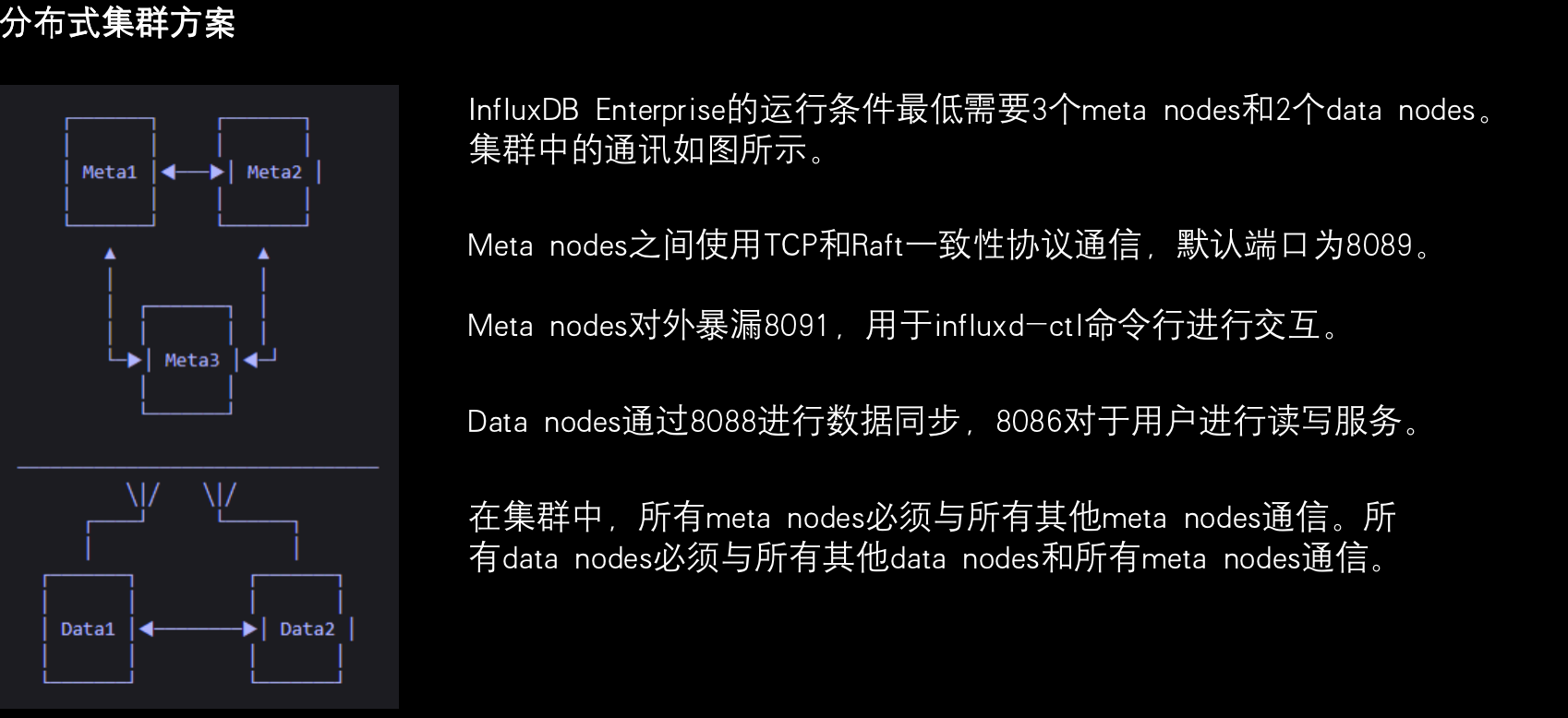
mata nodes主要保存以下所有的元数据信息
- 集群中所有的节点以及角色
- 集群中所有存在的数据库和保留策略(retention policy)
- 保存所有分片和分片组信息
- 保存集群用户权限
data node保存所有原始时序数据以及元数据,包括
- measurement(数据表)
- tag key和value
- field key和value;

#wget https://dl.influxdata.com/enterprise/releases/influxdb-meta_1.7.8-c1.7.8_amd64.deb
# dpkg -i influxdb-meta_1.7.8-c1.7.8_amd64.deb
influxdb-meda01
# egrep -v "#|^$" /etc/influxdb/influxdb-meta.conf

hostname = "enterprise-meta-01"

[enterprise]

license-key = "224bca5e-514d-441e-b2c2-31b29dd79811"

[meta]

dir = "/var/lib/influxdb/meta"

internal-shared-secret = "123.com"
influxdb-meda02
# egrep -v "#|^$" /etc/influxdb/influxdb-meta.conf

hostname = "enterprise-meta-02"

[enterprise]

license-key = "224bca5e-514d-441e-b2c2-31b29dd79811"

[meta]

 dir = "/var/lib/influxdb/meta"

internal-shared-secret = "123.com"
influxdb-meda03
# egrep -v "#|^$" /etc/influxdb/influxdb-meta.conf

hostname = "enterprise-meta-03"

[enterprise]

  license-key = "224bca5e-514d-441e-b2c2-31b29dd79811"

[meta]

  dir = "/var/lib/influxdb/meta"

   internal-shared-secret = "123.com"
# systemctl start influxdb-meta
# systemctl enable influxdb-meta
将meta node节点加入集群
#influxd-ctl add-meta enterprise-meta-02:8091
#influxd-ctl add-meta enterprise-meta-03:8091
【部署influxdb-node节点】
#wget https://dl.influxdata.com/enterprise/releases/influxdb-data-1.8.2_c1.8.2.x86_64.rpm
#dpkg -i influxdb-data_1.8.2-c1.8.2_amd64.deb
#egrep -v "#|^$" /etc/influxdb/influxdb.conf
 bind-address = "192.168.60.0:8088"

hostname = "enterprise-data-01"

[enterprise]

  license-key = "224bca5e-514d-441e-b2c2-31b29dd79811"

[meta]

  dir = "/var/lib/influxdb/meta"

   meta-internal-shared-secret = "123.com"

[data]

  dir = "/var/lib/influxdb/data"

  wal-dir = "/var/lib/influxdb/wal"

   cache-max-memory-size = "1g"

   cache-snapshot-memory-size = "25m"

   cache-snapshot-write-cold-duration = "10m"

  max-series-per-database = 0

   max-values-per-tag = 0

   max-index-log-file-size = "128k"

[cluster]

[hinted-handoff]

  dir = "/var/lib/influxdb/hh"

[anti-entropy]

[retention]

[shard-precreation]

[monitor]

   store-enabled = false

    [http]

       log-enabled = true

[logging]

[subscriber]

[[graphite]]

[[collectd]]

[[opentsdb]]

[[udp]]

[continuous_queries]

[tls]
# egrep -v "#|^$" /etc/influxdb/influxdb.conf
bind-address = "192.168.60.0:8088"

 hostname = "enterprise-data-02"

[enterprise]

  license-key = "224bca5e-514d-441e-b2c2-31b29dd79811"

[meta]

  dir = "/var/lib/influxdb/meta"

   meta-internal-shared-secret = "123.com"

[data]

  dir = "/var/lib/influxdb/data"

  wal-dir = "/var/lib/influxdb/wal"

   cache-max-memory-size = "1g"

   cache-snapshot-memory-size = "25m"

   cache-snapshot-write-cold-duration = "10m"

   max-series-per-database = 0

   max-values-per-tag = 0

   max-index-log-file-size = "128k"

[cluster]

[hinted-handoff]

  dir = "/var/lib/influxdb/hh"

[anti-entropy]

[retention]

[shard-precreation]

[monitor]

   store-enabled = true

[http]

[logging]

[subscriber]

[[graphite]]

[[collectd]]

[[opentsdb]]

[[udp]]

[continuous_queries]

   log-enabled = true

[tls]
#systemctl start influxd
#systemctl enable influxd
#将date node加入集群
#influxd-ctl add-data enterprise-data-01:8088
#influxd-ctl add-data enterprise-data-02:8088
最后我们在influxdb-meta节点上执行 influxd-ctl show查看集群节点状态
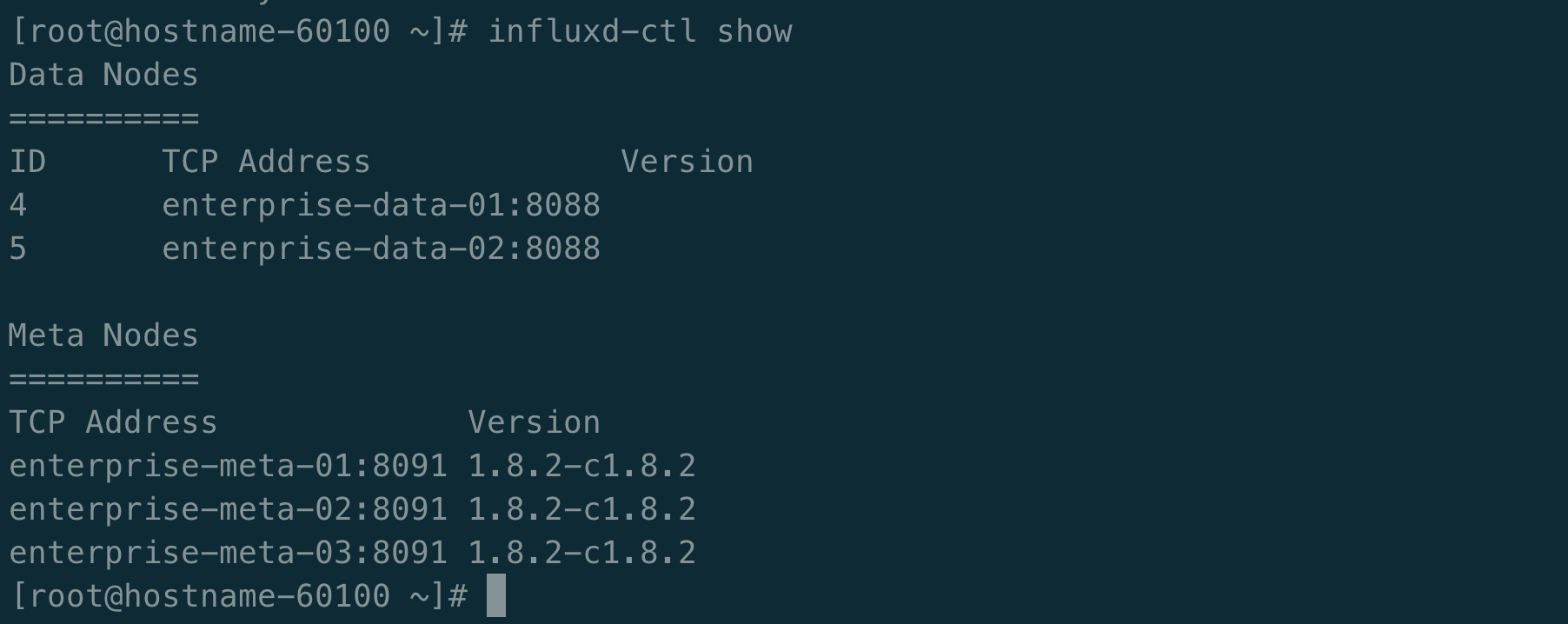
截止目前influxdb集群部署完毕!END
influxdb集群部署的更多相关文章
- Kubernetes集群部署关键知识总结
Kubernetes集群部署需要安装的组件东西很多,过程复杂,对服务器环境要求很苛刻,最好是能连外网的环境下安装,有些组件还需要连google服务器下载,这一点一般很难满足,因此最好是能提前下载好准备 ...
- Kubernetes(k8s)集群部署(k8s企业级Docker容器集群管理)系列目录
0.目录 整体架构目录:ASP.NET Core分布式项目实战-目录 k8s架构目录:Kubernetes(k8s)集群部署(k8s企业级Docker容器集群管理)系列目录 一.感谢 在此感谢.net ...
- linux运维、架构之路-Kubernetes离线集群部署-无坑
一.部署环境介绍 1.服务器规划 系统 IP地址 主机名 CPU 内存 CentOS 7.5 192.168.56.11 k8s-node1 2C 2G CentOS 7.5 192.168.56 ...
- k8s集群部署(2)
一.利用ansible部署kubernetes准备阶段 1.集群介绍 基于二进制方式部署k8s集群和利用ansible-playbook实现自动化:二进制方式部署有助于理解系统各组件的交互原理和熟悉组 ...
- Quartz.net持久化与集群部署开发详解
序言 我前边有几篇文章有介绍过quartz的基本使用语法与类库.但是他的执行计划都是被写在本地的xml文件中.无法做集群部署,我让它看起来脆弱不堪,那是我的罪过. 但是quart.net是经过许多大项 ...
- Openfire 集群部署和负载均衡方案
Openfire 集群部署和负载均衡方案 一. 概述 Openfire是在即时通讯中广泛使用的XMPP协议通讯服务器,本方案采用Openfire的Hazelcast插件进行集群部署,采用Hapro ...
- 基于Tomcat的Solr3.5集群部署
基于Tomcat的Solr3.5集群部署 一.准备工作 1.1 保证SOLR库文件版本相同 保证SOLR的lib文件版本,slf4j-log4j12-1.6.1.jar slf4j-jdk14-1.6 ...
- jstorm集群部署
jstorm集群部署下载 Install JStorm Take jstorm-0.9.6.zip as an example unzip jstorm-0.9.6.1.zip vi ~/.bashr ...
- CAS 集群部署session共享配置
背景 前段时间,项目计划搞独立的登录鉴权中心,由于单独开发一套稳定的登录.鉴权代码,工作量大,最终的方案是对开源鉴权中心CAS(Central Authentication Service)作适配修改 ...
随机推荐
- 一道JavaScript的二维数组求平均数的题
JavaScript中只支持一维数组,但是可以在数组中嵌套数组来创建二维以至于多维的数组.今天下午在看书时候,发现一道感觉比较有意思的题,就是js中如何求二维数组的列之和和行之和,现在就给大家分享下, ...
- JS 浏览器BOM
BOM:Browser Object Model 浏览器对象模型 2.组成: window :窗口对象 1.创建: 2.方法: *与弹出框有关 1.alert(); 弹出警告框 2.confirm() ...
- SSM框架整合核心内容
所需要的jar包及其版本 Spring 版本:4.3.18 tx.aop.beans.core.web.web-mvc.context.expression.jdbc MyBatis:3.4.6 ...
- JAVA8--流处理和optional
转载自https://www.cnblogs.com/invoker-/p/6896865.html 流与集合 众所周知,日常开发与操作中涉及到集合的操作相当频繁,而java中对于集合的操作又是 ...
- 性能之qps,并发数,相应时间
QPS:每秒处理的请求数.QPS = 并发数/请求平均处理时间. 请求响应时间=请求等待时间+网络时间+请求处理时间.假设请求处理时间不受影响,持续不变,实际请求数大于QPS,会影响请求响应时间,大量 ...
- SQL中只要用到聚合函数就一定要用到group by 吗?
1.当聚集函数和非聚集函数出现在一起时,需要将非聚集函数进行group by2.当只做聚集函数查询时候,就不需要进行分组了.
- 2020 计蒜之道 预赛 第三场 石子游戏(简单)(暴力DP)
石子游戏(简单) 原题链接 思路: 通过形式容易看出是一道DP.其中异或和的情况只有64种,所以我们可以开一维来记录当前异或和的状态. 利用dp[当前位置][异或和][是否选择当前]来进行状态转移.时 ...
- 使用Scrcpy实现电脑控制安卓手机
很多时候我们想要在电脑上使用一些手机软件,使用模拟器当然是一种选择,但是这些模拟器要不然不免费,要不然广告多不放心.Scrcpy是一个开源免费的软件,通过abd命令实现了安卓手机投屏和控制功能,并且支 ...
- Java10新特性
局部变量的类型推断 这个功能减少与编写Java相关的冗长度,同时保持对静态类型安全性的承诺 使用举例 public static void main(String[] args) { // 使用var ...
- 如何使用 C# 中的 ValueTask
在 C# 中利用 ValueTask 避免从异步方法返回 Task 对象时分配 翻译自 Joydip Kanjilal 2020年7月6日 的文章 <How to use ValueTask i ...