
SpringBoot与SpringCloud的版本对应详细版
大版本对应:
| Spring Boot | Spring Cloud |
|---|---|
| 1.2.x | Angel版本 |
| 1.3.x | Brixton版本 |
| 1.4.x stripes | Camden版本 |
| 1.5.x | Dalston版本、Edgware版本 |
| 2.0.x | Finchley版本 |
| 2.1.x | Greenwich.SR2 |
在实际开发过程中,我们需要更详细的版本对应:Spring 官方对应版本地址: (https://start.spring.io/actuator/info),建议用firefox浏览器打开,你会看见格式化好了json信息:
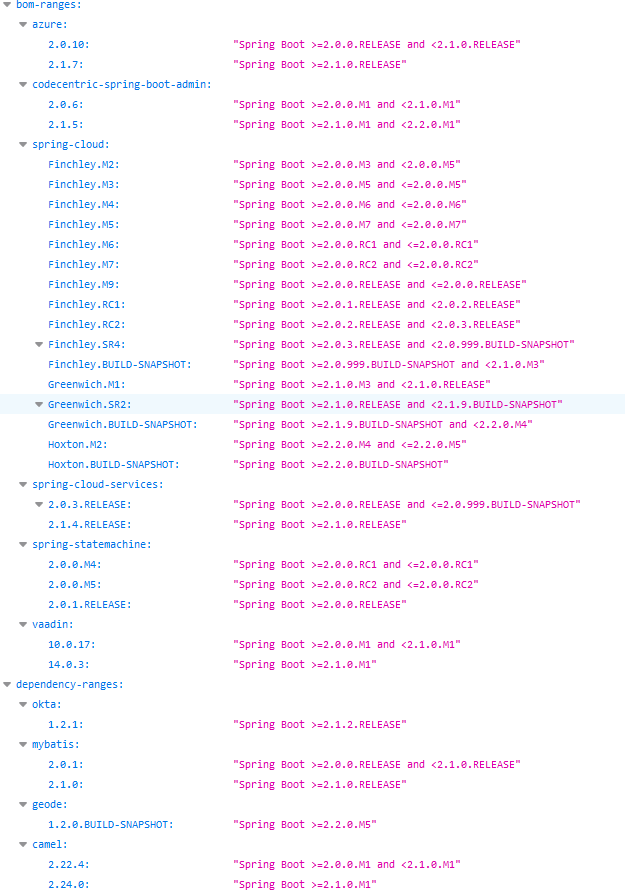
spring-cloud-dependencies 版本列表可查看:
https://mvnrepository.com/artifact/org.springframework.cloud/spring-cloud-dependencies
spring-boot-starter-parent 版本列表可查看:
https://mvnrepository.com/artifact/org.springframework.boot/spring-boot-starter-parent
在SpringCloud中,1.X和2.X版本在pom.xml中引入的jar包名字都不一样,比如有的叫spirng-cloud-starter-hystrix 有的叫spring-cloud-netflix-hystrix,维护起来会比较困难。
1.x版本pom.xml里几个基本用到的jar长这样:
<project xmlns="http://maven.apache.org/POM/4.0.0"

    xmlns:xsi="http://www.w3.org/2001/XMLSchema-instance"

    xsi:schemaLocation="http://maven.apache.org/POM/4.0.0 http://maven.apache.org/xsd/maven-4.0.0.xsd">

    <modelVersion>4.0.0</modelVersion>

    <groupId>com.joyce</groupId>

    <artifactId>joyce-test</artifactId>

    <version>1.0</version>

    <packaging>jar</packaging>

    <parent>

        <groupId>org.springframework.boot</groupId>

        <artifactId>spring-boot-starter-parent</artifactId>

        <version>1.5.9.RELEASE</version>

        <relativePath />

    </parent>

    <dependencyManagement>

        <dependencies>

            <dependency>

                <groupId>org.springframework.cloud</groupId>

                <artifactId>spring-cloud-dependencies</artifactId>

                <version>Edgware.RELEASE</version>

                <type>pom</type>

                <scope>import</scope>

            </dependency>

        </dependencies>

    </dependencyManagement>

    <properties>

        <project.build.sourceEncoding>UTF-8</project.build.sourceEncoding>

    </properties>

    <dependencies>

        <dependency>

            <groupId>org.springframework.cloud</groupId>

            <artifactId>spring-cloud-starter-feign</artifactId>

        </dependency>

        <dependency>

            <groupId>org.springframework.cloud</groupId>

            <artifactId>spring-cloud-starter-hystrix</artifactId>

        </dependency>

        <dependency>

            <groupId>org.springframework.cloud</groupId>

            <artifactId>spring-cloud-starter-zipkin</artifactId>

        </dependency>

        <dependency>

            <groupId>org.springframework.cloud</groupId>

            <artifactId>spring-cloud-starter-eureka</artifactId>

        </dependency>

        <dependency>

            <groupId>org.springframework.boot</groupId>

            <artifactId>spring-boot-starter-actuator</artifactId>

        </dependency>

        <dependency>

            <groupId>org.springframework.boot</groupId>

            <artifactId>spring-boot-starter-web</artifactId>

            <exclusions>

                <!-- 排除spring boot默认使用的tomcat,使用jetty -->

                <exclusion>

                    <groupId>org.springframework.boot</groupId>

                    <artifactId>spring-boot-starter-tomcat</artifactId>

                </exclusion>

            </exclusions>

        </dependency>

        <dependency>

            <groupId>org.springframework.boot</groupId>

            <artifactId>spring-boot-starter-jetty</artifactId>

        </dependency>

        <dependency>

            <groupId>org.springframework.cloud</groupId>

            <artifactId>spring-cloud-starter-ribbon</artifactId>

        </dependency>

        <dependency>

            <groupId>org.springframework.boot</groupId>

            <artifactId>spring-boot-starter-test</artifactId>

            <scope>test</scope>

        </dependency>

    </dependencies>

</project>
在SpringBoot 1.5.9.RELEASE 版本中,junit测试类模版长这样:
import org.junit.Test;

import org.junit.runner.RunWith;

import org.slf4j.LoggerFactory;

import org.springframework.beans.factory.annotation.Autowired;

import org.springframework.boot.test.context.SpringBootTest;

import org.springframework.test.context.junit4.SpringRunner;

import org.springframework.web.client.RestTemplate;

@RunWith(SpringRunner.class)

@SpringBootTest(classes=MyApplication.class)

public class MyApplicationTest {

    private static final org.slf4j.Logger LOG = LoggerFactory.getLogger(MyApplicationTest.class);

    @Autowired

    private RestTemplate restTemplate;

    @Test

    public void test() {

        System.out.println("ok!!!");

    }

    @Test

    public void orderName() {

        try {

            String name = "joyce";

            String rr = restTemplate.getForObject("http://joyce-user/orderName?name="+name, String.class);

            LOG.info("rr====" + rr);

        } catch (Exception e) {

            e.printStackTrace();

        }

    }

}
。
SpringBoot与SpringCloud的版本对应详细版的更多相关文章
- SpringBoot 与 SpringCloud 的版本对应详细信息
"spring-cloud": { "Finchley.M2": "Spring Boot >=2.0.0.M3 and <2.0.0.M ...
- SpringBoot和SpringCloud的版本对应关系
1.详细的SpringBoot和SpringCloud对应的关系: Spring官方对应关系 2.springCloud与各组件的版本对应关系 官方文档
- springboot与springcloud的版本问题
Spring Cloud为开发者提供了一套可以用来快速搭建分布式系统中常见模式的工具.提取主干即是Spring Cloud提供了一套工具.这些工具为开发人员提供了分布式系统下常见问题的通用解决方案.这 ...
- SpringBoot 整合 Mybatis 和 Mysql (详细版)
结构如下 1.引入相关依赖 <!--mysql--><dependency> <groupId>mysql</groupId> <artifact ...
- springboot集成springcloud,启动时报错java.lang.AbstractMethodError: null
出现这个问题是springboot和springcloud的版本不匹配. 我此处使用了springboot 2.0.4.RELEASE,springcloud 使用了Finchley.SR2. 修改方 ...
- springboot与springcloud版本不对应导致报错java.lang.NoSuchMethodError: org.springframework.boot.builder.SpringApplicationBuilder.<init>([Ljava/lang/Object;)V
springboot启动报错: 10:31:50.221 [main] ERROR org.springframework.boot.SpringApplication - Application r ...
- SpringBoot整合Mybatis完整详细版
记得刚接触SpringBoot时,大吃一惊,世界上居然还有这么省事的框架,立马感叹:SpringBoot是世界上最好的框架.哈哈! 当初跟着教程练习搭建了一个框架,传送门:spring boot + ...
- springboot和springcloud版本上的选择
现在的springboot项目和cloud版本都是更新很快,但我们开发不是版本越新越好,我们要把版本对应起来,那么我们怎么去关联呢? springboot和springcloud不是越新越好,clou ...
- SpringBoot整合Mybatis完整详细版二:注册、登录、拦截器配置
接着上个章节来,上章节搭建好框架,并且测试也在页面取到数据.接下来实现web端,实现前后端交互,在前台进行注册登录以及后端拦截器配置.实现简单的未登录拦截跳转到登录页面 上一节传送门:SpringBo ...
随机推荐
- python3+cv2+andiord安卓摄像头
#coding=utf-8import cv2 import time if __name__ == '__main__': cv2.namedWindow("camera",1) ...
- C# Ini、Json、Xml 封装类
1.Ini是什么?(我对它的理解,用于存储用户配置信息的文件,该文件放在用户电脑...) INI文件是一个无固定标准格式的配置文件.它以简单的文字与简单的结构组成,常常使用在Windows操作系统,或 ...
- configparser模块(ini配置文件生成模块)
config = configparser.ConfigParser() #初始化config对象 [DEFAULT] #设置默认的变量值,初始化 config["DEFAULT" ...
- WEB学习笔记12-高可读性的HTML之如何正确设计表单
网站中的用户登录.注册.用户调查等都是通过页面中的表单提交到网站服务器的.假设要实现让用户设置个人信息的一个表单. 该表格为两栏布局,第一栏中的文本左对齐,第二栏的表单控件右对齐,构成了最容易实现的表 ...
- 王者荣耀交流协会互评Beta版本--爱阅app
测评人:任思佳 爱阅APP软件说明书地址:http://www.cnblogs.com/szjzsd/p/7881686.html 1.根据NABCD评论作品的选题: N(Need):相比α发布来 ...
- O/R关系的深入理解(转载)
本文转载自aa8945163: http://aa8945163.iteye.com/blog/859713 什么是O/R Mapping? 广义上,ORM指的是面向对象的对象模型和关系型数据库的数据 ...
- ubuntu下绑定串口
查看有哪些设备连接在你的电脑上 lsusb 得到如图: 查看usb串口上连接的信息,得到不一样的信息 dmesg | grep ttyS* 我使用了一个usb扩展器,这边可以看到,被连接在ttyUSB ...
- 20155219付颖卓《网络对抗》Exp6 信息搜集与漏洞扫描
基础问题回答 1.哪些组织负责DNS,IP的管理? 全球根服务器均由美国政府授权的ICANN统一管理,负责全球的域名根服务器.DNS和IP地址管理. 全球根域名服务器:绝大多数在欧洲和北美(全球13台 ...
- oracle数据库连接缓慢
今天连接数据库时非常的慢,大概将近1分钟,才能连上,感觉不对,登录数据库所在的服务器,进行检查,常规的内存.硬盘.CPU全都正常,然后想要进入oracle用户时报错了:su: cannot set u ...
- Virtualization
time sharing——>virtualization. OS需要low-level machinery mechanisms and high-level intelligence. 前者 ...