
centos 增强功能安装失败
centos 共享目录设置失败
/sbin/mount.vboxsf: mounting failed with the error: No such device
准备安装增强功能
[root@localhost log]# cd /opt/VBoxGuestAdditions-5.2.1/init/
[root@localhost init]# ls
vboxadd vboxadd-service vboxadd-x11
[root@localhost init]# ./vboxadd setup
VirtualBox Guest Additions: Building the VirtualBox Guest Additions kernel modules.
This system is currently not set up to build kernel modules.
Please install the gcc make perl packages from your distribution.
VirtualBox Guest Additions: Starting.
VirtualBox Guest Additions: Building the VirtualBox Guest Additions kernel modules.
This system is currently not set up to build kernel modules.
Please install the gcc make perl packages from your distribution.
modprobe vboxguest failed
[root@localhost log]# cat vboxadd-install.log |grep echo
echo " ERROR: Kernel configuration is invalid."; \
echo " include/linux/autoconf.h or include/config/auto.conf are missing."; \
echo " Run 'make oldconfig && make prepare' on kernel src to fix it."; \
Files autoconf.h and auto.conf are present.
Kernel is newest:
[root@centos log]# rpm -qa |grep kernel
...
解决方式:
安装缺失软件包
[root@localhost /]# yum install kernel kernel-devel kernel-headers gcc make
已加载插件:fastestmirror
...
[root@localhost init]# yum groupinstall "Development Tools"
已加载插件:fastestmirror
..
[root@localhost init]# reboot
增强
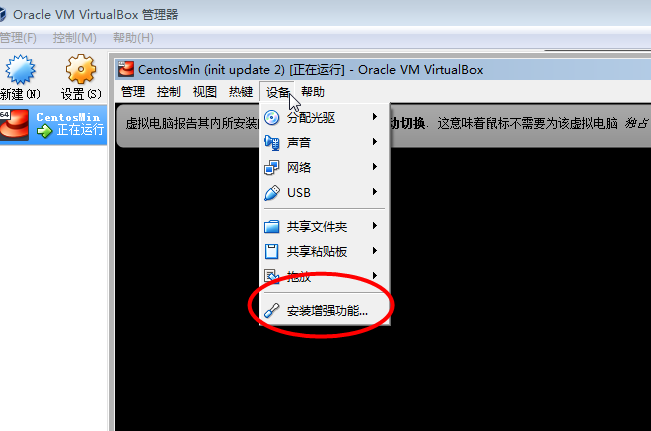
[root@localhost /]# cd /opt/VBoxGuestAdditions-5.2.1/init/
[root@localhost /]# ./vboxadd setup
设置共享目录...
参考:
https://wiki.centos.org/HowTos/Virtualization/VirtualBox/CentOSguest
https://forums.virtualbox.org/viewtopic.php?t=85105
https://www.centos.org/forums/viewtopic.php?t=1654
centos 增强功能安装失败的更多相关文章
- VitualBox CentOS增强功能的安装使用 - Linux操作系统
本人因为电脑配置原因,安装的是CentOS 6.6 minimal版本,虚拟环境为VirtualBox 4.3.18. 当我使用的时候,想从本机(WindowXP)电脑将文件共享到虚拟(Cen ...
- 有关Virtualbox虚拟机增强功能安装的问题
在老师给定的步骤下并不能正常的完成Virtualbox虚拟机增强功能安装而是显示下图
- 记一次在virtualbox中安装windows7遇到增强功能安装分辨率的问题
在windows7中遇到很多次安装好增强功能后并不能对其实现放大分辨率,使其跟随虚拟机界面大小而改变. 经过许多次的安装和恢复快照,发现了在设置中,显存的大小一直都是处于边缘的状态, 关闭虚拟机后,我 ...
- CentOS下MySQL安装失败,报socket '/tmp/mysql.sock错误解决方法
1.在centos里安装mysql数据库后,登录时提示‘/tmp/mysql.sock’ 第一种解决办法:采用ln链接方式进行处理 ln -s /var/lib/mysql/mysql.sock /t ...
- CentOS 7 yum安装失败问题
在CentOS 7中,执行yum安装,一直报错,错误信息如下 其实在上述的错误信息中,上述中的repodata/repomd.xml文件据说是/mnt目录rpm包的目录,路径 在/mnt中因为没有/r ...
- 虚拟机安装VBoxAdditions增强功能
在VirtualBox上安装好CentOS后,需将VBoxAdditions增强功能安装上,该功能有如下作用: (1)实现客户机和主机间的鼠标平滑移动 (2)与主机实现文件共享 (3)安装虚拟显卡驱动 ...
- ubuntu 18.04下virtualbox安装windows虚拟机+增强功能+secureCRT
先强调一下,我是在Ubuntu里安装windows虚拟机,如果要看如何安装linux虚拟机的话,那么你走错地方了. 我一直使用Linux系统做开发的,选择Ubuntu是因为多数常用软件对Ubuntu支 ...
- Debian 7 安装使用 Virtualbox及增强功能
一.安装virtualbox 可以从源里安装 sudo apt-get install virtualbox 也可以下载最新版安装 https://www.virtualbox.org/wiki/Do ...
- VirtualBox安装增强功能
一.安装依赖包 #yum install kernel-headers #yum install kernel-devel #yum install gcc* #yum install make 二. ...
随机推荐
- NoSQL数据库常见分类
1.列式数据库HBaseBigTable2.K-V数据库RedisCassandraLevelDBMemCacheEhcache3.文档数据库MongoDBCouchDB4.全文搜索引擎Elastic ...
- Windows10 ntoskrnl.exe占用大量的磁盘空间(100%)
一.解决办法: 1.此电脑(右键)> 管理(点击)> 系统工具 > 任务计划程序 > 任务计划程序库 > Microsoft > windows > .NE ...
- jmeter 之 beanshell sample
Lightweight Scripting for Java 官网:http://www.BeanShell.org/ 定时器: BeanShell Timer 前置处理器:BeanShell Pre ...
- 博客搬家 https://hanwang945.github.io/
博客搬家 https://hanwang945.github.io/
- 使用tortoisegit工具git地址中带号码密码的拉取,以及使用这种方式后中途重置密码报git remote: HTTP Basic: Access denied 错误解决办法
1. 在拉取git项目时可以在地址中直接指定号码密码如下就可以直接拉取下来 https://username:password@github.com 需要注意,因为在解析地址时是以@符号作为地址信 ...
- 初识springboot
一.springboot简介: 1.简化spring应用开发框架 2.把spring所有技术整合在了一起 3.J2EE开发的一站式解决方案 我曾经学习springMVC时候,那许许多多的配置文件的配置 ...
- 搭建docker私有仓库
保存镜像的地方成为仓库(registry).目前有2种仓库:公共仓库和私有仓库. 最方便的是使用公共仓库上传和下载镜像,下载不需要注册,上传需要到公共仓库注册.公共仓库网站:https://hub.d ...
- SpringMVC Web项目升级为Springboot项目(一)
一.项目改为Springboot项目 1.将pom中所有spring相关依赖删除,添加spring-boot-starter及spring-boot-starter-web(项目中可能有其他sprin ...
- 20190429 照片里面的GPS信息确实会暴露经纬度
这是我用Android手机拍摄的照片,并上传了原图(当然在没开启定位的工作的话,照片也没有GPS这个属性显示) 2. 之前也有一种关于给陌生人点赞,通过点赞来查看你与这个陌生人的距离,我也测试了一下有 ...
- git 解决授权失败的方法
git 提示 fatal: Authentication failed for 'http://***********‘’得解决方法 首先用 git config --list 查看一下 如果不对, ...