
Chrome Service Model
Chrome Service Model
John Abd-El-Malek
February 2016
Objective
Move Chrome codebase towards a service-oriented model. This will produce reusable and decoupled components while also reducing duplication. It also allows the Chrome team and other groups to experiment with new features without needing to modify Chrome.
Background
There are various problems and limitations in Chrome’s architecture:
- Poor component coherence:
○ Feature-specific code scattered across different modules and processes, e.g. platform and browser features with code in Blink and [chrome, components, content]/browser+renderer.
○ Seemingly unrelated features have either direct or indirect dependency entanglements, making it hard to isolate discrete service code for reuse, security, stability purposes (e.g. network service).
- Duplication/unnecessary complexity:
○ Many feature-specific IPCs to the browser process could be adequately replaced by a smaller set of common service APIs. For example, code in modules like pepper, content, extensions etc… often have similar code for proxying to the browser to handle permission requests, notifications, quota, disk access, resource loading etc…
○ Features implement their own bindings layers (e.g. Extensions, WebUI).
○ Common operations (network, preferences, etc…) are accessed differently depending on the calling code’s process.
- Poor extensibility:
○ Lack of flexible APIs and modularity mean experiments and new features usually have to be built directly into browser, further increasing complexity and bloat (e.g. Stars, Blimp, PDF) or are entirely prohibited (Flutter, Dart, Cardboard).
○ It’s not possible to plug in different implementations of core services (i.e. network, disk) for specialized uses of Chrome code base (i.e. for Headless Chrome & Blimp projects).
- Leaky abstractions:
○ Code reuse made harder on platforms that don’t implement interfaces the same way (e.g. WKWebView on iOS vs. WebContents)
○ Core abstractions like WebContents assume the hosted renderer is an instance of Blink, which adds unnecessary overhead for features like PDF and Blimp.
○ It’s difficult to move a service to a different process because of platform differences (e.g. see different code paths for gpu code on Android) or for security and stability improvements (e.g. network & profile processes).
There are two main reasons for the above limitations. The first is that the codebase was simply pushed to do many things that it was not designed for. From the beginning, the team consciously chose to not over-design the code and the architecture until we have an obvious need. The second reason is that in rush to add new features and support new platforms we didn’t pause to rethink the layering. With the tools that Mojo now provides us, the lessons learned from Mandoline, and a commitment for some long-term refactoring of the codebase, we have an opportunity to move the architecture to one that is more modular and flexible.
Overview
We propose fixing the various problems listed above by moving the code towards a service model. Given that Chrome now hosts many platforms (e.g. web platform, Pepper plugins, extensions, NaCl, Mojo Apps, Chrome Apps, Android Apps), it makes sense that it should be built using a layered model common in many systems (e.g. OSs). The end goal should be to have a set of shared services by which other services and features are layered upon.
These services would be exposed through Mojo interfaces, which hides details about where the caller and implementer are located. It would allow either side to move to different processes, allowing improvements to the system with ease. An example is networking: once we have a network service we can choose to run it out of process for better stability/security, or in-process if we're resource constrained. If consumers only talk to the network service through Mojo interfaces, then where the networking actually happens is transparent to them. Mojo will also allow code reuse by avoiding duplicate implementations depending on which process, module, or language the caller lives. From examining the current system’s IPC files, an initial set of shared services emerge. They include: files, network, preferences, leveldb, synchronization, notifications, permissions, quota, clipboard, pub/sub and so on. The creation of these services should be driven by conversion of the current code to use these new services.
Similarly, it follows that browser features should expose their API via Mojo interfaces. With appropriate security checks, they should be accessible from other processes and languages. This will avoid the need to support several APIs to a feature. It will also allow different implementations to be used, e.g. for exploration of new additions to the browser by the Chrome team or other groups at Google. Where a feature needs to interact with the rendering engine, it should do so using a Mojo interface that is implemented transparently by Blink, iOS, and possibly content handlers (see below) that we add in the future.
Projects
- Create “Foundation” services that are used by multiple features or by which other services are built upon. This should be driven by need as we convert features or simplify code. See this doc for a proposed list of starter services and their justification. As we create a service, a goal should be to convert as much of the code as is practical which uses this common functionality. A starting set includes:
○ UI (rendering & input) (mus)
○ Network (as a rough sketch, see Mandoline’s mojo/services/network/public/interfaces/)
○ File (as a rough sketch, see Mandoline’s components/filesystem/public/interfaces/)
○ LevelDB
○ Synchronization
○ Pub/Sub
○ Preference
○ Permission
○ Clipboard
○ Notifications
○ Tracing
○ WebView (navigation, frame tree)
- Convert web platform implementations that span the browser and renderer into being implemented solely in the renderer, by layering their implementation using the core services from above. A starting set:
○ Local Storage: detailed design
○ Session Storage
○ IndexedDB
○ FileSystem
- Create Mojo interfaces for browser features that are called from Extensions APIs and WebUI. Extension JS shims can then call them directly from the renderer process. Similarly for WebUI, have the pages call the features’ Mojo interfaces instead of manually writing bindings.
- Refactor browser components that span the browser and renderer processes to call the HTML engine through a Mojo interface.
○ Start with all the layered components since that removes an extra layer to deal with iOS/content.
○ Complete the rest of the browser features (i.e. chrome features that aren’t shared with iOS).
Code Location
Extracted services live in //services. See the README.md in that directory for more information. Extracted library code should move to where it makes sense (e.g. src/components, src/ui, etc.)
Tracking Bug
https://bugs.chromium.org/p/chromium/issues/detail?id=598069
Scope & Non-Goals
It's not an objective of the Service effort to make all Chrome features talk to one another using Mojo, nor to decompose every feature or interface into its own process. Basically, we're not trying to replicate the way XPCOM was used in Gecko in its early days.
Instead, you can think of this project as an enhancement of the conversion of Chrome from Chrome IPC to Mojo in the following ways:
- Common use cases present in the implementation of several Chrome IPC interfaces are exposed as a lower level well-designed, generic interface, allowing feature-specific code to move into the client.
- Given the modularity of these interfaces, it becomes possible to relocate the implementation to another process without updating calling code.
Additionally, you should view Mojo as a tool to be used in the cases where conceivably you might need to isolate a piece of code, rather than defaulting to using Mojo in place of more obvious techniques like simple function calls and PostTask().
Appendix A: Future projects
The projects above allow further improvements to Chrome’s architecture that we’ve wanted for years, but which have been too complicated to implement so far. Some examples:
- Run the network code in a separate and sandboxed process. For Windows, this would help with stability because of external software that hooks it via LSPs etc… We could also sandbox this code (not as strongly as the renderer, but better than the browser which has no sandbox). This can be staged, with each level providing its own benefits and culminating into a separate process:
○ Converge all code to make network requests through the same API (i.e. regardless of whether the calling code is in the renderer or browser processes). This will simplify the code, and also allow projects like Blimp to easily override the implementation for http & socket requests etc...
○ Code in the browser process that synchronously hooks into the network layer needs to use asynchronous APIs. This will clean up the public interface to the network library.
○ Move network code to a separate process. This will improve stability and security. It will also allow network requests to be made from other features if all of Chrome isn’t running.
- Implement Mojo Shell’s content handler concept in Chrome. This will allow new features/experiments to display their contents and get input events without having other subsystems in the code changing to support them. Most likely this will be dependent on Chrome using Mojo UI Service.
- Run a per-profile file service in a sandboxed process that only has access to the profile directory. Most of the code that accesses disk would therefore be protected from exploits that read/write to other directories. We would need multiple instances of the file service, one of which would have access to the entire filesystem for code in the browser that needs it. Steps:
○ Convert file system access in child processes to use file service
○ Convert file access (in code we control) in the browser to use the file service as well
- Run small parts of the browser after it’s shut down. Currently this is impossible as all the code depends on each other. With a service model, it becomes possible to run only the few services that are needed. Some examples:
○ The ARC runtime (in a separate process from Chrome) requires a bunch of services from Chrome. As a first step, we have to manually wrap them with interfaces. The second step, of being able to run ARC without Chrome, requires that all of these services are available when Chrome is not running.
○ On desktop, we want the notifications to show up if the browser is closed.
Appendix B: FAQ
Q: Does this mean we need to support different services built at different revisions? Will we expose these services to the web or to external authors?
A: Not anytime soon. Eventually, once the servicification is complete, the interfaces would be pretty stable and we can start thinking about which ones we want to support. We can then fully flush and try out the ideas about updating services at different schedules and/or exposing these services to other teams.
Q: How does this fit with refactorings to move web platform implementations from content/renderer to Blink, as well as have more specific APIs to Blink?
A: Both projects should be mutually beneficial to each other, and wouldn’t block the others.
As we convert a web platform feature to run only inside the renderer, that’ll make it easier to move all that code into Blink (since it won’t have content dependencies).
As a browser feature, like translate, is switched to use specific Blink APIs for that purpose instead of general purpose APIs, that’ll reduce the API surface between the renderer-side translate code and Blink. That will make it easier for this project to then call that new specific API through Mojo from the browser process.
Appendix C: Process Diagrams
Before:
After: on a device with lots of memory, maximize process separation for improved security and stability:
After: on a memory constrained device, we can simply run the services inside the browser process:
As the above two diagrams show, once discrete parts of the code are moved into services, we have the flexibility to run them in different processes. The above two diagrams are two extremes of process strategies, but we have the flexibility to pick process models anywhere along the spectrum.
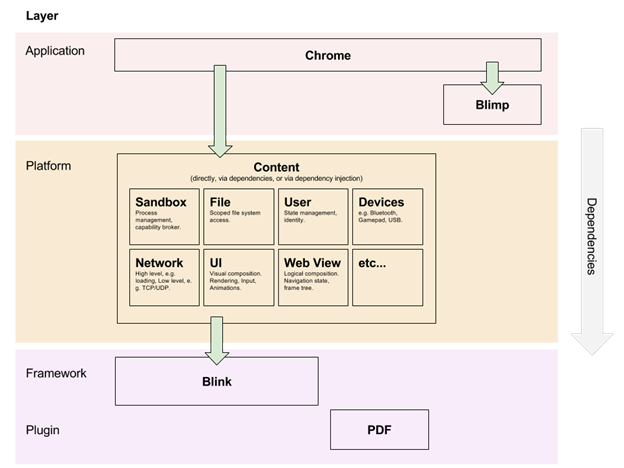
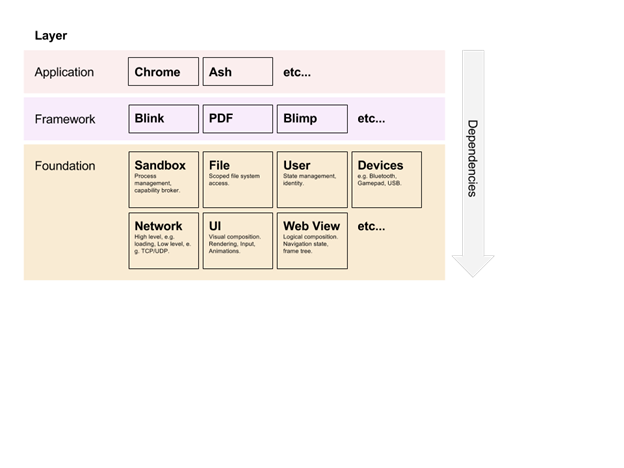
Appendix D: Layercakes
Before:
After:
Chrome Service Model的更多相关文章
- puppeteer(五)chrome启动参数列表API
List of Chromium Command Line Switches https://peter.sh/experiments/chromium-command-line-switches/ ...
- Odoo Web Service API
来自 Odoo Web服务暴露出相关的服务,路由分别是 /xmlrpc/ /xmlrpc/2/ /jsonrpc 根据 services 调用 后端对应服务的 方法method [定义 openerp ...
- PySe-004-Se-WebDriver 启动浏览器之二 - Chrome
上篇文章简略讲述了 WebDriver 启动 firefox 浏览器的示例脚本源码,具体请参阅: PySe-003-Se-WebDriver 启动浏览器之一 - Firefox 此文主要讲述在 Mac ...
- Learning WCF Chapter1 Hosting a Service in IIS
How messages reach a service endpoint is a matter of protocols and hosting. IIS can host services ov ...
- Learning WCF Chapter1 Generating a Service and Client Proxy
In the previous lab,you created a service and client from scratch without leveraging the tools avail ...
- Learning WCF Chapter1 Creating a New Service from Scratch
You’re about to be introduced to the WCF service. This lab isn’t your typical “Hello World”—it’s “He ...
- Learning WCF Chapter2 Service Contracts
A service contract describes the operations supported by a service,the message exchange pattern they ...
- Learning WCF Chapter2 Service Description
While messaging protocols are responsible for message serialization formats,there must be a way to c ...
- Learning WCF Chapter1 Exposing Multiple Service Endpoints
So far in this chapter,I have shown you different ways to create services,how to expose a service en ...
随机推荐
- Recovering unassigned shards on elasticsearch 2.x——副本shard可以设置replica为0在设置回来
Recovering unassigned shards on elasticsearch 2.x 摘自:https://z0z0.me/recovering-unassigned-shards-on ...
- zzulioj--1609--求和(数学规律)
1609: 求和 Time Limit: 1 Sec Memory Limit: 128 MB Submit: 209 Solved: 67 SubmitStatusWeb Board De ...
- 带你玩转Visual Studio——带你理解多字节编码与Unicode码
目录(?)[-] 多字节字符与宽字节字符 char与wchar_t string与wstring string 与 wstring的相关转换 字符集Charcater Set与字符编码Encoding ...
- (转载) Android开发时,那些相见恨晚的工具或网站!
huangmindong的专栏 目录视图 摘要视图 订阅 赠书 | 异步2周年,技术图书免费选 程序员8月书讯 项目管理+代码托管+文档协作,开发更流畅 Android ...
- 使用Mapping实现的以太坊智能合约的代码
Step 1: 创建一个基础合约 pragma solidity ^0.4.7; contract Coin { address public minter; mapping (address =&g ...
- 向Vue实例混入plusready
(function () { var onPlusReady = function (callback, context = this) { if (window.plus) { callback.c ...
- 50个极好的bootstrap框架
转自:http://sudasuta.com/bootstrap-admin-templates.html https://www.cnblogs.com/sanhao/p/9184323.html ...
- swift语言点评十五-$0
import UIKitimport XCPlayground class ViewController: UIViewController { func action() { print(" ...
- RocketMQ学习笔记(7)----RocketMQ的整体架构
1. RocketMQ主要的9个模块,如图: 2. 模块介绍 1. rocketmq-common:通用的常量枚举,基类方法或者数据结构,按描述的目标来分包,通俗易懂.报名有admin,consume ...
- (noip模拟十七)【BZOJ3930】[CQOI2015]选数-容斥水法
Description 我们知道,从区间[L,H](L和H为整数)中选取N个整数,总共有(H-L+1)^N种方案.小z很好奇这样选出的数的最大公约数的规律,他决定对每种方案选出的N个整数都求一次最大公 ...