
python 生成HTmL报告页面 V1.3 修改字体颜色
HTML报告V1.3 根据文字内容显示不同的字体颜色:
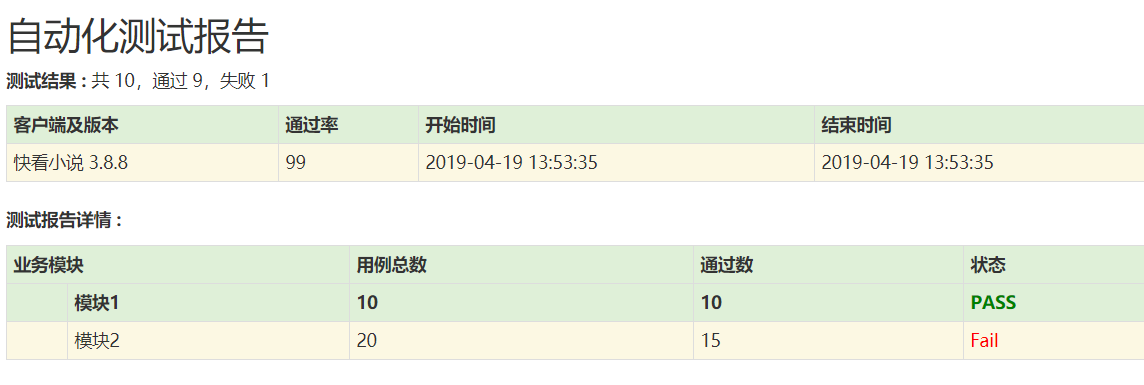
代码如下:
 # -*- coding=utf-8 -*-

 import  time,os

 """

 V1.2

 1.生成total表格

 2.生成report表格

 3.生成module表格

 4.生成case表格

 """

 #----数据部分-------------------------------------------

 func_dict={"funcname":"模块1",}

 funcname=['书架','书城','分类','我的']

 case1={"name":"模块1","total":"","passnum":"","failnum":"","radio":"","status":"PASS"}

 case2={"name":"模块2","total":"","passnum":"","failnum":"","radio":"","status":"Fail"}

 VERSION_DICT={"version": '快看小说 3.8.8',"radio":'',"runstarttime":time.strftime('%Y-%m-%d %H:%M:%S'),"runstoptime" : time.strftime('%Y-%m-%d %H:%M:%S')}

 #---END-------------------------------------------

 class Template_mixin(object):

     """html报告"""

     # ------------------------------------------------------------------------

     # HTML Template

     HTML_TMPL = r"""

         <!DOCTYPE html>

         <html lang="en">

         <head>

             <meta charset="UTF-8">

             <title>%(title)s</title>

             <link href="http://libs.baidu.com/bootstrap/3.0.3/css/bootstrap.min.css" rel="stylesheet">

             <h2 style="font-family: Microsoft YaHei">%(title)s</h2>

             <p class='attribute'><strong>测试结果 : </strong> %(total)s</p>

             <style type="text/css" media="screen">

         body  { font-family: Microsoft YaHei,Tahoma,arial,helvetica,sans-serif;padding: 20px;}

         </style>

         </head>

         <body>

             <table id='result_table' class="table table-condensed table-bordered table-hover">

                 <colgroup>

                     <col align='left' />

                     <col align='right' />

                     <col align='right' />

                     <col align='right' />

                 </colgroup>

                 <tr id='header_row' class="text-center success" style="font-weight: bold;font-size: 14px;">

                     <th>客户端及版本</th>

                     <th>通过率</th>

                     <th>开始时间</th>

                     <th>结束时间</th>

                 </tr>

                 %(table_total)s

             </table>

             <!-- 执行模块 -->

             <p class='attribute'><strong>测试报告详情 : </strong> </p>

             <table id='result_table' class="table table-condensed table-bordered table-hover">

                 <colgroup>

                    <col align='left' />

                    <col align='right' />

                    <col align='right' />

                    <col align='right' />

                    <col align='right' />

                 </colgroup>

                 <tr id='header_row' class="text-center success" style="font-weight: bold;font-size: 14px;">

                     <th colspan="2">业务模块</th>

                     <th>用例总数</th>

                     <th>通过数</th>

                     <th>状态</th>

                 </tr>

                 %(table_module)s

                 %(table_case)s

             </table>

             <script type="text/javascript">

                 //change color

                 //取都用demo的多组

                 var eles = document.getElementsByClassName('demo');

                 console.log(eles);

                 var x=document.getElementById("demo").innerText;

                 console.log("the value is :"+x);

                 //每组都应用样式

                 for(var i = 0; i < eles.length; i++){

                     if(eles[i].innerText == 'PASS'){

                         eles[i].style.color = 'green';

                     }else{

                         eles[i].style.color = 'red';

                     }

                 }

             </script>

         </body>

         </html>"""

     # variables: (title,total, table_total,table_module,table_case)

     # ------------------------------------------------------------------------

     # Report

     #总数据

     REPORT_TMPL_TOTAL = """

         <tr class='failClass warning'>

             <td>%(version)s</td>

             <td>%(radio)s</td>

             <td>%(runstarttime)s</td>

             <td>%(runstoptime)s</td>

         </tr>"""

     #详情表头

     REPORT_TMPL_MODULE = """

         <tr id='header_row' class="text-center success" style="font-weight: bold;font-size: 14px;">

             <th>%(name)s</th>

             <th>%(module)s</th>

             <th>%(casetotal)s</th>

             <th>%(passtotal)s</th>

             <th class='demo' id="demo">%(status)s</th>

         </tr>"""

     #case数据

     REPORT_TMPL_CASE = """

         <tr class='failClass warning'>

             <td>%(name)s</td>

             <td>%(module)s</td>

             <td>%(casetotal)s</td>

             <td>%(passtotal)s</td>

             <td class='demo'  id="demo2">%(status)s</td>

         </tr>"""

 if __name__ == '__main__':

     table_tr0 = ''

     table_tr1=""

     table_tr2=""

     numfail = 1

     numsucc = 9

     html = Template_mixin()

     #总表数据

     table_td = html.REPORT_TMPL_TOTAL % dict(version=VERSION_DICT['version'],radio=VERSION_DICT['radio'],runstarttime=VERSION_DICT['runstarttime'],runstoptime = VERSION_DICT['runstoptime'])

     table_tr0 += table_td

     #详情数据

     table_td_module=html.REPORT_TMPL_MODULE % dict(name="",module=case1["name"],casetotal=case1["total"],passtotal=case1["passnum"],status=case1["status"],)

     table_tr1 += table_td_module

     #title

     title_str="自动化测试报告"

     #表头总数

     total_str = '共 %s,通过 %s,失败 %s' % (numfail + numsucc, numsucc, numfail)

     #case数据

     table_td_case=html.REPORT_TMPL_CASE % dict(name="",module=case2["name"],casetotal=case2["total"],passtotal=case2["passnum"],status=case2["status"],)

     table_tr2 += table_td_case

     output=html.HTML_TMPL % dict(title=title_str,total = total_str,table_total = table_tr0,table_module=table_tr1,table_case=table_tr2)

     # 生成html报告

     filename='{date}_TestReport.html'.format(date=time.strftime('%Y%m%d%H%M%S'))

     print(filename)

     #获取report的路径

     dir= os.path.join(os.path.dirname(os.path.dirname(os.path.abspath(__file__))),'report/html')

     filename=os.path.join(dir,filename)

     with open(filename, 'wb') as f:

         f.write(output.encode('utf8'))
下一个版本,想要实现caselist批量生成表格。
python 生成HTmL报告页面 V1.3 修改字体颜色的更多相关文章
- python 生成HTmL报告页面 V1.2
上代码 # -*- coding=utf-8 -*- import time,os #数据部分 func_dict={"funcname":"模块1",} fu ...
- python 生成HTmL报告页面
计划做一个html页面 py3.4 代码: # -*- coding=utf-8 -*- # import time,os class Template_mixin(object): "&q ...
- html 报告页面 v1.2 批量数据生成表格
html 报告页面 v1.2 批量数据生成表格 上代码: <!DOCTYPE html> <html lang="en"> <head> < ...
- python生成HTMl报告(unittest)
Python3 使用HTMLTestRunner.py 报错ImportError: No module named 'StringIO'处理方法 HTMLTestRunner.py文件是基于Py ...
- 【纯代码】Swift-自定义PickerView单选(可修改分割线颜色、修改字体大小、修改字体颜色。)(可根据需要自己扩展)
typealias PopPickerViewCallBackClosure = (_ resultStr:NSString?) -> () class PopPickerView : UIVi ...
- layer ui插件显示tips时,修改字体颜色
今天做调查问卷,又遇到一个蛋疼小问题,记录下. 调查问卷有很多选项是要求必填的,如果不填的话,需要给出友好的提示.用的如下组件:http://layer.layui.com/ 1.之前一直默认用的: ...
- 关于无法使用python执行进入百度页面的代码修改
前几天听了个坑爹的视频教学,按照你们的方法做了,但尼玛,执行下来各种问题啊: 首先进入页面,总是提示开发者模式,删了下次执行又挂了,于是乎我就找网上帖子解决问题,果然被我解决了 先装这两个文件,把浏览 ...
- python生成pdf报告、python实现html转换为pdf报告
1.先说下html转换为pdf:其实支持直接生成,有三个函数pdfkit.f 安装python包:pip Install pdfkit 系统安装wkhtmltopdf:参考 https://githu ...
- ActionBar修改字体颜色
style: <resources xmlns:android="http://schemas.android.com/apk/res/android"> <!- ...
随机推荐
- 切换div位置
通过数组来存放div的属性以及属性值,鼠标点击的时候,切换数组中的元素,然后赋值给div <!DOCTYPE html PUBLIC "-//W3C//DTD XHTML 1.0 Tr ...
- 2015 编程之美初赛第一场 AC题
题目1 : 彩色的树 时间限制:2000ms 单点时限:1000ms 内存限制:256MB 描述 给定一棵n个节点的树,节点编号为1, 2, …, n.树中有n - 1条边,任意两个节点间恰好有一条路 ...
- python 使用scapy编写DNS Fuzzer
1. 描写叙述 使用scapy库,编写一个DNS Fuzzer工具,并測试.在这之前.先说明一下DNS协议请求包是封装在IP包中的UDP包(有些情况也可使用TCP)中.且UDP的端口为53. 进入sc ...
- 关于strace的一点东西
好久没写博客了,感觉有点羞愧,认为自己也应该静下心来利用自己可分配的时间去提升自己. 尽管近期在看一些Python的东西,但是认为自己还是不能忘记本行啊,Linux C的一些东西必须一直 ...
- android 自己定义ViewGroup实现可记载并呈现选择的ListView
转载请注明出处:王亟亟的大牛之路 之前也做过一些用TextView之类的记录ListView选项的东西.可是总认为好难看.发现个不错的实现就贴给大家. 项目文件夹 执行效果: 自己定义视图: @Tar ...
- 线段树+离线 hdu5654 xiaoxin and his watermelon candy
传送门:点击打开链接 题意:一个三元组假设满足j=i+1,k=j+1,ai<=aj<=ak,那么就好的.如今告诉你序列.然后Q次询问.每次询问一个区间[l,r],问区间里有多少个三元组满足 ...
- arm下用shell控制gpio
创建脚本gpio.sh #!/bin/sh PIN=$ VALUE=$ if test -d /sys/class/gpio/gpio$PIN/ then echo $VALUE > /sys/ ...
- Java命名规则详细总结
Class名应是首字母大写的名词.命名时应该使其简洁而又具有描述性.异常类的命名,应以Exception结尾.Interface的命名规则与Class相同 1. JAVA源文件的命名 JAVA源文件名 ...
- springboot 异常: Requested bean is currently in creation: Is there an unresolvable circular reference?
2018-07-31 11:56:18.812 WARN 10316 --- [ main] ConfigServletWebServerApplicationContext : Exception ...
- P1155 双栈排序(二分图染色)
P1155 双栈排序(二分图染色) 题目描述 Tom最近在研究一个有趣的排序问题.如图所示,通过2个栈S1和S2,Tom希望借助以下4种操作实现将输入序列升序排序. 操作a 如果输入序列不为空,将第一 ...