
python 生成HTmL报告页面 V1.2
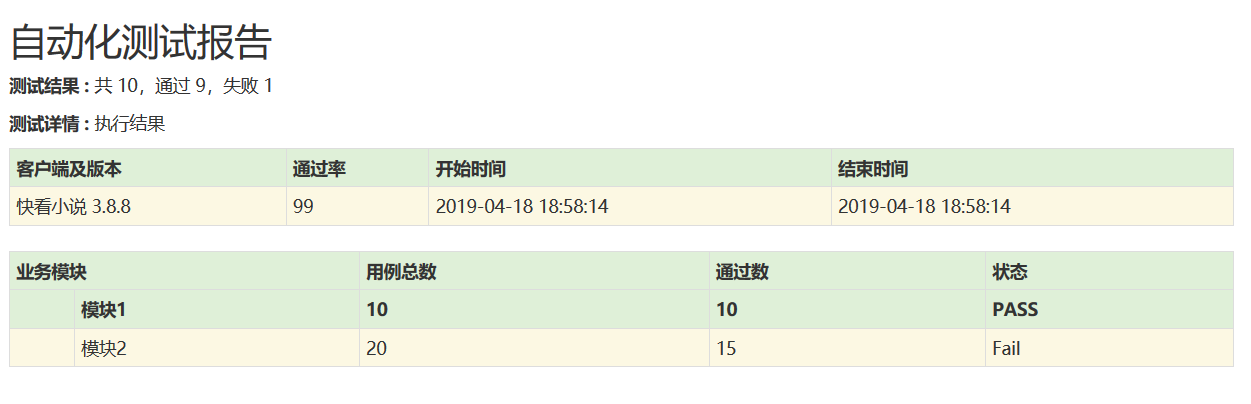
上代码
 # -*- coding=utf-8 -*-

 import  time,os

 #数据部分

 func_dict={"funcname":"模块1",}

 funcname=['书架','书城','分类','我的']

 case1={"name":"模块1","total":"","passnum":"","failnum":"","radio":"","status":"PASS"}

 case2={"name":"模块2","total":"","passnum":"","failnum":"","radio":"","status":"Fail"}

 VERSION_DICT={"version": '快看小说 3.8.8',"radio":'',"runstarttime":time.strftime('%Y-%m-%d %H:%M:%S'),"runstoptime" : time.strftime('%Y-%m-%d %H:%M:%S')}

 class Template_mixin(object):

     """html报告"""

     HTML_TMPL = r"""

         <!DOCTYPE html>

         <html lang="en">

         <head>

             <meta charset="UTF-8">

             <title>自动化测试报告</title>

             <link href="http://libs.baidu.com/bootstrap/3.0.3/css/bootstrap.min.css" rel="stylesheet">

             <h2 style="font-family: Microsoft YaHei">自动化测试报告</h2>

             <p class='attribute'><strong>测试结果 : </strong> %(value)s</p>

             <style type="text/css" media="screen">

         body  { font-family: Microsoft YaHei,Tahoma,arial,helvetica,sans-serif;padding: 20px;}

         </style>

         </head>

         <body>

             <table id='result_table' class="table table-condensed table-bordered table-hover">

                 <colgroup>

                     <col align='left' />

                     <col align='right' />

                     <col align='right' />

                     <col align='right' />

                 </colgroup>

                 <tr id='header_row' class="text-center success" style="font-weight: bold;font-size: 14px;">

                     <th>客户端及版本</th>

                     <th>通过率</th>

                     <th>开始时间</th>

                     <th>结束时间</th>

                 </tr>

                 %(table_tr)s

             <!-- 执行模块 -->

             <p class='attribute'><strong>测试详情 : </strong> 执行结果</p>

             <table id='result_table' class="table table-condensed table-bordered table-hover">

                 <colgroup>

                    <col align='left' />

                    <col align='right' />

                    <col align='right' />

                    <col align='right' />

                    <col align='right' />

                 </colgroup>

                 <tr id='header_row' class="text-center success" style="font-weight: bold;font-size: 14px;">

                     <th colspan="2">业务模块</th>

                     <th>用例总数</th>

                     <th>通过数</th>

                     <th>状态</th>

                 </tr>

                 %(table_tr2)s

                 %(table_tr3)s

             </table>

         </body>

         </html>"""

     #总数据

     TABLE_TMPL_TOTAL = """

         <tr class='failClass warning'>

             <td>%(version)s</td>

             <td>%(radio)s</td>

             <td>%(runstarttime)s</td>

             <td>%(runstoptime)s</td>

         </tr>"""

     #详情表头

     TABLE_TMPL_MODULE = """

         <tr id='header_row' class="text-center success" style="font-weight: bold;font-size: 14px;">

             <th>%(name)s</th>

             <th>%(module)s</th>

             <th>%(casetotal)s</th>

             <th>%(passtotal)s</th>

             <th>%(status)s</th>

         </tr>"""

     #case数据

     TABLE_TMPL_CASE = """

         <tr class='failClass warning'>

             <td>%(name)s</td>

             <td>%(module)s</td>

             <td>%(casetotal)s</td>

             <td>%(passtotal)s</td>

             <td>%(status)s</td>

         </tr>"""

 if __name__ == '__main__':

     table_tr0 = ''

     table_tr1=""

     table_tr2=""

     numfail = 1

     numsucc = 9

     html = Template_mixin()

     #总表数据

     table_td = html.TABLE_TMPL_TOTAL % dict(version=VERSION_DICT['version'],radio=VERSION_DICT['radio'],runstarttime=VERSION_DICT['runstarttime'],runstoptime = VERSION_DICT['runstoptime'])

     table_tr0 += table_td

     #详情数据

     table_td_module=html.TABLE_TMPL_MODULE % dict(name="",module=case1["name"],casetotal=case1["total"],passtotal=case1["passnum"],status=case1["status"],)

     table_tr1 += table_td_module

     #表头总数

     total_str = '共 %s,通过 %s,失败 %s' % (numfail + numsucc, numsucc, numfail)

     #case数据

     table_td_case=html.TABLE_TMPL_CASE % dict(name="",module=case2["name"],casetotal=case2["total"],passtotal=case2["passnum"],status=case2["status"],)

     table_tr2 += table_td_case

     output=html.HTML_TMPL % dict(value = total_str,table_tr = table_tr0,table_tr2=table_tr1,table_tr3=table_tr2)

     # 生成html报告

     filename='{date}_TestReport.html'.format(date=time.strftime('%Y%m%d%H%M%S'))

     print(filename)

     #获取report的路径

     dir= os.path.join(os.path.dirname(os.path.dirname(os.path.abspath(__file__))),'report')

     filename=os.path.join(dir,filename)

     with open(filename, 'wb') as f:

         f.write(output.encode('utf8'))
python 生成HTmL报告页面 V1.2的更多相关文章
- python 生成HTmL报告页面 V1.3 修改字体颜色
HTML报告V1.3 根据文字内容显示不同的字体颜色: 代码如下: # -*- coding=utf-8 -*- import time,os """ V1.2 1.生成 ...
- python 生成HTmL报告页面
计划做一个html页面 py3.4 代码: # -*- coding=utf-8 -*- # import time,os class Template_mixin(object): "&q ...
- html 报告页面 v1.2 批量数据生成表格
html 报告页面 v1.2 批量数据生成表格 上代码: <!DOCTYPE html> <html lang="en"> <head> < ...
- python生成HTMl报告(unittest)
Python3 使用HTMLTestRunner.py 报错ImportError: No module named 'StringIO'处理方法 HTMLTestRunner.py文件是基于Py ...
- python生成pdf报告、python实现html转换为pdf报告
1.先说下html转换为pdf:其实支持直接生成,有三个函数pdfkit.f 安装python包:pip Install pdfkit 系统安装wkhtmltopdf:参考 https://githu ...
- python+requests+excel+unittest+ddt接口自动化数据驱动并生成html报告
1.环境准备: python3.6 requests xlrd openpyxl HTMLTestRunner_api 2.目前实现的功能: 封装requests请求方法 在excel填写接口请求参数 ...
- python+requests+excel+unittest+ddt接口自动化数据驱动并生成html报告(二)
可以参考 python+requests接口自动化完整项目设计源码(一)https://www.cnblogs.com/111testing/p/9612671.html 原文地址https://ww ...
- python+requests+excel+unittest+ddt接口自动化数据驱动并生成html报告(已弃用)
前言 1.环境准备: python3.6 requests xlrd openpyxl HTMLTestRunner_api 2.目前实现的功能: 封装requests请求方法 在excel填写接口请 ...
- 利用Python半自动化生成Nessus报告
0x01 前言 Nessus是一个功能强大而又易于使用的远程安全扫描器,Nessus对个人用户是免费的,只需要在官方网站上填邮箱,立马就能收到注册号了,对应商业用户是收费的.当然,个人用户是有16个I ...
随机推荐
- N天学习一个linux命令之xz
前言 最近使用gitbook写接口文档,gitbook需要nodejs执行环境.安装nodejs时,发现安装包使用的是xz后缀,它是使用LZMA无损数据压缩算法生成的文件,压缩率很高.GNU已经内置了 ...
- 新的HTML5语义元素
先看一个传统的HTML4的文档: <div class="header"> <h1>My Site Name</h1> <h2>My ...
- bzoj1087【SCOI2005】互不侵犯King
1087: [SCOI2005]互不侵犯King Time Limit: 10 Sec Memory Limit: 162 MB Submit: 2405 Solved: 1413 [Submit ...
- 开源 免费 java CMS - FreeCMS1.9 移动APP生成栏目列表数据
项目地址:http://www.freeteam.cn/ 生成栏目列表数据 提取当前管理网站下同意移动APP訪问的栏目列表,生成json数据到/site/网站文件夹/mobile/channels.h ...
- ExtJs--06--Ext.WindowGroup相关方法简单使用
Ext.onReady(function(){ //用windowGroup对象去操作多个window窗体 var winG = new Ext.WindowGroup(); for (var i = ...
- zoj 3822 Domination 概率dp 2014牡丹江站D题
Domination Time Limit: 8 Seconds Memory Limit: 131072 KB Special Judge Edward is the headm ...
- 使用Carthage安装及使用第三方库
CocoaPods 安装不了,只好使用Carthage 参考:http://www.jianshu.com/p/52dff4cef8a2 http://www.jianshu.com/p/bf263c ...
- local_response_normalization 和 batch_normalization
Normalization Normalization local_response_normalization local_response_normalization出现在论文”ImageNe ...
- hdu 1242(BFS+优先队列)
Rescue Time Limit: 2000/1000 MS (Java/Others) Memory Limit: 65536/32768 K (Java/Others)Total Subm ...
- JS文件中的中文在网页上显示为乱码解决方法
转自:http://www.pc6.com/infoview/Article_63835.html 如果JS文件中的中文在网页上显示为乱码,不妨采用本文章中的方法来试一试,或许能解决使你很头疼的问题. ...