
Vue 自定义全局消息框组件
消息弹框组件,默认3秒后自动关闭,可设置info/success/warning/error类型
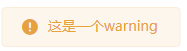
效果图:




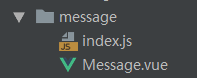
文件目录:
Message.vue
<template>

  <transition name="fade">

    <div class="message" :class="type" v-if="visible">

      <i class="icon-type iconfont" :class="'icon-'+type"></i>

      <div class="content">{{content}}

        <i v-if="hasClose" class="btn-close iconfont icon-close" @click="visible=false"></i>

      </div>

    </div>

  </transition>

</template>

<script>

  export default {

    name: "MyMessage",

    data() {

      return {

        content: '',

        time: 3000,

        visible: false,

        type:'info',//'success','warning','error'

        hasClose:false,

      }

    },

    mounted() {

      this.close()

    },

    methods: {

      close() {

        window.setTimeout(() =>{

          this.visible = false

        }, this.time);

      }

    }

  }

</script>
index.js
给Vue添加$my_message方法,
判断参数,使用$mount()给组件手动挂载参数,然后将组件插入页面中
import Vue from 'vue'

import Message from './Message.vue'

const messageBox = Vue.extend(Message)

Message.install = function (options, type) {

  if (options === undefined || options === null) {

    options = {

      content: ''

    }

  } else if (typeof options === 'string' || typeof options === 'number') {

    options = {

      content: options

    }

    if (type != undefined && options != null) {

      options.type = type;

    }

  }

  let instance = new messageBox({

    data: options

  }).$mount()

  document.body.appendChild(instance.$el)

  Vue.nextTick(() => {

    instance.visible = true

  })

}

export default Message
在main.js里全局引入
import Message from '@/components/common/message'

Vue.prototype.$my_message = Message.install;| 参数名 | 类型 | 说明 |
|---|---|---|
| content | String | 内容 |
| time | Number | 消失时间,默认3秒后消失 |
| type | String | info/success/warning/error,默认info |
| hasClose | Boolean | 是否含关闭按钮,默认false |
页面中调用
//简写,第一个参数为内容,第二个为类型
this.$my_message('这是一个message');

this.$my_message('这是一个warning','warning');
//传参的方式
this.$my_message({

    content:'这是一个success提示',

    time:5000000,

    type:'success',

    hasClose:true,

});
Vue 自定义全局消息框组件的更多相关文章
- 一个vue的全局提示框组件
<template> <!-- 全局提示框 --> <div v-show="visible" class="dialog-tips dia ...
- vue自定义下拉框组件
创建下拉框组件 Select.vue <template> <div class="selects"> <div :class="{sele ...
- vue 自定义modal 模态框组件
参数名 类型 说明 visible Boolean 是否显示,默认false title String 标题 update:visible Boolean 更新visible, 使用:visible. ...
- vue 自定义全局方法
import {myfun} from '../static/js/test.js' //se6的正确写法export default {methods:{ diyfun:function () { ...
- Combo( 自定义下拉框) 组件
本节课重点了解 EasyUI 中 Combo(自定义下拉框)组件的使用方法,这个组件依赖于ValidateBox(验证框)组件 一. 加载方式自定义下拉框不能通过标签的方式进行创建.<input ...
- 第二百一十二节,jQuery EasyUI,Combo(自定义下拉框)组件
jQuery EasyUI,Combo(自定义下拉框)组件 学习要点: 1.加载方式 2.属性列表 3.事件列表 4.方法列表 本节课重点了解 EasyUI 中 Combo(自定义下拉框)组件的使用方 ...
- vue自定义全局和局部指令
一.介绍 1.除了核心功能默认内置的指令 (v-model 和 v-show),Vue 也允许注册自定义指令. 2.自定义指令的分类 1.全局指令 2.局部指令 3.自定义全局指令格式 V ...
- 使用Vue自定义指令实现Select组件
完成的效果图如下: 一.首先,我们简单布局一下: <template> <div class="select"> <div class="i ...
- Vue自定义全局Toast和Loading
如果我们的Vue项目中没有用到任何UI框架的话,为了更好的用户体验,肯定会用到loading和toast.那么我们就自定义这两个组件吧. 1.Toast组件 首先,在common下新建global文件 ...
随机推荐
- TortoiseSvn介绍 客户端
转载自:http://www.cnblogs.com/lyhabc/articles/2482381.html TortoiseSvn 是 Subversion 版本控制系统的一个免费开源客户端,可以 ...
- vue中剖析中的一些方法
1 判断属性 71 -81 var hasOwnProperty = Object.prototype.hasOwnProperty; /** * Check whether the object h ...
- 硬件时间,操作系统时间,Windows 和linux 双系统时间差8小时问题说明
1.硬件时间:硬件时钟是存储在主板上CMOS里的时间即BIOS时间,关机后该时钟依然运行,主板的电池为它供电.对应于嵌入式设备有一个RTC模块.硬件时钟即RTC时钟.信息比较少没时区.夏令时的概念. ...
- 紫书 习题 10-44 UVa 11246 ( 容斥原理)
把k的倍数的删去(k, 2k, 3k--),但是k^2不应该删去,因为k已经删去,所以不存在某个数乘上k之后为k^2 所以k^2可以留下,然后因为有k^2,所以k^3就是k^2的k倍,所以k^3要删去 ...
- CSDN博客给我带来的一些诱惑和选择机会(二):HR“邀请于我”,猎头“有求于我”
上次,2013年10月8日 ,分享了一篇颇具"正能量"的文章CSDN博客给我带来的一些诱惑和选择机会,获得了很好的正面效果. 10月份,又发生了很多有趣.有意义的事情. 其中,有一 ...
- Flex与Java通信之HttpService
flashbuilder4.6.myeclipse10 参考:http://www.cnblogs.com/lovemoon714/archive/2012/05/25/2517684.html 1. ...
- 洛谷 P3040 [USACO12JAN]贝尔分享Bale Share
P3040 [USACO12JAN]贝尔分享Bale Share 题目描述 Farmer John has just received a new shipment of N (1 <= N & ...
- C++的new_handler
这个new_handler其实对应于signal_handler 当operator new申请一个内存失败时,它会进行如下的处理步骤:1.如果存在客户指定的处理函数,则调用处理函数(new_hand ...
- 高速改动android系统默认日期方法
高速改动android系统默认日期方法 在android系统的设备上,都有一个默认的開始日期,看过非常多设备,有些设备在没有联网的时候没有同步到系统时间的时候,竟然默认的还是1970年的日期.也见过有 ...
- Android学习笔记(23):列表项的容器—AdapterView的子类们
AdapterView的子类的子类ListView.GridView.Spinner.Gallery.AdapterViewFlipper和StackView都是作为容器使用,Adapter负责提供各 ...