
关于k Line Chart (k线图)
K Line Chart
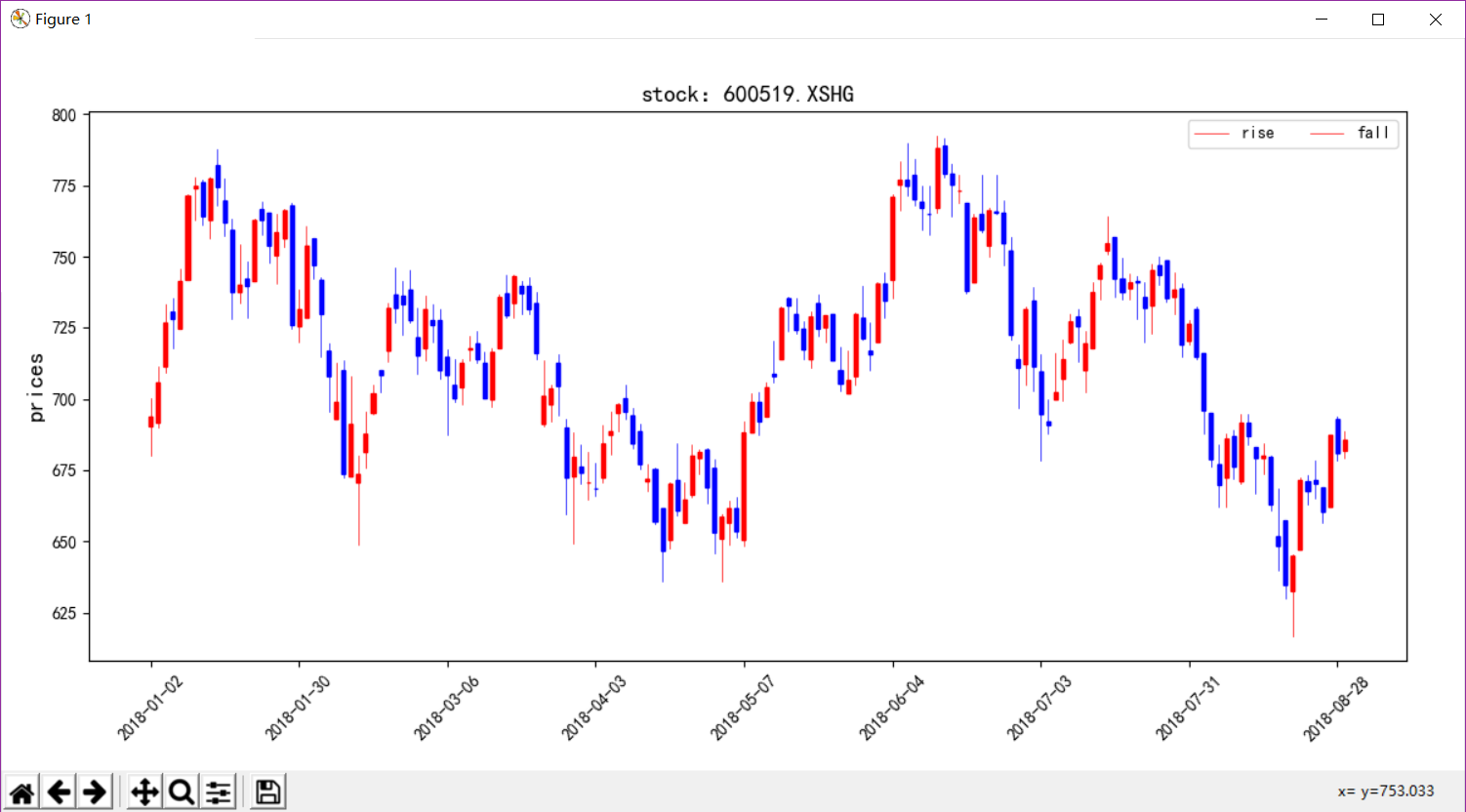
python实现k线图的代码,之前找过matplotlib中文文档但是画k线图的finance方法已经弃用了。所以自己在网上搜寻一下加上改编,很好的实现出k线图,
代码如下:__main__
# conding:utf-8

# 导入聚宽函数库

from jqdatasdk import *

import pandas as pd

import matplotlib.pyplot as plt

from KLineChart.mpl_finance import plt_KLineChart

import os

'''

:param fields 字符串list, 默认是None(表示['open', 'close', 'high', 'low', 'volume', 'money']这几个标准字段),

      支持以下属性 ['open', 'close', 'low', 'high', 'volume', 'money', 'factor', 'high_limit', 'low_limit', 'avg', 'pre_close', 'paused']

:param skip_paused 是否跳过不交易日期

'''

auth('your ID','your password')

fields = ['open', 'close', 'high', 'low', 'volume', 'money']

stock_code = ['600519.XSHG','000001.XSHE','IC9999.CCFX']

data = get_price(stock_code,start_date='2018-1-1',end_date='2018-8-29',frequency='1d',fields=fields,skip_paused=False)

k,m,n = data.shape

# print(k,m,n)

for i in range(n):

    Data = data.iloc[:,:,i]

    plt_KLineChart(Data,stock_code[i],step=20,fontSize=14)

plt.show()

# 数据保存

# os.mkdir('data/中国银行.xlsx')

# data.to_excel(r'./data/中国银行.xlsx')

# sql.to_excel()

# print(data.shape)
这下我们需要导入自定义函数:from mpl_finance import plt_KLineChart
"""
A collection of functions for analyzing and plotting
financial data. User contributions welcome!
"""
from __future__ import (absolute_import, division, print_function,
unicode_literals) import numpy as np
import matplotlib.pyplot as plt
from matplotlib import colors as mcolors
from matplotlib.collections import LineCollection, PolyCollection
from matplotlib.lines import TICKLEFT, TICKRIGHT, Line2D
from matplotlib.patches import Rectangle
from matplotlib.transforms import Affine2D from six.moves import xrange, zip def plot_day_summary_oclh(ax, quotes, ticksize=3,
colorup='k', colordown='r'):
"""Plots day summary
Represent the time, open, close, high, low as a vertical line
ranging from low to high. The left tick is the open and the right
tick is the close.
Parameters
----------
ax : `Axes`
an `Axes` instance to plot to
quotes : sequence of (time, open, close, high, low, ...) sequences
data to plot. time must be in float date format - see date2num
ticksize : int
open/close tick marker in points
colorup : color
the color of the lines where close >= open
colordown : color
the color of the lines where close < open
Returns
-------
lines : list
list of tuples of the lines added (one tuple per quote)
"""
return _plot_day_summary(ax, quotes, ticksize=ticksize,
colorup=colorup, colordown=colordown,
ochl=True) def plot_day_summary_ohlc(ax, quotes, ticksize=3,
colorup='k', colordown='r'):
"""Plots day summary
Represent the time, open, high, low, close as a vertical line
ranging from low to high. The left tick is the open and the right
tick is the close.
Parameters
----------
ax : `Axes`
an `Axes` instance to plot to
quotes : sequence of (time, open, high, low, close, ...) sequences
data to plot. time must be in float date format - see date2num
ticksize : int
open/close tick marker in points
colorup : color
the color of the lines where close >= open
colordown : color
the color of the lines where close < open
Returns
-------
lines : list
list of tuples of the lines added (one tuple per quote)
"""
return _plot_day_summary(ax, quotes, ticksize=ticksize,
colorup=colorup, colordown=colordown,
ochl=False) def _plot_day_summary(ax, quotes, ticksize=3,
colorup='k', colordown='r',
ochl=True):
"""Plots day summary
Represent the time, open, high, low, close as a vertical line
ranging from low to high. The left tick is the open and the right
tick is the close.
Parameters
----------
ax : `Axes`
an `Axes` instance to plot to
quotes : sequence of quote sequences
data to plot. time must be in float date format - see date2num
(time, open, high, low, close, ...) vs
(time, open, close, high, low, ...)
set by `ochl`
ticksize : int
open/close tick marker in points
colorup : color
the color of the lines where close >= open
colordown : color
the color of the lines where close < open
ochl: bool
argument to select between ochl and ohlc ordering of quotes
Returns
-------
lines : list
list of tuples of the lines added (one tuple per quote)
"""
# unfortunately this has a different return type than plot_day_summary2_*
lines = []
for q in quotes:
if ochl:
t, open, close, high, low = q[:5]
else:
t, open, high, low, close = q[:5] if close >= open:
color = colorup
else:
color = colordown vline = Line2D(xdata=(t, t), ydata=(low, high),
color=color,
antialiased=False, # no need to antialias vert lines
) oline = Line2D(xdata=(t, t), ydata=(open, open),
color=color,
antialiased=False,
marker=TICKLEFT,
markersize=ticksize,
) cline = Line2D(xdata=(t, t), ydata=(close, close),
color=color,
antialiased=False,
markersize=ticksize,
marker=TICKRIGHT) lines.extend((vline, oline, cline))
ax.add_line(vline)
ax.add_line(oline)
ax.add_line(cline) ax.autoscale_view() return lines def candlestick_ochl(ax, quotes, width=0.2, colorup='k', colordown='r',
alpha=1.0):
"""
Plot the time, open, close, high, low as a vertical line ranging
from low to high. Use a rectangular bar to represent the
open-close span. If close >= open, use colorup to color the bar,
otherwise use colordown
Parameters
----------
ax : `Axes`
an Axes instance to plot to
quotes : sequence of (time, open, close, high, low, ...) sequences
As long as the first 5 elements are these values,
the record can be as long as you want (e.g., it may store volume).
time must be in float days format - see date2num
width : float
fraction of a day for the rectangle width
colorup : color
the color of the rectangle where close >= open
colordown : color
the color of the rectangle where close < open
alpha : float
the rectangle alpha level
Returns
-------
ret : tuple
returns (lines, patches) where lines is a list of lines
added and patches is a list of the rectangle patches added
"""
return _candlestick(ax, quotes, width=width, colorup=colorup,
colordown=colordown,
alpha=alpha, ochl=True) def plt_KLineChart(data,stockCode,step=20,fontSize=13,figsize=(12,6)): '''
:param data: type for DataFrame
:param stockCode: stock code
:param step: xticks step
:param fontSize: font size
:param figsize: window size
:return:
''' prices = data[['open', 'high', 'low', 'close']] fig = plt.figure(figsize=figsize)
ax = fig.add_axes([0.06, 0.15, 0.9, 0.75]) # margin_left margin_bottom width height
candlestick_ohlc(ax, prices, width=0.5, colorup='r', colordown='b') dataIndex = [str(i).split(' ')[0] for i in data.iloc[::step, :].index]
location = list(range(0,len(data.iloc[:,0]),step))
plt.xticks(location,dataIndex,rotation=45) font_size = {'size': fontSize}
plt.ylabel('prices',font_size)
plt.title('stock:%s'%(stockCode),font_size)
plt.rcParams['font.sans-serif'] = ['SimHei'] # 设置字体为SimHei显示中文
plt.rcParams['axes.unicode_minus'] = False # 设置正常显示符号 def candlestick_ohlc(ax, quotes, width=0.2, colorup='k', colordown='r',
alpha=1.0):
"""
Plot the time, open, high, low, close as a vertical line ranging
from low to high. Use a rectangular bar to represent the
open-close span. If close >= open, use colorup to color the bar,
otherwise use colordown
Parameters
----------
ax : `Axes`
an Axes instance to plot to
quotes : sequence of (time, open, high, low, close, ...) sequences
As long as the first 5 elements are these values,
the record can be as long as you want (e.g., it may store volume).
time must be in float days format - see date2num
width : float
fraction of a day for the rectangle width
colorup : color
the color of the rectangle where close >= open
colordown : color
the color of the rectangle where close < open
alpha : float
the rectangle alpha level
Returns
-------
ret : tuple
returns (lines, patches) where lines is a list of lines
added and patches is a list of the rectangle patches added
"""
return _candlestick(ax, quotes, width=width, colorup=colorup,
colordown=colordown,
alpha=alpha, ochl=False) def _candlestick(ax, quotes, width=0.2, colorup='k', colordown='r',
alpha=1.0, ochl=True):
"""
Plot the time, open, high, low, close as a vertical line ranging
from low to high. Use a rectangular bar to represent the
open-close span. If close >= open, use colorup to color the bar,
otherwise use colordown
Parameters
----------
ax : `Axes`
an Axes instance to plot to
quotes : sequence of quote sequences
data to plot. time must be in float date format - see date2num
(time, open, high, low, close, ...) vs
(time, open, close, high, low, ...)
set by `ochl`
width : float
fraction of a day for the rectangle width
colorup : color
the color of the rectangle where close >= open
colordown : color
the color of the rectangle where close < open
alpha : float
the rectangle alpha level
ochl: bool
argument to select between ochl and ohlc ordering of quotes
Returns
-------
ret : tuple
returns (lines, patches) where lines is a list of lines
added and patches is a list of the rectangle patches added
""" OFFSET = width / 2.0 lines = []
patches = []
quotes = np.column_stack([list(range(len(quotes))), quotes])
for q in quotes:
if ochl:
t, open, close, high, low = q[:5]
else:
t, open, high, low, close = q[:5] if close >= open:
color = colorup
lower = open
height = close - open
else:
color = colordown
lower = close
height = open - close vline = Line2D(
xdata=(t, t), ydata=(low, high),
color=color,
linewidth=0.5,
antialiased=True,
) rect = Rectangle(
xy=(t - OFFSET, lower),
width=width,
height=height,
facecolor=color,
edgecolor=color,
)
rect.set_alpha(alpha) lines.append(vline)
patches.append(rect)
ax.add_line(vline)
ax.add_patch(rect)
ax.autoscale_view() return lines, patches def _check_input(opens, closes, highs, lows, miss=-1):
"""Checks that *opens*, *highs*, *lows* and *closes* have the same length.
NOTE: this code assumes if any value open, high, low, close is
missing (*-1*) they all are missing
Parameters
----------
ax : `Axes`
an Axes instance to plot to
opens : sequence
sequence of opening values
highs : sequence
sequence of high values
lows : sequence
sequence of low values
closes : sequence
sequence of closing values
miss : int
identifier of the missing data
Raises
------
ValueError
if the input sequences don't have the same length
""" def _missing(sequence, miss=-1):
"""Returns the index in *sequence* of the missing data, identified by
*miss*
Parameters
----------
sequence :
sequence to evaluate
miss :
identifier of the missing data
Returns
-------
where_miss: numpy.ndarray
indices of the missing data
"""
return np.where(np.array(sequence) == miss)[0] same_length = len(opens) == len(highs) == len(lows) == len(closes)
_missopens = _missing(opens)
same_missing = ((_missopens == _missing(highs)).all() and
(_missopens == _missing(lows)).all() and
(_missopens == _missing(closes)).all()) if not (same_length and same_missing):
msg = ("*opens*, *highs*, *lows* and *closes* must have the same"
" length. NOTE: this code assumes if any value open, high,"
" low, close is missing (*-1*) they all must be missing.")
raise ValueError(msg) def plot_day_summary2_ochl(ax, opens, closes, highs, lows, ticksize=4,
colorup='k', colordown='r'):
"""Represent the time, open, close, high, low, as a vertical line
ranging from low to high. The left tick is the open and the right
tick is the close.
Parameters
----------
ax : `Axes`
an Axes instance to plot to
opens : sequence
sequence of opening values
closes : sequence
sequence of closing values
highs : sequence
sequence of high values
lows : sequence
sequence of low values
ticksize : int
size of open and close ticks in points
colorup : color
the color of the lines where close >= open
colordown : color
the color of the lines where close < open
Returns
-------
ret : list
a list of lines added to the axes
""" return plot_day_summary2_ohlc(ax, opens, highs, lows, closes, ticksize,
colorup, colordown) def plot_day_summary2_ohlc(ax, opens, highs, lows, closes, ticksize=4,
colorup='k', colordown='r'):
"""Represent the time, open, high, low, close as a vertical line
ranging from low to high. The left tick is the open and the right
tick is the close.
*opens*, *highs*, *lows* and *closes* must have the same length.
NOTE: this code assumes if any value open, high, low, close is
missing (*-1*) they all are missing
Parameters
----------
ax : `Axes`
an Axes instance to plot to
opens : sequence
sequence of opening values
highs : sequence
sequence of high values
lows : sequence
sequence of low values
closes : sequence
sequence of closing values
ticksize : int
size of open and close ticks in points
colorup : color
the color of the lines where close >= open
colordown : color
the color of the lines where close < open
Returns
-------
ret : list
a list of lines added to the axes
""" _check_input(opens, highs, lows, closes) rangeSegments = [((i, low), (i, high)) for i, low, high in
zip(xrange(len(lows)), lows, highs) if low != -1] # the ticks will be from ticksize to 0 in points at the origin and
# we'll translate these to the i, close location
openSegments = [((-ticksize, 0), (0, 0))] # the ticks will be from 0 to ticksize in points at the origin and
# we'll translate these to the i, close location
closeSegments = [((0, 0), (ticksize, 0))] offsetsOpen = [(i, open) for i, open in
zip(xrange(len(opens)), opens) if open != -1] offsetsClose = [(i, close) for i, close in
zip(xrange(len(closes)), closes) if close != -1] scale = ax.figure.dpi * (1.0 / 72.0) tickTransform = Affine2D().scale(scale, 0.0) colorup = mcolors.to_rgba(colorup)
colordown = mcolors.to_rgba(colordown)
colord = {True: colorup, False: colordown}
colors = [colord[open < close] for open, close in
zip(opens, closes) if open != -1 and close != -1] useAA = 0, # use tuple here
lw = 1, # and here
rangeCollection = LineCollection(rangeSegments,
colors=colors,
linewidths=lw,
antialiaseds=useAA,
) openCollection = LineCollection(openSegments,
colors=colors,
antialiaseds=useAA,
linewidths=lw,
offsets=offsetsOpen,
transOffset=ax.transData,
)
openCollection.set_transform(tickTransform) closeCollection = LineCollection(closeSegments,
colors=colors,
antialiaseds=useAA,
linewidths=lw,
offsets=offsetsClose,
transOffset=ax.transData,
)
closeCollection.set_transform(tickTransform) minpy, maxx = (0, len(rangeSegments))
miny = min([low for low in lows if low != -1])
maxy = max([high for high in highs if high != -1])
corners = (minpy, miny), (maxx, maxy)
ax.update_datalim(corners)
ax.autoscale_view() # add these last
ax.add_collection(rangeCollection)
ax.add_collection(openCollection)
ax.add_collection(closeCollection)
return rangeCollection, openCollection, closeCollection def candlestick2_ochl(ax, opens, closes, highs, lows, width=4,
colorup='k', colordown='r',
alpha=0.75):
"""Represent the open, close as a bar line and high low range as a
vertical line.
Preserves the original argument order.
Parameters
----------
ax : `Axes`
an Axes instance to plot to
opens : sequence
sequence of opening values
closes : sequence
sequence of closing values
highs : sequence
sequence of high values
lows : sequence
sequence of low values
width : int
size of open and close ticks in points
colorup : color
the color of the lines where close >= open
colordown : color
the color of the lines where close < open
alpha : float
bar transparency
Returns
-------
ret : tuple
(lineCollection, barCollection)
""" return candlestick2_ohlc(ax, opens, highs, lows, closes, width=width,
colorup=colorup, colordown=colordown,
alpha=alpha) def candlestick2_ohlc(ax, opens, highs, lows, closes, width=4,
colorup='k', colordown='r',
alpha=0.75):
"""Represent the open, close as a bar line and high low range as a
vertical line.
NOTE: this code assumes if any value open, low, high, close is
missing they all are missing
Parameters
----------
ax : `Axes`
an Axes instance to plot to
opens : sequence
sequence of opening values
highs : sequence
sequence of high values
lows : sequence
sequence of low values
closes : sequence
sequence of closing values
width : int
size of open and close ticks in points
colorup : color
the color of the lines where close >= open
colordown : color
the color of the lines where close < open
alpha : float
bar transparency
Returns
-------
ret : tuple
(lineCollection, barCollection)
""" _check_input(opens, highs, lows, closes) delta = width / 2.
barVerts = [((i - delta, open),
(i - delta, close),
(i + delta, close),
(i + delta, open))
for i, open, close in zip(xrange(len(opens)), opens, closes)
if open != -1 and close != -1] rangeSegments = [((i, low), (i, high))
for i, low, high in zip(xrange(len(lows)), lows, highs)
if low != -1] colorup = mcolors.to_rgba(colorup, alpha)
colordown = mcolors.to_rgba(colordown, alpha)
colord = {True: colorup, False: colordown}
colors = [colord[open < close]
for open, close in zip(opens, closes)
if open != -1 and close != -1] useAA = 0, # use tuple here
lw = 0.5, # and here
rangeCollection = LineCollection(rangeSegments,
colors=colors,
linewidths=lw,
antialiaseds=useAA,
) barCollection = PolyCollection(barVerts,
facecolors=colors,
edgecolors=colors,
antialiaseds=useAA,
linewidths=lw,
) minx, maxx = 0, len(rangeSegments)
miny = min([low for low in lows if low != -1])
maxy = max([high for high in highs if high != -1]) corners = (minx, miny), (maxx, maxy)
ax.update_datalim(corners)
ax.autoscale_view() # add these last
ax.add_collection(rangeCollection)
ax.add_collection(barCollection)
return rangeCollection, barCollection def volume_overlay(ax, opens, closes, volumes,
colorup='k', colordown='r',
width=4, alpha=1.0):
"""Add a volume overlay to the current axes. The opens and closes
are used to determine the color of the bar. -1 is missing. If a
value is missing on one it must be missing on all
Parameters
----------
ax : `Axes`
an Axes instance to plot to
opens : sequence
a sequence of opens
closes : sequence
a sequence of closes
volumes : sequence
a sequence of volumes
width : int
the bar width in points
colorup : color
the color of the lines where close >= open
colordown : color
the color of the lines where close < open
alpha : float
bar transparency
Returns
-------
ret : `barCollection`
The `barrCollection` added to the axes
""" colorup = mcolors.to_rgba(colorup, alpha)
colordown = mcolors.to_rgba(colordown, alpha)
colord = {True: colorup, False: colordown}
colors = [colord[open < close]
for open, close in zip(opens, closes)
if open != -1 and close != -1] delta = width / 2.
bars = [((i - delta, 0), (i - delta, v), (i + delta, v), (i + delta, 0))
for i, v in enumerate(volumes)
if v != -1] barCollection = PolyCollection(bars,
facecolors=colors,
edgecolors=((0, 0, 0, 1),),
antialiaseds=(0,),
linewidths=(0.5,),
) ax.add_collection(barCollection)
corners = (0, 0), (len(bars), max(volumes))
ax.update_datalim(corners)
ax.autoscale_view() # add these last
return barCollection def volume_overlay2(ax, closes, volumes,
colorup='k', colordown='r',
width=4, alpha=1.0):
"""
Add a volume overlay to the current axes. The closes are used to
determine the color of the bar. -1 is missing. If a value is
missing on one it must be missing on all
nb: first point is not displayed - it is used only for choosing the
right color
Parameters
----------
ax : `Axes`
an Axes instance to plot to
closes : sequence
a sequence of closes
volumes : sequence
a sequence of volumes
width : int
the bar width in points
colorup : color
the color of the lines where close >= open
colordown : color
the color of the lines where close < open
alpha : float
bar transparency
Returns
-------
ret : `barCollection`
The `barrCollection` added to the axes
""" return volume_overlay(ax, closes[:-1], closes[1:], volumes[1:],
colorup, colordown, width, alpha) def volume_overlay3(ax, quotes,
colorup='k', colordown='r',
width=4, alpha=1.0):
"""Add a volume overlay to the current axes. quotes is a list of (d,
open, high, low, close, volume) and close-open is used to
determine the color of the bar
Parameters
----------
ax : `Axes`
an Axes instance to plot to
quotes : sequence of (time, open, high, low, close, ...) sequences
data to plot. time must be in float date format - see date2num
width : int
the bar width in points
colorup : color
the color of the lines where close1 >= close0
colordown : color
the color of the lines where close1 < close0
alpha : float
bar transparency
Returns
-------
ret : `barCollection`
The `barrCollection` added to the axes
""" colorup = mcolors.to_rgba(colorup, alpha)
colordown = mcolors.to_rgba(colordown, alpha)
colord = {True: colorup, False: colordown} dates, opens, highs, lows, closes, volumes = list(zip(*quotes))
colors = [colord[close1 >= close0]
for close0, close1 in zip(closes[:-1], closes[1:])
if close0 != -1 and close1 != -1]
colors.insert(0, colord[closes[0] >= opens[0]]) right = width / 2.0
left = -width / 2.0 bars = [((left, 0), (left, volume), (right, volume), (right, 0))
for d, open, high, low, close, volume in quotes] sx = ax.figure.dpi * (1.0 / 72.0) # scale for points
sy = ax.bbox.height / ax.viewLim.height barTransform = Affine2D().scale(sx, sy) dates = [d for d, open, high, low, close, volume in quotes]
offsetsBars = [(d, 0) for d in dates] useAA = 0, # use tuple here
lw = 0.5, # and here
barCollection = PolyCollection(bars,
facecolors=colors,
edgecolors=((0, 0, 0, 1),),
antialiaseds=useAA,
linewidths=lw,
offsets=offsetsBars,
transOffset=ax.transData,
)
barCollection.set_transform(barTransform) minpy, maxx = (min(dates), max(dates))
miny = 0
maxy = max([volume for d, open, high, low, close, volume in quotes])
corners = (minpy, miny), (maxx, maxy)
ax.update_datalim(corners)
# print 'datalim', ax.dataLim.bounds
# print 'viewlim', ax.viewLim.bounds ax.add_collection(barCollection)
ax.autoscale_view() return barCollection def index_bar(ax, vals,
facecolor='b', edgecolor='l',
width=4, alpha=1.0, ):
"""Add a bar collection graph with height vals (-1 is missing).
Parameters
----------
ax : `Axes`
an Axes instance to plot to
vals : sequence
a sequence of values
facecolor : color
the color of the bar face
edgecolor : color
the color of the bar edges
width : int
the bar width in points
alpha : float
bar transparency
Returns
-------
ret : `barCollection`
The `barrCollection` added to the axes
""" facecolors = (mcolors.to_rgba(facecolor, alpha),)
edgecolors = (mcolors.to_rgba(edgecolor, alpha),) right = width / 2.0
left = -width / 2.0 bars = [((left, 0), (left, v), (right, v), (right, 0))
for v in vals if v != -1] sx = ax.figure.dpi * (1.0 / 72.0) # scale for points
sy = ax.bbox.height / ax.viewLim.height barTransform = Affine2D().scale(sx, sy) offsetsBars = [(i, 0) for i, v in enumerate(vals) if v != -1] barCollection = PolyCollection(bars,
facecolors=facecolors,
edgecolors=edgecolors,
antialiaseds=(0,),
linewidths=(0.5,),
offsets=offsetsBars,
transOffset=ax.transData,
)
barCollection.set_transform(barTransform) minpy, maxx = (0, len(offsetsBars))
miny = 0
maxy = max([v for v in vals if v != -1])
corners = (minpy, miny), (maxx, maxy)
ax.update_datalim(corners)
ax.autoscale_view() # add these last
ax.add_collection(barCollection)
return barCollection
K线图函数:plt_KLineChart
关于k Line Chart (k线图)的更多相关文章
- Open Flash Chart 之线图
天公司要求开发一个曲线图,简单看了一下之前公司的一个系统,发现一个曲线图效果还不错,查了一下叫OpenFlashChart,还是很不错的,很多人用.研究了一下,发现还不错,特地写了个DEMO测试下. ...
- Open Flash Chart 之线图(二)
上一节在研究Open Flash Chart时,漏掉不少东西,只是简单的熟悉了一下后端的属性设置.今天再来补充一下. 一.显示Open Flash Chart图表 Open Flash Chart 前 ...
- pyhton中matplotlib箱线图的绘制(matplotlib双轴图、箱线图、散点图以及相关系数矩阵图))
//2019.07.23 1.箱形图,又称为盒式图,一般可以很好地反映出数据分布的特征,也可以进行多项数据之间分布特征的比较,它主要包含五个基础数据:中位数,两个上下分位数以及上下边缘线数据 其中的一 ...
- canvas绘图,html5 k线图,股票行情图
canvas绘图,html5 k线图,股票行情图 canvas跟其他标签一样,也可以通过css来定义样式.但这里需要注意的是:canvas的默认宽高为300px * 150px,在css中为canva ...
- Android开源图表图形库K线图
Android开源图表图形库K线图 web端k线图一般使用TradingView,android原生的一般是在MPAndroidChart 基础上做开发的,目前看到一个比较好的K线开源组件是KChar ...
- highstock K线图 深入研究
K线图,相信每个股民都不陌生,如何用SVG画好一个K线图是一个难题. 我选择用highstock做为画图组件,适当的修改了一下源码,参考了数个财经网站的案例,完成了一个不太成熟的K线图,欢迎大家批评指 ...
- WPF中使用amCharts绘制股票K线图
原文:WPF中使用amCharts绘制股票K线图 本想自己用GDI绘图, 通过数据直接绘制一张蜡柱图, 但觉得这样子的功能比较少, 所以到网上搜索一些能画出K线图的控件. 发现DynamicDataD ...
- Wijmo金融图表系列之平均K线图&砖形图
2015年7月16日将会发布有史以来最令人兴奋的控件-Wijmo 金融图表,它的一体化设计为单个自定义集合提供了所有主要的金融图表,这是市场上的其他控件都不具备的独一无二的好处.它像Wijmo其他任意 ...
- Highcharts candlestick(K线图)案例
<!DOCTYPE html> <html lang="en"> <head> <meta charset="UTF-8&quo ...
随机推荐
- 如何搭建SBT编译Scala开发的Android工程
作者:戚明峰 最近接触了shadowsocks的Android客户端项目源码(https://github.com/shadowsocks/shadowsocks-android),刚好这个项目是使用 ...
- Java的框架是什么意思
框架就是一些类和接口的集合,通过这些类和接口协调来完成一系列的程序实现. JAVA框架可以分为三层:表示层,业务层和物理层.框架又叫做开发中的半成品,它不能提供整个WEB应用程序的所有东西,但是有了框 ...
- Linux上Makefile管理java项目
前面文章讲到了Linux上通过.spec文件与rpmbuild命令将java程序打包为RPM安装包, 现阶段遇到新的需求: 使用Makefile来操纵java的编译.打包 该需求以前面的内容为基础 可 ...
- 【HNOI2008】玩具装箱TOY & 斜率优化学习笔记
题目 P教授要去看奥运,但是他舍不下他的玩具,于是他决定把所有的玩具运到北京.他使用自己的压缩器进行压缩,其可以将任意物品变成一堆,再放到一种特殊的一维容器中.P教授有编号为 \(1\cdots N\ ...
- Python 常见的错误类型和继承关系
Python所有的错误都是从BaseException类派生 BaseException +-- SystemExit +-- KeyboardInterrupt +-- GeneratorExit ...
- 系统学习Docker 践行DevOps理念
Docker代表的容器技术是近两年的大热技术,和人工智能.区块链等热点不同,容器技术的门槛并不高,每一个开发.测试.运维人员都能在日常工作中掌握和使用,是当今IT从业人员的必备技能之一.本课程会带大家 ...
- python基础篇 05字典
本节主要内容:1. 字典的简单介绍2. 字典增删改查和其他操作3. 字典的嵌套 一. 字典的简单介绍:字典(dict)是python中唯一的一个映射类型.他是以{ }括起来的键值对组成. 在dict中 ...
- 为Zabbix配置Nova服务、Keystone和Placement进程CPU和内存usage监控
目前已经完成了RabbitMQ和MySQL的监控项配置,还差对nova-api.nova-conductor.nova-scheduler和keystone进程CPU和内存 usage的监控,类似的轮 ...
- [PocketFlow]解决在coco上mAP非常低的bug
1.问题 继上次训练挂起的bug后,又遇到了现在评估时AP非常低的bug.具体有多低呢?Pelee论文中提到,用128的batchsize大小在coco数据集上训练70K次迭代后,AP@0.5:0.9 ...
- EM算法浅析(二)-算法初探
EM算法浅析,我准备写一个系列的文章: EM算法浅析(一)-问题引出 EM算法浅析(二)-算法初探 一.EM算法简介 在EM算法之一--问题引出中我们介绍了硬币的问题,给出了模型的目标函数,提到了这种 ...