
【Mac + Python3.6 + ATX基于facebook-wda】之IOS自动化(二):安装facebook-wda库并编写简易自动化测试脚本
上一篇介绍完如何安装WDA,接下来开始正式安装开发库并编写自动化脚本。
目录:
一、安装facebook-wda库
运行命令行安装:
pip install --pre facebook-wda
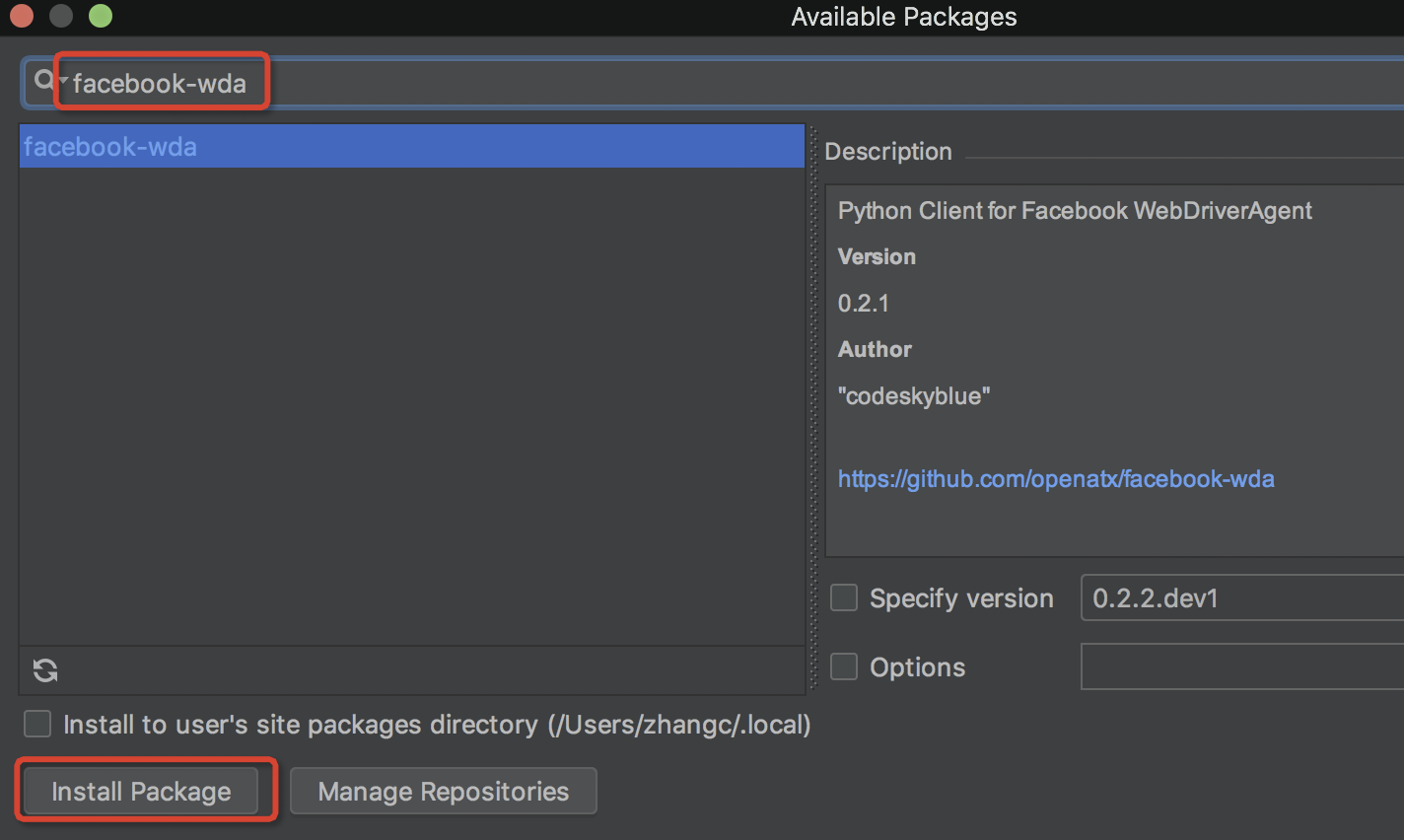
或者使用pycharm中,Preferences->Project->Project Interpreter->【+】(加号), 搜索:facebook-wda,并安装
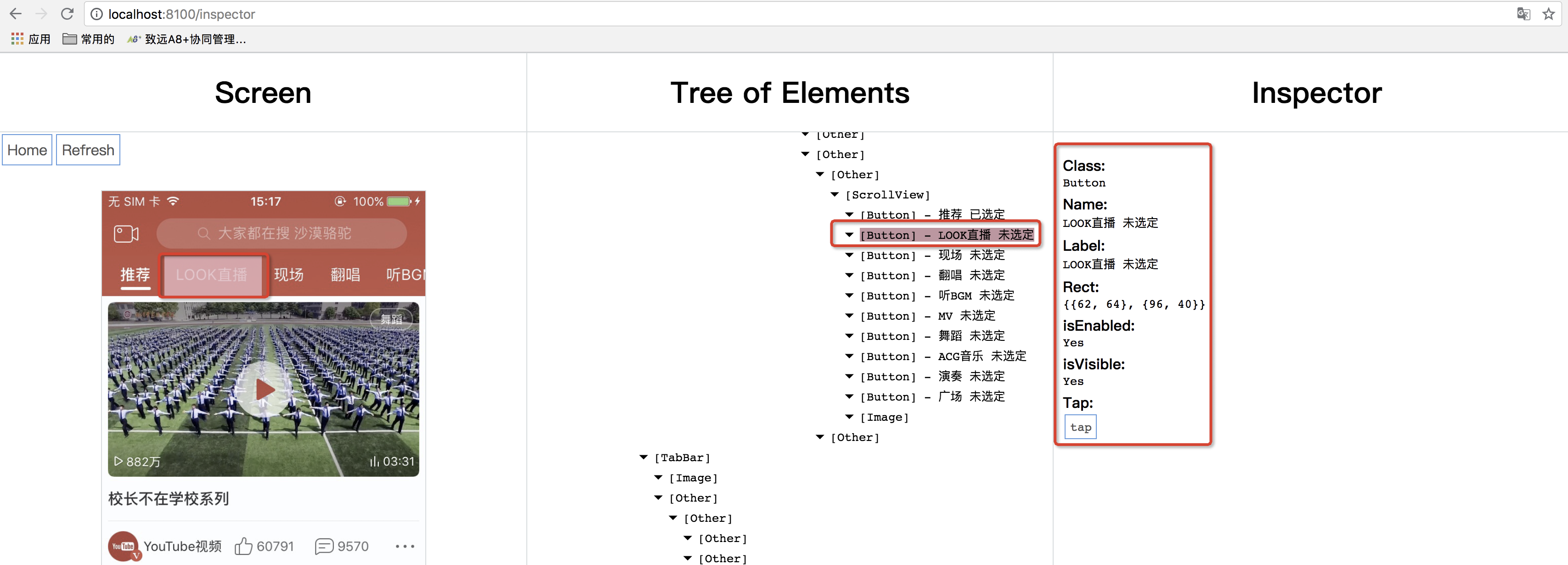
举个栗子,页面元素定位,如下图,class、name一一展示:
通过“ideviceinstaller -l ”或者其他工具查找到APP软件的bundleId
$ ideviceinstaller -l

Total: 5 apps

com.ysr.scancode - 二维码扫描器 3

com.apple.test.WebDriverAgentRunner-Runner - WebDriverAgentRunner-Runner 1

com.sogou.sogouinput - 搜狗输入法 142709

com.netease.cloudmusic - 网易云音乐 1044

com.leqimea.recorderAudio - PP助手 10000
但是,会一直报错Could not connect to lockdownd. Exiting.
痛苦了大半天,终于找到了解决办法:
参考:《IOS 执行ideviceinstaller -l ,结果报错Could not connect to lockdownd. Exiting.》
上代码:
#!/usr/bin/env python

# -*- coding: utf-8 -*-

# @Time    : 2018/10/16 11:42

# @Author  : zc

# @File    : test.py

import unittest

import wda

wda.DEBUG = False # default False

wda.HTTP_TIMEOUT = 10.0 # default 60.0 seconds

bundle_id = "com.chen.CityMineSafetyOne"  (通过上面获得)

c = wda.Client('http://localhost:8100')

# 启动应用

s = c.session(bundle_id)

class Test_safety(unittest.TestCase):

    def setUp(self):

        print("=======start!=======")

        pass

    def tearDown(self):

        print("=======stop!=======")

        pass

    def test1(self):

     # class、name定位参考网易图所示,这里只是举个栗子,并不是网易代码

        s(name='home btn newtask',className='Button').tap()

if __name__ == '__main__':

    unittest.main()
运行成功!!!!
二、通过WEditor定位元素 返回目录
之前做uiautomator2-Android自动化时,用到了这个进行定位元素,非常方便,facebook-wda-IOS自动化也可以通过这个进行定位元素。
首先,启动weditor
python -m weditor
有时候会报错:OSError: [Errno 48] Address already in use
提示您地址已经被占用,所以我们可以查看weditor的17310端口,看看哪些软件占用了此端口:
# 查看端口使用情况

lsof -i tcp:17310

COMMAND    PID   USER   FD   TYPE             DEVICE SIZE/OFF NODE NAME

Google     396 zhan  156u  IPv6 0x9b9eee3e3dae5dfb      0t0  TCP localhost:58732->localhost:17310 (ESTABLISHED)

python3.6 8244 zhan    4u  IPv6 0x9b9eee3e34507f3b      0t0  TCP *:17310 (LISTEN)

# 其中谷歌和py3.6占用了端口,选择杀死进程

kill 396

kill 8244
接着再启动weditor,发现还是报错:
ModuleNotFoundError: No module named 'atx'
需要安装atx:
pip install atx==1.1.2.dev18
$ pip install atx==1.1.2.dev18

Collecting atx==1.1.2.dev18

  Downloading https://files.pythonhosted.org/packages/16/75/f47630ae898e61900f0c32165916330bce718aa048e4abd1ce8408cef9ff/atx-1.1.2.dev18-py3-none-any.whl (2.2MB)

    100% |████████████████████████████████| 2.2MB 600kB/s

Collecting imageio==1.5 (from atx==1.1.2.dev18)

  Downloading https://files.pythonhosted.org/packages/e8/b7/8d78cb388c1aa8648c65601572fb4c50cc36f5eff6b22f0ec69ef0d63ecc/imageio-1.5.zip (3.3MB)

    100% |████████████████████████████████| 3.3MB 444kB/s

Requirement already satisfied: Pillow>=2.7.0 in /Users/zhan/.pyenv/versions/3.6.1/lib/python3.6/site-packages (from atx==1.1.2.dev18)

Collecting PyYAML==3.11 (from atx==1.1.2.dev18)

  Downloading https://files.pythonhosted.org/packages/75/5e/b84feba55e20f8da46ead76f14a3943c8cb722d40360702b2365b91dec00/PyYAML-3.11.tar.gz (248kB)

    100% |████████████████████████████████| 256kB 3.7MB/s

Collecting colorama==0.3.7 (from atx==1.1.2.dev18)

  Downloading https://files.pythonhosted.org/packages/b7/8e/ddb32ddaabd431813e180ca224e844bab8ad42fbb47ee07553f0ec44cd86/colorama-0.3.7-py2.py3-none-any.whl

Collecting numpy>=1.11.0 (from atx==1.1.2.dev18)

  Downloading https://files.pythonhosted.org/packages/0a/2b/726b7d4e4ba844d4805c52b8e05299a5f49bc16c69ca0fa8e1964c0871fe/numpy-1.15.2-cp36-cp36m-macosx_10_6_intel.macosx_10_9_intel.macosx_10_9_x86_64.macosx_10_10_intel.macosx_10_10_x86_64.whl (24.5MB)

    100% |████████████████████████████████| 24.5MB 60kB/s

Collecting tqdm==4.5.0 (from atx==1.1.2.dev18)

  Downloading https://files.pythonhosted.org/packages/83/4f/50d87b628eeae681eb9b5217840a215808ce3cf42c0d72752be286b1bfdf/tqdm-4.5.0-py2.py3-none-any.whl

Collecting facebook-wda==0.1.1.dev1 (from atx==1.1.2.dev18)

  Downloading https://files.pythonhosted.org/packages/4b/01/fbe44ad81ef016f1cc4fb149ce684da1cff163464a6168a7b87c4bd4597d/facebook_wda-0.1.1.dev1-py3-none-any.whl

Requirement already satisfied: requests>=2.9.1 in /Users/zhan/.pyenv/versions/3.6.1/lib/python3.6/site-packages (from atx==1.1.2.dev18)

Collecting futures==3.0.5 (from atx==1.1.2.dev18)

  Downloading https://files.pythonhosted.org/packages/55/db/97c1ca37edab586a1ae03d6892b6633d8eaa23b23ac40c7e5bbc55423c78/futures-3.0.5.tar.gz

Collecting maproxy==0.0.12 (from atx==1.1.2.dev18)

  Downloading https://files.pythonhosted.org/packages/2e/12/41e87a13b3e64373f73029ad1e826084afa64d4cdfa17baadc3ccde2ee02/maproxy-0.0.12.zip

Collecting atx-uiautomator==0.2.12.dev6 (from atx==1.1.2.dev18)

  Downloading https://files.pythonhosted.org/packages/42/40/bde514f5eb29d267cc06ab2bf890e972edf46345e24ebdae44d79b0f87e1/atx_uiautomator-0.2.12.dev6-py3-none-any.whl (2.9MB)

    100% |████████████████████████████████| 2.9MB 514kB/s

Collecting AxmlParserPY==0.0.2 (from atx==1.1.2.dev18)

  Downloading https://files.pythonhosted.org/packages/38/2b/50f92036bd6d46cdb7b581f4a0a4c5c0081ccc1235e0db96b640ed0fdcba/AxmlParserPY-0.0.2.tar.gz

Requirement already satisfied: tornado>=4.4 in /Users/zhan/.pyenv/versions/3.6.1/lib/python3.6/site-packages (from atx==1.1.2.dev18)

Collecting aircv==1.4.5 (from atx==1.1.2.dev18)

  Downloading https://files.pythonhosted.org/packages/66/5e/e58fd28a7a96e23a87cecf61f5d57acbae88812f22192afcbdbbb6015499/aircv-1.4.5.tar.gz (4.0MB)

    100% |████████████████████████████████| 4.0MB 402kB/s

Requirement already satisfied: six>=1.10.0 in /Users/zhan/.pyenv/versions/3.6.1/lib/python3.6/site-packages (from facebook-wda==0.1.1.dev1->atx==1.1.2.dev18)

Requirement already satisfied: idna<2.8,>=2.5 in /Users/zhan/.pyenv/versions/3.6.1/lib/python3.6/site-packages (from requests>=2.9.1->atx==1.1.2.dev18)

Requirement already satisfied: chardet<3.1.0,>=3.0.2 in /Users/zhan/.pyenv/versions/3.6.1/lib/python3.6/site-packages (from requests>=2.9.1->atx==1.1.2.dev18)

Requirement already satisfied: certifi>=2017.4.17 in /Users/zhan/.pyenv/versions/3.6.1/lib/python3.6/site-packages (from requests>=2.9.1->atx==1.1.2.dev18)

Requirement already satisfied: urllib3<1.24,>=1.21.1 in /Users/zhan/.pyenv/versions/3.6.1/lib/python3.6/site-packages (from requests>=2.9.1->atx==1.1.2.dev18)

Installing collected packages: imageio, PyYAML, colorama, numpy, tqdm, facebook-wda, futures, maproxy, atx-uiautomator, AxmlParserPY, aircv, atx

  Running setup.py install for imageio ... done

  Running setup.py install for PyYAML ... done

  Found existing installation: facebook-wda 0.2.1

    Uninstalling facebook-wda-0.2.1:

      Successfully uninstalled facebook-wda-0.2.1

  Running setup.py install for futures ... done

  Running setup.py install for maproxy ... done

  Running setup.py install for AxmlParserPY ... done

  Running setup.py install for aircv ... done

Successfully installed AxmlParserPY-0.0.2 PyYAML-3.11 aircv-1.4.5 atx-1.1.2.dev18 atx-uiautomator-0.2.12.dev6 colorama-0.3.7 facebook-wda-0.1.1.dev1 futures-3.0.5 imageio-1.5 maproxy-0.0.12 numpy-1.15.2 tqdm-4.5.0

You are using pip version 9.0.1, however version 18.1 is available.

You should consider upgrading via the 'pip install --upgrade pip' command.
在安装cv2,作用是读取图像相关的:
pip install opencv-python
再次运行weditor,又发生错误:
from atx import ioskit
File "/Users/zhangc/.pyenv/versions/3.6.1/lib/python3.6/site-packages/atx/ioskit.py", line 199
print dev.screenshot('i.png')
^
SyntaxError: invalid syntax
语法错误,经过大神调试得知原来是,atx版本问题,升级atx版本。
# 查看pip下各个库的版本

pip list

# 得知

atx (1.1.2.dev18)

pip (9.0.1)

# 升级pip

pip install --upgrade pip

# 升级atx

pip install -U atx

# 再查看pip下各个库版本

    Package       Version

--------------- -----------

     atx           1.2.0

     pip           18.1

# 最后再运行weditor

python -m weditor
weditor终于启动成功!!!!!
浏览器自动打开weditor,选择IOS,输入地址:http://localhost:8100,点击【Connect】连接,出现小绿叶
【Mac + Python3.6 + ATX基于facebook-wda】之IOS自动化(二):安装facebook-wda库并编写简易自动化测试脚本的更多相关文章
- 【Mac + Python3.6 + ATX基于facebook-wda】之IOS自动化(三):facebook-wda库--API学习以及附录:Github上对WDA的问题解答
下面简单介绍facebook-wda库--API的学习 import wda # debug模式,会在run运行时控制台生成消息 wda.DEBUG = False # False 关闭,True开启 ...
- 【Mac + Python3.6 + ATX基于facebook-wda】之IOS自动化(一):WebDriverAgent安装
此篇介绍如何安装WebDriverAgent,下一篇介绍facebook-wda库的安装使用以及自动化脚本的开发. 前言: 对于iOS的应用的测试,如果不需要用到图像识别,推荐使用这个项目facebo ...
- 【Mac + Appium + Python3.6学习(二)】之Android自动化测试,appium-desktop配置和简易自动化测试脚本
上一篇文章介绍安装appium测试环境,这一片研究介绍如何测试Android自动化. 上一篇地址:<[Mac + Appium学习(一)]之安装Appium环境> 这一篇参考:<Ma ...
- 【Python + ATX基于uiautomator2】之编写unittest自动化测试脚本
不说废话上代码: #!/usr/bin/env python # -*- coding: utf-8 -*- # @Time : 2018/08/31 09:43 # @Author : zc # @ ...
- 【ATX学习大纲】【ATX基于uiautomator2+Python学习】之Android自动化
github学习地址:https://github.com/openatx/uiautomator2 <_io.TextIOWrapper name='<stderr>' mode= ...
- 【Mac + ATX基于uiautomator2】使用weditor时,报错:requests.exceptions.ConnectionError: ('Connection aborted.', ConnectionResetError(54, 'Connection reset by peer'))
产生以下原因找到了:是因为启动了appium,两者冲突,不能同时使用. 之前讲过怎么安装u2([Mac安装,ATX基于uiautomator2]之安装步骤)以及使用weditor, 但是经过一段时间, ...
- Mac python3连接mysql
Mac python3连接mysql 安装方法1: 1.pip3 install --upgrade pip //升级pip版本 2.sudo python3 /Library/Frameworks/ ...
- Python3操作MySQL基于PyMySQL封装的类
Python3操作MySQL基于PyMySQL封装的类 在未使用操作数据库的框架开发项目的时候,我们需要自己处理数据库连接问题,今天在做一个Python的演示项目,写一个操作MySQL数据库的类, ...
- 基于Python3.6使用Django框架连接mysql数据库的驱动模块安装解决办法
解决办法1 使用PyMySQL模块,直接使用pip install pymysql即可. 参考文章:https://www.cnblogs.com/wcwnina/p/8719482.html 原文内 ...
随机推荐
- Shiro 设置session超时时间
通过api:Shiro的Session接口有一个setTimeout()方法 //登录后,可以用如下方式取得session SecurityUtils.getSubject().getSession( ...
- Android消息机制探索(Handler,Looper,Message,MessageQueue)
概览 Android消息机制是Android操作系统中比较重要的一块.具体使用方法在这里不再阐述,可以参考Android的官方开发文档. 消息机制的主要用途有两方面: 1.线程之间的通信.比如在子线程 ...
- asp.net mvc视图引擎
继上周介绍了Razor之后,ASP.NET MVC 现在已有四种主要的视图引擎.其他三种引擎是Spark.NHaml和传统的ASPX文件模板.本文将大致介绍这四种引擎,并着重讨论新的Razor引 擎. ...
- Modify Headers模拟不同地域进行网页测试
今天要简单讲一下Modify Headers这个Firefox插件,记录一下我是怎么使用它的. Modify Headers: https://addons.mozilla.org/zh-CN/fir ...
- Listener监听器之HttpSessionListener
编写一个OnlineUserListener. package anni; import java.util.List; import javax.servlet.ServletContext; im ...
- OS中处理机调度模型和调度算法
OS中处理机调度模型和调度算法 调度层次 1.1. 高级调度(长程调度,作业调度) 功能:依据某种算法.把在外存队列上处于后备队列的那些作业调入内存.以作业为操做对象. 作业:比程序更为广泛的概念,不 ...
- HDU 4289 Control (最小割 拆点)
Control Time Limit: 2000/1000 MS (Java/Others) Memory Limit: 32768/32768 K (Java/Others) Total Su ...
- Macro definition of snprintf conflicts with Standard Library function declaration
Macro definition of snprintf conflicts with Standard Library function declaration 即将此处的宏定义注释掉,因为在VS2 ...
- UGUI 实现界面 渐隐渐现 FadeIn/Out 效果
孙广东 2015.7.10 事实上熟悉NGUI的人,应该知道 实现渐隐渐现 FadeIn/Out 效果是非常方便的,由于父对象 的 改变会自己主动影响到子对象. 比方 UIWidget.UIPan ...
- mac 上多版本python 共存
Mac上自带了Python2.x的版本,有时需要使用Python3.x版本做开发,但不能删了Python2.x,可能引起系统不稳定,那么就需要安装多个版本的Python. 1.安装Python3.x版 ...