
how to use Sqoop to import/ export data
Sqoop is a tool designed for efficiently transferring data between RDBMS and HDFS, we can import data from mysql, oracle, and other data bases into HDFS very easily; meanwhile we can dump data into data base from HDFS. For detailed documentation, please refer to sqoop documentation.
Before using Sqoop, please follow steps to setup it correctly.
Sqoop - Import
the following command is used for import
sqoop import (generic-args) (import-args)
given a table named stock_info, and the schema is:

Case 1: we can use below command to import stock_info data to hadoop hdfs file system:
sqoop import --connect jdbc:mysql://host:port/dbname --username loginuser --password loginuser --table stock_info --m 1
and the result looks like:
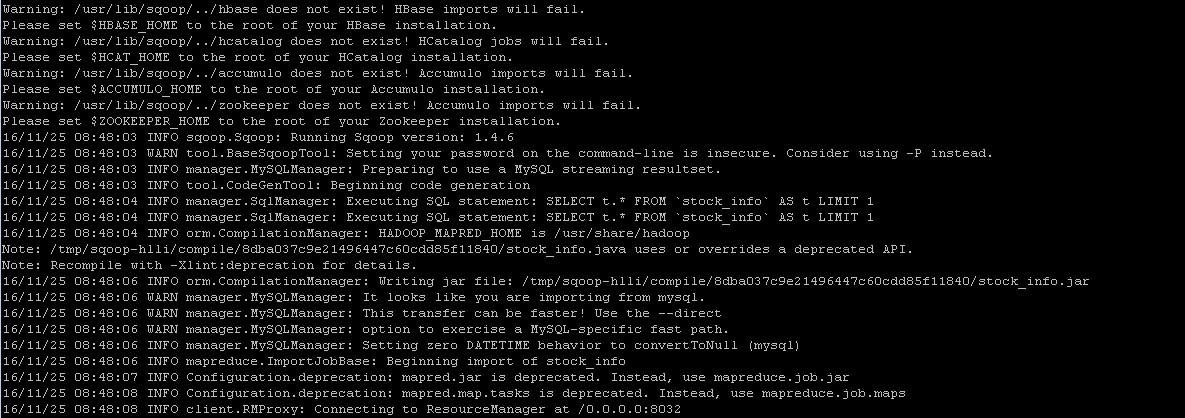
we can verify result in hdfs by running command
hadoop fs -cat /emp/part-m-*
Case 2: sepcify the target directory in hdfs by running the following import command
sqoop import --connect jdbc:mysql://host:port/dbname --username loginuser --password loginuser --table stock_info --m 1 --target-dir /temp
then we can verify result by executing the same command as above
Case 3: imcremental import by specifying --incremental, --check-column and --append arguments. Note we should change 'last_chg_date' when applying other tables.
sqoop import --connect jdbc:mysql://host:port/dbname --username loginuser --password loginuser --table stock_info --m 1 --target-dir /temp --incremental lastmodified --check-column last_chg_date --append
Case 4: specify target file format as parquet format by adding argument '--as-parquetfile'
sqoop import --connect jdbc:mysql://host:port/dbname --username loginuser --password loginuser --table stock_info --m 1 --target-dir /temp --incremental lastmodified --check-column last_chg_date --append --as-parquetfile
Case 5: import all tables
sqoop import-all-tables --connect jdbc:mysql://host:port/dbname --username loginuser --password loginuser
Sqoop - Export
export means to dump data from hdfs to mysql, oracle or other data bases, command syntax is like
sqoop export (generic-args) (export-args)
given there are many parquet files under stock_info folder which is imported by sqoop import command incrementally
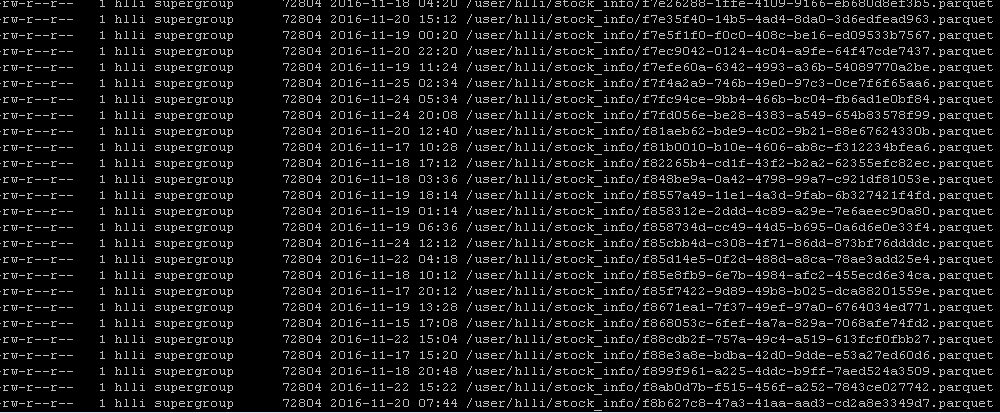
then we want to dump data back into mysql data base, using the following command
sqoop export --connent jdbc:mysql://host:port/dbname --username loginuser --password loginuser --table stock_info --export-dir /user/hlli/stock_info
finally verify data in mysql command line
select * from stock_info;
Incremental importing data
by using linux timer 'crontab' to schedule a job to execute importing periodically.
cd /var/spool/cron
touch hlli (please change hlli to your user name here)
vi hlli
*/ * * * * /usr/lib/sqoop/bin/sqoop import --connect jdbc:mysql://host:port/dbname --username loginuser --password loginuser --table stock_info --m 1 --target-dir /temp --incremental lastmodified --check-column last_chg_date --append --as-parquetfile
if it works, you will receive email in '/var/spool/mail/hlli'; meanwhile we can verify data by running command
hadoop fs -ls /
Commonly used Sqoop commands
sqoop help import
sqoop help export
sqoop help job
sqoop help codegen
sqoop help eval
sqoop help list-tables
sqoop help list-databases
sqoop help import-all-tables
References:
- http://sqoop.apache.org/
- http://man.linuxde.net/crontab
how to use Sqoop to import/ export data的更多相关文章
- 1.3 Quick Start中 Step 7: Use Kafka Connect to import/export data官网剖析(博主推荐)
不多说,直接上干货! 一切来源于官网 http://kafka.apache.org/documentation/ Step 7: Use Kafka Connect to import/export ...
- hadoop kafka import/export data (8)
reference: http://kafka.apache.org/quickstart need to solve issue ISSUE 1: [2019-01-29 15:59:39,272] ...
- Data import/export of Netezza using external table
Introduction External table is a special table in Netezza system, which could be used to import/exp ...
- sqoop import/export使用经验
一.先创建一个小表(test_01)进行测试(主节点IP:169.254.109.130/oracle服务器IP:169.254.109.100) 1.测试连接oracle; sqoop list-t ...
- Sqoop import export参数
通用参数 import export 通用通用参数选项 含义说明–connect 指定JDBC连接字符串–connection-manager 指定要使用的连接管理器类–dri ...
- [Hive - LanguageManual] Import/Export
LanguageManual ImportExport Skip to end of metadata Added by Carl Steinbach, last edited by Le ...
- 前端 高级 (二十五)vue2.0项目实战一 配置简要说明、代码简要说明、Import/Export、轮播和列表例子
一.启动服务自动打开浏览器运行 二.配置简要说明 1.node_modules 安装好的依赖文件,中间件等,所在位置 2.package.jason 配置当前项目要安装的中间件和依赖文件 { &quo ...
- 探讨ES6的import export default 和CommonJS的require module.exports
今天来扒一扒在node和ES6中的module,主要是为了区分node和ES6中的不同意义,避免概念上的混淆,同时也分享一下,自己在这个坑里获得的心得. 在ES6之前 模块的概念是在ES6发布之前就出 ...
- ES6中的export,import ,export default
ES6模块主要有两个功能:export和importexport用于对外输出本模块(一个文件可以理解为一个模块)变量的接口import用于在一个模块中加载另一个含有export接口的模块.也就是说使用 ...
随机推荐
- DFS小题
原创 题目为:()()()+()()()=()()() 将1~9这9个数字填入括号,每个数字只能用一次. 枚举: public class Test { public static void main ...
- 使用Recyclerview实现图片水平自动循环滚动
简介: 本篇博客主要介绍的是如何使用RecyclerView实现图片水平方向自动循环(跑马灯效果) 效果图: 思路: 1.准备m张图片 1.使用Recyclerview实现,返回无数个(实际Inter ...
- 微信运动数据抓取(PHP)
“微信运动”能够向朋友分享一个包含有运动数据的网页,网页中就有我们需要的数据.url类似于:http://hw.weixin.qq.com/steprank/step/personal?openid= ...
- Kotlin 在kotlin内使用Java的一些注意(长篇)
首先呢,大部分的java在kotlin内是可以使用的. 但是有些java的关键字和kotlin的一样,而意义不一样就需要转义.(单引号括起来的)这一点需要注意. 这是一个长篇 我会不断更新.毕竟我也在 ...
- react.js学习之路三
学习react.js,知识点整理: 1.props和state: props是相对于父级来说,固定的不会改变的内容.一般会先定义一个变量,则在父级中进行引用, var user = "liu ...
- 洛谷P4495 [HAOI2018]奇怪的背包(数论)
题面 传送门 题解 好神仙的思路啊--orzyyb 因为不限次数,所以一个体积为\(V_i\)的物品可以表示出所有重量为\(\gcd(V_i,P)\)的倍数的物品,而所有物品的总和就是这些所有的\(\ ...
- Django rest framework框架——APIview源码分析
一.什么是rest REST其实是一种组织Web服务的架构,而并不是我们想象的那样是实现Web服务的一种新的技术,更没有要求一定要使用HTTP.其目标是为了创建具有良好扩展性的分布式系统. 可用一句话 ...
- HDU6336-2018ACM暑假多校联合训练4-1005-Problem E. Matrix from Arrays-前缀和
题意是给了一种矩阵的生成方式 让你求两个左边之间的矩阵里面的数加起来的和(不是求矩阵的值) 没看标程之前硬撸写了160行 用了前缀和以后代码量缩短到原来的1/3 根据规律可以推导出这个矩阵是在不断重复 ...
- 错误代码: 1142 REFERENCES command denied to user 'wuyong'@'localhost' for table 'orders'
错误代码: 1142 REFERENCES command denied to user 'wuyong'@'localhost' for table 'orders' 原因:在使用SQLyog操作数 ...
- 使用过多的递归出现错误,“System.StackOverflowException”类型的未经处理的异常在 mscorlib.dll 中发生
class Program { static void Main(string[] args) { sub(0); } private static void sub(int count) { ...