
Centos 7.2 双网卡绑定之踩坑
线上服务器,安装centos7.2 x64最小化安装,需要做链路聚合,双网卡绑定。在centos 6.x 和 centos 7上测试都OK,于是直接开搞。
说明下,以下环境是在虚拟机中实现的:
系统: centos7.2 x64 最小化安装。
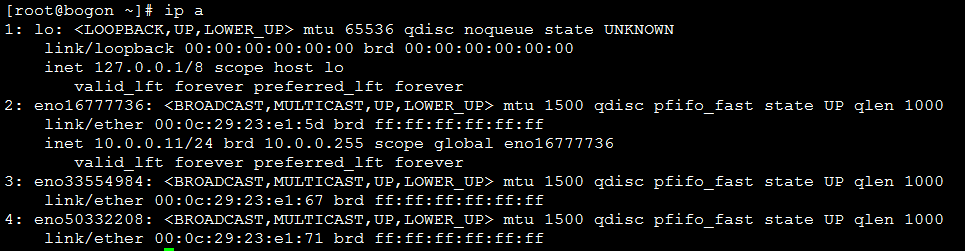
为了方便演示,这里共有三张网卡:
eno16777736 : 桥接网卡:10.0.0.11/24
剩下的两张网卡准备做绑定:
eno33554984
eno50332208
[root@bogon ~]# nmcli con sh

NAME                UUID                                  TYPE            DEVICE

Wired connection   bf0cf9b6-c7fb-4c0a-ada4-abfb650dd5f0  --ethernet  --

Wired connection   5b4e0b3e-c469-404c--76d18442fc20  --ethernet  --

eno16777736         100e462e-c0d0--9b5a-1c8e47ff0d03  --ethernet  eno16777736

[root@bogon ~]# nmcli con del 5b4e0b3e-c469-404c--76d18442fc20 bf0cf9b6-c7fb-4c0a-ada4-abfb650dd5f0

Connection 'Wired connection 1' (5b4e0b3e-c469-404c--76d18442fc20) successfully deleted.

Connection 'Wired connection 2' (bf0cf9b6-c7fb-4c0a-ada4-abfb650dd5f0) successfully deleted.

[root@bogon ~]# nmcli con add type team ifname team0 con-name team0 config '{"runner":{"name":"roundrobin"}}'

Connection 'team0' (913f05c2-15d8-49a9-a35f-8bc5ee843c0c) successfully added.

[root@bogon ~]# nmcli con add type team-slave ifname eno50332208 con-name team0-port2 master team0

Connection 'team0-port2' (1583854c-1f85-4c76-8cc7-c643071d4b82) successfully added.

[root@bogon ~]# nmcli con mod team0 ipv4.address "192.168.121.100/24"

[root@bogon ~]# nmcli con mod team0 ipv4.method manual

[root@bogon ~]# nmcli con sh

NAME         UUID                                  TYPE            DEVICE

eno16777736  100e462e-c0d0--9b5a-1c8e47ff0d03  --ethernet  eno16777736

team0-port2  1583854c-1f85-4c76-8cc7-c643071d4b82  --ethernet  --

team0-port1  bfd408b4-76d9-4f5c-ad5b-4d92430eb6ba  --ethernet  --

team0        913f05c2-15d8-49a9-a35f-8bc5ee843c0c  team            --
到这里都没毛病。
[root@bogon ~]# nmcli con up team0

Error: Connection activation failed: NetworkManager plugin for 'team' unavailable
什么鬼?NetworkManager "team"插件不可用。于是开始排查。
是否存在team模块
[root@bogon ~]# lsmod | egrep *team*
木有。那直接restart network好了。
[root@bogon ~]# systemctl restart network

Job for network.service failed because the control process exited with error code. See "systemctl status network.service" and "journalctl -xe" for details.

[root@bogon ~]# systemctl status network

...

Mar  :: bogon network[]: Bringing up interface team0:  Error: Connection activation failed: NetworkManager plugin for 'team' unavailable

Mar  :: bogon network[]: [FAILED]

...
一样的报错,难道什么包没有安装到?
[root@bogon ~]# yum list all | grep NetworkManager*

NetworkManager.x86_64                   :1.0.-.el7                 @anaconda

NetworkManager-libnm.x86_64             :1.0.-.el7                 @anaconda

NetworkManager-tui.x86_64               :1.0.-.el7                 @anaconda

NetworkManager-wifi.x86_64              :1.0.-.el7                 @anaconda

NetworkManager-adsl.x86_64              :1.0.-.el7                 yum

NetworkManager-bluetooth.x86_64         :1.0.-.el7                 yum

NetworkManager-glib.x86_64              :1.0.-.el7                 yum

NetworkManager-libreswan.x86_64         1.0.-.el7                    yum

NetworkManager-libreswan-gnome.x86_64   1.0.-.el7                    yum

NetworkManager-team.x86_64              :1.0.-.el7                 yum

NetworkManager-wwan.x86_64              :1.0.-.el7                 yum
哎哟,还真有个NetworkManager-team没有安装叻。
[root@bogon ~]# yum install NetworkManager-team -y
然后再次尝试:
[root@bogon ~]# nmcli con sh

NAME         UUID                                  TYPE            DEVICE

eno16777736  100e462e-c0d0--9b5a-1c8e47ff0d03  --ethernet  eno16777736

team0-port2  1583854c-1f85-4c76-8cc7-c643071d4b82  --ethernet  --

team0-port1  bfd408b4-76d9-4f5c-ad5b-4d92430eb6ba  --ethernet  --

team0        913f05c2-15d8-49a9-a35f-8bc5ee843c0c  team            --

[root@bogon ~]# nmcli con up team0

Error: Connection activation failed: NetworkManager plugin for 'team' unavailable
尼玛,还是同样的错,这就尴尬了。那就重启下NetworkManager 在看看。
[root@bogon ~]# systemctl restart NetworkManager

[root@bogon ~]# nmcli con sh

NAME         UUID                                  TYPE            DEVICE

team0-port2  1583854c-1f85-4c76-8cc7-c643071d4b82  --ethernet  eno50332208

eno16777736  100e462e-c0d0--9b5a-1c8e47ff0d03  --ethernet  eno16777736

team0-port1  bfd408b4-76d9-4f5c-ad5b-4d92430eb6ba  --ethernet  eno33554984

team0        913f05c2-15d8-49a9-a35f-8bc5ee843c0c  team            team0
好了? What the fuck!赶紧查看是不是roundrobin模式
[root@bogon ~]# teamdctl team0 st

setup:

  runner: roundrobin

ports:

  eno33554984

    link watches:

      link summary: up

      instance[link_watch_0]:

        name: ethtool

        link: up

        down count:

  eno50332208

    link watches:

      link summary: up

      instance[link_watch_0]:

        name: ethtool

        link: up

        down count:

[root@bogon ~]# teamnl team0 ports

 : eno50332208: up 1000Mbit FD

 : eno33554984: up 1000Mbit FD
一切OK,老铁,扎心了。
接下来测试下roundrobin
这里说明下:roundrobin这种bind模式:
先来讲下网卡bind的原理:
通过将两张或者多张网卡通过软件虚拟出来一张逻辑网卡来传输数据,这里bind的模式有很多种。比如我们上面的这种,就是其中的链路聚合模式。当使用该模式的时候,两张物理网卡和逻辑网卡的mac地址都被设置为一致,大家都知道,我们做链路聚合就是为了让多张物理网卡聚合在一块扩展数据带宽的方式,既然我们在逻辑上是一张网卡,那mac地址也就必须一致对吧。不然我们接到交换机或者路由器上,逻辑网卡一会是物理网卡1的mac地址,一会又是物理网卡2的地址,交换机一会找的到人,一会又找不到人。那数据还怎么传输。
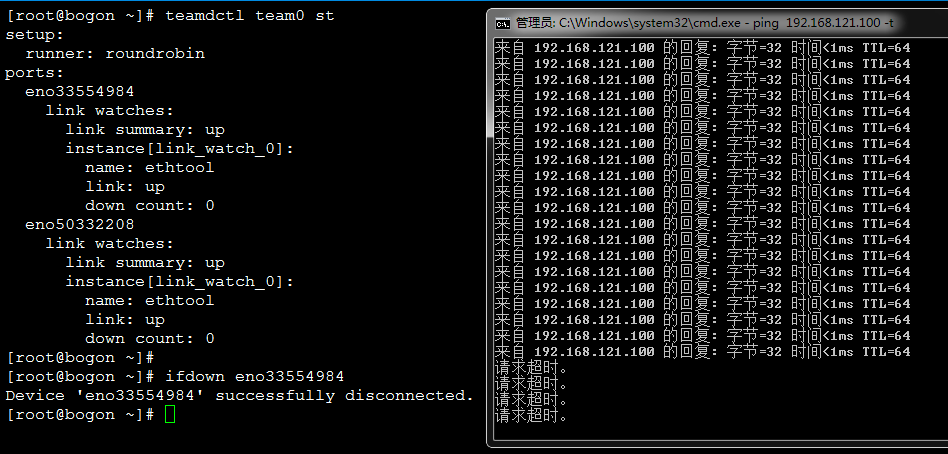
在链路聚合中,因为是两张物理网卡捆绑的模式,如果其中一张网卡down掉了,整个链路也就瘫了。
如下:
Centos 7.2 双网卡绑定之踩坑的更多相关文章
- Centos 7.6 双网卡绑定实现高可用
Centos 7.6 双网卡绑定实现高可用 作者:尹正杰 版权声明:原创作品, 谢绝转载!否则将追究法律责任. 一.Bond模式概述 当linux系统上有多个单独网卡,又想充分利用这些网卡,同时对外提 ...
- CentOS 6.X 双网卡绑定配置
相关环境 主机:Dell PowerEdge R720服务器(背板有4个GE网口) 操作系统:CentOS(RHEL)6.X 网线连接 使用6类网线 将Dell R720 GE网口 0,与交换机A相连 ...
- CentOS 6.9下双网卡绑定单个IP地址及装网卡绑定到一个网桥(转)
说明:经过查阅,原来双网卡绑定一个IP的专业名词叫做bond,可以实现负载均衡:如果想要实现两张网卡绑定到一个网桥,基本思路是两张网卡设置同一个网桥是行不通的,但如果先实现bond,然后将bond绑定 ...
- centos 6.4系统双网卡绑定配置详解
Linux双网卡绑定实现就是使用两块网卡虚拟成为一块网卡(需要交换机支持),这个聚合起来的设备看起来是一个单独的以太网接口设备,通俗点讲就是两块网卡具有相同的IP地址而并行链接聚合成一个逻辑链路工作. ...
- Linux下双网卡绑定(bonding技术)
Linux网卡绑定探析 2013-08-20 15:39:31 现在很多服务器都自带双千兆网口,利用网卡绑定既能增加网络带宽,同时又能做相应的冗余,目前应用于很多的场景.linux操作系统下自带的 ...
- Linux 双网卡绑定技术
bond技术是在linux2.4以后加入内核. 一般步骤是1.把bonding模块加入内核, 2 编辑要绑定的网卡设置,去除地址设定 3 添加bond设备,设置地址等配置 4 重启网络 5 在交换机 ...
- 做双网卡绑定_______物理机在双网卡的情况下做多IP绑定
公司的环境是这样的: 一台物理机需要做双网卡绑定,同时呢,在双网卡绑定的同时还要做多IP. 其实整个过程可以分为两个步骤: 第一个,物理机先做双网卡. 第二个,在bond上做多IP实例. 双网卡绑定的 ...
- linux中配置双网卡的目的?如何实现双网卡绑定,以实现负载均衡?
配置双网卡的目的:========================== 1.你想做路由器,网关 2.实现冗余 3.负载均衡 linux 主机安装双网卡,共享一个IP地址,对外提供访问,实际 同 ...
- Linux双网卡绑定bond详解--单网卡绑定多个IP
Linux双网卡绑定bond详解 1 什么是bond 网卡bond是通过多张网卡绑定为一个逻辑网卡,实现本地网卡的冗余,带宽扩容和负载均衡,在生产场景中是一种常用的技术.Kernels 2.4.12及 ...
随机推荐
- LeetCode 92 ——反转链表 II
1. 题目 2. 解答 我们需要先找到第 m 个结点及其上一个结点,然后将从 m 到 n 的结点进行反转,最后依次将 m 到 n 反转后的结点和 n 之后的结点放入原链表中即可. 从前往后依次遍历 m ...
- LeetCode 82 ——删除排序链表中的重复元素 II
1. 题目 2. 解答 新建一个链表,并添加一个哨兵结点,从前向后开始遍历链表. 如果下一个结点的值和当前结点的值相等,则循环向后遍历直到找到一个和当前结点值不相等的结点: 反之,如果下一个结点的值和 ...
- Spark实战练习01--XML数据处理
一.要求 将XML中的account_number.model数据提取出来,并以account_number:model格式存储 1.XML文件数据格式 <activations> < ...
- mongolass 中报 ($.content: "say Hi ~") ✖ (type: String)
第二次报这个错了, 一直以为MongoDB的模型用的type 是 String, 一直报错, 找不到原因. // 留言模型1 exports.Comment = mongolass.model('Co ...
- BZOJ4602 SDOI2016齿轮(搜索)
dfs一遍给每个齿轮随便标个值看是否矛盾就行了. #include<iostream> #include<cstdio> #include<cmath> #incl ...
- BZOJ4444 SCOI2015国旗计划(贪心+倍增)
链上问题是一个经典的贪心.于是考虑破环成链,将链倍长.求出每个线段右边能作为后继的最远线段,然后倍增即可. #include<iostream> #include<cstdio> ...
- ARC074 E RGB Sequence DP
---题面--- 题解: 首先,有一个不太直观的状态,f[i][j][k][l]表示DP到i位,三种颜色最后出现的位置分别是j, k, l的方案数.因为知道了三种颜色最后出现的位置,因此也可以得知以当 ...
- [Leetcode] Remove duplicates from sorted array 从已排序的数组中删除重复元素
Given a sorted array, remove the duplicates in place such that each element appear only once and ret ...
- BZOJ2286 [Sdoi2011]消耗战 【虚树 + 树形Dp】
2286: [Sdoi2011]消耗战 Time Limit: 20 Sec Memory Limit: 512 MB Submit: 4261 Solved: 1552 [Submit][Sta ...
- BZOJ 1098: [POI2007]办公楼biu 链表
求补图连通块,用链表优化,势能O(n+m) #include<cstdio> #include<cstring> #include<iostream> #inclu ...