
当我们在安装tensorflow时,我们在安装什么?- Intro to TF, Virtualenv, Docker, CUDA, cuDNN, NCCL, Bazel
(Mainly quoted from its official website)
Summary:
1. TensorFlow™ is an open source software library.
2. Virtualenv is a tool to create isolated Python environments.
3. Docker:
An image is a executable package.
A container is a runtime instance of an image.
4. CUDA® is a parallel computing platform and programming model.
The CUDA Toolkit is used to develop GPU-accelerated applications.
5. cuDNN is a GPU-accelerated library of primitives for deep neural networks.
6. NCCL implements multi-GPU and multi-node collective communication primitives.
7. Bazel is an open-source build and test tool.
------------------------------------------------------------------------------------
TensorFlow™
TensorFlow™ is an open source software library for high performance numerical computation.
Its flexible architecture allows easy deployment of computation across a variety of platforms (CPUs, GPUs, TPUs), and from desktops to clusters of servers to mobile and edge devices.
------------------------------
Virtualenv
Virtualenv is a tool to create isolated Python environments.
e.g. Some applications need python 2.x, while some need python 3.x, so that they cannot share the system default python.
One solution is to use virtualenv to create isolated python environments for different applications.
Usage:
- Create an environment (e.g. venv)
- Use source to enter this environment (e.g. $ source venv/bin/activate)
- Inside the venv, the packages installed by pip will be installed in the venv and will not be influenced by system default python. (e.g. (venv) $ pip install ***)
- Use deactivate to exit the current environment. (e.g. (venv) $ deactivate)
------------------------------
Docker
An image is a lightweight, stand-alone, executable package that includes everything needed to run a piece of software, including the code, a runtime, libraries, environment variables, and config files.
A container is a runtime instance of an image—what the image becomes in memory when actually executed. It runs completely isolated from the host environment by default, only accessing host files and ports if configured to do so.
Container vs. virtual machines
Containers run apps natively on the host machine’s kernel. They have better performance characteristics than virtual machines that only get virtual access to host resources through a hypervisor. Containers can get native access, each one running in a discrete process, taking no more memory than any other executable.

Virtual machines run guest operating systems—note the OS layer in each box. This is resource intensive, and the resulting disk image and application state is an entanglement of OS settings, system-installed dependencies, OS security patches, and other easy-to-lose, hard-to-replicate ephemera. 这是资源密集型的,所产生的磁盘映像和应用程序状态,会导致众多问题的纠缠,如操作系统设置、系统安装依赖项、OS安全修补程序和其他易丢失、因仅短期有效而难以复制的生命期。
Containers can share a single kernel, and the only information that needs to be in a container image is the executable and its package dependencies, which never need to be installed on the host system. These processes run like native processes, and you can manage them individually by running commands like docker ps—just like you would run ps on Linux to see active processes. Finally, because they contain all their dependencies, there is no configuration entanglement; a containerized app “runs anywhere.” 容器可以共享单个内核,并且容器映像中唯一需要的信息是可执行文件及其包依赖项,它们永远不需要安装在主机系统上。 这些进程像本机进程一样运行,您可以通过运行docker ps之类的命令来单独管理它们,就像在Linux上运行ps来查看活动进程一样。 最后,因为它们包含所有依赖项,所以没有配置纠缠; 容器化的应用程序“随处运行”。
With containerization, developers don’t need to write application code into different VMs operating different app components to retrieve compute, storage and networking resources. A complete application component can be executed in its entirety within its isolated environment without affecting other app components or software. Conflicts within libraries or app components do not occur during execution and the application container can move between the cloud or data center instances efficiently.
(https://www.bmc.com/blogs/containers-vs-virtual-machines/)
------------------
Virtualenv vs. Container
Virtualenv is used to isolate different python versions.
Container is used to let different components of a complete application be executed in its entirety within its isolated resources. Each container contains everything needed to run a piece of software.
-----------------------------------
CUDA (https://developer.nvidia.com/cuda-zone)
CUDA® is a parallel computing platform and programming model developed by NVIDIA for general computing on graphical processing units (GPUs). With CUDA, developers are able to dramatically speed up computing applications by harnessing the power of GPUs.
In GPU-accelerated applications, the sequential part of the workload runs on the CPU – which is optimized for single-threaded performance – while the compute intensive portion of the application runs on thousands of GPU cores in parallel. When using CUDA, developers program in popular languages such as C, C++, Fortran, Python and MATLAB and express parallelism through extensions in the form of a few basic keywords.
The CUDA Toolkit from NVIDIA provides everything you need to develop GPU-accelerated applications. The CUDA Toolkit includes GPU-accelerated libraries, a compiler, development tools and the CUDA runtime.
-------------------------------
cuDNN (https://developer.nvidia.com/cudnn)
The NVIDIA CUDA® Deep Neural Network library (cuDNN) is a GPU-accelerated library of primitives for deep neural networks. cuDNN provides highly tuned implementations for standard routines such as forward and backward convolution, pooling, normalization, and activation layers. cuDNN is part of the NVIDIA Deep Learning SDK.
Deep learning researchers and framework developers worldwide rely on cuDNN for high-performance GPU acceleration. It allows them to focus on training neural networks and developing software applications rather than spending time on low-level GPU performance tuning. cuDNN accelerates widely used deep learning frameworks, including Caffe,Caffe2, Chainer, Keras,MATLAB, MxNet, TensorFlow, and PyTorch.
---------------------
NCCL
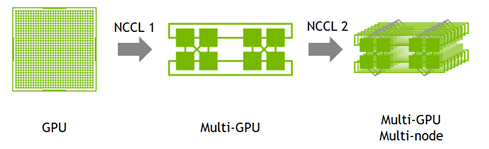
The NVIDIA Collective Communications Library (NCCL) implements multi-GPU and multi-node collective communication primitives that are performance optimized for NVIDIA GPUs. NCCL provides routines such as all-gather, all-reduce, broadcast, reduce, reduce-scatter, that are optimized to achieve high bandwidth over PCIe and NVLink high-speed interconnect.
Developers of deep learning frameworks can rely on NCCL’s highly optimized, MPI compatible and topology aware routines, to take full advantage of all available GPUs within and across multiple nodes. Leading deep learning frameworks such as Caffe,Caffe2, Chainer, MxNet, TensorFlow, and PyTorch have integrated NCCL to accelerate deep learning training on multi-GPU systems.
---------------------
Bazel
Bazel is an open-source build and test tool similar to Make, Maven, and Gradle. It uses a human-readable, high-level build language. Bazel supports projects in multiple languages and builds outputs for multiple platforms. Bazel supports large codebases across multiple repositories, and large numbers of users.
(Can use it to build tensorflow from source.)
当我们在安装tensorflow时,我们在安装什么?- Intro to TF, Virtualenv, Docker, CUDA, cuDNN, NCCL, Bazel的更多相关文章
- 【tensorflow】1.安装Tensorflow开发环境,安装Python 的IDE--PyCharm
================================================== 安装Tensorflow开发环境,安装Python 的IDE--PyCharm 1.PyCharm ...
- Windows下安装程序时提示未安装Microsoft Net FrameWork 2.0
问题描述 安装程序时碰到如下: 现在基本都是用win7.win10系统,缺少环境大多数都是因为系统没有启用. 解决方法 控制面板 - 程序 - 启用或关闭Windows功能 - 把第一项'NET Fr ...
- 安装 tensorflow 时遇到 OSError: [Errno 1] Operation not permitted 的解决办法
Installing collected packages: numpy, scipy, six, pyyaml, Keras, opencv-python, h5py, html5lib, blea ...
- 安装TensorFlow时出现ERROR: Cannot uninstall 'wrapt'问题的解决方案
pip install -U --ignore-installed wrapt enum34 simplejson netaddr pip install -i https://pypi.tuna.t ...
- Winodws安装系统时,通过安装磁盘进行分区
今天使用一个系统盘安装的时候,很奇怪,分区总是分出来一个系统磁盘,一个MBR,剩下的只能分主分区. 这样就导致我在进行windows激活时,激活工具都找不到启动磁盘的盘符(因为自动分出来的系统磁盘和M ...
- ubuntu上安装adt时无法在线安装的问题
安装了新的ubuntu系统之后,就得重新布置android开发环境了. 找了网上的教程,一步一步做,到了在eclipse上在线下载adt总是出现 Unable to connect to reposi ...
- 8-linux 安装 requests 时 pip install 安装不了
安装提示更新:但是必须要sudo才行: sudo pip install --upgrade pip 安装 requests时有报错:这样写可以: sudo python -m pip install ...
- 安装Mysql时提示尚未安装Python 解决方案
我明明安装了python,结果在安装mysql是却提示没有安装python. 原因,没有将python添加到path中. 解决方法:卸载python,然后重装python,在安装界面中勾选将path添 ...
- 解决安装office2013时提示已安装相同版本的office
例如出现如上所示的图: ------------------------------------------------------------------ 在尝试使用官方的卸载清理工具无果后, 终极 ...
随机推荐
- 【题解】洛谷P2341 [HAOI2006]受欢迎的牛(强连通分量)
洛谷P2341:https://www.luogu.org/problemnew/show/P2341 前言 这题看错题目 足足花了将近5小时提交了15次 在一位dalao的提醒下才AC了 记得要看清 ...
- lucene&solr学习——创建和查询索引(代码篇)
1. Lucene的下载 Lucene是开发全文检索功能的工具包,从官网下载Lucene4.10.3并解压. 官网:http://lucene.apache.org/ 版本:lucene7.7.0 ( ...
- AngularJS web应用程序
<!DOCTYPE html><html><head><meta http-equiv="Content-Type" content=&q ...
- 关于Vue-cli 跨域,即使是非自己的服务器也可以get到内容
刚入门vue ,打算用vue的脚手架做一个小项目.需要用到第三方的api,无奈遇到各种各样的问题. 比如 Access-Control-Allow-Origin ,或者使用了ajax的jsonp模式之 ...
- QT基于model/view数据库编程2
Qt中数据编程主要分为以下两点:1.利用qt提供类 访问数据库或者成为简单的数据库编程2.数据库编程中引入model/view编程模型 基于model/view数据库编程: qt提供model类: Q ...
- LeetCode 中级 - 路径总和2(113)
给定一个二叉树和一个目标和,找到所有从根节点到叶子节点路径总和等于给定目标和的路径. 说明: 叶子节点是指没有子节点的节点. 示例:给定如下二叉树,以及目标和 sum = 22, 5 / \ 4 8 ...
- noip模拟赛 动态仙人掌(并查集,贪心)
思路: 贪心+并查集 因为45‘,所以可以很方便的算出每个仙人掌的最晚起跳(左端点) 右端点自然也能出来 先按左端点排序 如果他右面的和他相交,就更新 用并查集维护这个更新的关系 更新的同时维护高就好 ...
- 《瞿葩的数字游戏》T3-三角圣地(Lucas)
题目背景 国王1带大家到了数字王国的中心:三角圣地. 题目描述 不是说三角形是最稳定的图形嘛,数字王国的中心便是由一个倒三角构成.这个倒三角的顶端有一排数字,分别是1~N.1~N可以交换位置.之后的每 ...
- thinkphp-PHP实现pdf导出功能
Thinkphp框架引用tcpdf插件,插件下载地址:待续... 代码编写前先引入tcpdf整个文件夹到项目目录的ThinkPHP文件夹下 如:/ThinkPHP/Library/Vendor/tcp ...
- Ruby字符串的一些方法
最近因为公司需求开始看ruby,先从ruby的基本数据类型开始看 看到ruby的字符串类型string,发现ruby中的字符串单双引号是不一样的,这点和Python有那么点不一样 主要是我们对字符串进 ...