
Qt 使用irrlicht(鬼火)3D引擎
项目中需要加载简单的3D场景。资深老前辈推荐使用开源小巧的引擎irrlicht。
关于irrlicht,来之百度百科
Irrlicht引擎是一个用C++书写的高性能实时的3D引擎,可以应用于C++程序或者.NET语言中。通过使用Direct3D(Windows平台),OpenGL 1.2或它自己的软件着色程序,可以实现该引擎的完全跨平台。尽管是开源的,该Irrlicht库提供了可以在商业级的3D引擎上具有的艺术特性,例如动态的阴影,粒子系统,角色动画,室内和室外技术以及碰撞检测等。
具体信息 百度百科。
如何使用,
首先使用Qt建立工程,略过。
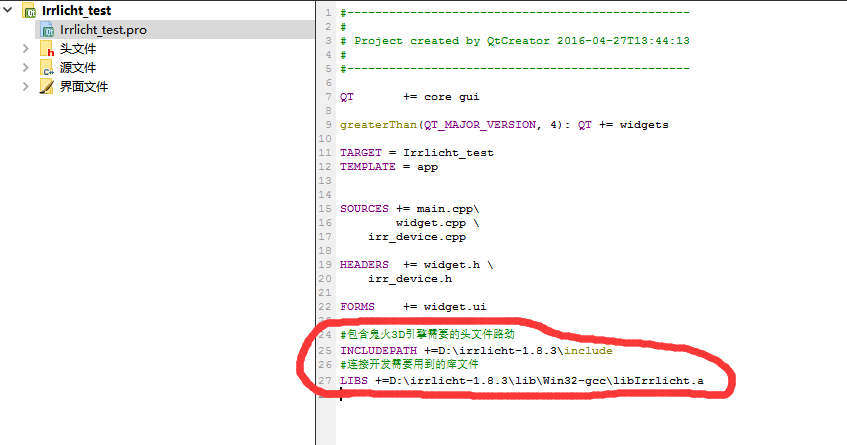
在Qt pro工程文件总中加入引擎头文件路径,和库文件路径。
#包含鬼火3D引擎需要的头文件路劲

INCLUDEPATH +=D:\irrlicht-1.8.3\include

#连接开发需要用到的库文件

LIBS +=D:\irrlicht-1.8.3\lib\Win32-gcc\libIrrlicht.a
如图所示
剩下的就是一般的核心代码部分了,
包含头文件部分
#include <QObject>

#include <QWidget>

#include <QApplication>

#include <irrlicht.h>
使用命名空间部分
using namespace irr;

using namespace core;

using namespace scene;

using namespace video;

using namespace io;

using namespace gui;
引擎初始化
void Irr_Device::init_Dev()

{

    if(m_Device != NULL)

    {

        return;

    }

    SIrrlichtCreationParameters params;

    params.AntiAlias = 0;

    params.Bits = 32;

    params.DeviceType = EIDT_BEST;

    params.Doublebuffer = true;

    params.DriverType = EDT_OPENGL;

    params.EventReceiver = 0;

    params.Fullscreen = false;

    params.HighPrecisionFPU = false;

    params.IgnoreInput = false;

    params.LoggingLevel = ELL_INFORMATION;

    params.Stencilbuffer = true;

    params.Stereobuffer = false;

    params.Vsync = false;

    // Specify which window/widget to render to

    // 指定哪个窗口小部件呈现

    params.WindowId = reinterpret_cast<void*>(winId());

    params.WindowSize.Width = width();

    params.WindowSize.Height = height();

    params.WithAlphaChannel = true;

    params.ZBufferBits = 16;

    // Create the Irrlicht Device with the previously specified parameters

    // 创建Irrlicht设备的使用与前面指定的参数

    m_Device = createDeviceEx(params);

    /*

        获取视频设备,场景管理器和用户图形环境的指针并存储起来。

    */

    video_Driver = m_Device->getVideoDriver();

    scene_Msnsger = m_Device->getSceneManager();

    guienv = m_Device->getGUIEnvironment();

    //smgr->loadScene

    qDebug()<< scene_Msnsger->loadScene("123.irr");

    /*

        Now we'll create a camera, and give it a collision response animator

        that's built from the mesh nodes in the scene we just loaded.

    */

    /*

        现在我们将创建一个相机,给它一个碰撞响应动画师  由网格节点的现场加载。

    */

    m_Camera = scene_Msnsger->addCameraSceneNodeFPS(0,50.f,0.1f);

    /*

        Now we will find all the nodes in the scene and create triangle

        selectors for all suitable nodes.  Typically, you would want to make a

        more informed decision about which nodes to performs collision checks

        on; you could capture that information in the node name or Id.

    */

    /*

        现在我们将在现场找到的所有节点并创建三角形  选择合适的节点。通常,您会想要  更明智的决定哪些节点执行碰撞检查  ;你可以捕捉信息的节点名称或Id。

    */

    scene::IMetaTriangleSelector* meta = scene_Msnsger->createMetaTriangleSelector();

    //    core::array<scene::ISceneNode*> nodes;

    //    scene_Msnsger->getSceneNodeFromType(scene::ESNT_ANY, nodes);

    core::array<scene::ISceneNode *> nodes;

    scene_Msnsger->getSceneNodesFromType(scene::ESNT_ANY, nodes); // Find all nodes

    for(u32 i =0;i<nodes.size();++i)

    {

        scene::ISceneNode* node = nodes[i];

        scene::ITriangleSelector* selector =0;

        switch (node->getType())

        {

        case scene::ESNT_CUBE:

        case scene::ESNT_ANIMATED_MESH:

            // Because the selector won't animate with the mesh,

            // and is only being used for camera collision, we'll just use an approximate

            // bounding box instead of ((scene::IAnimatedMeshSceneNode*)node)->getMesh(0)

            // 因为选择器不会与网格动画,

            // 和仅用于相机碰撞,我们只使用一个近似

            // 边界框代替((场景::IAnimatedMeshSceneNode *)节点)- > getMesh(0)

            selector = scene_Msnsger->createTriangleSelectorFromBoundingBox(node);

            break;

        case scene::ESNT_MESH:

        case scene::ESNT_SPHERE:

            selector = scene_Msnsger->createTriangleSelector(((scene::IMeshSceneNode*)node)->getMesh(),node);

            break;

        case scene::ESNT_TERRAIN:

            selector = scene_Msnsger->createTerrainTriangleSelector((scene::ITerrainSceneNode*)node);

            break;

        case scene::ESNT_OCTREE:

            selector = scene_Msnsger->createOctreeTriangleSelector(((scene::IMeshSceneNode*)node)->getMesh(),node);

            break;

        default:

            break;

        }

        if(selector)

        {

            meta->addTriangleSelector(selector);

            selector->drop();

        }

    }

    /*

        Now that the mesh scene nodes have had triangle selectors created and added

        to the meta selector, create a collision response animator from that meta selector.

    */

    /*

        现在有三角形网格场景节点选择器创建和添加  元选择器,创建一个元的碰撞响应动画选择器。

    */

    scene::ISceneNodeAnimator* anim = scene_Msnsger->createCollisionResponseAnimator(

                meta,m_Camera,core::vector3df(5,5,5),core::vector3df(0,0,0));

    meta->drop();

    m_Camera->addAnimator(anim);

    anim->drop();

    m_Camera->setPosition(core::vector3df(0.f,20.f,0.f));

    scene::ISceneNode*cube = scene_Msnsger->getSceneNodeFromType(scene::ESNT_CUBE);

    if(cube)

    {

        m_Camera->setTarget(cube->getAbsolutePosition());

    }

    m_Device->getCursorControl()->setVisible(false);

    connect(this,SIGNAL(sigUpdateIrrlicht(irr::IrrlichtDevice*)),

            this,SLOT(slotUpdateIrrlicht(irr::IrrlichtDevice*)));

    startTimer(0);

}
保证实时刷新界面部分
void Irr_Device::slotUpdateIrrlicht(IrrlichtDevice *device)

{

    if(device != 0)

    {

        if (isVisible() && isEnabled()/*&&device->isWindowActive()*/)

        {

            device->getTimer()->tick();//在没有用IrrlichtDevice::run()的情况下,必须加上这句,否则键盘不响应

            SColor color (255,100,100,140);

            device->getVideoDriver()->beginScene(true, true, color);

            device->getSceneManager()->drawAll();

            device->getVideoDriver()->endScene();

        }

        else

        {

            device->yield();

        }

    }

}

void Irr_Device::timerEvent(QTimerEvent *event)

{

    if (m_Device != NULL) {

            emit sigUpdateIrrlicht(m_Device);

        }

        event->accept();

}
这部分代码暂时还不是很理解,也欢迎大神指出里面存在的问题。
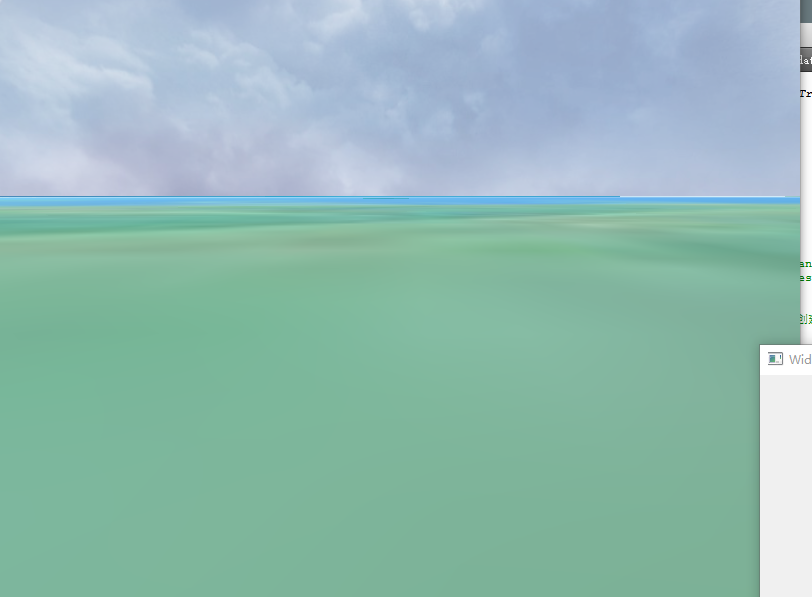
软件运行截图如图
Demo 链接:http://download.csdn.net/detail/z609932088/9504584

Qt 使用irrlicht(鬼火)3D引擎的更多相关文章
- 【Irrlicht鬼火引擎】 认识鬼火引擎
一.Irrlicht简介 (1)概念 Irrlicht引擎是一个用C++书写的高性能实时3D引擎,可以应用于C++程序或者.NET语言中.通过使用Direct3D(Windows平台).OpenGL ...
- 转:Irrlicht 0.1引擎源码分析与研究(一)
目录(?)[-] 主要技术特性 引擎概览 Irrlicht的窗口管理 Irrlicht引擎主要是由一个名叫Nikolaus Gebhardt奥地利人所设计,是sourceforge上的一个开源项目 ...
- 转:典型开源3D引擎分类比较
常见的3D引擎有:Unreal.Quake.Lithtech.OGRE.Nebula.Irrlicht.Truevision3D... 其中开源免费的有:OGRE.irrlicht.fly3d.Neo ...
- 转:开源3D引擎介绍
Delta3D:Delta3D是一个功能齐全的游戏引擎,可用于游戏,模拟或其他图形应用.其模块化设计集成了其他的开源项目,如‘开放场景图’,‘开放动力学引擎’,‘人物动画库’和‘OpenAL’ .De ...
- 支持Android 的几款开源3D引擎调研
最近由于工作需要,对支持Android的一些开源3D引擎做了调研,结果如下: 1.Ogre 十分强大的一款3D引擎,号称工业级标准的开源项目,不仅可以用于游戏,还可以用于其他和3D相关的软件.大多数该 ...
- 3d引擎列表
免费引擎 Agar - 一个高级图形应用程序框架,用于2D和3D游戏. Allegro library - 基于 C/C++ 的游戏引擎,支持图形,声音,输入,游戏时钟,浮点,压缩文件以及GUI. A ...
- Qt Creator中的3D绘图及动画教程(参照NeHe)
Qt Creator中的3D绘图及动画教程(参照NeHe) http://blog.csdn.net/cly116/article/details/47184729 刚刚学习了Qt Creator,发 ...
- irrlicht鬼火
中文鬼火 开源3d引擎 ogre osg等 libpng png图片处理 jpeg jpg图片库
- 关于如何学好游戏3D引擎编程的一些经验[转]
此篇文章献给那些为了游戏编程不怕困难的热血青年,它的神秘要我永远不间断的去挑战自我,超越自我,这样才能攀登到游戏技术的最高峰 ——阿哲VS自己 QQ79134054多希望大家一起交流与沟通 这篇文章是 ...
随机推荐
- c# TCP高性能通信
开篇都是吹牛逼哈... 我原本打算使用dotnetty来解决传输问题,但是试了下没有成功,也没有找到相关问题解决方法,导出源码,好大啊.暂时不想研究,而且是.Net Core的.最后没有办法,就自己封 ...
- 微信小程序全局/页面配置
flex布局 父元素 display:flex; flex-direction: row; justify-content:space-between 补充 flex-direction属性决定主轴的 ...
- 大学C++程序设计教程期末复习重点
第一章 1.cin与count的应用<iostream> 例: cin>>a; cout<<"hello"<<endl; cout& ...
- ABAP术语-Interface
Interface 原文:http://www.cnblogs.com/qiangsheng/archive/2008/02/22/1077086.html Information tool that ...
- Python的核心数据类型
Python的核心数据类型有:数字,字符串,列表,字典,元组,文件等. 数字 数字类型有:整形int,浮点型float,复数complex,布尔型bool. 整形 整型数是不带有小数部分的 ...
- HTTP头部信息解释分析
HTTP 头部解释 1. Accept:告诉WEB服务器自己接受什么介质类型,*/* 表示任何类型,type/* 表示该类型下的所有子类型,type/sub-type. 2. Accept-Chars ...
- 编译安装GCC
下载GCC包 http://mirror.hust.edu.cn/gnu/gcc/ 解压 .tar.gzcd gcc-4.9.4./contrib/download_prerequisites #下载 ...
- wordpress整站无损搬迁的几种方法 最后一种最完美
网站建设之wordpress整站无损搬迁的几种方法 最后一种最完美 网站搬家,当我们更换php虚拟主机,空间升级或更好空间提供商都会发生,站长们请注意,掌握网站迁移方法,是网站日常维护技术中必须掌握的 ...
- python核心编程2 第十四章 练习
14-3.执行环境.创建运行其他Python脚本的脚本. if __name__ == '__main__': with open('test.py') as f: exec(f.read()) 14 ...
- 用 jQuery 实现表单验证(转载)
jQuery 官方 API 地址: http://api.jquery.com/ 在线引用 jQuery:http://code.jquery.com/ ——选自<锋利的jQuery>(第 ...