
maven-聚合与继承
1、聚合-方便快速构建项目
多个maven模块要构建需要分别执行一次maven构建命令,怎样只执行一次构建命令就构建多个maven模块呢?maven提供了聚合模块可以满足一次运行,构建多模块的要求
2、继承-消除重复配置,统一管理
多个maven模块中的pxm.xml有很多相同的配置,如果简化配置?maven提供了继承机制,抽出重复的配置,统一依赖管理和插件管理
maven工程隐式的继承超级POM,超级POM如下:
<?xml version="1.0" encoding="UTF-8"?>

<!--

Licensed to the Apache Software Foundation (ASF) under one

or more contributor license agreements.  See the NOTICE file

distributed with this work for additional information

regarding copyright ownership.  The ASF licenses this file

to you under the Apache License, Version 2.0 (the

"License"); you may not use this file except in compliance

with the License.  You may obtain a copy of the License at

    http://www.apache.org/licenses/LICENSE-2.0

Unless required by applicable law or agreed to in writing,

software distributed under the License is distributed on an

"AS IS" BASIS, WITHOUT WARRANTIES OR CONDITIONS OF ANY

KIND, either express or implied.  See the License for the

specific language governing permissions and limitations

under the License.

-->

<!-- START SNIPPET: superpom -->

<project>

  <modelVersion>4.0.0</modelVersion>

  <repositories>

    <repository>   --中央仓库

      <id>central</id>

      <name>Central Repository</name>

      <url>https://repo.maven.apache.org/maven2</url>

      <layout>default</layout>

      <snapshots>

        <enabled>false</enabled>

      </snapshots>

    </repository>

  </repositories>

  <pluginRepositories>

    <pluginRepository>   --中央插件仓库

      <id>central</id>

      <name>Central Repository</name>

      <url>https://repo.maven.apache.org/maven2</url>

      <layout>default</layout>

      <snapshots>

        <enabled>false</enabled>

      </snapshots>

      <releases>

        <updatePolicy>never</updatePolicy>

      </releases>

    </pluginRepository>

  </pluginRepositories>

  <build>  --在子maven工程中设定相同的标签元素的值,则覆盖父POM的标签元素的值

    <directory>${project.basedir}/target</directory> --项目主输出目录

    <outputDirectory>${project.build.directory}/classes</outputDirectory> --主代码输出目录

    <finalName>${project.artifactId}-${project.version}</finalName> --最终构建的名称格式

    <testOutputDirectory>${project.build.directory}/test-classes</testOutputDirectory> --测试代码输出目录

    <sourceDirectory>${project.basedir}/src/main/java</sourceDirectory> --主源码目录

    <scriptSourceDirectory>${project.basedir}/src/main/scripts</scriptSourceDirectory> --脚本源码目录

    <testSourceDirectory>${project.basedir}/src/test/java</testSourceDirectory> --测试源码目录

    <resources>

      <resource> --主资源目录

        <directory>${project.basedir}/src/main/resources</directory>

      </resource>

    </resources>

    <testResources> --测试资源目录

      <testResource>

        <directory>${project.basedir}/src/test/resources</directory>

      </testResource>

    </testResources>

    <pluginManagement>  --申明核心插件,设定了版本

      <!-- NOTE: These plugins will be removed from future versions of the super POM -->

      <!-- They are kept for the moment as they are very unlikely to conflict with lifecycle mappings (MNG-4453) -->

      <plugins>

        <plugin>

          <artifactId>maven-antrun-plugin</artifactId>

          <version>1.3</version>

        </plugin>

        <plugin>

          <artifactId>maven-assembly-plugin</artifactId>

          <version>2.2-beta-5</version>

        </plugin>

        <plugin>

          <artifactId>maven-dependency-plugin</artifactId>

          <version>2.8</version>

        </plugin>

        <plugin>

          <artifactId>maven-release-plugin</artifactId>

          <version>2.3.2</version>

        </plugin>

      </plugins>

    </pluginManagement>

  </build>

  <reporting>

    <outputDirectory>${project.build.directory}/site</outputDirectory>

  </reporting>

  <profiles>

    <!-- NOTE: The release profile will be removed from future versions of the super POM -->

    <profile>

      <id>release-profile</id>

      <activation>

        <property>

          <name>performRelease</name>

          <value>true</value>

        </property>

      </activation>

      <build>

        <plugins>

          <plugin>

            <inherited>true</inherited>

            <artifactId>maven-source-plugin</artifactId>

            <executions>

              <execution>

                <id>attach-sources</id>

                <goals>

                  <goal>jar</goal>

                </goals>

              </execution>

            </executions>

          </plugin>

          <plugin>

            <inherited>true</inherited>

            <artifactId>maven-javadoc-plugin</artifactId>

            <executions>

              <execution>

                <id>attach-javadocs</id>

                <goals>

                  <goal>jar</goal>

                </goals>

              </execution>

            </executions>

          </plugin>

          <plugin>

            <inherited>true</inherited>

            <artifactId>maven-deploy-plugin</artifactId>

            <configuration>

              <updateReleaseInfo>true</updateReleaseInfo>

            </configuration>

          </plugin>

        </plugins>

      </build>

    </profile>

  </profiles>

</project>

<!-- END SNIPPET: superpom -->
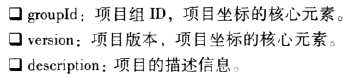
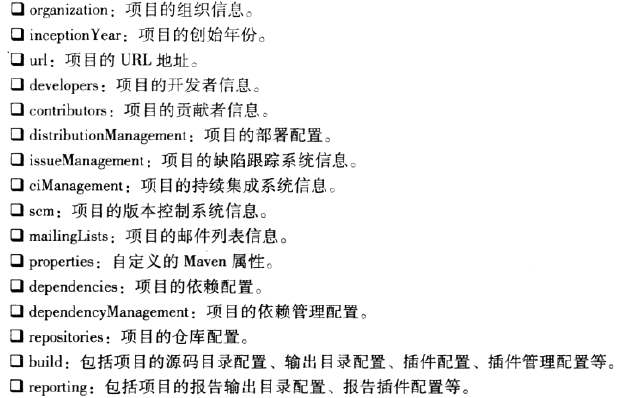
以下元素可从超级POM获者其它的POM文件继承:
3、聚合和继承的关系
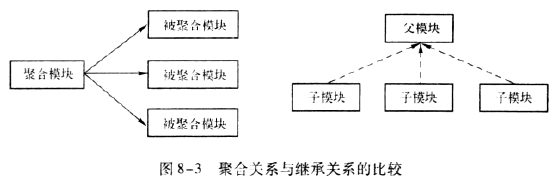
对于聚合模块,它知道有哪些被聚合的模块,但那些被聚合的模块不知道聚合模块的存在。
对于继承关系的父POM,它不知道有哪些子模块继承它,但那些子模块知道自己继承的父POM
相同点:聚合POM和继承关系中的父POM的packaging必须是pom,
聚合模块和继承关系中到的父模块除了pom之外都没有实际内容
4、maven聚合工程(+父工程)
在实际项目中,通常聚合模块和继承关系中到的父模块是同一个,以下合并使用。两种常用的多模块的maven工程目录结构:
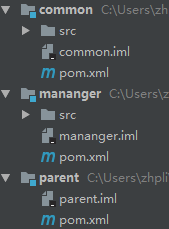
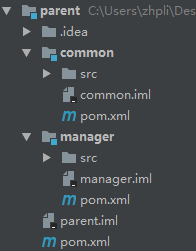
其中,parent既是聚合工程,也是父工程。
- 新建聚合工程:略
- parent模块的pom.xml文件
<?xml version="1.0" encoding="UTF-8"?>

<project xmlns="http://maven.apache.org/POM/4.0.0" xmlns:xsi="http://www.w3.org/2001/XMLSchema-instance"

  xsi:schemaLocation="http://maven.apache.org/POM/4.0.0 http://maven.apache.org/xsd/maven-4.0.0.xsd">

  <modelVersion>4.0.0</modelVersion>

  <groupId>com.cn</groupId>

  <artifactId>parent</artifactId>

  <packaging>pom</packaging>

  <version>1.0-SNAPSHOT</version>

  <modules>

    <module>../common</module>   --被聚合的common模块

    <module>../mananger</module>

  </modules>

  <name>parent</name>

  <!-- FIXME change it to the project's website -->

  <url>http://www.example.com</url>

  <properties>  --定义属性的值,后续可以被引用

    <project.build.sourceEncoding>UTF-8</project.build.sourceEncoding>

    <maven.compiler.source>1.7</maven.compiler.source>

    <maven.compiler.target>1.7</maven.compiler.target>

    <spring-version>3.2.2.RELEASE</spring-version>

  </properties>

  <dependencies>  --需要引入的依赖

    <dependency>

      <groupId>junit</groupId>

      <artifactId>junit</artifactId>

      <version>4.11</version>

      <scope>test</scope>

    </dependency>

  </dependencies>

  <dependencyManagement>  --申明依赖,但实际不会被引入

    <dependencies>

      <dependency>

        <groupId>org.springframework</groupId>

        <artifactId>spring-core</artifactId>

        <version>${spring-version}</version>

      </dependency>

      <dependency>

        <groupId>org.springframework</groupId>

        <artifactId>spring-context</artifactId>

        <version>${spring-version}</version>

      </dependency>

    </dependencies>

  </dependencyManagement>

  <build>

    <pluginManagement><!-- lock down plugins versions to avoid using Maven defaults (may be moved to parent pom) -->  --申明插件,但实际不会被引入

      <plugins>

        <plugin>

          <artifactId>maven-clean-plugin</artifactId>

          <version>3.0.0</version>

        </plugin>

        <!-- see http://maven.apache.org/ref/current/maven-core/default-bindings.html#Plugin_bindings_for_jar_packaging -->

        <plugin>

          <artifactId>maven-resources-plugin</artifactId>

          <version>3.0.2</version>

        </plugin>

        <plugin>

          <artifactId>maven-compiler-plugin</artifactId>

          <version>3.7.0</version>

        </plugin>

        <plugin>

          <artifactId>maven-surefire-plugin</artifactId>

          <version>2.20.1</version>

        </plugin>

        <plugin>

          <artifactId>maven-jar-plugin</artifactId>

          <version>3.0.2</version>

        </plugin>

        <plugin>

          <artifactId>maven-install-plugin</artifactId>

          <version>2.5.2</version>

        </plugin>

        <plugin>

          <artifactId>maven-deploy-plugin</artifactId>

          <version>2.8.2</version>

        </plugin>

      </plugins>

    </pluginManagement>

  </build>

</project>
- 子模块manager的pom.xml
<?xml version="1.0" encoding="UTF-8"?>

<project xmlns="http://maven.apache.org/POM/4.0.0" xmlns:xsi="http://www.w3.org/2001/XMLSchema-instance"

         xsi:schemaLocation="http://maven.apache.org/POM/4.0.0 http://maven.apache.org/xsd/maven-4.0.0.xsd">

    <parent>    --配置继承父工程

        <artifactId>parent</artifactId>

        <groupId>com.cn</groupId>

        <version>1.0-SNAPSHOT</version>

        <relativePath>../parent/pom.xml</relativePath>   --父工程pom.xml的相对位置,未配置则默认为上一层目录下

    </parent>

    <modelVersion>4.0.0</modelVersion>

    <artifactId>mananger</artifactId> --省略了版本和组id,因为从父pom中继承了

    <packaging>war</packaging>

    <name>mananger Maven Webapp</name>

    <!-- FIXME change it to the project's website -->

    <url>http://www.example.com</url>

    <properties>

        <project.build.sourceEncoding>UTF-8</project.build.sourceEncoding>

        <maven.compiler.source>1.7</maven.compiler.source>

        <maven.compiler.target>1.7</maven.compiler.target>

    </properties>

    <dependencies>

        <dependency>  --实际引入了父pom中申明的jar包,只需指定id

            <groupId>org.springframework</groupId>

            <artifactId>spring-core</artifactId>

        </dependency>

        <dependency>

            <groupId>org.springframework</groupId>

            <artifactId>spring-context</artifactId>

        </dependency>

    </dependencies>

    <build>

       <plugins>

           <plugin>  --实际引入父pom中申明的插件

               <artifactId>maven-compiler-plugin</artifactId>

               <version>3.7.0</version>

               <configuration>

                   <source>1.7</source>

                   <target>1.7</target>

               </configuration>

           </plugin>

       </plugins>

    </build>

</project>
- 执行构建命令,多模块的maven工程构建过程
Maven按序读取POM,如果该POM没有继承模块,就构建该模块,否则就先构建其继承的模块,如果该继承的模块还继承其它模块,则进一步先构建继承的模块。在此过程中,构建过的模块不再构建。(反应堆:所有模块组成的构建结构,包含了模块间的继承关系,能够计算出模块的构建顺序)
假设A项目聚合了B、C项目,B、C项目继承D项目,D继承E,则构建顺序为:A、E、D、B、C
maven-聚合与继承的更多相关文章
- 06 Maven 聚合和继承
Maven 聚合和继承 1. 聚合 2. 继承 <parent> <groupId>org.apache.karaf.demos</groupId> <art ...
- maven聚合与继承笔记
maven聚合 聚合的目的是为了快速构建项目,当我们有几个maven模块,想要一次性构建,而不是到每个模块下面去执行maven命令,这时候就需要使用maven聚合(或者称为多模块). 使用聚合的时候, ...
- (十四)Maven聚合与继承
1.Maven聚合 我们在平时的开发中,项目往往会被划分为好几个模块,比如common公共模块.system系统模块.log日志模块.reports统计模块.monitor监控模块等等.这时我们肯定会 ...
- Maven——聚合与继承
原文:http://www.cnblogs.com/xdp-gacl/p/4058008.html 一.聚合 如果我们想一次构建多个项目模块,那我们就需要对多个项目模块进行聚合 1.1.聚合配置代码 ...
- Maven聚合和继承的详细解释
说到聚合与继承我们都非常熟悉,maven相同也具备这种设计原则.以下我们来看一下Maven的pom怎样进行聚合与继承的配置实现. 一.为什么要聚合? 随着技术的飞速发展和各类用户对软件的要求越来越高. ...
- 笔记:Maven 聚合和继承
聚合模块 我们希望一次构建两个或更多项目,而不是到每个模块的目录下分别执行mvn命令,Maven 聚合这一特性就是为该需求服务的, 为了使用聚合,我们必须创建一个聚合模块,通过该模块与其他项目聚合,并 ...
- maven课程 项目管理利器-maven 3-10 maven聚合和继承 4星
本节主要讲了以下内容: 1 maven聚合 2 maven继承 1 maven聚合 <!-- 聚合特有标签 --> <groupId>com.hongxing</grou ...
- maven学习(十二)——maven聚合与继承实战
聚合与继承实战 创建四个Maven项目,如下图所示:
- Maven 教程(14)— Maven聚合与继承
原文地址:https://blog.csdn.net/liupeifeng3514/article/details/79553011 1.Maven聚合 我们在平时的开发中,项目往往会被划分为好几个模 ...
- Java开发学习(三十)----Maven聚合和继承解析
一.聚合 分模块开发后,需要将这四个项目都安装到本地仓库,目前我们只能通过项目Maven面板的install来安装,并且需要安装四个,如果我们的项目足够多,那么一个个安装起来还是比较麻烦的 如果四个项 ...
随机推荐
- 数据结构复习之C语言指针与结构体
数据结构指针复习: #include <stdio.h> void main() { ] = {, , , , }; // a[3] == *(3+a) printf(+a)); // a ...
- iDempiere 使用指南 MRP/生产插件 LiberoMFG 源码安装
Created by 蓝色布鲁斯,QQ32876341,blog http://www.cnblogs.com/zzyan/ iDempiere官方中文wiki主页 http://wiki.idemp ...
- iDempiere 视频教程下载
Created by 蓝色布鲁斯,QQ32876341,blog http://www.cnblogs.com/zzyan/ iDempiere官方中文wiki主页 http://wiki.idemp ...
- 上传文件到Maven仓库
1.上传jar到本地仓库 mvn install:install-file -DgroupId=org.csource -DartifactId=fastdfs-client-java -Dversi ...
- jquery表单
<!DOCTYPE html><html><head lang="en"> <meta charset="UTF-8" ...
- 记录一次 sql在数据库可以查到 mybatis代码查不到的问题
原始代码: 查不到 SELECT b.ID, b.PRICE_ITEM_CODE, b.PRICE_NAME, b.DES_SITE_CODE, b.SRC_SITE_CODE, b.CALC_TYP ...
- ZT 自定义operator new与operator delete的使用(1)
http://blog.csdn.net/waken_ma/article/details/4004972 先转两篇文章: 拨开自定义operator new与operator delete的迷雾 C ...
- 2019年5月训练记录(更新ing)
前言 \(ZJOI\)正式结束了. 但期中考试只考了年级\(216\),退役既视感... 于是就被抓回去补文化课了. 下半个学期可能要以文化课为主了吧! 但周三.周日应该还是会正常参加训练的,但其他时 ...
- 对枚举数据类型使用switch
- 2018.12.25 Spring中JDBCTemplate模版API学习
1 Spring整合JDBC模版 1.1 spring中土拱了一个可以操作数据库的对象.对象封装了jdbc技术 JDBCTemplateJDBC模板对象 1.2 与DBUtils中的QueryRunn ...