
(十三)事件分发器——event()函数,事件过滤
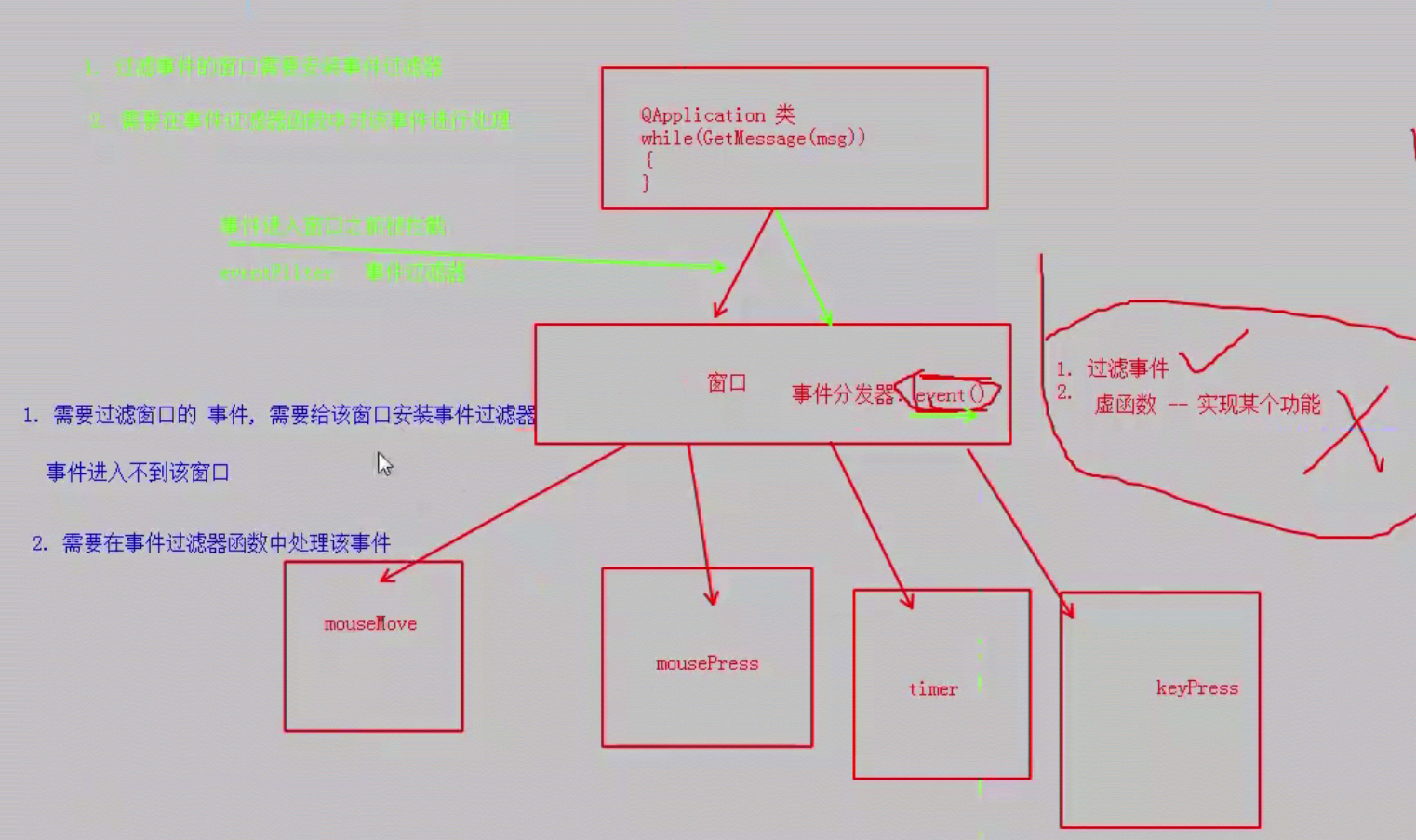
事件分发器——event()函数
事件过滤
事件进入窗口之前被拦截 eventFilter
#include "mywidget.h"

#include "ui_mywidget.h"

#include <QDebug>

MyWidget::MyWidget(QWidget *parent) :

    QWidget(parent),

    ui(new Ui::MyWidget)

{

    ui->setupUi(this);

    // 给MyLabel 安装事件过滤器

    // 参数 谁来过滤label 的事件

    ui->mylabel->installEventFilter(this);

    ui->label_2->installEventFilter(this);

}

MyWidget::~MyWidget()

{

    delete ui;

}

void MyWidget::mousePressEvent(QMouseEvent *)

{

    qDebug() << "+++++++++++++";

}

bool MyWidget::eventFilter(QObject *obj, QEvent *e)

{

    // 判断对象

    if (obj == ui->mylabel) {

        // 过滤事件

        if (e->type() == QEvent::MouseMove)

        {

            ui->mylabel->setText("++++++++++");

            return true;

        }

    }

    if (obj == ui->label_2) {

        if (e->type() == QEvent::MouseMove)

        {

            ui->label_2->setText("**********");

            return true;

        }

    }

    // 执行默认处理

    return QWidget::eventFilter(obj,e);

}
mywidget.cpp
#include "mylabel.h"

#include <QMouseEvent>

#include <QTimerEvent>

#include <QTimer>

#include <QEvent>

// QWidget 默认是不追踪鼠标事件的

MyLabel::MyLabel(QWidget *parent) : QLabel(parent)

{

    // 设置窗口追踪鼠标键

    this->setMouseTracking(true);

    // 启动定时器

    // 参数 1: 触发定时器的时间, 单位: ms

    // 参数2: 使用默认值

    // 返回值: 定时器ID

    id = startTimer();

    id1 = startTimer();

    // 第二种定时器用法

//    QTimer * timer = new QTimer(this);

//    timer->start(100);

//    connect(timer, &QTimer::timeout, this, [=]()

//    {

//        static int number = 0;

//        this->setText(QString::number(number++));

//    });

}

// 进入还是离开边界的一瞬间来完成的

// 鼠标进入

void MyLabel::enterEvent(QEvent *)

{

    setText("你不要在我身上乱摸!!!!");

}

// 鼠标离开

void MyLabel::leaveEvent(QEvent *)

{

    setText("终于离开了...");

}

void MyLabel::mousePressEvent(QMouseEvent *ev)

{

    // 字符串拼接 QString().arg()

    // %1, %2, %3 -- 占位符

    QString btn;

    if(ev->button() == Qt::LeftButton)

    {

        btn = "LeftButton";

    }

    else if(ev->button() == Qt::RightButton)

    {

        btn = "RightButton";

    }

    else if(ev->button() == Qt::MidButton)

    {

        btn = "MidButton";

    }

    QString str = QString("MousePree[%3]:(%1, %2)").arg(ev->x()).arg(ev->y()).arg(btn);

    setText(str);

}

void MyLabel::mouseReleaseEvent(QMouseEvent *ev)

{

    QString btn;

    if(ev->button() == Qt::LeftButton)

    {

        btn = "LeftButton";

    }

    else if(ev->button() == Qt::RightButton)

    {

        btn = "RightButton";

    }

    else if(ev->button() == Qt::MidButton)

    {

        btn = "MidButton";

    }

    QString str = QString("MouseRelease[%3]:(%1, %2)").arg(ev->x()).arg(ev->y()).arg(btn);

    setText(str);

}

void MyLabel::mouseMoveEvent(QMouseEvent *ev)

{

    QString btn;

    if(ev->buttons() & (Qt::LeftButton | Qt::RightButton))

    {

        btn = "LeftButton";

    }

    else if(ev->buttons() & Qt::RightButton)

    {

        btn = "RightButton";

    }

    else if(ev->buttons() & Qt::MidButton)

    {

        btn = "MidButton";

    }

    QString str = QString("MouseMove[%3]:(%1, %2)").arg(ev->x()).arg(ev->y()).arg(btn);

    setText(str);

}

// 每触发一次定时器, 进入该函数中

void MyLabel::timerEvent(QTimerEvent *e)

{

    QString str;

    if(e->timerId() == id)

    {

        static int num = -;

        str = QString("%1: %2").arg("Time out: ").arg(num++);

        if(num >= )

        {

            // 关闭定时器

            killTimer(id);

        }

    }

    else if(e->timerId() == id1)

    {

        static int num1 = ;

        str = QString("%1: %2").arg("Time out: ").arg(num1++);

        if(num1 >= +)

        {

            // 关闭定时器

            killTimer(id1);

        }

    }

    setText(str);

}

bool MyLabel::event(QEvent *e)

{

    // 返回值

    // true -- 代表事件被处理了,不再继续下发,停止了

    // false -- 事件没有被处理,会继续向下分发

    // 大概的处理步骤

//    switch(e->type()){

//        case QEvent::MouseMove:

//            mouseMoveEvent(e);

//            break;

//        case QEvent::Timer:

//            timerEvent(e);

//            break;

//    }

    // 过滤定时器事件

    if (e->type() == QEvent::Timer) {

        return true;// return false,将事件抛给父类

    }

//    else if (e->type() == QEvent::MouseMove) {

//        return true;

//    }

    else if (e->type() == QEvent::MouseButtonPress) {

        return false;

    }

    // 让父类执行默认的处理

    return QLabel::event(e);

}
mylabel.cpp
#ifndef MYWIDGET_H

#define MYWIDGET_H

#include <QWidget>

namespace Ui {

class MyWidget;

}

class MyWidget : public QWidget

{

    Q_OBJECT

public:

    explicit MyWidget(QWidget *parent = nullptr);

    ~MyWidget();

    void mousePressEvent(QMouseEvent *);

    bool eventFilter(QObject *obj, QEvent *e);

private:

    Ui::MyWidget *ui;

};

#endif // MYWIDGET_H
mywidget.h
#ifndef MYLABEL_H

#define MYLABEL_H

#include <QWidget>

#include <QLabel>

class MyLabel : public QLabel

{

    Q_OBJECT

public:

    explicit MyLabel(QWidget *parent = nullptr);

    void enterEvent(QEvent *);

    void leaveEvent(QEvent *);

    void mousePressEvent(QMouseEvent *ev);

    void mouseReleaseEvent(QMouseEvent *ev);

    void mouseMoveEvent(QMouseEvent *ev);

    void timerEvent(QTimerEvent *e);

    bool event(QEvent *e);

private:

    int id;

    int id1;

signals:

public slots:

};

#endif // MYLABEL_H
mylabel.h
(十三)事件分发器——event()函数,事件过滤的更多相关文章
- QT_8_Qt中的事件处理_定时器事件_定时器类_事件分发器_事件过滤器_绘图事件_高级绘图事件_绘图设备_QFile 文件读写_QFileInfo文件信息
Qt中的事件处理 1.1. 捕获QLabel中是鼠标事件 1.2. enterevent 鼠标进入 1.3. leaveevent 鼠标离开 1.4. 鼠标按下MyLabel::mousePressE ...
- cocos2d JS 自定义事件分发器(接收与传递数据) eventManager
简而言之,它不是由系统自动触发,而是人为的干涉 较多情况用于传递数据 var _listener1 = cc.EventListener.create({ event: cc.EventListene ...
- MySQL事件调度器Event Scheduler
我们都知道windows的计划任务和linux的crontab都是用来实现一些周期性的任务和固定时间须要运行的任务. 在mysql5.1之前我们完毕数据库的周期性操作都必须借助这些操作系统实现. 在m ...
- Android事件分发机制三:事件分发工作流程
前言 很高兴遇见你~ 本文是事件分发系列的第三篇. 在前两篇文章中,Android事件分发机制一:事件是如何到达activity的? 分析了事件分发的真正起点:viewRootImpl,Activit ...
- MySQL计划任务(事件调度器)(Event Scheduler)
http://www.cnblogs.com/c840136/articles/2388512.html https://dev.mysql.com/doc/refman/5.7/en/events- ...
- MySQL事件调度器event的使用
Q:假设,有一个需求,希望在某一个时刻系统调用一个begin end执行一下:十分钟以后执行一下begin end.亦或有一个需求,每个多长时间周期性执行begin end.那么这个时候该怎么办呢? ...
- MySQL计划任务(事件调度器)(Event Scheduler)[转]
原文链接: http://www.cnblogs.com/c840136/articles/2388512.html MySQL5.1.x版本中引入了一项新特性EVENT,顾名思义就是事件.定时任务机 ...
- Android事件分发机制一:事件是如何到达activity的?
事件分发,真的一定从Activity开始吗? 前言 很高兴遇见你~ 事件分发,android中一个老生常谈的话题了.基本的流程我们也都知道是从Activity开始分发,但有一个关键问题是:事件是如何到 ...
- Qt中事件处理的方法(三种处理方法,四种覆盖event函数,notify函数,event过滤,事件处理器。然后继续传递给父窗口。可观察QWidget::event的源码,它是虚拟保护函数,可改写)
一.Qt中事件处理的方式 1.事件处理模式一 首先是事件源产生事件,最后是事件处理器对这些事件进行处理.然而也许大家会问, Qt中有这么多类的事件,我们怎么样比较简便的处理每个事件呢?设想,如果是 ...
随机推荐
- Java 工厂模式(一)— 抽象工厂(Abstract Factory)模式
一.抽象工厂模式介绍: 1.什么是抽象工厂模式: 抽象工厂模式是所有形态的工厂模式中最为抽象和最具有一般性的一种形态,抽象工厂模式向客户端提供一个接口,使得客户端在不知道具体产品的情类型的情况下,创建 ...
- iOS----------适配iOS12
library not found for -lstdc++.6.0.9 原因是苹果在XCode10和iOS12中移除了libstdc++这个库,由libc++这个库取而代之,苹果的解释是libstd ...
- Android开发相关的Blog推荐——跟随大神的脚步才能成长为大神
转载:https://blog.csdn.net/zhaokaiqiang1992/article/details/43731967 CSDN 鸿洋:http://blog.csdn.net/lmj6 ...
- SQL学习笔记---非select操作
非select命令 数据库 1.创建 //create database 库名 2.删除 //drop database 库名,... 2.重命名//exec sp_renamedb ...
- emacs 只读打开文件
emacs 只读打开文件 : C-x C-r emacs 让buffer区变成只读 : C-x C-q emacs 让只读buffer区变成可以保存修改 : C-x C-q
- Win7下emacs简单配置
;;win7下.emacs在C:\Users\用户名\AppData\Roaming目录下 在.emacs文件中添加 ;; cancel welcome page取消欢迎界面(setq inhibit ...
- Win7系统下,docker构建nginx+php7环境实践
前面两章介绍的是Windows系统下如何安装和配置docker,主要原因在于,公司大多人数用的是Windows环境,想通过在Windows环境上,通过docker,构建一个公用的配置. 首先要说明的是 ...
- 用Redis管理Session
maven <dependency> <groupId>redis.clients</groupId> <artifactId>jedis</ar ...
- host头注入
看到有说这个题为出题而出题,其实我还是这么觉得, host出问题的话我觉得一般只有在审计代码,看到才知道有host注入 假设不提示host注入,就有难度了 常规的注入了
- PHP按权重随机
之前业务部门提了一个需求,要求将广告按照ecpm高低进行随机.(即:ecpm高的获取流量的几率大) 如下数组: //要求AD1的概率要求为50%,AD2概率为25% ,AD3的概率为15%,AD4的概 ...