
Jetson TX1使用usb camera采集图像 (1)
使用python实现
https://jkjung-avt.github.io/tx2-camera-with-python/
How to Capture and Display Camera Video with Python on Jetson TX2
Oct 19, 2017
Quick link: tegra-cam.py
In this post I share how to use python code (with OpenCV) to capture and display camera video on Jetson TX2, including IP CAM, USB webcam and the Jetson onboard camera. This sample code should work on Jetson TX1 as well.
Prerequisite:
- OpenCV with GStreamer and python support needs to be built and installed on the Jetson TX2. I use opencv-3.4.0 and python3. You can refer to my earlier post for how to build and install OpenCV with python support: How to Install OpenCV (3.4.0) on Jetson TX2.
- If you’d like to test with an IP CAM, you need to have it set up and know its RTSP URI, e.g. rtsp://admin:XXXXX@192.168.1.64:554.
- Hook up a USB webcam (I was using Logitech C920) if you’d like to test with it. The USB webcam would usually be instantiated as /dev/video1, since the Jetson onboard camera has occupied /dev/video0.
- Install gstreamer1.0-plugins-bad-xxx which include the
h264parseelement. This is required for decoding H.264 RTSP stream from IP CAM.
$ sudo apt-get install gstreamer1.0-plugins-bad-faad \

                       gstreamer1.0-plugins-bad-videoparsers
Reference:
- I developed my code based on this canny edge detector sample code.
- ACCELERATED GSTREAMER FOR TEGRA X2 USER GUIDE: Descriptions of nvcamerasrc, nvvidconv and omxh264dec could be found in this document.
How to run the Tegra camera sample code:
- Download the
tegra-cam.pysource code from my GitHubGist: https://gist.github.com/jkjung-avt/86b60a7723b97da19f7bfa3cb7d2690e - To capture and display video using the Jetson onboard camera, try the following. By default the camera resolution is set to 1920x1080 @ 30fps.
$ python3 tegra-cam.py
- To use a USB webcam and set video resolution to 1280x720, try the following. The ‘–vid 1’ means using /dev/video1.
$ python3 tegra-cam.py --usb --vid 1 --width 1280 --height 720
- To use an IP CAM, try the following command, while replacing the last argument with RTSP URI for you own IP CAM.
$ python3 tegra-cam.py --rtsp --uri rtsp://admin:XXXXXX@192.168.1.64:554
Discussions:
The crux of this tegra-cam.py script lies in the GStreamer pipelines I use to call cv.VideoCapture(). In my experience, using nvvidconv to do image scaling and to convert color format to BGRx (note that OpenCV requires BGR as the final output) produces better results in terms of frame rate.
def open_cam_rtsp(uri, width, height, latency):

    gst_str = ("rtspsrc location={} latency={} ! rtph264depay ! h264parse ! omxh264dec ! "

               "nvvidconv ! video/x-raw, width=(int){}, height=(int){}, format=(string)BGRx ! "

               "videoconvert ! appsink").format(uri, latency, width, height)

    return cv2.VideoCapture(gst_str, cv2.CAP_GSTREAMER)

def open_cam_usb(dev, width, height):

    # We want to set width and height here, otherwise we could just do:

    #     return cv2.VideoCapture(dev)

    gst_str = ("v4l2src device=/dev/video{} ! "

               "video/x-raw, width=(int){}, height=(int){}, format=(string)RGB ! "

               "videoconvert ! appsink").format(dev, width, height)

    return cv2.VideoCapture(gst_str, cv2.CAP_GSTREAMER) #该命令在测试时无法启动摄像头,但采用"return cv2.VideoCapture(0)"可以正常显示,I don`t know ???
def open_cam_onboard(width, height): # On versions of L4T previous to L4T 28.1, flip-method=2 # Use Jetson onboard camera gst_str = ("nvcamerasrc ! " "video/x-raw(memory:NVMM), width=(int)2592, height=(int)1458, format=(string)I420, framerate=(fraction)30/1 ! " "nvvidconv ! video/x-raw, width=(int){}, height=(int){}, format=(string)BGRx ! " "videoconvert ! appsink").format(width, height) return cv2.VideoCapture(gst_str, cv2.CAP_GSTREAMER)
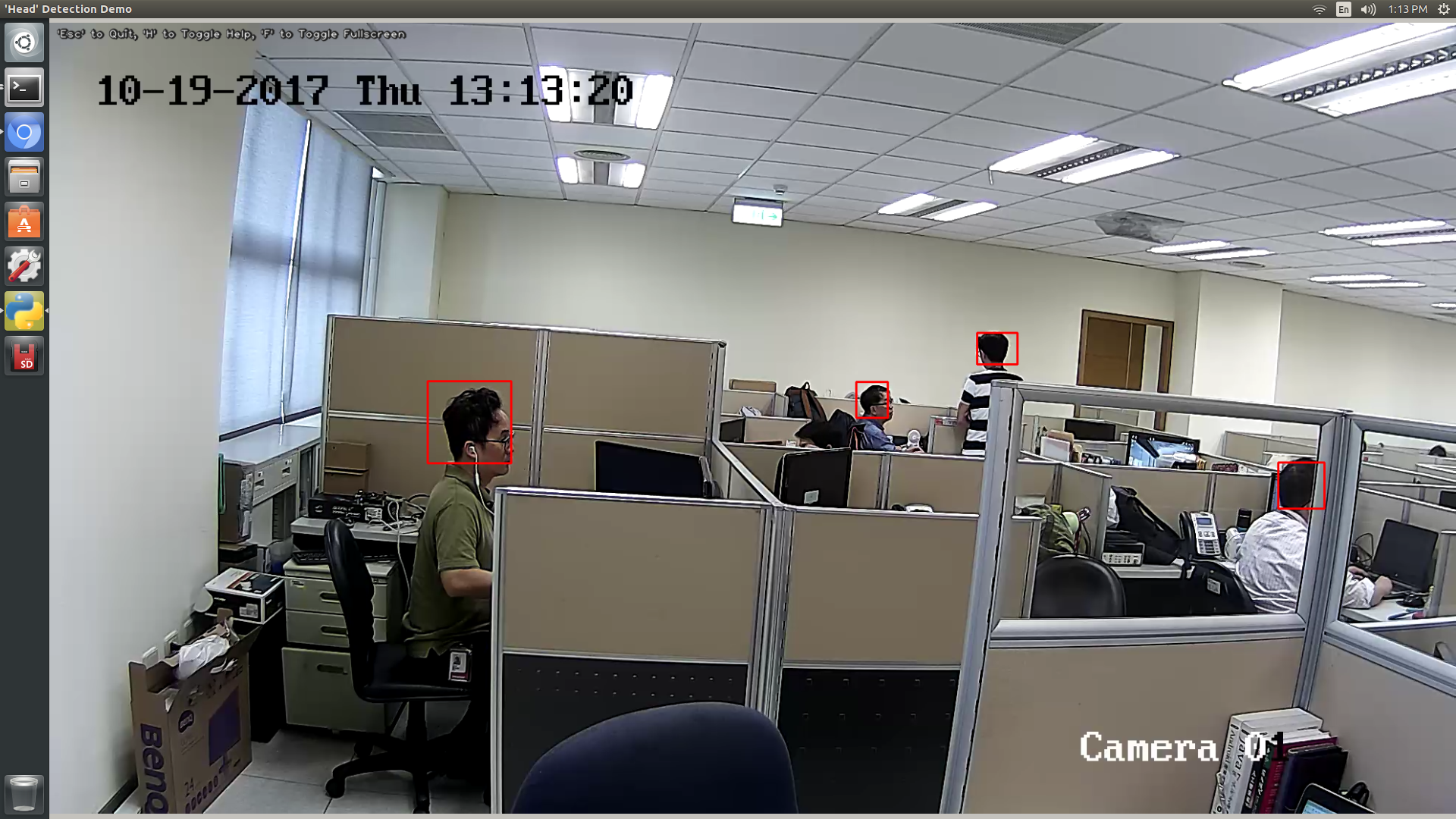
Here’s a screenshot of my Jetson TX2 running tegra-cam.py with a live IP CAM video feed. (I also hooked up a Faster R-CNN model to do human head detection and draw bounding boxes on the captured images here, but the main video capture/display code was the same.)
If you like this post or have any questions, feel free to leave a comment below. Otherwise be sure to also check out my next post How to Capture Camera Video and Do Caffe Inferencing with Python on Jetson TX2, in which I demonstrate how to feed live camera images into a Caffe pipeline for real-time inferencing.
Jetson TX1使用usb camera采集图像 (1)的更多相关文章
- Jetson TX1使用usb camera采集图像 (2)
该方法只启动usb摄像头 import cv2 import numpy import matplotlib.pyplot as plot class Camera: cap = cv2.VideoC ...
- Camera 采集图像的方法
使用 Camera 采集图像, 实现步骤如下: 需要权限: android.permission.CAMERA android.permission.WRITE_EXTERNAL_STORAGE // ...
- 【Xilinx-Petalinux学习】-06-OpenCV通过USB摄像头采集图像。
占位, 实现USB摄像头的图像采集与保存
- 基于英伟达Jetson TX1的GPU处理平台
基于英伟达Jetson TX1 GPU的HDMI图像输入的深度学习套件 [309] 本平台基于英伟达的Jetson TX1视觉计算的全功能开发板,配合本公司研发的HDMI输入图像采集板:Jetson ...
- camera按键采集图像及waitKey的用法(转)
源: camera按键采集图像及waitKey的用法
- camera按键采集图像及waitKey的用法
前言 项目需要通过摄像头采集图像并保存,主要是用于后续的摄像头标定.实现过程其实很简单,需要注意一些细节. 系统环境 系统版本:ubuntu16.04:opencv版本:opencv2.4.13:编程 ...
- [转]Jetson TX1 开发教程(1)配置与刷机
开箱 Jetson TX1是英伟达公司新出的GPU开发板,拥有世界上先进的嵌入式视觉计算系统,提供高性能.新技术和极佳的开发平台.在进行配置和刷机工作之前,先来一张全家福: 可以看到,Jetson T ...
- 【并行计算-CUDA开发】 NVIDIA Jetson TX1
概述 NVIDIA Jetson TX1是计算机视觉系统的SoM(system-on-module)解决方案.它组合了最新的NVIDIAMaxwell GPU架构,其具有ARM Cortex-A57 ...
- ffmpeg从USB摄像头采集一张原始图片(转)
本文讲解使用ffmpeg从USB摄像头中采集一帧数据并写入文件保存,测试平台使用全志A20平台,其他平台修改交叉工具链即可移植.开发环境使用eclipse+CDT.交叉工具链使用arm-Linux-g ...
随机推荐
- 二维剪板机下料问题(2-D Guillotine Cutting Stock Problem) 的混合整数规划精确求解——数学规划的计算智能特征
二维剪板机下料问题(2-D Guillotine Cutting Stock Problem) 的混合整数规划精确求解——数学规划的计算智能特征 二维剪板机下料(2D-GCSP) 的混合整数规划是最优 ...
- 解决WebMagic抓HTTPS时出现SSLException
访问我的博客 前言 在今年二月份在项目中引入了 WebMagic 技术,用来抓取合作方的书籍,详见之前文章:WebMagic之爬虫监控,这两天新接入了一个合作商,对方接口采取的是 HTTPS 协议,而 ...
- 痞子衡嵌入式:高性能MCU之Media应用开发那些事 - 索引
大家好,我是痞子衡,是正经搞技术的痞子.本系列痞子衡给大家介绍的是高性能MCU之Media应用开发相关知识. 飞思卡尔半导体(现恩智浦半导体)2017年推出的i.MX RT系列第一款芯片i.MXRT1 ...
- ThreadPoolExecutor中的submit()方法详细讲解
https://blog.csdn.net/qq_33689414/article/details/72955253
- .NET Framework VS .NET Core
本文对应的原文来至 c-sharpcorner 的一篇文章,文末有链接.如有错误,还请指正. 前言 你会为你的下一个应用程序选择哪一种开发平台 - .NET Framework 或者 .NET Cor ...
- DevExpress TreeList 禁止节点拖动到其他节点上
背景 在做一个类似文件树的控件,支持节点从树上向其它的控件拖动程序,但是要保证树上的节点不能拖动上其他的节点上. 代码 /// <summary> /// 拖动节点完成 /// </ ...
- 浏览器与android移动端视频互播技术实现
手机端与平台之间的视频直播功能,主要通过集成多种开源视频框架以及采购第三方视频直播服务器产品来实现预定业务需求.视频直播对话功能的实现,主要经历了三个阶段:利用开源视频框架实现视频直播.采购第三方视频 ...
- rabbitmq之简述HAProxy配置集群过程
简介 HAProxy是一款提供高可用性.负载均衡以及基于TCP和HTTP应用的代理软件,HAProxy是完全免费的.借助HAProxy可以快速并且可靠的提供基于TCP和HTTP应用的代理解决方案.HA ...
- javafx:JavaFX Scene Builder 2.0打开含有第三方jar包的fxml文件报错 Caused by: java.lang.ClassNotFoundException
报错如下: java.io.IOException: javafx.fxml.LoadException: /C:/User.................test.fxml at com.orac ...
- Eclipse里JAR文件的打包和使用
作用:用于封装class.properties文件,是文件封装的最小单元: 包含Java类的普通库.资源(resources).辅助文件(auxiliary files)等. 可以将程 ...