
Activiti之 Exclusive Gateway
一、Exclusive Gateway
Exclusive Gateway(也称为XOR网关或更多技术基于数据的排他网关)经常用做决定流程的流转方向。当流程到达该网关的时候,所有的流出序列流到按照已定义好的顺序依次执行。当序列流条件的求值结果为true(或没有条件集的时候,在概念上有定义一个“true”定义序列流),就会选择该序列继续的处理。Exclusive Gateway的图标就是菱形里面有一个X符合,如下所示:
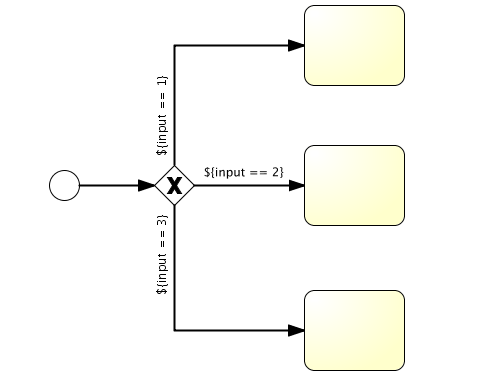
XML的代码为:
<exclusiveGateway id="exclusiveGw" name="Exclusive Gateway" />

<sequenceFlow id="flow2" sourceRef="exclusiveGw" targetRef="theTask1">

  <conditionExpression xsi:type="tFormalExpression">${input == 1}</conditionExpression>

</sequenceFlow>

<sequenceFlow id="flow3" sourceRef="exclusiveGw" targetRef="theTask2">

  <conditionExpression xsi:type="tFormalExpression">${input == 2}</conditionExpression>

</sequenceFlow>

<sequenceFlow id="flow4" sourceRef="exclusiveGw" targetRef="theTask3">

  <conditionExpression xsi:type="tFormalExpression">${input == 3}</conditionExpression>

</sequenceFlow>
二、示例
本例子以请假流程为例,流程设计图如下图所示:

当员工提出的请假时间大于2天的时候由总经理审批,当请假时间不大于2天的时候由经理审批。
1、leave.bpmn内容如下:
<?xml version="1.0" encoding="UTF-8"?>
<definitions xmlns="http://www.omg.org/spec/BPMN/20100524/MODEL" xmlns:xsi="http://www.w3.org/2001/XMLSchema-instance" xmlns:xsd="http://www.w3.org/2001/XMLSchema" xmlns:activiti="http://activiti.org/bpmn" xmlns:bpmndi="http://www.omg.org/spec/BPMN/20100524/DI" xmlns:omgdc="http://www.omg.org/spec/DD/20100524/DC" xmlns:omgdi="http://www.omg.org/spec/DD/20100524/DI" typeLanguage="http://www.w3.org/2001/XMLSchema" expressionLanguage="http://www.w3.org/1999/XPath" targetNamespace="http://www.activiti.org/test">
<process id="leave" name="请假流程图" isExecutable="true">
<documentation>请假流程图</documentation>
<startEvent id="startevent1" name="Start"></startEvent>
<endEvent id="endevent1" name="End"></endEvent>
<!-- ${employeeId} 中的employeeId 在启动流程实例的时候,就设置employeeId变量。再根据employeeId获取员工请假任务,最后设置请假时间进行提交-->
<userTask id="usertask1" name="员工请假" activiti:assignee="${employeeId}"></userTask>
<userTask id="usertask2" name="经理审批" activiti:candidateGroups="manager"></userTask>
<userTask id="usertask3" name="总经理审批" activiti:candidateGroups="boss"></userTask>
<sequenceFlow id="flow1" sourceRef="startevent1" targetRef="usertask1"></sequenceFlow>
<sequenceFlow id="flow2" name="${flag == true}" sourceRef="usertask2" targetRef="endevent1">
<conditionExpression xsi:type="tFormalExpression"><![CDATA[${flag == true}]]></conditionExpression>
</sequenceFlow>
<sequenceFlow id="flow3" name="${flag == true}" sourceRef="usertask3" targetRef="endevent1">
<conditionExpression xsi:type="tFormalExpression"><![CDATA[${flag == true}]]></conditionExpression>
</sequenceFlow>
<sequenceFlow id="flow4" name="${flag == false}" sourceRef="usertask2" targetRef="usertask1">
<conditionExpression xsi:type="tFormalExpression"><![CDATA[${flag == false}]]></conditionExpression>
</sequenceFlow>
<sequenceFlow id="flow5" name="${flag == false}" sourceRef="usertask3" targetRef="usertask1">
<conditionExpression xsi:type="tFormalExpression"><![CDATA[${flag == false}]]></conditionExpression>
</sequenceFlow>
<exclusiveGateway id="exclusivegateway1" name="Exclusive Gateway"></exclusiveGateway>
<sequenceFlow id="flow6" sourceRef="usertask1" targetRef="exclusivegateway1"></sequenceFlow>
<sequenceFlow id="flow7" name="${day <= 2}" sourceRef="exclusivegateway1" targetRef="usertask2">
<conditionExpression xsi:type="tFormalExpression"><![CDATA[${day <= 2}]]></conditionExpression>
</sequenceFlow>
<sequenceFlow id="flow8" name="${day > 2}" sourceRef="exclusivegateway1" targetRef="usertask3">
<conditionExpression xsi:type="tFormalExpression"><![CDATA[${day > 2}]]></conditionExpression>
</sequenceFlow>
</process>
<bpmndi:BPMNDiagram id="BPMNDiagram_leave">
<bpmndi:BPMNPlane bpmnElement="leave" id="BPMNPlane_leave">
<bpmndi:BPMNShape bpmnElement="startevent1" id="BPMNShape_startevent1">
<omgdc:Bounds height="35.0" width="35.0" x="355.0" y="48.0"></omgdc:Bounds>
</bpmndi:BPMNShape>
<bpmndi:BPMNShape bpmnElement="endevent1" id="BPMNShape_endevent1">
<omgdc:Bounds height="35.0" width="35.0" x="355.0" y="362.0"></omgdc:Bounds>
</bpmndi:BPMNShape>
<bpmndi:BPMNShape bpmnElement="usertask1" id="BPMNShape_usertask1">
<omgdc:Bounds height="55.0" width="105.0" x="320.0" y="112.0"></omgdc:Bounds>
</bpmndi:BPMNShape>
<bpmndi:BPMNShape bpmnElement="usertask2" id="BPMNShape_usertask2">
<omgdc:Bounds height="55.0" width="105.0" x="170.0" y="240.0"></omgdc:Bounds>
</bpmndi:BPMNShape>
<bpmndi:BPMNShape bpmnElement="usertask3" id="BPMNShape_usertask3">
<omgdc:Bounds height="55.0" width="105.0" x="480.0" y="242.0"></omgdc:Bounds>
</bpmndi:BPMNShape>
<bpmndi:BPMNShape bpmnElement="exclusivegateway1" id="BPMNShape_exclusivegateway1">
<omgdc:Bounds height="40.0" width="40.0" x="352.0" y="247.0"></omgdc:Bounds>
</bpmndi:BPMNShape>
<bpmndi:BPMNEdge bpmnElement="flow1" id="BPMNEdge_flow1">
<omgdi:waypoint x="372.0" y="83.0"></omgdi:waypoint>
<omgdi:waypoint x="372.0" y="112.0"></omgdi:waypoint>
</bpmndi:BPMNEdge>
<bpmndi:BPMNEdge bpmnElement="flow2" id="BPMNEdge_flow2">
<omgdi:waypoint x="222.0" y="295.0"></omgdi:waypoint>
<omgdi:waypoint x="222.0" y="379.0"></omgdi:waypoint>
<omgdi:waypoint x="355.0" y="379.0"></omgdi:waypoint>
<bpmndi:BPMNLabel>
<omgdc:Bounds height="14.0" width="100.0" x="183.0" y="309.0"></omgdc:Bounds>
</bpmndi:BPMNLabel>
</bpmndi:BPMNEdge>
<bpmndi:BPMNEdge bpmnElement="flow3" id="BPMNEdge_flow3">
<omgdi:waypoint x="532.0" y="297.0"></omgdi:waypoint>
<omgdi:waypoint x="532.0" y="379.0"></omgdi:waypoint>
<omgdi:waypoint x="390.0" y="379.0"></omgdi:waypoint>
<bpmndi:BPMNLabel>
<omgdc:Bounds height="14.0" width="100.0" x="483.0" y="309.0"></omgdc:Bounds>
</bpmndi:BPMNLabel>
</bpmndi:BPMNEdge>
<bpmndi:BPMNEdge bpmnElement="flow4" id="BPMNEdge_flow4">
<omgdi:waypoint x="222.0" y="240.0"></omgdi:waypoint>
<omgdi:waypoint x="222.0" y="139.0"></omgdi:waypoint>
<omgdi:waypoint x="320.0" y="139.0"></omgdi:waypoint>
<bpmndi:BPMNLabel>
<omgdc:Bounds height="14.0" width="100.0" x="170.0" y="191.0"></omgdc:Bounds>
</bpmndi:BPMNLabel>
</bpmndi:BPMNEdge>
<bpmndi:BPMNEdge bpmnElement="flow5" id="BPMNEdge_flow5">
<omgdi:waypoint x="532.0" y="242.0"></omgdi:waypoint>
<omgdi:waypoint x="532.0" y="139.0"></omgdi:waypoint>
<omgdi:waypoint x="425.0" y="139.0"></omgdi:waypoint>
<bpmndi:BPMNLabel>
<omgdc:Bounds height="14.0" width="100.0" x="485.0" y="191.0"></omgdc:Bounds>
</bpmndi:BPMNLabel>
</bpmndi:BPMNEdge>
<bpmndi:BPMNEdge bpmnElement="flow6" id="BPMNEdge_flow6">
<omgdi:waypoint x="372.0" y="167.0"></omgdi:waypoint>
<omgdi:waypoint x="372.0" y="247.0"></omgdi:waypoint>
</bpmndi:BPMNEdge>
<bpmndi:BPMNEdge bpmnElement="flow7" id="BPMNEdge_flow7">
<omgdi:waypoint x="352.0" y="267.0"></omgdi:waypoint>
<omgdi:waypoint x="275.0" y="267.0"></omgdi:waypoint>
<bpmndi:BPMNLabel>
<omgdc:Bounds height="14.0" width="100.0" x="283.0" y="247.0"></omgdc:Bounds>
</bpmndi:BPMNLabel>
</bpmndi:BPMNEdge>
<bpmndi:BPMNEdge bpmnElement="flow8" id="BPMNEdge_flow8">
<omgdi:waypoint x="392.0" y="267.0"></omgdi:waypoint>
<omgdi:waypoint x="480.0" y="269.0"></omgdi:waypoint>
<bpmndi:BPMNLabel>
<omgdc:Bounds height="14.0" width="100.0" x="400.0" y="247.0"></omgdc:Bounds>
</bpmndi:BPMNLabel>
</bpmndi:BPMNEdge>
</bpmndi:BPMNPlane>
</bpmndi:BPMNDiagram>
</definitions>
2、测试类LeaveTest代码如下:
 package com.shh.test;

 import java.util.HashMap;

 import java.util.List;

 import java.util.Map;

 import org.activiti.engine.HistoryService;

 import org.activiti.engine.ProcessEngine;

 import org.activiti.engine.ProcessEngineConfiguration;

 import org.activiti.engine.RepositoryService;

 import org.activiti.engine.RuntimeService;

 import org.activiti.engine.TaskService;

 import org.activiti.engine.history.HistoricProcessInstanceQuery;

 import org.activiti.engine.task.Task;

 import org.junit.Before;

 import org.junit.Test;

 /**

  * 请假流程

  */

 public class LeaveTest {

     ProcessEngine processEngine = null;

     RepositoryService repositoryService = null;

     RuntimeService runtimeService = null;

     TaskService taskService = null;

     /**

      * 加载配置文件

      */

     @Before

     public void init() {

         processEngine = ProcessEngineConfiguration.createProcessEngineConfigurationFromResource("activiti.cfg.xml")

                 .buildProcessEngine();

         repositoryService = processEngine.getRepositoryService();

         runtimeService = processEngine.getRuntimeService();

         taskService = processEngine.getTaskService();

     }

     /**

      * 部署流程定义

      */

     @Test

     public void deploy(){

         repositoryService.createDeployment().addClasspathResource("diagrams/leave.bpmn").deploy();

         System.out.println("***************部署流程定义完成***************");

     }

     /**

      * 启动一个请假流程

      */

     @Test

     public void start() {

         Map<String, Object> variables = new HashMap<String, Object>();

         variables.put("employeeId", "Kermit"); //请假人

         String processId = runtimeService.startProcessInstanceByKey("leave", variables).getId();

         System.out.println("***************启动一个请假流程完成***************" + processId);

     }

     /**

      * 提交请假申请

      */

     @Test

     public void apply(){

         System.out.println("***************提交请假申请开始***************");

         List<Task> tasks = taskService.createTaskQuery().taskAssignee("Kermit").list();

         System.out.println(tasks.size());

         for (Task task : tasks) {

             System.out.println("Kermit的任务taskname:" + task.getName() + ",id:" + task.getId());

             taskService.setVariable(task.getId(), "day", 4);//设置请假天数

             taskService.complete(task.getId());//完成任务

             System.out.println("请假4 天");

         }

         System.out.println("***************提交请假申请完成***************");

     }

     @Test

     public void step2manager() {

         System.out.println("***************经理组审批流程开始***************");

         List<Task> tasks = taskService.createTaskQuery().taskCandidateGroup("manager").list();// 经理组的任务

         System.out.println("经理组的任务:" + tasks.size());

         for (Task task : tasks) {

             System.out.println("经理组的任务taskname:" + task.getName() + ",id:" + task.getId());

             taskService.claim(task.getId(), "李四");//申领任务

             taskService.setVariable(task.getId(), "flag", false);//true批准,false不批准

             Object applyUser = taskService.getVariable(task.getId(), "employeeId");

             Object day = taskService.getVariable(task.getId(), "day");

             System.out.println(String.format("%s请假%s天", applyUser, day));

             taskService.complete(task.getId());//完成任务

         }

         System.out.println("***************经理组审批流程结束***************");

     }

     @Test

     public void step2Boss() {

         System.out.println("***************总经理组审批流程开始***************");

         List<Task> tasks = taskService.createTaskQuery().taskCandidateGroup("boss").list();// 总经理组的任务

         System.out.println("总经理组的任务:" + tasks.size());

         for (Task task : tasks) {

             System.out.println("manager的任务taskname:" + task.getName() + ",id:" + task.getId());

             taskService.claim(task.getId(), "王五");//申领任务

             taskService.setVariable(task.getId(), "flag", true);//true批准,false不批准

             Object applyUser = taskService.getVariable(task.getId(), "employeeId");

             Object day = taskService.getVariable(task.getId(), "day");

             System.out.println(String.format("%s请假%s天", applyUser, day));

             taskService.complete(task.getId());//完成任务

         }

         System.out.println("***************总经理组审批流程结束***************");

     }

 }
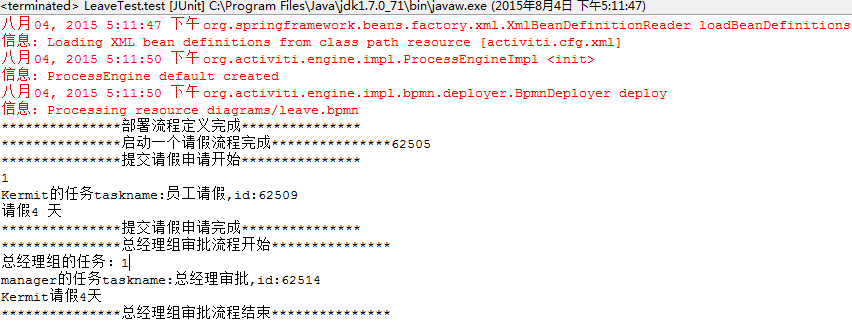
依次运行deploy()、start()、apply()方法之后,因为申请的请假天数为4天,所以流程已经到了总经理角色,此时运行step2Boss()方法,一个完整的请假流程就已经完成。运行结果如下图所示:
也可对代码进行修改,总经理不批准
taskService.setVariable(task.getId(), "flag", false);
流程就回到员工那里,员工继续申请,设置天数为2
taskService.setVariable(task.getId(), "day", 4);//设置请假天数
此时流程到达经理角色,经理批准,流程也就结束
taskService.setVariable(task.getId(), "flag", true);
Activiti之 Exclusive Gateway的更多相关文章
- activiti搭建(五)BPMN介绍
转载请注明源地址:http://www.cnblogs.com/lighten/p/5931207.html 对于BPMN我也不是十分清楚,目前也只是因为对于Modeler中不熟悉的组件查询,来对这部 ...
- activiti参考5-任务TASK
一.概要 1,设计TASK的表主要是:ACT_RU_TASK,ACT_HI_TASKINST(见参考-activiti表): 2,任务主要有:人工任务(usertask),服务任务(serviceta ...
- activiti任务TASK
一.概要 设计TASK的表主要是:ACT_RU_TASK,ACT_HI_TASKINST(见参考-activiti表): 任务主要有:人工任务(usertask),服务任务(servicetask)等 ...
- 【应用篇】Activiti显示器(抽象)简单的应用程序和服务的颗粒结合(两)
Activiti简单的应用程序,业务颗粒与工作流程结合.让流程带动业务颗粒运行的过程.此次的监听我们应用抽象的监听来实现,也就是说全部的普通业务类均应用此抽象监听,而不须要每个类一个监听的来操作. 新 ...
- 工作流引擎Activiti 专题
https://github.com/Activiti/Activiti Quick Start Guide This quick start assumes: Familiarity with Ma ...
- Activiti工作流学习笔记
先从工作流的启动开始讲,Activiti提供了四种工作流的启动方式 1.空启动事件 2.定时启动事件 3.异常启动事件 4.消息启动事件 空启动事件中标签内没有任何其他元素的定义 <startE ...
- Liferay7 BPM门户开发之2: BPMN 2.0 规范入门 (Activiti BPMN extensions)
Liferay最大的问题是BPM弱,如果做企业开发,BPM必不可少,所以直入主题,做个BPMN2入门. 本文参考地址:http://activiti.org/userguide/index.html# ...
- Activiti 5.1.4最佳实践
1.简单介绍 Activiti是一个开源的工作流引擎,它实现了BPMN 2.0规范,可以发布设计好的流程定义,并通过api进行流程调度. Activiti 作为一个遵从 Apache 许可的工作流和业 ...
- 最近学习工作流 推荐一个activiti 的教程文档
全文地址:http://www.mossle.com/docs/activiti/ Activiti 5.15 用户手册 Table of Contents 1. 简介 协议 下载 源码 必要的软件 ...
随机推荐
- Javascript——DOM
DOM(Document Object Model)文档对象模型 --DOM可以将任何HTML或XML文档描绘成一个由多层节点构成的结构. D--doument(文档).当创建一个网页并把它加载到we ...
- Guava学习笔记:复写的Object常用方法
在Java中Object类是所有类的父类,其中有几个需要override的方法比如equals,hashCode和toString等方法.每次写这几个方法都要做很多重复性的判断, 很多类库提供了覆写这 ...
- 使用Apache的DigestUtils类实现哈希摘要(SHA/MD5)
包名称:org.apache.commons.codec.digest 类名称:org.apache.commons.codec.digest.DigestUtils 1.MD5 public sta ...
- 初识Spring框架
一.Ioc 1)概念:Ioc(Inversion Of Control)控制反转,也被称为依赖注入DI(Dependency Injection),是面向对象编程的一种思想. 2)作用:用来减低程序代 ...
- 使用React并做一个简单的to-do-list
1. 前言 说到React,我从一年之前就开始试着了解并且看了相关的入门教程,而且还买过一本<React:引领未来的用户界面开发框架 >拜读.React的轻量组件化的思想及其virtual ...
- css用背景图来替换文字来达到隐藏文字的目的
根据html代码的不同来分成两大类方法,如下 html代码: <h1 class="replace-indent">hello see</h1> 第一种方法 ...
- Charted – 自动化的可视化数据生成工具
Charted 是一个让数据自动生成可视化图表的工具.只需要提供一个数据文件的链接,它就能返回一个美丽的,可共享的图表.Charted 不会存储任何数据.它只是获取和让链接提供的数据可视化. 在线演示 ...
- 使用 Google Analytics 跟踪 JavaScript 错误
Google Analytics(谷歌分析)不仅仅是一个流量统计工具,你还可以用它来测量广告活动的有效性,跟踪用户多远到所需的页面流(从点击广告到购物车到结账页面)获取,并基于用户的信息设置浏览器和语 ...
- javascript 对象初探 (四)--- 内建对象之旅之Array
我们不要去纠结神马是内建对象,神马是內建构造器.到后来你们便会发现其实她们都是对象. Array()是一个构建数组的內建构造器函数: var arr = new Array(); 与下面的是等效的: ...
- PhpStorm下Laravel代码智能提示
phpstorm&Laravel PHPstorm是我见过的最好的PHP的IDE,前年用的时候就毫不犹豫的抛弃了zend studio :) ,Laravel是我用过最好的框架,除了做手游后台 ...