
ubuntu下cacti安装配置
参考文献
http://kling.blog.51cto.com/3320545/1180778
前言:
原本是想源码安装的,但是现在发现还是太麻烦了,就直接通过apt-get install安装了。
一、cacti概述
1. cacti是用php语言实现的一个软件,它的主要功能是用snmp服务获取数据,然后用rrdtool储存和更新数据,当用户需要查看数据的时候用rrdtool生成图表呈现给用户。因此,snmp和rrdtool是cacti的关键。Snmp关系着数据的收集,rrdtool关系着数据存储和图表的生成。
2. Mysql配合PHP程序存储一些变量数据并对变量数据进行调用,如:主机名、主机ip、snmp团体名、端口号、模板信息等变量。
3. snmp抓到数据不是存储在mysql中,而是存在rrdtool生成的rrd文件中(在cacti根目录的rra文件夹下)。rrdtool对数据的更新和存储就是对rrd文件的处理,rrd文件是大小固定的档案文件(Round Robin Archive),它能够存储的数据笔数在创建时就已经定义。
二、系统环境
1、Linux ubuntu-server 3.5.0-23-generic x86_64
三、apache、mysql、php安装
参考:http://developer.51cto.com/art/201110/299303.htm
四、cacti安装
enadmin@ubuntu-server:~$ apt-get update

enadmin@ubuntu-server:~$ sudo apt-get install cacti
通过这种方式安装会显示依赖包
Reading package lists... Done

Building dependency tree

Reading state information... Done

The following extra packages will be installed:

  libperl5. libphp-adodb libsensors4 libsnmp-base libsnmp15 mysql-server php5-snmp rrdtool snmp

Suggested packages:

  php5-ldap php5-adodb lm-sensors snmp-mibs-downloader

The following NEW packages will be installed:

  cacti libperl5. libphp-adodb libsensors4 libsnmp-base libsnmp15 mysql-server php5-snmp rrdtool snmp

 upgraded,  newly installed,  to remove and  not upgraded.

Need to get , kB/, kB of archives.

After this operation, 12.6 MB of additional disk space will be used.

Do you want to continue [Y/n]? y

Get: http://mirrors.163.com/ubuntu/ precise-security/main php5-cli amd64 5.3.10-1ubuntu3.13 [3,051 kB]

Get: http://mirrors.163.com/ubuntu/ precise-security/main php5-mysql amd64 5.3.10-1ubuntu3.13 [76.6 kB]

Get: http://mirrors.163.com/ubuntu/ precise-security/main php5-gd amd64 5.3.10-1ubuntu3.13 [38.8 kB]

Get: http://mirrors.163.com/ubuntu/ precise-security/main libapache2-mod-php5 amd64 5.3.10-1ubuntu3.13 [3,137 kB]

Get: http://mirrors.163.com/ubuntu/ precise-security/main php5-common amd64 5.3.10-1ubuntu3.13 [1,774 kB]

Get: http://mirrors.163.com/ubuntu/ precise-security/main libsnmp-base all 5.4.3~dfsg-2.4ubuntu1.2 [217 kB]

Get: http://mirrors.163.com/ubuntu/ precise-security/main libsnmp15 amd64 5.4.3~dfsg-2.4ubuntu1.2 [1,334 kB]

Get: http://mirrors.163.com/ubuntu/ precise-security/main mysql-server all 5.5.38-0ubuntu0.12.04.1 [11.4 kB]

Get: http://mirrors.163.com/ubuntu/ precise-security/main php5-snmp amd64 5.3.10-1ubuntu3.13 [11.0 kB]

Get: http://mirrors.163.com/ubuntu/ precise-security/main snmp amd64 5.4.3~dfsg-2.4ubuntu1.2 [162 kB]

Fetched , kB in 16s ( kB/s)

Preconfiguring packages ...

Package configuration
下面是安装过程截图




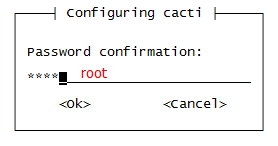
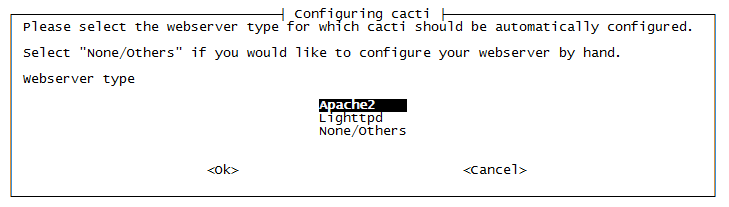
选中Apache2以后,接下来再会安装一些软件
Selecting previously unselected package libsensors4.

(Reading database ...  files and directories currently installed.)

Unpacking libsensors4 (from .../libsensors4_1%3a3.3.1-2ubuntu1_amd64.deb) ...

Preparing to replace php5-cli 5.3.-1ubuntu3. (using .../php5-cli_5.3.10-1ubuntu3.13_amd64.deb) ...

Unpacking replacement php5-cli ...

Preparing to replace php5-mysql 5.3.-1ubuntu3. (using .../php5-mysql_5.3.10-1ubuntu3.13_amd64.deb) ...

Unpacking replacement php5-mysql ...

Preparing to replace php5-gd 5.3.-1ubuntu3. (using .../php5-gd_5.3.10-1ubuntu3.13_amd64.deb) ...

Unpacking replacement php5-gd ...

Preparing to replace libapache2-mod-php5 5.3.-1ubuntu3. (using .../libapache2-mod-php5_5.3.10-1ubuntu3.13_amd64.deb) ...

Unpacking replacement libapache2-mod-php5 ...

Preparing to replace php5-common 5.3.-1ubuntu3. (using .../php5-common_5.3.10-1ubuntu3.13_amd64.deb) ...

Unpacking replacement php5-common ...

Selecting previously unselected package libperl5..

Unpacking libperl5. (from .../libperl5.14_5.14.2-6ubuntu2.4_amd64.deb) ...

Selecting previously unselected package libphp-adodb.

Unpacking libphp-adodb (from .../libphp-adodb_5.-1_all.deb) ...

Selecting previously unselected package libsnmp-base.

Unpacking libsnmp-base (from .../libsnmp-base_5.4.3~dfsg-.4ubuntu1.2_all.deb) ...

Selecting previously unselected package libsnmp15.

Unpacking libsnmp15 (from .../libsnmp15_5.4.3~dfsg-.4ubuntu1.2_amd64.deb) ...

Selecting previously unselected package mysql-server.

Unpacking mysql-server (from .../mysql-server_5.5.38-0ubuntu0.12.04.1_all.deb) ...

Selecting previously unselected package php5-snmp.

Unpacking php5-snmp (from .../php5-snmp_5.3.10-1ubuntu3.13_amd64.deb) ...

Selecting previously unselected package snmp.

Unpacking snmp (from .../snmp_5.4.3~dfsg-.4ubuntu1.2_amd64.deb) ...

Selecting previously unselected package rrdtool.

Unpacking rrdtool (from .../rrdtool_1.4.7-1_amd64.deb) ...

Selecting previously unselected package cacti.

Unpacking cacti (from .../cacti_0..7i-2ubuntu1_all.deb) ...

Processing triggers for man-db ...

Setting up libsensors4 (:3.3.-2ubuntu1) ...

Setting up php5-common (5.3.-1ubuntu3.) ...

Setting up php5-cli (5.3.-1ubuntu3.) ...

Setting up libapache2-mod-php5 (5.3.-1ubuntu3.) ...

* Reloading web server config apache2

   ...done.

Setting up php5-mysql (5.3.-1ubuntu3.) ...

Setting up php5-gd (5.3.-1ubuntu3.) ...

Setting up libperl5. (5.14.-6ubuntu2.) ...

Setting up libphp-adodb (5.12-) ...

Setting up libsnmp-base (5.4.~dfsg-.4ubuntu1.) ...

Setting up libsnmp15 (5.4.~dfsg-.4ubuntu1.) ...

Setting up mysql-server (5.5.-0ubuntu0.12.04.) ...

Setting up php5-snmp (5.3.-1ubuntu3.) ...

Setting up snmp (5.4.~dfsg-.4ubuntu1.) ...

Setting up rrdtool (1.4.-) ...

Setting up cacti (0.8.7i-2ubuntu1) ...

dbconfig-common: writing config to /etc/dbconfig-common/cacti.conf

Creating config file /etc/dbconfig-common/cacti.conf with new version

Creating config file /etc/cacti/debian.php with new version

granting access to database cacti for cacti@localhost: success.

verifying access for cacti@localhost: success.

creating database cacti: success.

verifying database cacti exists: success.

populating database via sql...  done.

dbconfig-common: flushing administrative password

Creating config file /etc/cacti/apache.conf with new version

Creating config file /etc/cacti/lighttpd.conf with new version

* Reloading web server config apache2

   ...done.

Processing triggers for libc-bin ...

ldconfig deferred processing now taking place
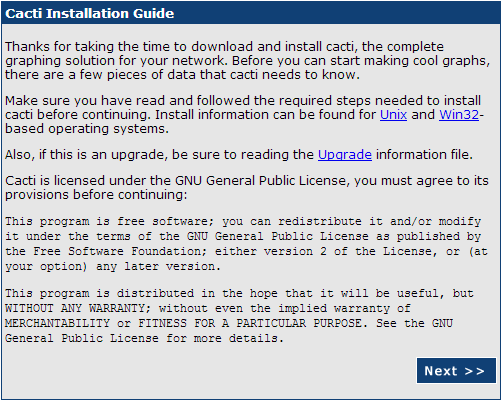
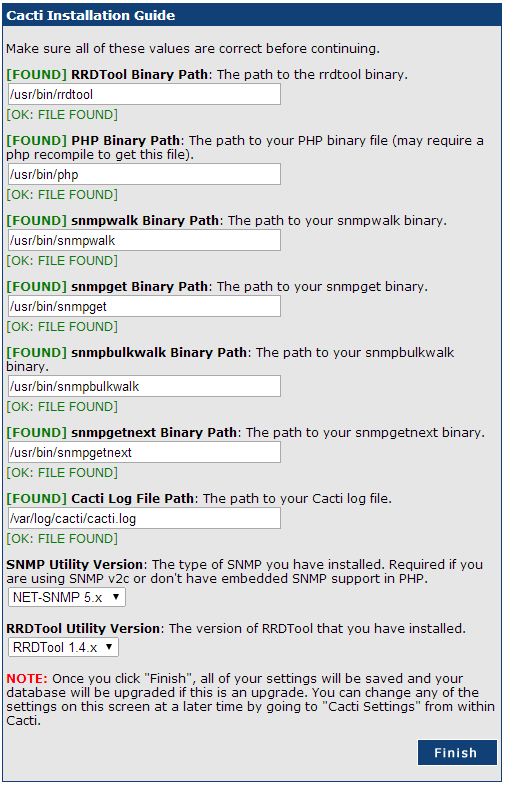
网页安装
在安装完上面内容以后,请进入以下地址http://your-ip/cacti/再安装

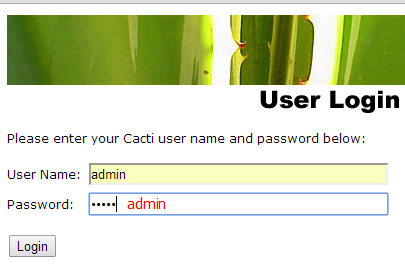
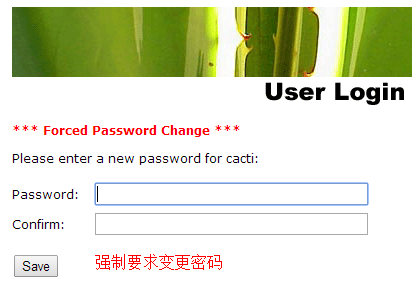
安装snmpd
enadmin@ubuntu-server:~$ sudo apt-get install snmpd

Reading package lists... Done

Building dependency tree

Reading state information... Done

The following NEW packages will be installed:

  snmpd

 upgraded,  newly installed,  to remove and  not upgraded.

Need to get 76.0 kB of archives.

After this operation,  kB of additional disk space will be used.

Get: http://mirrors.163.com/ubuntu/ precise-security/main snmpd amd64 5.4.3~dfsg-2.4ubuntu1.2 [76.0 kB]

Fetched 76.0 kB in 0s (97.6 kB/s)

Preconfiguring packages ...

Selecting previously unselected package snmpd.

(Reading database ...  files and directories currently installed.)

Unpacking snmpd (from .../snmpd_5.4.3~dfsg-.4ubuntu1.2_amd64.deb) ...

Processing triggers for ureadahead ...

ureadahead will be reprofiled on next reboot

Processing triggers for man-db ...

Setting up snmpd (5.4.~dfsg-.4ubuntu1.) ...

update-rc.d: warning: snmpd stop runlevel arguments () do not match LSB Default-Stop values (  )

* Starting network management services:

enadmin@ubuntu-server:~$
测试snmp的服务
enadmin@ubuntu-server:~$ snmpwalk -v  -c public localhost .1.3.6.1.2.1.1.1.

iso.3.6.1.2.1.1.1.0 = STRING: "Linux ubuntu-server 3.5.0-23-generic #35~precise1-Ubuntu SMP Fri Jan 25 17:13:26 UTC 2013 x86_64"

enadmin@ubuntu-server:~$
查看localhost的监控画面
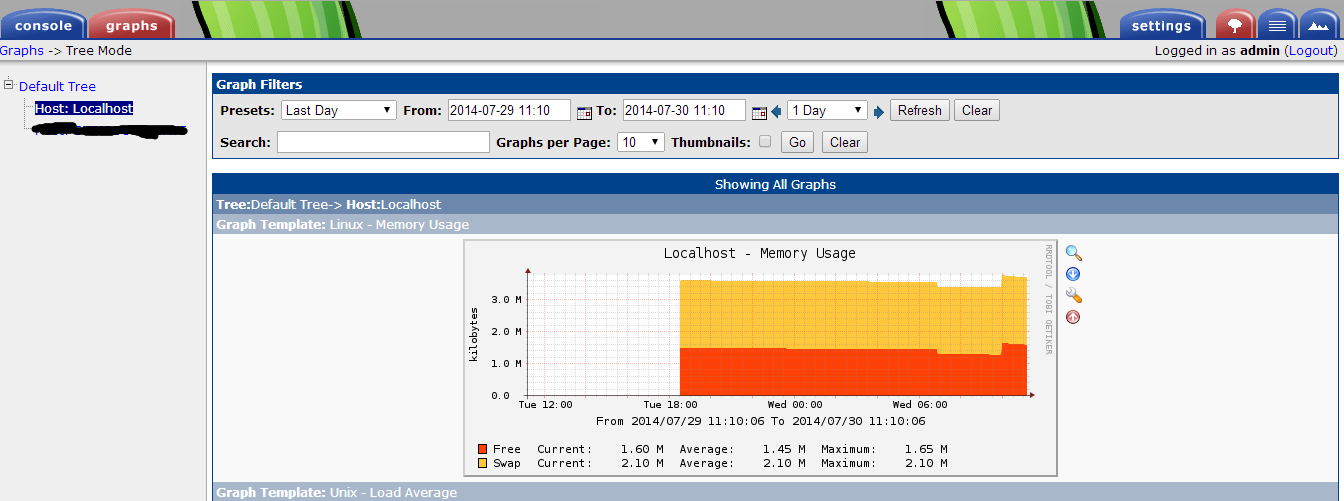
在配置完毕上述内容以后,正常情况下应该可以看到cacti对于自身localhost的的默认监控了。我们进入到Graphs->Tree Mode->Default Tree->Host:Localhost当中查看对于localhost的监控,如下图所示。
常见问题解决
问题1:cacti无法正常生成图片
在cacti当中看不到图片,通过Turn Off Graph Debug Mode.提示报错如下:
'/var/lib/cacti/rra/localhost_users_6.rrd': No such file or directory

解决方法:
这是因为权限问题原因导致的,系统无法生成相应的rrd文件,需要我们人工手动生成,具体操作方法如下:
Console->System Utilities->Rebuild Poller Cache

ubuntu下cacti安装配置的更多相关文章
- Ubuntu下apache2安装配置(内含数字证书配置)
Ubuntu下apache2安装配置(内含数字证书配置)安装命令:sudo apt-get updatesudo apt-get install apache2 配置1.查看apache2安装目录命令 ...
- ubuntu下postgreSQL安装配置
一.安装并配置,并设置远程登陆的用户名和密码 1.安装postgreSQL sudo apt-get update sudo apt-get install postgresql-9.4 在Ubunt ...
- ubuntu下apache2 安装 配置 卸载 CGI设置 SSL设置
一.安装.卸载apache2 apache2可直接用命令安装 sudo apt-get install apache2 卸载比较麻烦,必须卸干净,否则会影响ap ...
- ubuntu下MySQL安装配置及基本操作
在linux下安装方法: 分为四种:一: 直接用软件仓库自动安装(如:ubuntu下,sudo apt-get install mysql-server; Debain下用yum安装): 二:官网下载 ...
- Win7和Ubuntu下mysql 安装配置
Windows下安装 下载对应版本的mysql安装包安装,如果安装目录为 C:\Program Files\MySQL\MySQL Server 5.6 增加环境变量 MYSQL_HOME=C:\Pr ...
- ubuntu下smokeping安装配置
0.参考文件 http://wenku.baidu.com/view/950fbb0a79563c1ec5da71b1 http://aaaxiang000.blog.163.com/blog/sta ...
- 【云计算】ubuntu下docker安装配置指南
Docker Engine安装配置 以下描述仅Docker在Ubuntu Precise 12.04 (LTS).Ubuntu Trusty 14.04 (LTS).Ubuntu Wily 15.10 ...
- ubuntu下spark安装配置
一.安装vmware虚拟机 二.在虚拟机上安装ubuntu12.04操作系统 三.安装jdk1.8.0_25 http://www.oracle.com/technetwork/java/javase ...
- Ubuntu 下 redmine 安装配置
安装 rvm \curl -L https://get.rvm.io | bash -s stable --ruby --autolibs=enable –auto-dotfiles 安装 Ruby ...
随机推荐
- Csstyle - 创建简洁、可维护强的 CSS 样式
Csstyle 是一种现代的方式,用于制作精美的可维护样式表.这个 Csstyle 方法使用 SASS 混入,使你的 CSS 更具可读性和语义,并为你生成选择器,自动处理嵌套等事情. Csstyle ...
- web前端学习笔记(CSS变化宽度布局)
一.“1-2-1”单列变宽布局: 对于变宽度的布局,首先要使内容的整体宽度随浏览器窗口宽度的变化而变化.因此中间的container容器中的左右两列的总宽度也会变化,这样就会产生不同的情况.这两列是按 ...
- 关于Unicode和URL encoding入门的一切以及注意事项
本文同时也发表在我另一篇独立博客 <关于Unicode和URL encoding入门的一切以及注意事项>(管理员请注意!这两个都是我自己的原创博客!不要踢出首页!不是转载!已经误会三次了! ...
- Android图片加载库的理解
前言 这是“基础自测”系列的第三篇文章,以Android开发需要熟悉的20个技术点为切入点,本篇重点讲讲Android中的ImageLoader这个库的一些理解,在Android上最让人头疼是 ...
- 在Mac下配置php开发环境:Apache+php+MySql
/private/etc/apache2/httpd.conf 一.启动Apache sudo apachectl start sudo apachectl -v 可以查看到Apache的版本信息 ...
- velocity的一些用法
velocity模板其实就是java不分语法的翻译,用到的属性还是java的方法,get,set,等 1.截取部分字段substring 原始字符串:$!ag.tagValue,也许很长,前端页面展示 ...
- JS根据身份证号码算年龄
如果把身份证号码传到页面上,在前端页面获取年龄就需要用到JS脚本了: function GetAge(identityCard) { var len = (identityCard + "& ...
- 解析导航栏的url--selnium,beautifulsoup实战
前段时间做ui自动化测试的时候,导航栏菜单始终有点问题,最后只好直接获取到url,然后直接使用driver.get(url)进入页面: 包括做压测的时候,比如我要找出所有报表菜单的url,这样不可能手 ...
- SqlCommandBuilder实现大数据更新
/// <param name="table">准备更新的DataTable新数据</param> /// <param name="Tab ...
- 相关子查询【SQL Server】
查询book表中大于该类图书价格平均值的图书信息 先将第一条记录的类编号的值为2代入子查询中,子查询为 select avg(price) from book b where b.id=2 则得到类编 ...