
Spring Boot 获取yaml配置文件信息
Spring boot 项目启动过程中:
org.springframework.boot.SpringApplication#prepareEnvironment
当程序步入listeners.environmentPrepared(environment);这里后,就会读取配置文件中信息。
private ConfigurableEnvironment prepareEnvironment(SpringApplicationRunListeners listeners,

            ApplicationArguments applicationArguments) {

        // Create and configure the environment

        ConfigurableEnvironment environment = getOrCreateEnvironment();

        configureEnvironment(environment, applicationArguments.getSourceArgs());

        listeners.environmentPrepared(environment);

        bindToSpringApplication(environment);

        if (!this.isCustomEnvironment) {

            environment = new EnvironmentConverter(getClassLoader()).convertEnvironmentIfNecessary(environment,

                    deduceEnvironmentClass());

        }

        ConfigurationPropertySources.attach(environment);

        return environment;

    }
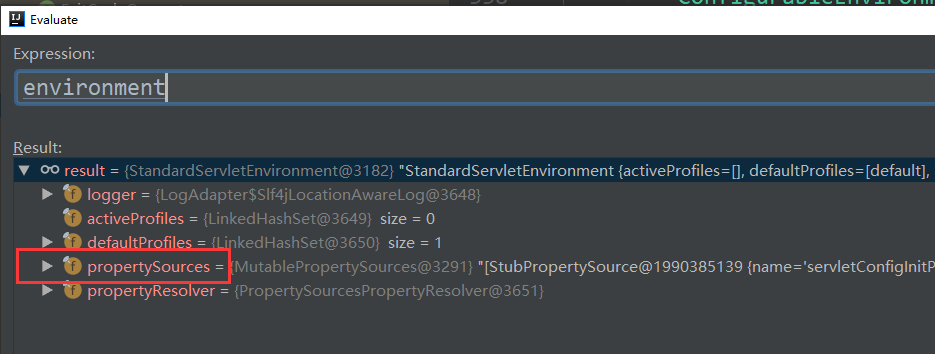
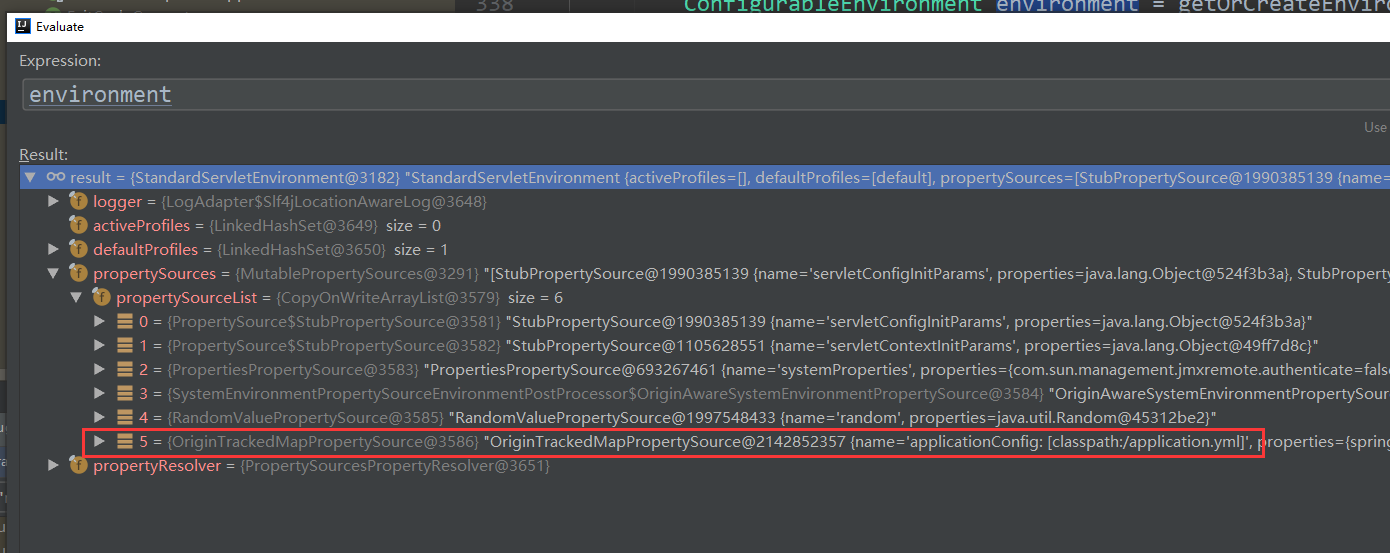
这句代码不好调试listeners.environmentPrepared(environment);
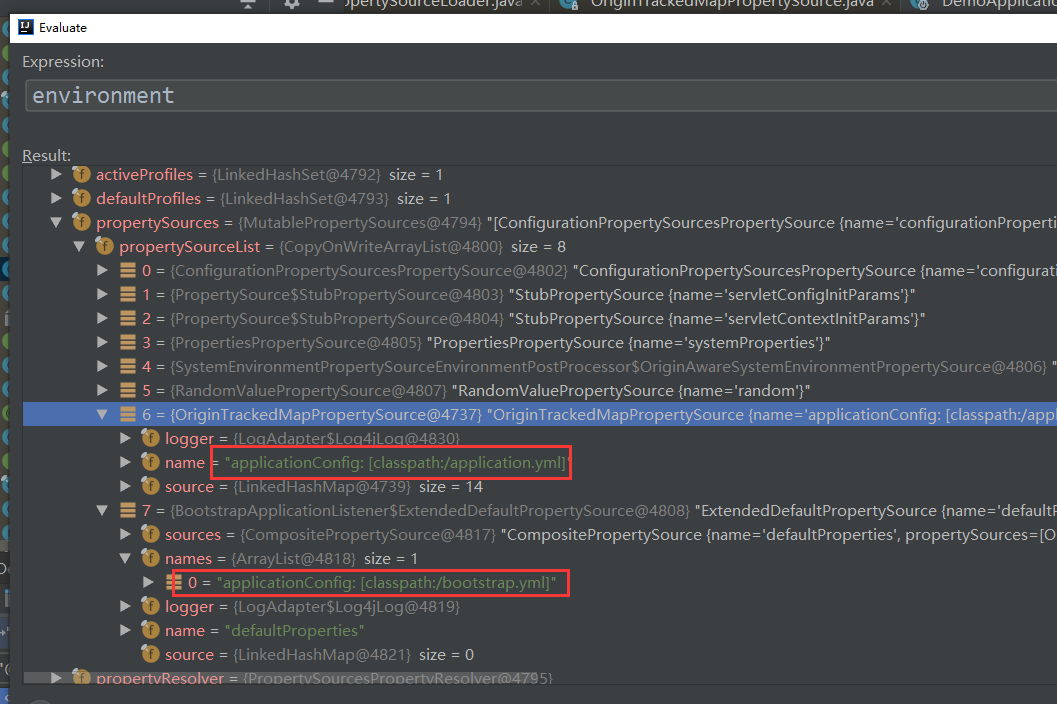
但可以换一种方式,找到上图中的这个类:org.springframework.boot.env.OriginTrackedMapPropertySource

在断点处打上断点,就可以看到系统是如何运行的:下面是堆栈信息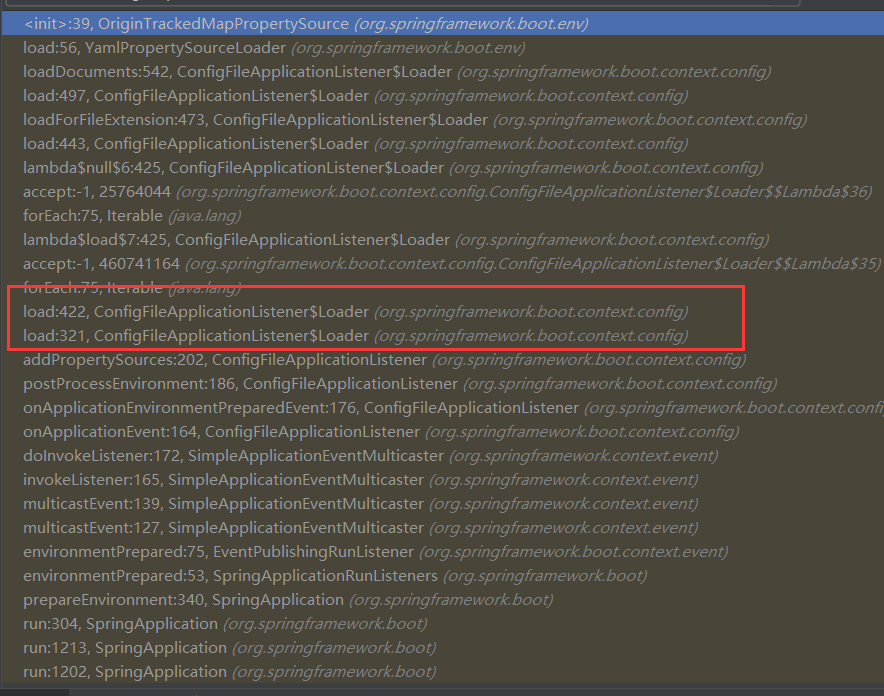
在堆栈信息中,可以看到这个类:org.springframework.boot.context.config.ConfigFileApplicationListener
这个类里面的包含一些配置信息:
private static final String DEFAULT_PROPERTIES = "defaultProperties";

    // Note the order is from least to most specific (last one wins)

    private static final String DEFAULT_SEARCH_LOCATIONS = "classpath:/,classpath:/config/,file:./,file:./config/";

    private static final String DEFAULT_NAMES = "application";

    private static final Set<String> NO_SEARCH_NAMES = Collections.singleton(null);

    private static final Bindable<String[]> STRING_ARRAY = Bindable.of(String[].class);

    /**

     * The "active profiles" property name.

     */

    public static final String ACTIVE_PROFILES_PROPERTY = "spring.profiles.active";

    /**

     * The "includes profiles" property name.

     */

    public static final String INCLUDE_PROFILES_PROPERTY = "spring.profiles.include";

    /**

     * The "config name" property name.

     */

    public static final String CONFIG_NAME_PROPERTY = "spring.config.name";

    /**

     * The "config location" property name.

     */

    public static final String CONFIG_LOCATION_PROPERTY = "spring.config.location";
一个properties. 一个yaml配置sourceloader
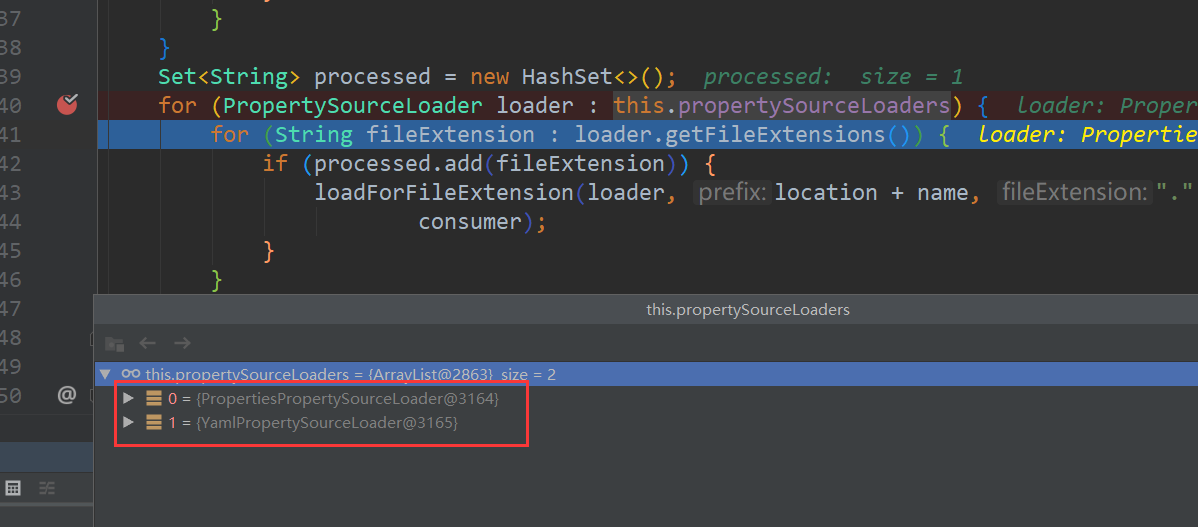
加载yaml文件的类是YamlPropertySourceLoader
public class YamlPropertySourceLoader implements PropertySourceLoader {

    @Override

    public String[] getFileExtensions() {

        return new String[] { "yml", "yaml" };

    }

    @Override

    public List<PropertySource<?>> load(String name, Resource resource) throws IOException {

        if (!ClassUtils.isPresent("org.yaml.snakeyaml.Yaml", null)) {

            throw new IllegalStateException(

                    "Attempted to load " + name + " but snakeyaml was not found on the classpath");

        }

        List<Map<String, Object>> loaded = new OriginTrackedYamlLoader(resource).load();

        if (loaded.isEmpty()) {

            return Collections.emptyList();

        }

        List<PropertySource<?>> propertySources = new ArrayList<>(loaded.size());

        for (int i = 0; i < loaded.size(); i++) {

            String documentNumber = (loaded.size() != 1) ? " (document #" + i + ")" : "";

            propertySources.add(new OriginTrackedMapPropertySource(name + documentNumber, loaded.get(i)));

        }

        return propertySources;

    }

}
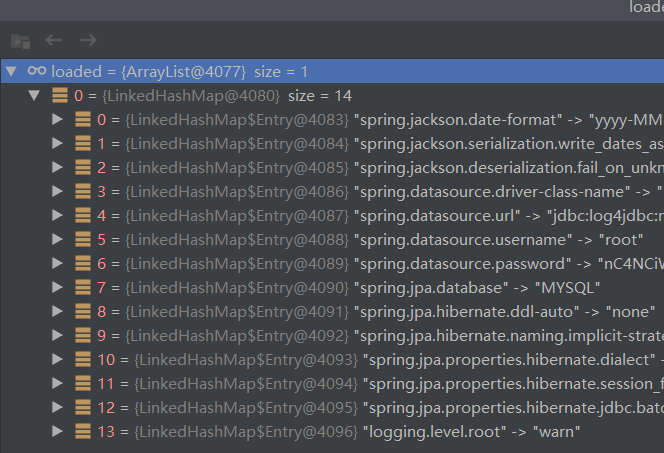
注如果是云环境,则首先加载的是bootstrap.yml, environment也是StandardEnvironment,非servlet环境。这是和Spring boot有很大的不同,加载完成后,再嵌套一StandardServletEnvironment.
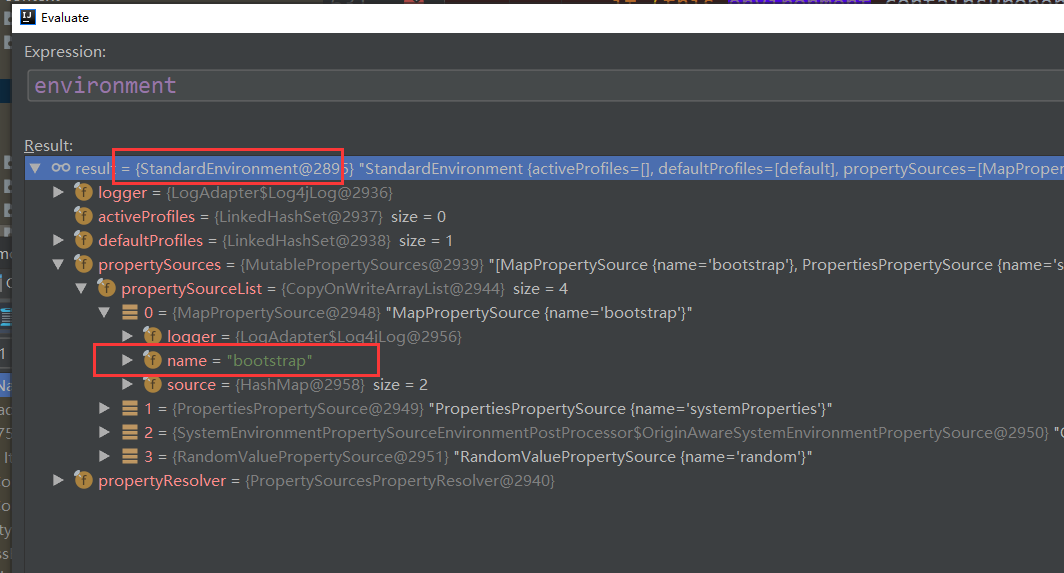
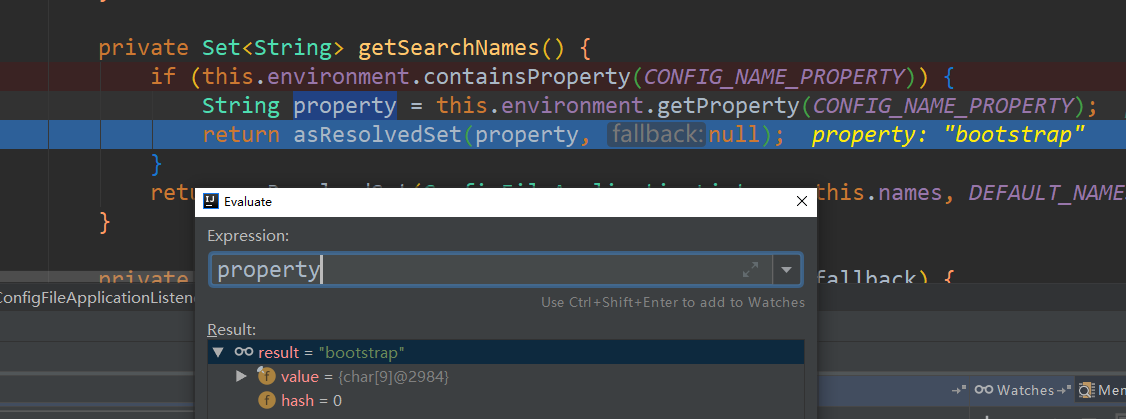
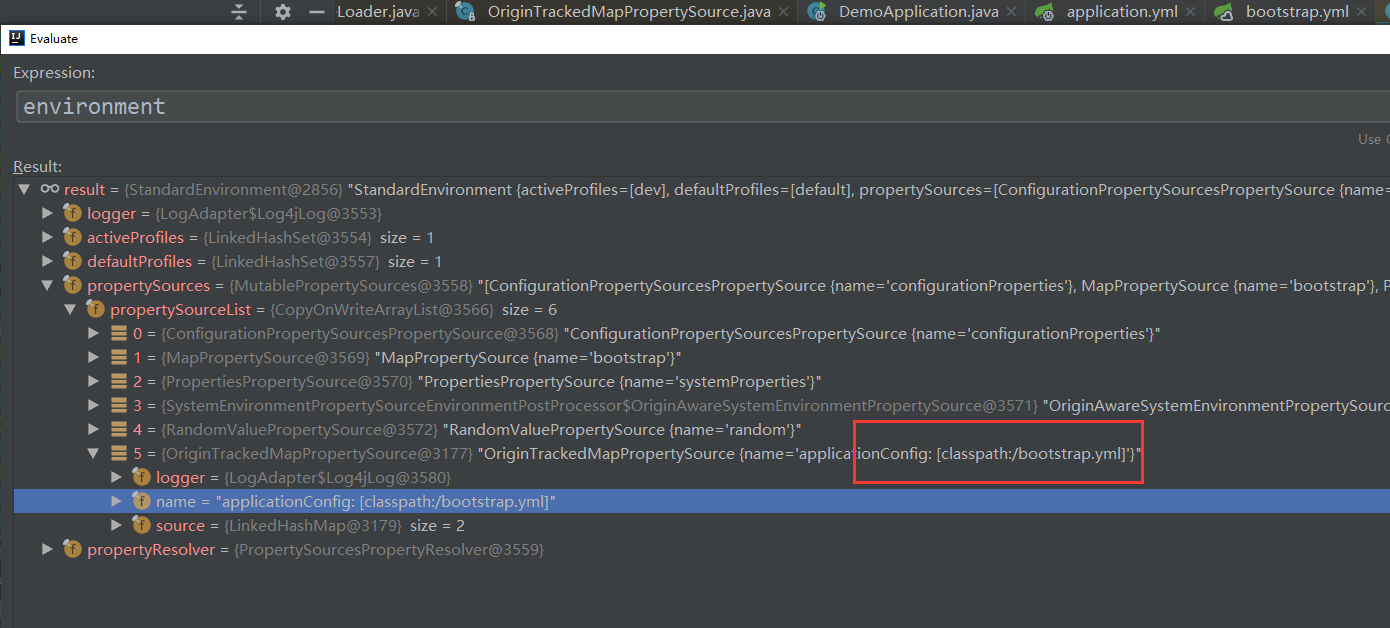
加载完成后,再嵌套一StandardServletEnvironment.
Spring Boot 获取yaml配置文件信息的更多相关文章
- Spring Boot 的核心配置文件有哪几个?它们的区别是什么?
Spring Boot 的核心配置文件是 application 和 bootstrap 配置文件.application 配置文件这个容易理解,主要用于 Spring Boot 项目的自动化配置.b ...
- Java 获取到配置文件信息
Java程序将数据库或者服务器IP写入到代码中,难免缺少灵活性. 如果写入到配置文件,部署到不通服务器上,只需要修改配置文 件即可. Java怎么读取配置文件 /** * 获取到配置文件信息 * @p ...
- Spring Boot获取前端页面参数的几种方式总结
Spring Boot的一个好处就是通过注解可以轻松获取前端页面的参数,之后可以将参数经过一系列处理传送到后台数据库. 获得的方式有很多种,这里稍微总结一下,大致分为以下几种: 1.指定前端url请求 ...
- Spring Boot 获取 java resources 下文件
Spring Boot 获取 java resources 下文件 Spring Boot 获取 resources 目录下的目录(例:获取 resources 目录下的 template 目录): ...
- spring boot 项目从配置文件中读取maven 的pom.xml 文件标签的内容。
需求: 将pom.xml 文件中的版本号读取到配置文件并打印到日志中. 第一步: 在pom.xml 中添加以下标签. 第二步: 将version 标签的值读取到配置文件中 这里使用 @@ 而不是 ...
- Spring Boot - 获取所有的Bean信息
前言 Spring Boot启动的时候需要加载许多Bean实现最小化配置,本文将尝试找出Spring启动后加载的所有Bean信息: 通过ApplicationContext 去获取所有的Bean 通过 ...
- Spring Boot 2.4 配置文件将加载机制大变化
Spring Boot 2.4.0.M2 刚刚发布,它对 application.properties 和 application.yml 文件的加载方式进行重构.如果应用程序仅使用单个 applic ...
- 利用神器BTrace 追踪线上 Spring Boot应用运行时信息
概述 生产环境中的服务可能会出现各种问题,但总不能让服务下线来专门排查错误,这时候最好有一些手段来获取程序运行时信息,比如 接口方法参数/返回值.外部调用情况 以及 函数执行时间等信息以便定位问题.传 ...
- 【spring Boot】spring boot获取资源文件的三种方式【两种情况下】
首先声明一点,springboot获取资源文件,需要看是 1>从spring boot默认的application.properties资源文件中获取 2>还是从自定义的资源文件中获取 带 ...
随机推荐
- DB 分库分表(2):全局主键生成策略
DB 分库分表(2):全局主键生成策略 本文将主要介绍一些常见的全局主键生成策略,然后重点介绍flickr使用的一种非常优秀的全局主键生成方案.关于分库分表(sharding)的拆分策略和实施细则,请 ...
- (十四)C语言之一维数组、二维数组
- Nginx事件管理之epoll模块
1. epoll 原理 假设有 100 万用户同时与一个进程保持着 TCP 连接,而每一时刻只有几十个或几百个 TCP 连接时活跃的(接收到 TCP 包),也就是说,在每一时刻,进程只需要处理这 10 ...
- 【南工程开源计划】南京工程学院 信息与通信工程学院 课程设计说明书(论文) 宽带接入技术--WLAN接入设计
文章目录 蓝奏云文件存放地址 一.课程设计目的 二.课程设计要求 三.课程设计网络环境 四.课程设计内容 4.1 WLAN接入设计 4.1.1设计拓扑 4.1.2设计原理 1)WLAN 2)RADIU ...
- 安装vncserver, vncviewer--远程桌面
1 问题如下 /etc/sysconfig/vncservers---配置文件作用去掉最后两行的注释 no route to host 是防火墙的原因---必须得研究好防火墙 本地可以vnc,本地 ...
- DP&图论 DAY 5 下午
DP&图论 DAY 5 下午 树链剖分 每一条边要么属于重链要么轻边 证明: https://www.cnblogs.com/sagitta/p/5660749.html 轻边重链都是交 ...
- javascript定时器方法使用
<!DOCTYPE html PUBLIC "-//W3C//DTD XHTML 1.0 Transitional//EN" "http://www.w3.org/ ...
- CentOS7性能监控系统安装
想打造 New Relic 那样漂亮的实时监控系统我们只需要 InfluxDB/collectd/Grafana 这三个工具,这三个工具的关系是这样的: 采集数据(collectd)-> 存储数 ...
- FAQ_2
FAQ-2 1.LoadRunner超时错误: 在录制Web服务器端,如果超过120秒服务器协议脚本回放时超时情况经常出现,产生错误的原因也有很多,解决的方法也不同. 错误现象1:Action.c(1 ...
- 如何实现Eclipse默认编码为UTF-8
1 Window->Preferences->General->Workspace,右边Text file encoding选择Other->UTF-8 2 Window-&g ...