
powerDesigner关联数据库显示中文注释
最近使用powerdesigner,遇到些问题,记录一下【安装过程就略过了】
一、安装odbc驱动
分享下驱动,百度网盘链接:https://pan.baidu.com/s/1UYPq_PEQkDOJ3qoaAgrACA 密码:7b8m
安装32位的即可
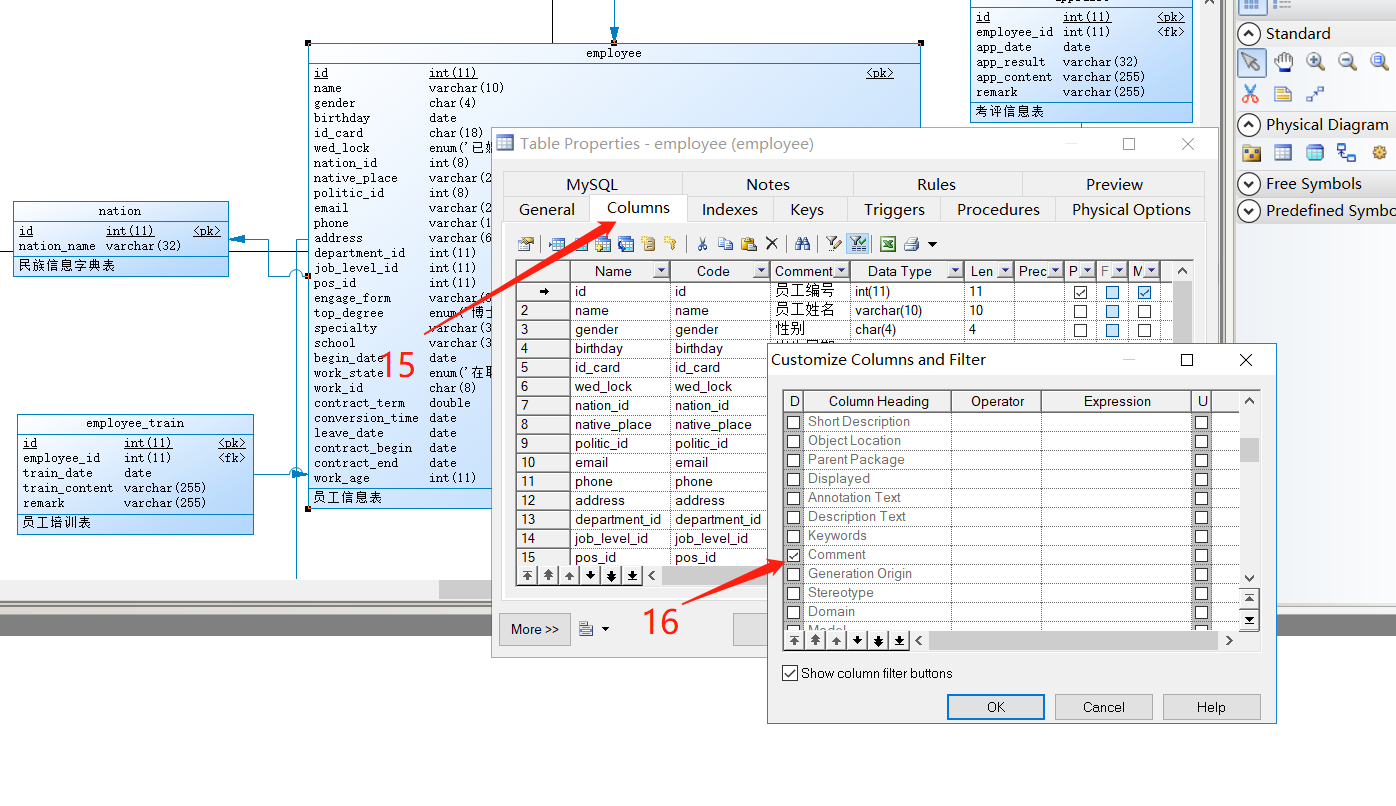
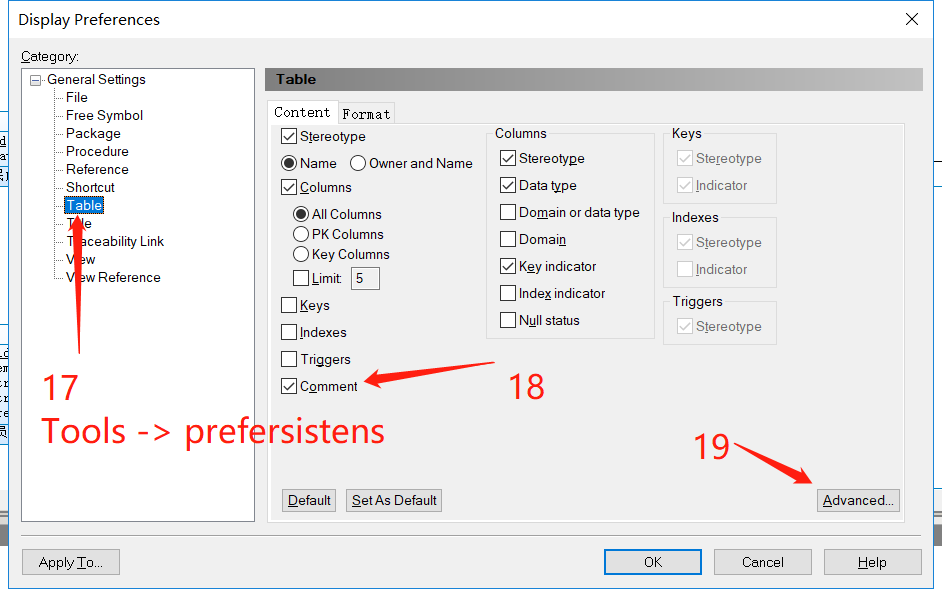
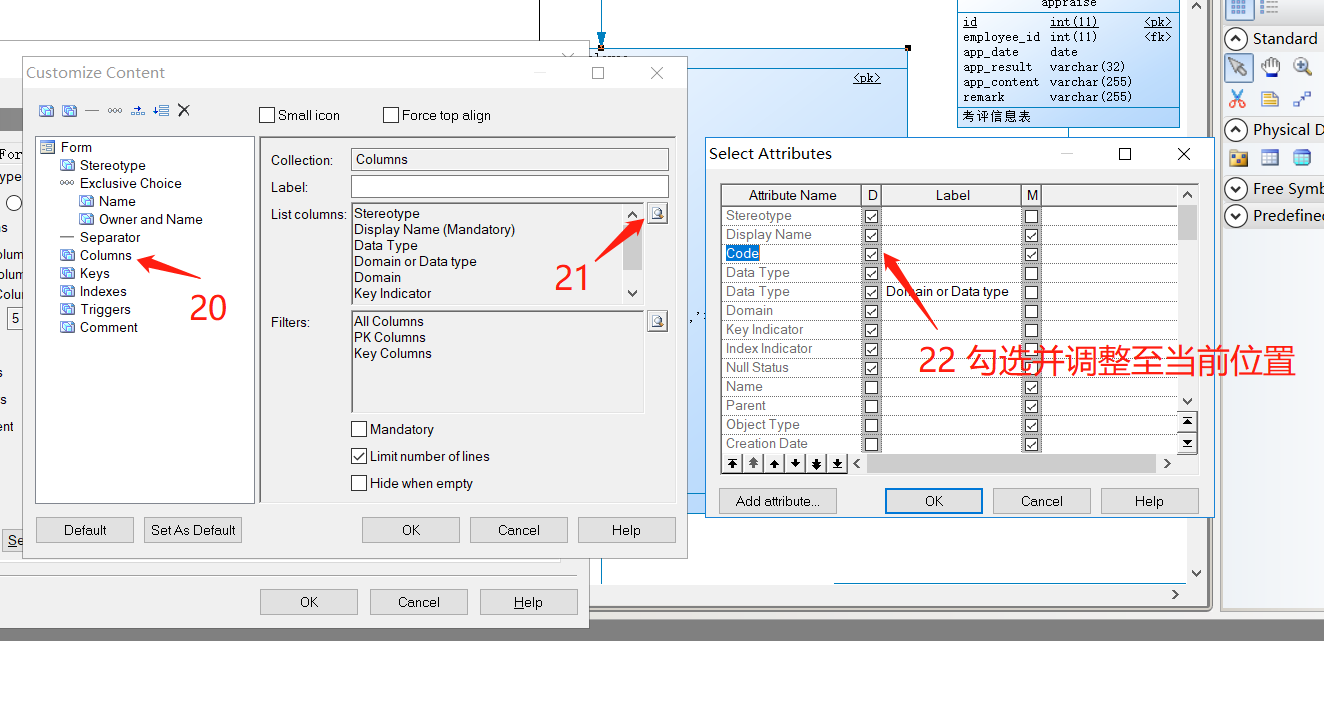
二、步骤【图片】

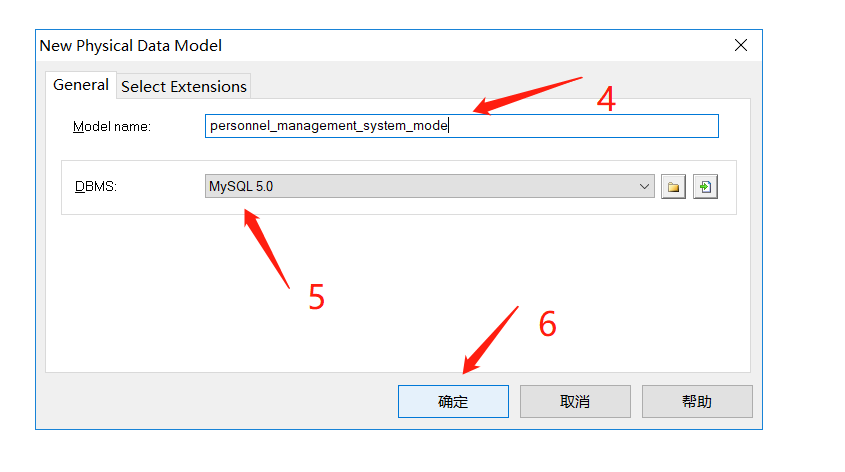
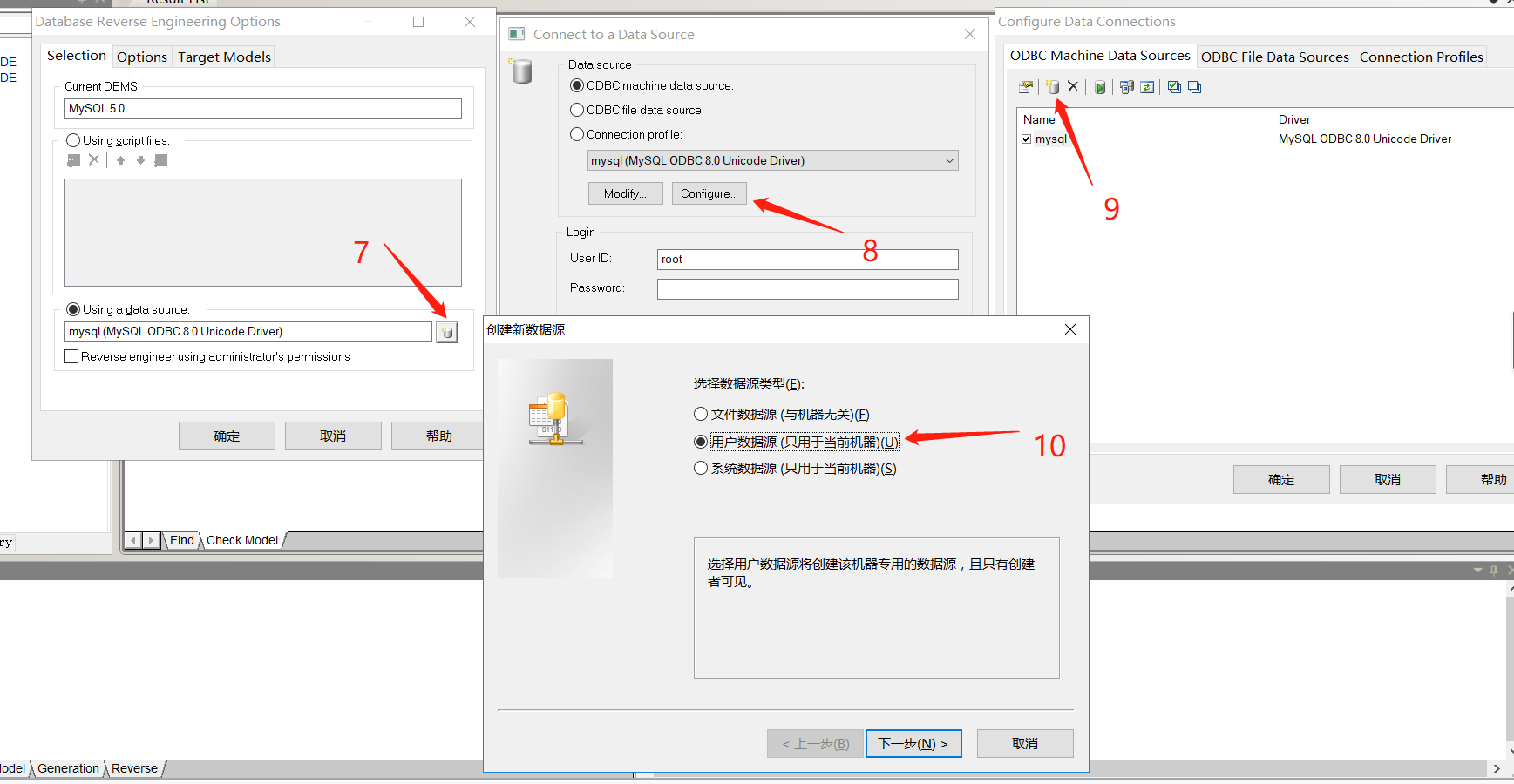
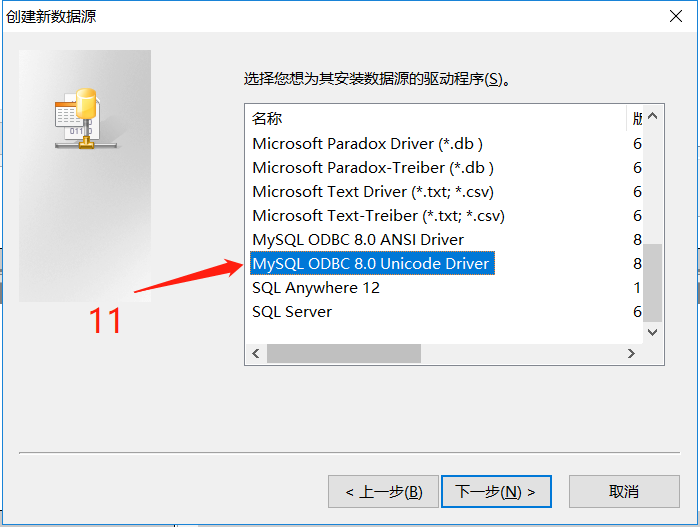


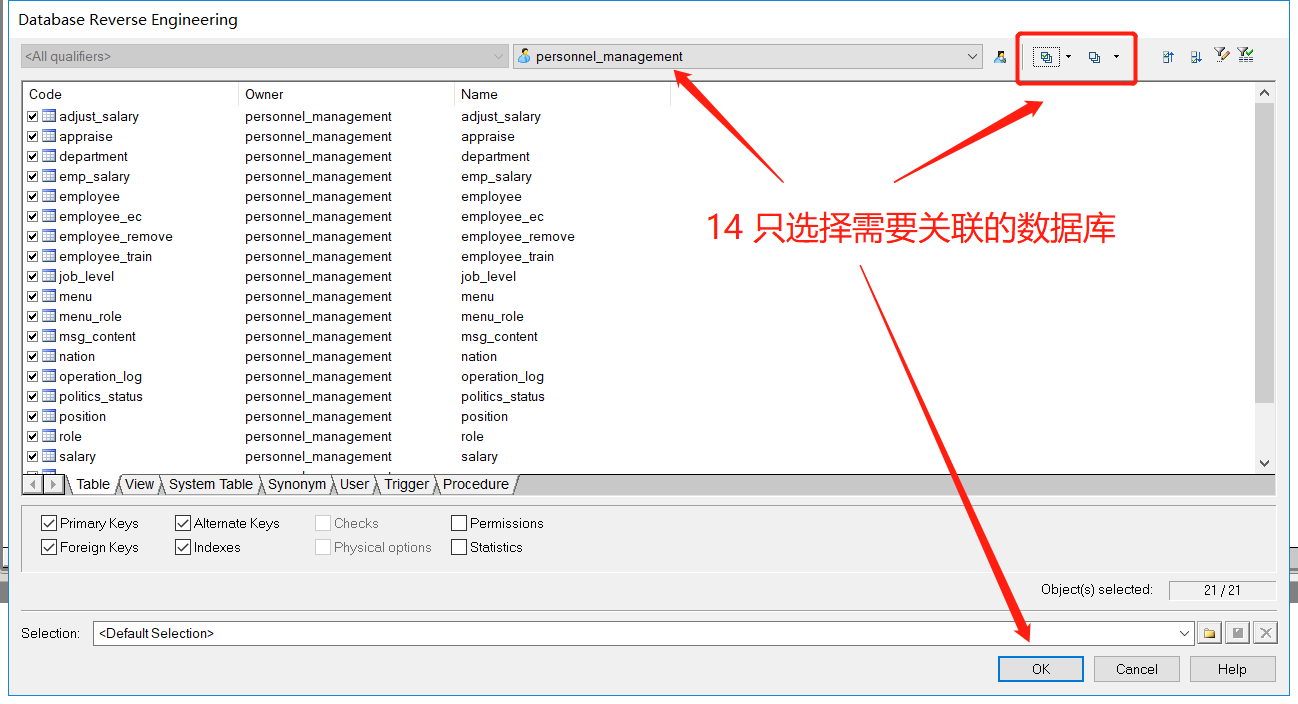

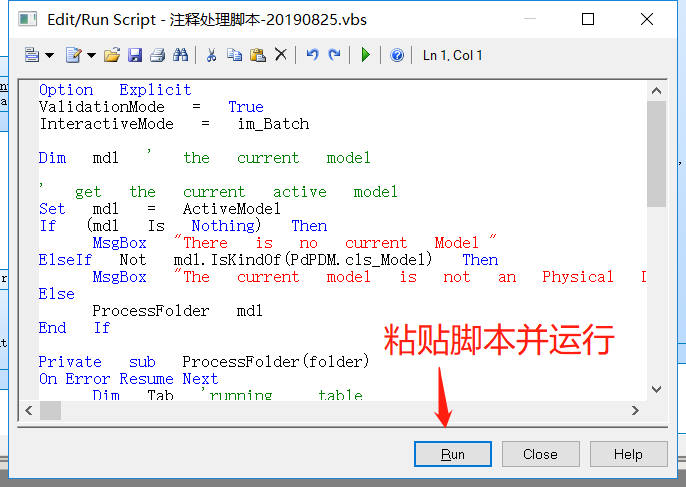
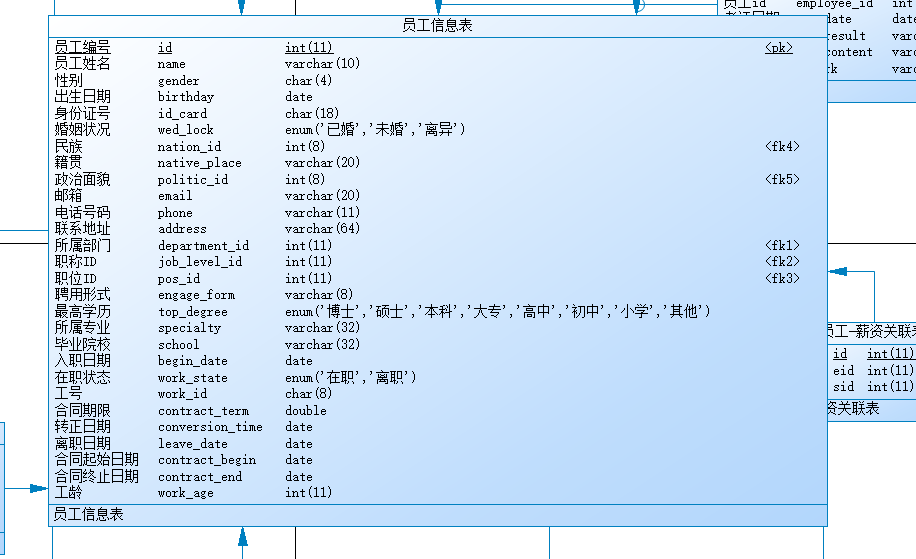
三、注释转换脚本
Option   Explicit

ValidationMode   =   True

InteractiveMode   =   im_Batch

Dim   mdl   '   the   current   model

'   get   the   current   active   model

Set   mdl   =   ActiveModel

If   (mdl   Is   Nothing)   Then

      MsgBox   "There   is   no   current   Model "

ElseIf   Not   mdl.IsKindOf(PdPDM.cls_Model)   Then

      MsgBox   "The   current   model   is   not   an   Physical   Data   model. "

Else

      ProcessFolder   mdl

End   If

Private   sub   ProcessFolder(folder)

On Error Resume Next

      Dim   Tab   'running     table

      for   each   Tab   in   folder.tables

            if   not   tab.isShortcut   then

                  tab.name   =   tab.comment

                  Dim   col   '   running   column

                  for   each   col   in   tab.columns

                  if col.comment="" then

                  else

                        col.name=   col.comment

                  end if

                  next

            end   if

      next

      Dim   view   'running   view

      for   each   view   in   folder.Views

            if   not   view.isShortcut   then

                  view.name   =   view.comment

            end   if

      next

      '   go   into   the   sub-packages

      Dim   f   '   running   folder

      For   Each   f   In   folder.Packages

            if   not   f.IsShortcut   then

                  ProcessFolder   f

            end   if

      Next

end   sub
powerDesigner关联数据库显示中文注释的更多相关文章
- Navicat premium查看数据库表中文注释的两种方式
有时候我需要查看数据库表中文注释,来确定每个表存的是哪个模块的数据,确保测试时对数据库查询操作无误. 这个操作我忘记了,此处做一个记录 方式一:通过sql语句来,前提是你知道是哪个表,这种方式不容易改 ...
- powerdesigner 设置字段显示comment注释
在Columns标签下,一排按钮中找到这个按钮:Customize Columns and Filter
- Python使用中文注释和输出中文(原创)
刚开始学习python,需要在Python中注释中文和输出中文,现在开始尝试: 仅为初步学习参考,高手请绕行. -------------------------------------------- ...
- mysql数据库导出模型到powerdesigner,PDM图形窗口中显示数据列的中文注释
1,mysql数据库导出模型到powerdesigner 2,CRL+Shift+X 3,复制以下内容,执行 '******************************************** ...
- 转 在PowerDesigner的PDM图形窗口中显示数据列的中文注释
Name是名称(字段描述),Code是字段名称,Comment是注释名称,ER图中显示的是Name.一般设计时,Name跟comment都设计成描述, 而设计时候常把comment写成中文,name保 ...
- 从PowerDesigner表字段的Name到EF实体类属性的Display Name(根据PowerDesigner生成EF实体类中文注释和验证元数据)
第一步:将PowerDesigner表字段的中文Name填入Comment中:工具-Execute Commands-Edit/Run Script... '********************* ...
- PowerDesigner设计时表显示注释选项
PowerDesigner设计时表显示注释选项:选定编辑的表,右键- >Properties- >Columns- >Customize Columns and Filter(或直接 ...
- 向Sql Server数据库插入中文时显示乱码的解决办法 (转)
转自:http://blog.csdn.net/wizardlun/article/details/4577658 參考:http://shareideas.blog.51cto.com/362642 ...
- PowerDesigner显示Common注释列并自动赋值
PowerDesigner中默认不显示Common注释列,可根据以下步骤显示并紫东填充Name列内容. 1.显示Common注释列 2.运行VB Script脚本自动赋值 使用Shift+Ctrl+X ...
随机推荐
- e.target.value和this的区别
1.e.target.value获取的就是你选择接受事件的元素输入的或者选择的值. 参数e接收事件对象. 而事件对象也有很多属性和方法,其中target属性是获取触发事件对象的目标,也就是绑定事件的元 ...
- 传统Spring配置JTA 实现多数据源事务的统一管理
分布式事务是指事务的参与者.支持事务的服务器.资源管理器以及事务管理器分别位于分布系统的不同节点之上,在两个或多个网络计算机资源上访问并且更新数据,将两个或多个网络计算机的数据进行的多次操作作为一个整 ...
- compile cmdow
1. http://www.commandline.co.uk/ https://github.com/ritchielawrence/cmdow/tarball/master 2. g++ -O2 ...
- SQL Server孤立用戶
如何解决孤立用户问题 http://blog.csdn.net/zzl1120/article/details/7394468 SQL SERVER孤立用户问题解决方法 http://www.2cto ...
- 了解Springboot加载文件机制
https://blog.csdn.net/u014044812/article/details/84256764(
- am335x system upgarde ddr3 capacity configuration base on TI DDR3 Software Leveling Tool (二十)
follow test is use ti DDR Software Leveling op log. AM335x DDR3 Software Leveling -- Version: Beta ...
- Java进阶知识16 Spring创建IOC容器的两种方式
1.直接得到 IOC 容器对象 ApplicationContext applicationContext = new ClassPathXmlApplicationContext("app ...
- 用matlab脚本语言写M文件函数时用三种方法简单实现实现DFT(离散傅里叶变换)
%用二重循环实现DFT: function xk=dt_0(xn); %define a function N=length(xn); %caculate the length of the vari ...
- Django-权限管理与路径导航
1.url权限管理 设计表 1.设计表 系统一共有多少个路径: 有哪些用户使用: 用户在公司的角色: 对角色进行权限分配(什么样的角色可以访问什么样的路径): 2.往表中添加数据,分配角色权限 3.登 ...
- Leetcode题目78.子集(回溯-中等)
题目描述: 给定一组不含重复元素的整数数组 nums,返回该数组所有可能的子集(幂集). 说明:解集不能包含重复的子集. 示例: 输入: nums = [1,2,3] 输出: [ [3], [1] ...