
Springcloud 引导上下文
SpringCloud为我们提供了bootstrap.properties的属性文件,我们可以在该属性文件里做我们的服务配置。可是,我们知道SpringBoot已经为我们提供了做服务配置的属性文件application.properties,那么这两个配置文件有什么区别呢?在SpringCloud里是否能用bootstrap代替application做服务的配置?要解决这个问题,我们必须先讨论一下SpringCloud的引导。
一、 官方文档描述
引导应用程序上下文
一个Spring Cloud应用程序通过创建一个“引导”上下文来进行操作,这个上下文是主应用程序的父上下文。开箱即用,负责从外部源加载配置属性,还解密本地外部配置文件中的属性。这两个上下文共享一个Environment,这是任何Spring应用程序的外部属性的来源。Bootstrap属性的优先级高,因此默认情况下不能被本地配置覆盖。
引导上下文使用与主应用程序上下文不同的外部配置约定,因此使用bootstrap.yml application.yml(或.properties)代替引导和主上下文的外部配置。例:bootstrap.yml
spring:

  application:

    name: foo

  cloud:

    config:

      uri: ${SPRING_CONFIG_URI:http://localhost:8888}
如果您的应用程序需要服务器上的特定于应用程序的配置,那么设置spring.application.name(在bootstrap.yml或application.yml)中是个好主意。
您可以通过设置spring.cloud.bootstrap.enabled=false(例如在系统属性中)来完全禁用引导过程。
二、引导上下文
1. 关于引导上下文位置
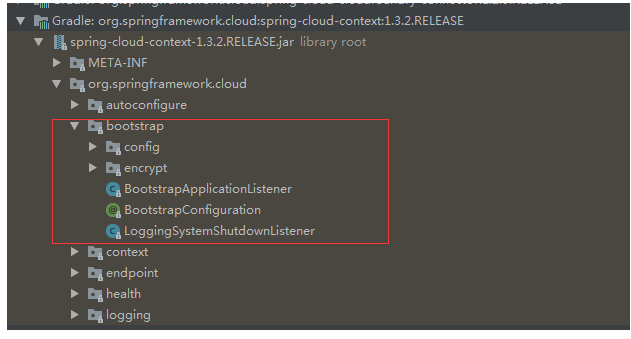
这里我们可以发现几个关键的类,其中BootstrapApplicationListener是核心中的核心,可自行查看源码
这个类是一个监听器,它用于监听ApplicationEnvironmentPreparedEvent事件,而EventPublishingRunListener在SpringBoot启动时会触发该事件。如果不理解的这个类的朋友请务必先了解SpringBoot启动过程
2.这个上下文是主应用程序的父上下文
这个工作主要分为两个层面:1.创建上下文引导 2.设置为其为当前程序的父级上下文
1) 我们先看看onApplicationEvent方法,该方法首先读取spring.cloud.bootstrap.enabled的属性值如果为false,那么就直接return。这也就是官方文档里的说明可以用此属性禁用引导的理由。
2)紧接着它会从当前应用程序SpringApplication试着在所有的ApplicationInitializer中获取ParentContextApplicationContextInitializer,如果找到的话就把该类下的parent做为引导上下文。
3)如果没有找到ParentContextApplicationContextInitializer,则通过 bootstrapServiceContext方法来创建引导上下文,其中如下代码请大家留意下:
    List<String> names = SpringFactoriesLoader

                .loadFactoryNames(BootstrapConfiguration.class, classLoader);
看到SpringFactoriesLoader不用想一定会在META-INF/spring.factoies里找配置的BootstrapConfiguration的进行实例化
4)通过如下代码创建引导上下文对象:

SpringApplicationBuilder builder = new SpringApplicationBuilder()

                .profiles(environment.getActiveProfiles()).bannerMode(Mode.OFF)

                .environment(bootstrapEnvironment)

                .properties("spring.application.name:" + configName)

                .registerShutdownHook(false).logStartupInfo(false).web(false);

        if (environment.getPropertySources().contains("refreshArgs")) {

            // If we are doing a context refresh, really we only want to refresh the

            // Environment, and there are some toxic listeners (like the

            // LoggingApplicationListener) that affect global static state, so we need a

            // way to switch those off.

            builder.application()

                    .setListeners(filterListeners(builder.application().getListeners()));

        }

        List<Class<?>> sources = new ArrayList<>();

        for (String name : names) {

            Class<?> cls = ClassUtils.resolveClassName(name, null);

            try {

                cls.getDeclaredAnnotations();

            }

            catch (Exception e) {

                continue;

            }

            sources.add(cls);

        }

        AnnotationAwareOrderComparator.sort(sources);

        builder.sources(sources.toArray(new Class[sources.size()]));

        final ConfigurableApplicationContext context = builder.run();
5)最后通过如下方法设置引导上下文为当前应用程序的上下文:
// Make the bootstrap context a parent of the app context

        addAncestorInitializer(application, context);
3. 负责从外部源加载配置属性,还解密本地外部配置文件中的属性
开箱即用,理解起来很简单。通过2.2分析,引导程序在SpringBoot的启动前就帮我们创建好了,当然也就开箱即用了。
下面我们看一下spring-cloud-context.jar下的META-INF/spring.factoies文件:
# AutoConfiguration

org.springframework.boot.autoconfigure.EnableAutoConfiguration=\

org.springframework.cloud.autoconfigure.ConfigurationPropertiesRebinderAutoConfiguration,\

org.springframework.cloud.autoconfigure.RefreshAutoConfiguration,\

org.springframework.cloud.autoconfigure.RefreshEndpointAutoConfiguration,\

org.springframework.cloud.autoconfigure.LifecycleMvcEndpointAutoConfiguration

# Application Listeners

org.springframework.context.ApplicationListener=\

org.springframework.cloud.bootstrap.BootstrapApplicationListener,\

org.springframework.cloud.bootstrap.LoggingSystemShutdownListener,\

org.springframework.cloud.context.restart.RestartListener

# Bootstrap components

org.springframework.cloud.bootstrap.BootstrapConfiguration=\

org.springframework.cloud.bootstrap.config.PropertySourceBootstrapConfiguration,\

org.springframework.cloud.bootstrap.encrypt.EncryptionBootstrapConfiguration,\

org.springframework.cloud.autoconfigure.ConfigurationPropertiesRebinderAutoConfiguration,\

org.springframework.boot.autoconfigure.context.PropertyPlaceholderAutoConfiguration
我们来看一下 BootstrapConfiguration下面配置的引导程序类:
org.springframework.cloud.bootstrap.config.PropertySourceBootstrapConfiguration:这个类主要解析加载外部化配置属性
org.springframework.cloud.bootstrap.encrypt.EncryptionBootstrapConfiguration:主要配置文件中前缀为{cipher}的相关解密,熟悉spring-boot-starter-security在springcloud应用的朋友一定不陌生
org.springframework.cloud.autoconfigure.ConfigurationPropertiesRebinderAutoConfiguration:主要是监听EnvironmentChangeEvent事件用于刷新@ConfigurationProperties标记的配置
org.springframework.boot.autoconfigure.context.PropertyPlaceholderAutoConfiguration:主要解析配置文件中的${}占位符
4. 这两个上下文共享一个Environment
既然引导上下文为当前主程序的父级上下文,那么就可以确定他们共享Environment,至于为什么请阅读文章第一部分
5. BootStrap属性的优先级高,因此默认情况下不能被本地配置覆盖
对于引导程序bootstrap.yml比application.yml优先级更高,更不可能被application.yml文件里的所覆盖
三、总结
1)引导程序上下文在prepareEnvironment的阶段就会被创建,创建时会读取bootstrap.properties|yml 在内容作为引导配置, 因此bootstrap优先于application加载。引导程序非常类似于bios,而bootstrap.application就相当于设置bios的相关参数
2)boostrap的属性文件在以下情景下会使用:
配置中心:config-server里请用bootstrap属性文件
解密属性文件时,最好使用bootstrap属性文件
需要自定义引导程序时使用bootstrap属性文件,主要一定不要被我们主程序扫描到
3)application会覆盖bootstrap中的非引导配置,因此不建议两种类型配置文件同时存在。简单粗暴的做法是在springcloud应用中用bootstrap属性文件代替application一统江湖嘛,毕竟Envrionment是共享的。
4) 在阅读官方文档时,一定要结合源代码深入分析,才能更好的理解其用意
Springcloud 引导上下文的更多相关文章
- 深入理解SpringCloud之引导程序应用上下文
tips:我希望通过这篇文章来给对于bootstrap还不理解的朋友带来帮助.当然这篇文章不仅仅是讲解知识,我更希望给广大朋友带来学习与理解官方文档的一种思路.阅读本文前,建议大家对SpringBoo ...
- SpringCloud入门之应用程序上下文服务(Spring Cloud Context)详解
构建分布式系统非常复杂且容易出错.Spring Cloud为最常见的分布式系统模式提供了简单易用的编程模型,帮助开发人员构建弹性,可靠和协调的应用程序.Spring Cloud构建于Spring Bo ...
- 深入理解SpringCloud之分布式配置
Spring Cloud Config Server能够统一管理配置,我们绝大多数情况都是基于git或者svn作为其配置仓库,其实SpringCloud还可以把数据库作为配置仓库,今天我们就来了解一下 ...
- SpringCloud使用Consul作为分布式配置中心
版权声明:本文为博主原创文章,遵循CC 4.0 BY-SA版权协议,转载请附上原文出处链接和本声明. 本文链接:https://blog.csdn.net/qq_36027670/article/de ...
- SpringCloud及其组件详解
SpringCloud及其组件详解 1.Spring Cloud 1.1 Spring Cloud和Dubbo的区别图解 1.2 微服务的技术栈 2.Spring Cloud 概述 2.1 Sprin ...
- Spring Cloud的应用程序—上下文服务
Spring Boot对于如何使用Spring构建应用程序有一个看法:例如它具有常规配置文件的常规位置,以及用于常见管理和监视任务的端点.Spring Cloud建立在此之上,并添加了一些可能系统中所 ...
- Spring Cloud上下文:应用程序上下文服务
Spring Boot对于如何使用Spring构建应用程序有一个看法:例如它具有常规配置文件的常规位置,以及用于常见管理和监视任务的端点.Spring Cloud建立在此之上,并添加了一些可能系统中所 ...
- Spring Cloud教程(十)自定义引导配置属性源
可以通过在org.springframework.cloud.bootstrap.BootstrapConfiguration键下添加条目/META-INF/spring.factories来训练引导 ...
- Spring Cloud教程(九)应用程序上下文服务
Spring Boot对于如何使用Spring构建应用程序有一个看法:例如它具有常规配置文件的常规位置,以及用于常见管理和监视任务的端点.Spring Cloud建立在此之上,并添加了一些可能系统中所 ...
随机推荐
- CV2——学习笔记-图像分类
1.图像分类 • 2.神经网络原理 • 1.卷积神经网络介绍 • 2.利用caffe搭建深度网络做图像分类 挑战:光照变化+形变.类内变化. 标签.预测函数,泛化能力. 如何提高泛化能力?需要用图像特 ...
- 011-多线程-JUC集合-Queue-PriorityBlockingQueue和DelayQueue
一.PriorityBlockingQueue简介 PriorityBlockingQueue是一个支持优先级的无界阻塞队列.默认情况下元素采用自然顺序升序排列.也可以自定义类实现compareTo( ...
- SQL 模糊查询条件的四种匹配模式
转: 执行数据库查询时,有完整查询和模糊查询之分. 一般模糊语句格式如下: SELECT 字段 FROM 表 WHERE 某字段 LIKE 条件; 其中,关于条件,SQL提供了四种匹配模式: 1.%: ...
- Linux 7 关闭、禁用防火墙服务
1 查看防火墙状态 [root@lvxinghao ~]# systemctl status firewalld 2 查看开机是否启动防火墙服务 [root@lvxinghao ~]# systemc ...
- 迭代器iterator-生成器generator
1. 迭代 根据记录的前面的元素的位置信息 去访问后续的元素的过程 -遍历 迭代 2. 可迭代对象 iterable 如何判断可迭代对象的3种方式 能够被迭代访问的对象 for in 常用可迭代对象- ...
- 随机数据构造-Faker
from faker import Faker # fake = Faker() #本地化处理 fake = Faker('zh_CN') # print(fake.name()) # print(f ...
- 常用SQL50句
Student(S#,Sname,Sage,Ssex) 学生表 Course(C#,Cname,T#) 课程表 SC(S#,C#,score) 成绩表 Teacher(T#,Tname) 教师表 问题 ...
- 使用MockMvc进行springboot调试(SpringbootTest)
测试前关闭web项目.springboot启动程序WebApplication.class 笔者本地自定了端口SpringBootTest.WebEnvironment.DEFINED_PORT 代码 ...
- (十四)用session和过滤器方法检验用户是否登录
一.session方法 1.1 编写登录页面文件(index.html) <!doctype html> <html> <head> <title>测试 ...
- Windows server 2008 R2 桌面服务器管理器打开提示:试图引用不存在的令牌
来源:https://social.technet.microsoft.com/Forums/zh-CN/90f376a3-2b52-46c1-be34-4a2dbf4fdea2/winserver2 ...